Automating a Broken Process Makes the Same Mistakes Faster
With Josh Schultz ·
Answer. Automating a broken process makes the same mistakes faster. AI (or any automation, a tool that does a step without you) multiplies whatever is already there. If a step only exists because something upstream is broken, fix that first, and then automate what is left.
The picture
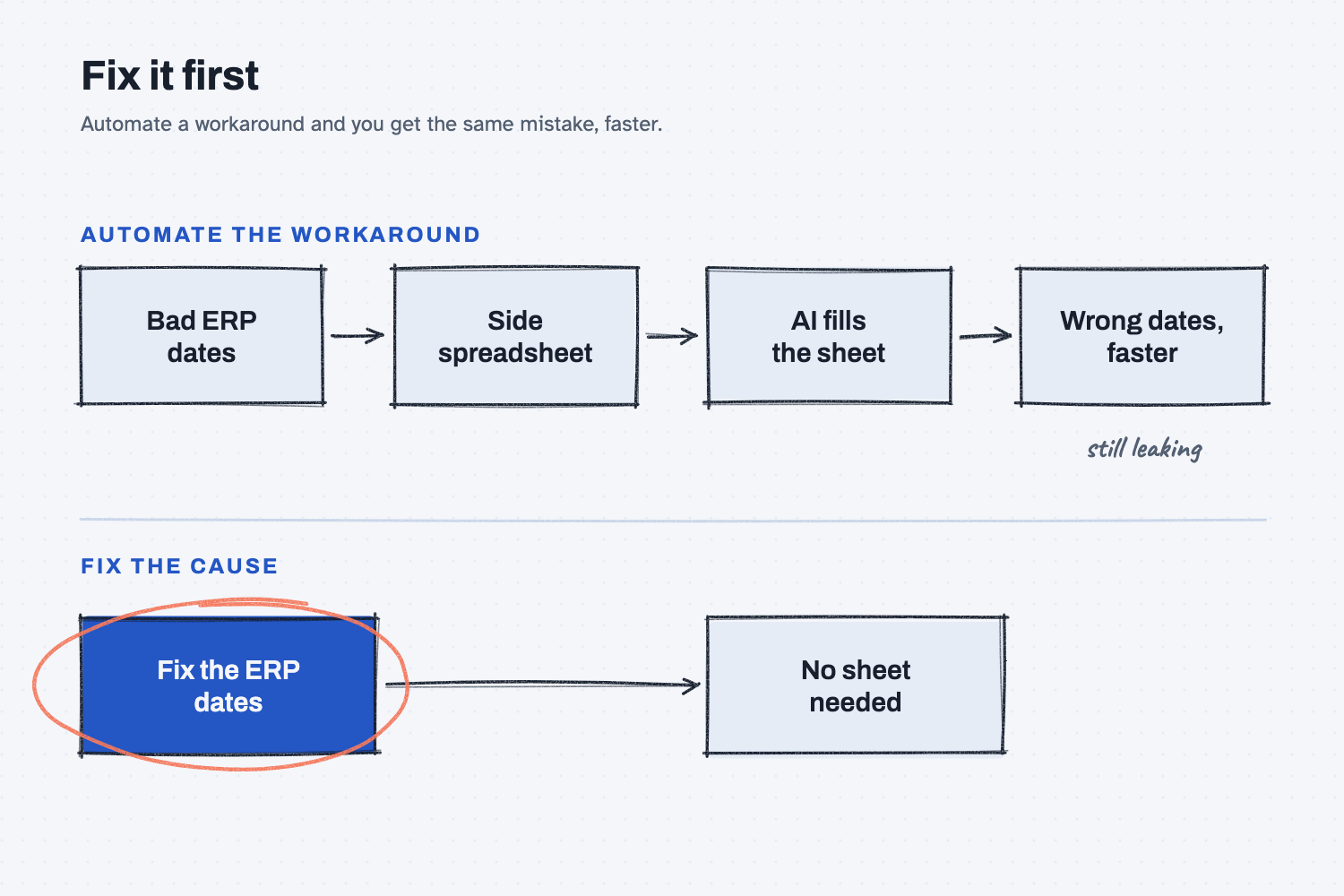
Follow the top path first. The ERP dates are wrong, so someone keeps a side spreadsheet to correct them, and then AI gets asked to fill in that sheet, which leaves you with wrong dates, only faster. The bottom path fixes the dates at the source, and because the dates are right, the sheet is no longer needed. The fix is circled because it is the step that actually solves the problem.
Think of it like this
Picture a press with a slow leak in a hydraulic line. Somebody puts a drip pan under it, and then somebody empties the pan every shift. That is a workaround, and it works, more or less.
Now picture automating it with a bigger pan and a pump that empties it for you. Nobody has to think about the leak anymore, but it is still leaking, and it might be leaking faster, and now nobody is looking at it. The real fix was the fitting all along.
As I put it: "So a workaround is usually a sign of a broken process."
Why does it matter at work?
AI makes it very easy to automate the drip pan. Once a workaround is automated, it becomes harder to see, so the real problem lasts longer.
Here is how that plays out. Every Monday, Hector Lee at Mesquite Ridge Metal Works copies the open orders out of the ERP into a side spreadsheet. Then he fixes the ship dates by hand, because the ERP dates are often wrong, and the whole job takes him about 3 hours.
Walt, the VP of Operations, asks if AI could build that spreadsheet for him. It could, but first Hector asks a different question, which is why the dates are wrong. The answer turns out to be simple. The ERP says powder coat at Blue Heron Coatings takes 5 days, but it really takes about 12, so every order with paint gets a ship date a week too early. Hector fixes that one lead time in the ERP, and most of his Monday sheet goes away, leaving nothing worth automating.
How does it work?
Technology speeds up whatever it touches. In my words: "If you automate something that shouldn't even be done, you basically scale bad things faster." So you look for the workaround, ask why it exists, and fix that before you build anything.
Spot the workaround. Workarounds look a lot alike from shop to shop.
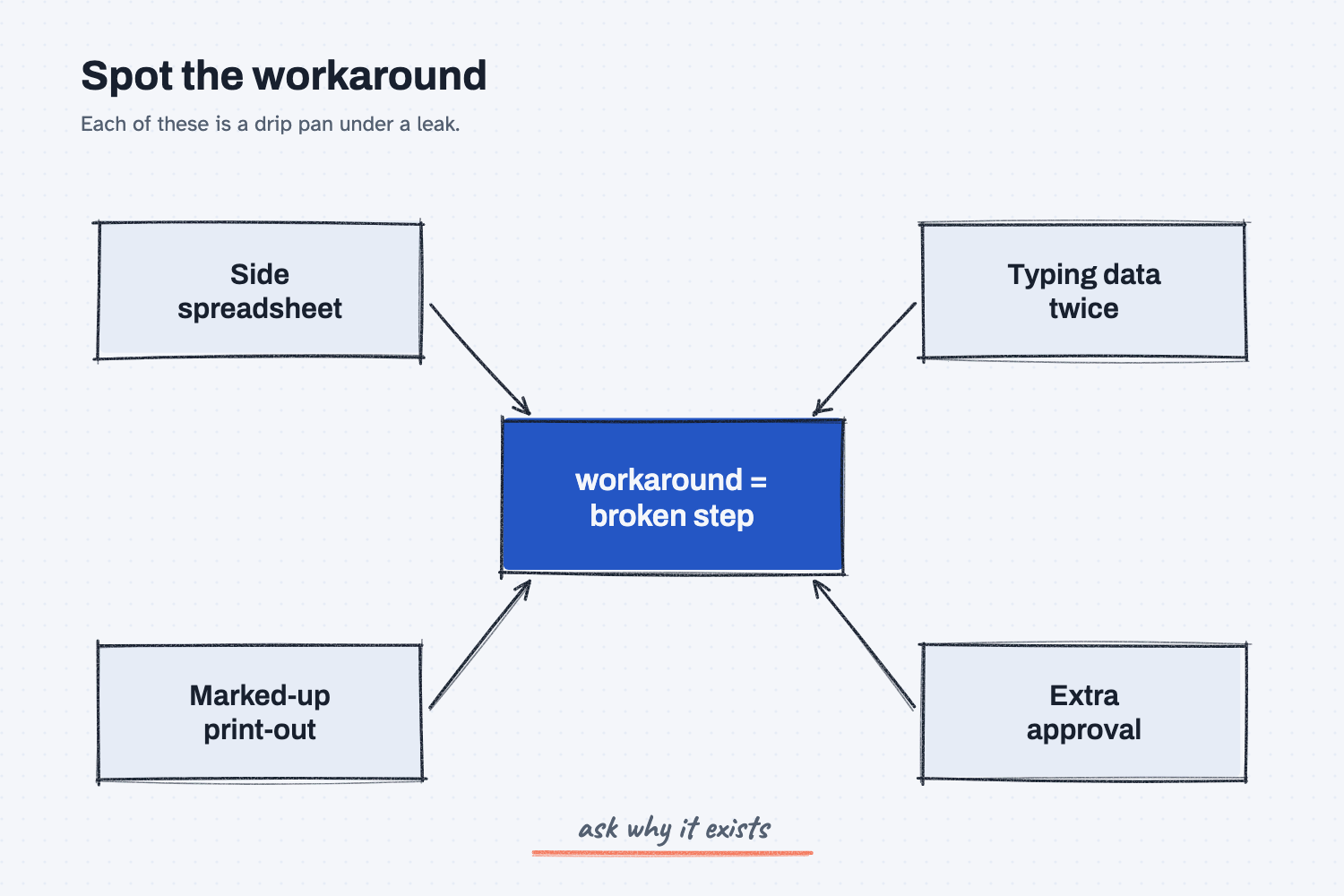
The diagram shows the four most common signs. They are a side spreadsheet, typing the same data into two systems, a print-out that someone marks up by hand, and an extra approval step that nobody can explain. Each one is a drip pan, which means each one points to a broken step upstream.
Ask why it exists. Keep asking why until you reach something you can actually change, such as a wrong setting, a missing field, or a handoff that nobody owns. That is the fitting.
Fix the cause, then automate what is left. Sometimes the fix removes the whole task. Other times a smaller, cleaner task remains, and that one is worth automating.
I tell people a version of a story about phone calls. A company automated its follow-up calls to doctors' offices, and "The doctor started getting 20 calls a day and stopped answering the phone." The calls went out faster than ever, but the thing the company needed became harder to get.
Where do people get it wrong?
Most mistakes come from asking "how do I automate this?" before asking "why do we do this?" Here are four to watch for.
- Automating the side spreadsheet. It feels like a quick win, but it locks in the workaround and hides the real problem.
- Buying a tool first. As I say it: "Technology is not a strategy." Start with the step, and not with the software.
- Asking AI the wrong question. AI answers the question you ask, so if you ask how to automate, it will help you automate, even when the step should not exist.
- Waiting for a perfect process. You do not need every step fixed. You only need the step you are about to automate to be worth keeping.
Try this in 2 minutes
This test asks AI about the same story in two different ways. Use any chat tool.
- Open a new chat and paste this:
Every Monday our planner copies the open orders from our ERP into a side spreadsheet and fixes the ship dates by hand, because the dates in the ERP are often wrong. It takes about 3 hours. How can we use AI to automate this spreadsheet? Answer in 4 short lines.
- Open a second new chat and paste the same story, but end it with this question instead:
What real problem does this workaround hide, and what should we fix first? Answer in 4 short lines.
- Put the two answers side by side.
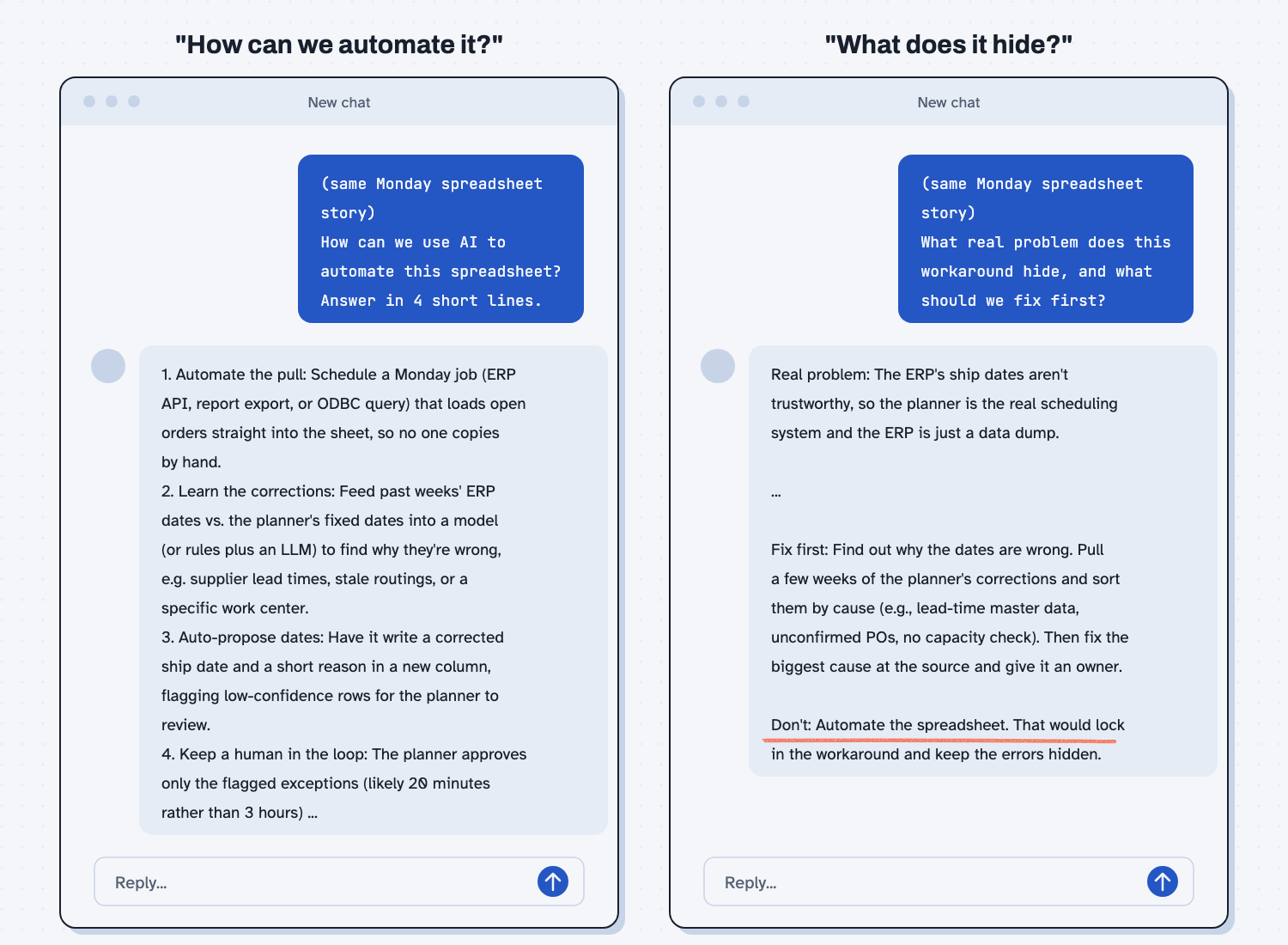
When I tried this, the "automate" question got a plan to automate the spreadsheet. It started with "Automate the pull: Schedule a Monday job ... so no one copies by hand." Then it built a model to guess the right dates: "Feed past weeks' ERP dates vs. the planner's fixed dates into a model ... to find why they're wrong." That plan studied the wrong dates, but it never said to fix them in the ERP.
The "what does this hide" question gave a very different answer: "Real problem: The ERP's ship dates aren't trustworthy, so the planner is the real scheduling system and the ERP is just a data dump." It also said: "Don't: Automate the spreadsheet. That would lock in the workaround and keep the errors hidden."
So the story was the same both times, and the question you ask decides the answer you get.
Frequently asked questions
How do I know if a process is broken?
Look for the workaround. If people keep a side spreadsheet, type the same data twice, or mark up print-outs, something upstream is not doing its job. Ask why the workaround exists, because the answer usually points to the broken part.
Should I wait to use AI until every process is fixed?
No. Use AI to help find the cause, because it is good at that, as the test above shows. Just do not use it to speed up a step that should not exist.
What if I can't fix the cause?
Sometimes the cause belongs to another team or a supplier, and then a workaround may be the right call for now. Write down the real cause next to it, so the automated version does not hide it.
Isn't automating the workaround still saving time?
It does for a while, but it locks the problem in place and makes it harder to see. Fixing the cause usually saves more time, and it keeps saving it.
Use it today
- Related idea: When not to use AI.
From my training: this is the line I hold with every company before we build anything. Fix it first.