When Not to Use AI: Sort Each Step Into Rule, Judgment, or Person
With Josh Schultz ·
Answer. Don't hand AI a whole job. Split the job into steps and tag each one. A rule step (a formula or fixed check that never changes) goes to Excel or a script. A judgment step goes to AI. A step where a wrong call costs real money stays with a person.
The picture
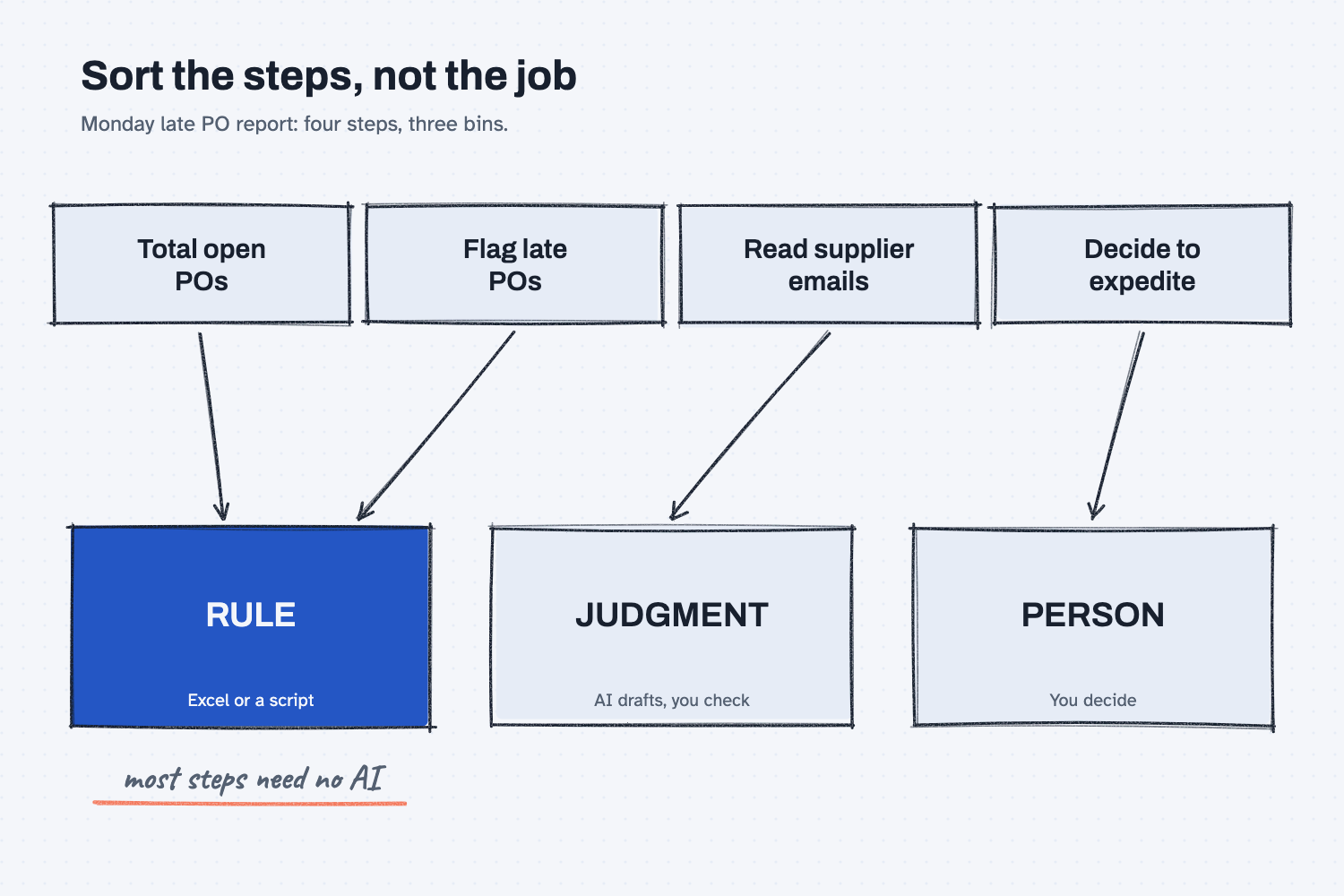
The picture starts with one job, the Monday late PO report, and splits it into four steps that each drop into one of three bins. Two steps, totaling the open POs and flagging the late ones, land in the rule bin, so a formula can do them. Only one step, reading the supplier emails, is real AI work, and it lands in the judgment bin. The last step, deciding whether to expedite, needs a person. The point is that you sort the steps and not the whole job, and when you do, most steps turn out to need no AI.
Think of it like this
You would not send your best engineer to move a pallet. A forklift moves pallets the same way every time, and nobody has to think about it. The engineer is for the problem nobody has solved yet, and a big purchase still needs the plant manager's signature.
When I explain this, I put it plainly: "Similar to having an engineer go move a box." AI is the engineer, who is smart and good with messy problems but wasted on lifting.
Most jobs in your week contain all three kinds of work. Some steps are forklift work, one or two need the engineer, and one needs a signature.
Why does it matter at work?
AI can be right most of the time on a step that a rule gets right every time, and "most of the time" is a bad deal when the rule is free.
Here is how that plays out. Hector Lee plans production at Mesquite Ridge Metal Works. Every Monday he pastes the open PO export into a chat and asks, "Which POs are more than 5 days late?" Most weeks the list looks right, but one week three late POs are missing, so nobody calls those suppliers, and two of them hold up a build. A filter on the promised date column would have caught all three, every week, in about ten seconds.
AI still has a real job in Hector's Monday. Reading 40 supplier emails for new ship dates is messy work, and AI is good at it. The call on whether to expedite belongs to Dana, the buyer. So the four steps use three different tools: a rule, AI for judgment, and a person.
How does it work?
Write the job as a list of steps, and then ask three questions about each step, in this order.
Can a rule do it the same way every time? If so, it is a rule step. Totals, sorts, filters, date math, lookups, and matching a PO to an invoice all belong here. As I put it: "If it could be done with a script, do it with a script. No LLM, no cost, and it gives the same answer every time." If you cannot write the formula yourself, ask AI to write it once, and then let Excel run it. The lesson on what deterministic means shows that hand-off.
Does it need reading or weighing? If so, it is a judgment step, and AI can help. Messy emails, rough notes, a first draft, and a summary of three quotes are good examples, and in each case AI drafts and you check.
Does a wrong call cost real money or trust? If so, a person decides. AI can pull the facts together first, but the signature is still yours. The lesson on letting AI clear the easy 80 percent shows how to set that line.
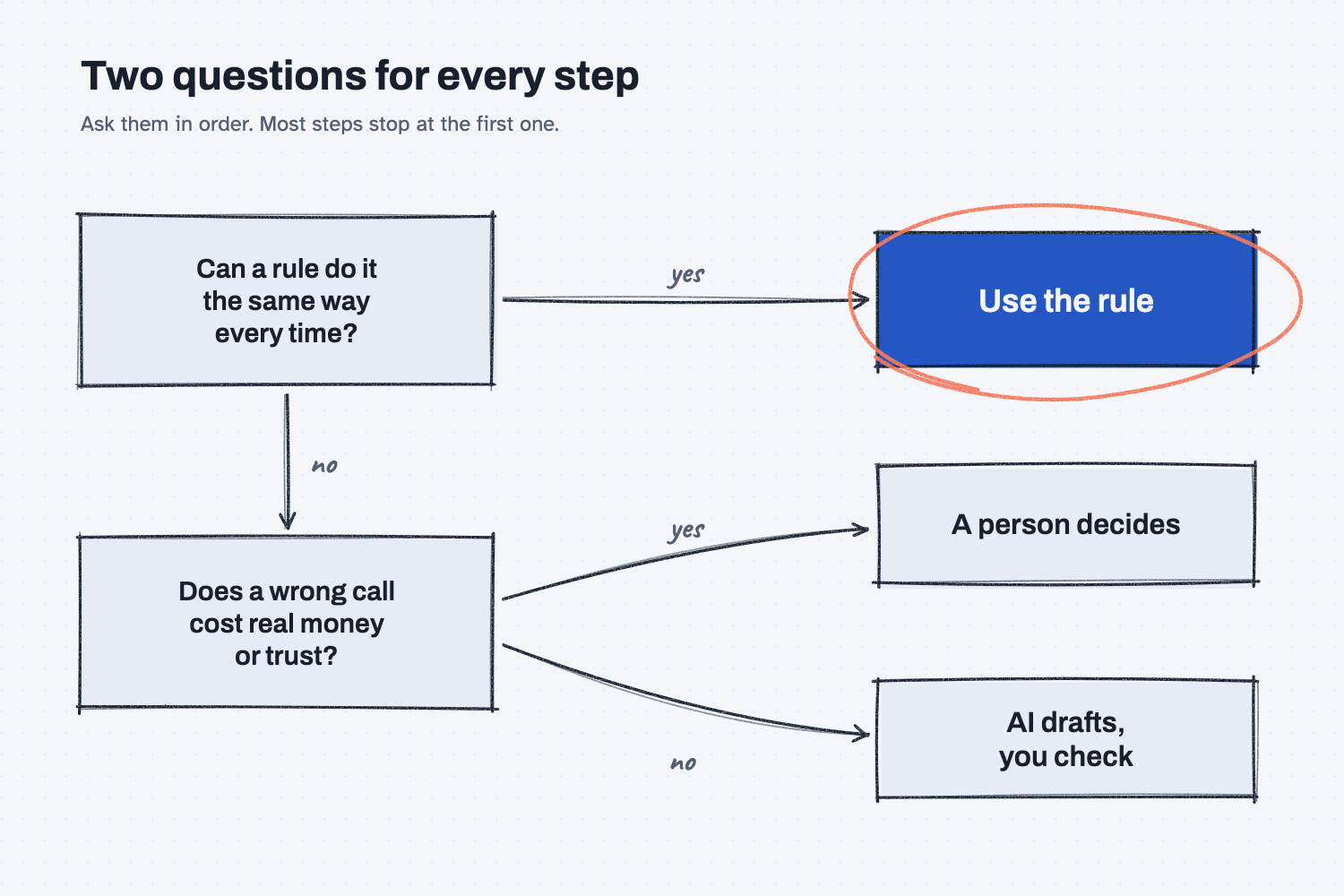
The diagram shows the same sorting as a path. A step first meets the rule question, and if the answer is yes, you use the rule. If the answer is no, the step meets the money question, where yes means a person decides and no means AI drafts and you check.
Here is the part that surprises people. When you sort honestly, the rule bin fills up fast. In my framework notes I wrote it this way: "Most steps need no model at all." And: "code walks the tree and the model shows up at the steps that take judgment." The rules carry the job, and AI shows up only where it adds real value.
Where do people get it wrong?
Most mistakes come from giving one tool the whole job. Here are four to watch for.
- Handing AI the whole job in one ask. A request like "Do my Monday report" mixes rule steps with judgment steps, so split it first.
- Asking AI to count, total, or filter a long list. That is forklift work, so use a filter or a formula, or ask AI to write the formula for you.
- Letting AI make the final call on money or people. It can lay out the options, but a person signs.
- Swinging too far the other way. Some people get burned once and stop using AI at all, but reading 40 messy emails is exactly where it pays off.
Try this in 2 minutes
This test sorts five jobs from a buyer's week. Use any chat tool.
- Open a new chat and paste this:
Sort these 5 jobs from my week. Tag each one:
RULE = a formula or fixed rule can do it the same way every time
JUDGMENT = it needs reading or weighing, so AI can help draft
PERSON = a person has to decide or sign off
1. Total open PO dollars by supplier from our ERP export.
2. Flag every PO that is more than 5 days late.
3. Read 40 supplier emails and pull out any new ship dates.
4. Decide whether to switch suppliers for our main control board.
5. Approve a $48,000 steel order.
One line each: number, tag, short reason.
- Read the tags, and decide whether you agree with each one.
- Then swap in the steps of one job from your own week and run it again.
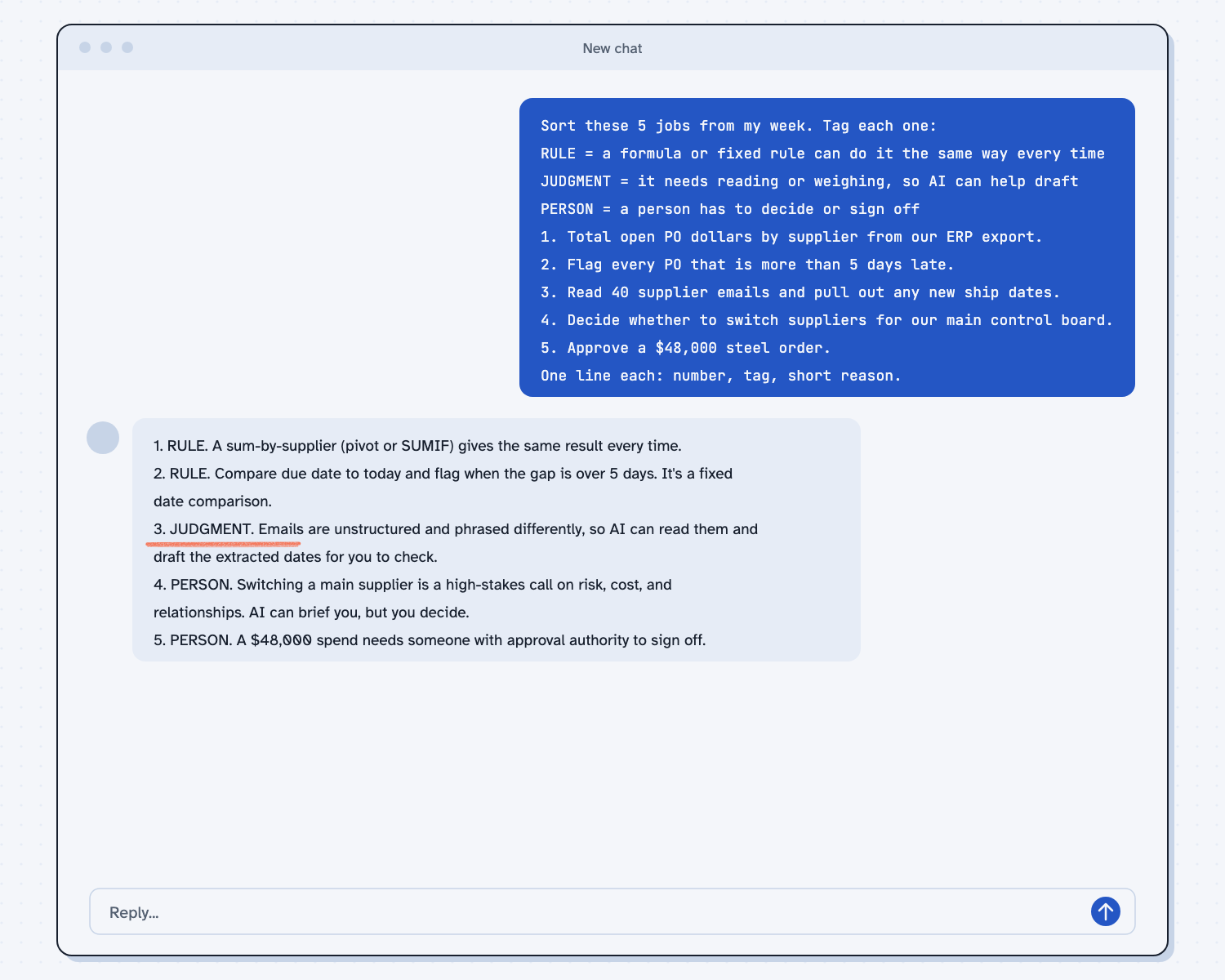
When I tried this, jobs 1 and 2 came back as RULE, job 3 came back as JUDGMENT, and jobs 4 and 5 came back as PERSON. Here is the line for job 2: "RULE. Compare due date to today and flag when the gap is over 5 days. It's a fixed date comparison."
And here is job 3, the only one that needs AI: "JUDGMENT. Emails are unstructured and phrased differently, so AI can read them and draft the extracted dates for you to check."
So only one of the five jobs was real AI work, and the AI even told me to use a rule on the late-PO job.
Frequently asked questions
Isn't AI good enough now to just do everything?
No. AI reads and writes very well, but it can still skip a row or change its answer from one run to the next, and a formula does not. When a rule can do the step, the rule wins on cost and on trust.
What if I can't write the formula?
Ask AI to write it. Paste a few sample rows and say what you want, such as "flag rows where the promised date is more than 5 days ago." Test the formula on rows you can check by eye, and then Excel runs it every week.
Can AI ever make the final call?
On small, repeating, low-risk steps it can, once it has earned trust. Start with AI drafting and you approving. The lesson on levels of AI automation walks through how to hand over more.
What counts as a "rule"?
A rule is anything you could write as a fixed step, such as a formula, a filter, a sort, a lookup, or an "if this, then that" check. If two careful people would always get the same answer, it is a rule.
Use it today
- Compare supplier quotes the same way every time: AI reads the quotes, and a script does the math.
- Turn a messy ERP export into a clean report: let AI help set it up, then let Excel do the counting.
From my training: this is how I sort every job before we build anything for a company. Rules first, AI where it takes judgment, and a person on the big calls.