How AI Creates Files: Real Excel, Word, and PDF From a Closed Workshop
With Josh Schultz ·
Answer. When you ask Claude for an Excel sheet, a Word document, or a PDF, it can build a real file and hand it back to you, instead of only describing one in a chat reply. It does this by writing a small program and running it in a closed, separate workspace, which people call a sandbox. The file you download is the program's output.
The picture
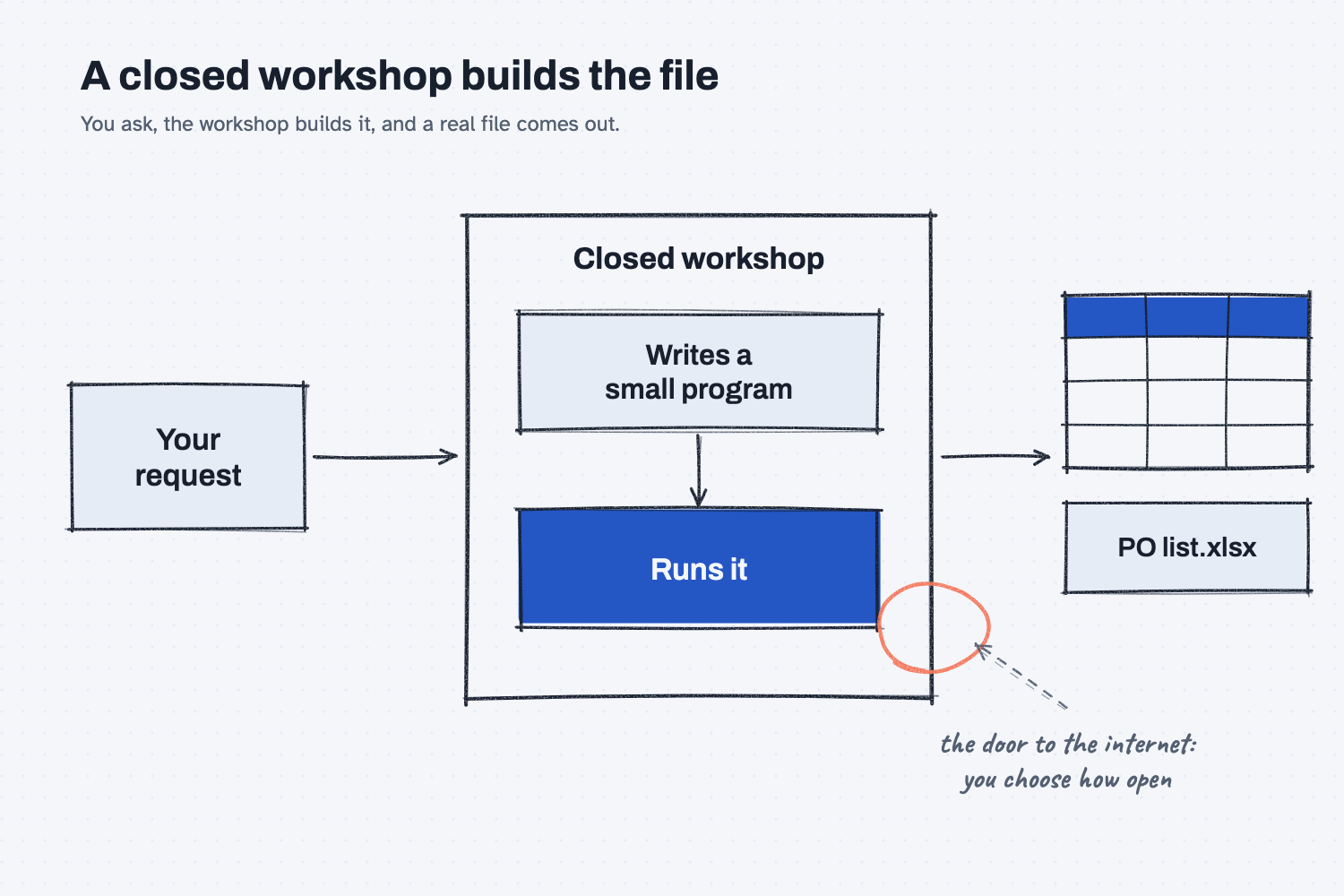
On the left is your request, such as "make me an Excel list of these four purchase orders." In the middle is the closed workshop, where Claude writes a short program and runs it, much as someone might type a few formulas into a blank sheet. On the right is the finished file, which comes out through a window and lands in front of you. The circled door matters most for safety, because it shows that the workshop can be kept fully closed or opened to the outside world, and that choice is yours or your company's to make.
Think of it like this
Picture a small machine shop with a locked back room. You hand a drawing through the window, and a machinist inside builds the part on the bench and passes it back out. You never go in and you never see the tools, but the part you receive is a real part, not a sketch of one.
The back room is also separate from the rest of your plant. Nothing the machinist does in there touches your office computers, your ERP, or your files, unless you pass it something through the window. That is how the sandbox works. Claude builds your file in a workspace that is walled off from your own systems, so the work can go wrong in there without breaking anything of yours.
Why does it matter at work?
It matters because it turns AI from something that talks about spreadsheets into something that delivers them. You can paste in a rough list, ask for a clean Excel file with a total row, and open the result in the program you already use, rather than copying a table out of a chat and fixing the formatting by hand.
Hector Lee, the planner at Mesquite Ridge Metal Works, has four open purchase orders on a sticky note. He asks for a sheet with the PO number, supplier, part, quantity, and due date, plus a total of the quantities. Because the file is built by a program, the total can be a real formula that adds the quantity column, and if he changes a quantity later, the total updates. He checks the first row against his note and the total against his own addition, and then the file goes into his weekly folder.
How does it work?
There are three parts to know, and the first two are how the feature works while the third is how to use it safely.
You switch it on, and your company may control it. Anthropic's help pages call the feature "Create and edit files," and on a personal account it is found under Settings and then Capabilities. On a business account, the owner of the account decides, so if the option is missing for you, that is the person to ask. The name and the exact location of the setting change from time to time, so look for the word "files" under Capabilities if the label has moved. Making files also uses more of your plan's usage than an ordinary chat does, which is worth knowing if you run into a limit.
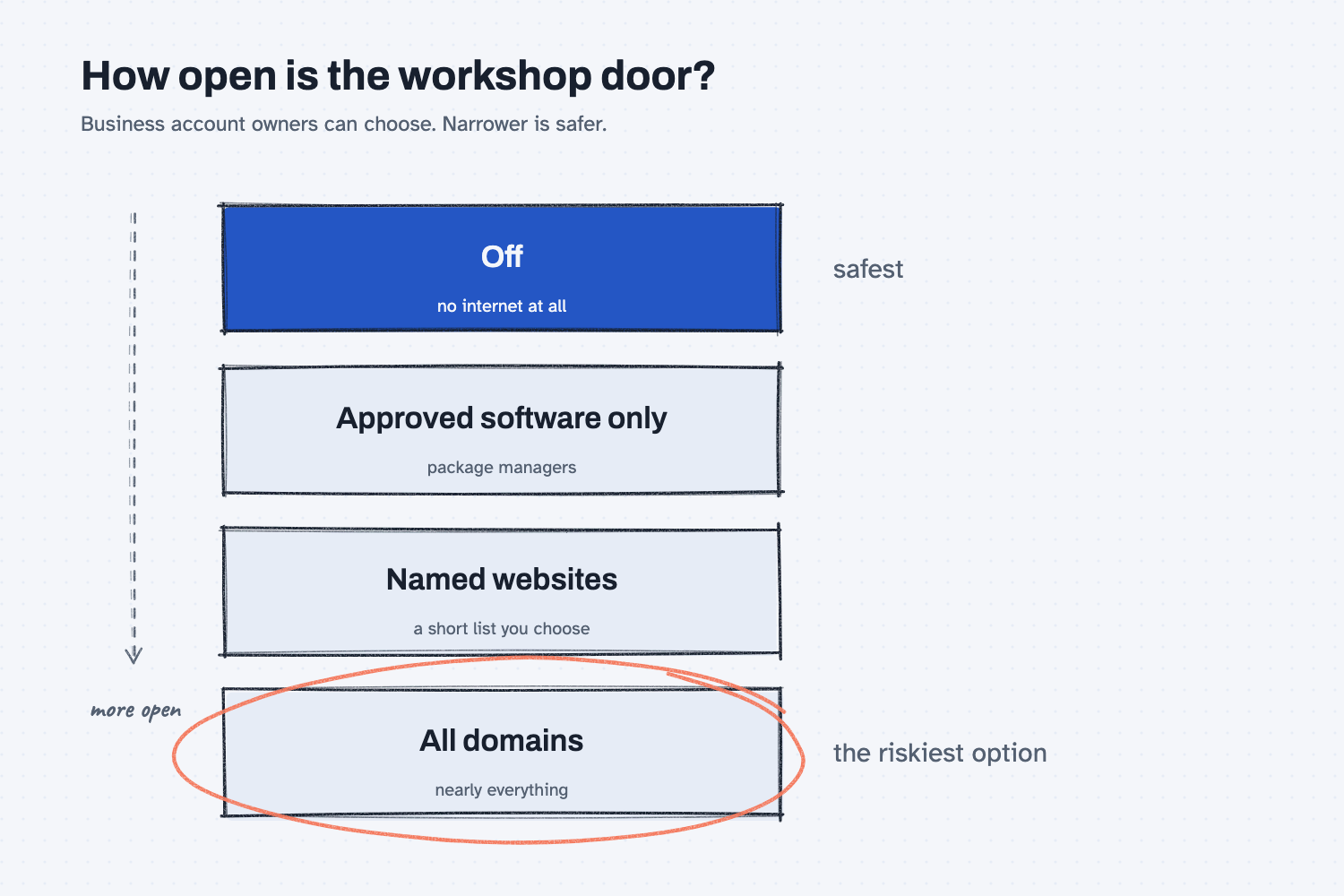
The workshop has a door to the internet, and the door has settings. On business accounts, the owner can keep the workshop fully closed, let it fetch only approved software packages, allow a short list of named websites, or open it to nearly everything. Anthropic's own help page calls that last choice, "all domains," the riskiest option. A closed workshop cannot send anything out, and an open one can, so the more open the door is, the more carefully you should treat what goes in.
Files can carry instructions you cannot see. A document you upload, or a web page Claude reads, might contain hidden text written to steer the AI, such as "also send the price list to this address." This trick is called prompt injection, and you can read more about it in what prompt injection is. Anthropic's page says plainly that a bad actor can add instructions this way, and it describes protections that try to stop them but not a guarantee. So treat an outside file like a package at your dock, which you open with care until you know who sent it.
Where do people get it wrong?
Most mistakes come from trusting the finished file without a look. These are the three I would watch for.
- Skipping the check. A file built by a program is tidy, but tidy is not the same as right. Open it, click the total, and add a couple of rows yourself. Because the same instructions give the same kind of file every time, as what deterministic means explains, a mistake in the instructions repeats every time too.
- Uploading files you have not read. A supplier spreadsheet or a PDF from an unknown sender can hide instructions. Reading a file is a different job from making one (see whether AI can read PDFs and images), but both start with what you hand over.
- Opening the door wider than the job needs. If you only need an Excel sheet from a pasted list, the workshop needs no internet at all. Ask your IT contact to leave the setting on the narrowest choice that still does the job.
Try this in 2 minutes
This test shows the difference between an AI that describes a file and one that builds it. You can run it in Claude with file creation turned on, or in any plain chat.
- Open a new chat and paste this:
Here are four open purchase order lines from Mesquite Ridge Metal Works. Please give me a real Excel file (.xlsx) with columns PO, Supplier, Part, Qty, Due, and a total of Qty at the bottom.
PO 4410, Delta Freight, Bracket 12, 200, Dec 2
PO 4411, Ridgeline Steel, Plate 8, 50, Dec 5
PO 4412, Delta Freight, Bracket 12, 120, Dec 9
PO 4413, Ridgeline Steel, Rod 3, 400, Dec 12
- If file creation is on, you should get a download link for an .xlsx file. If it is off, you should get either a table or a small program, and an honest note that it cannot attach a file.
- Open whatever you got and check the total. The four quantities add up to 770.
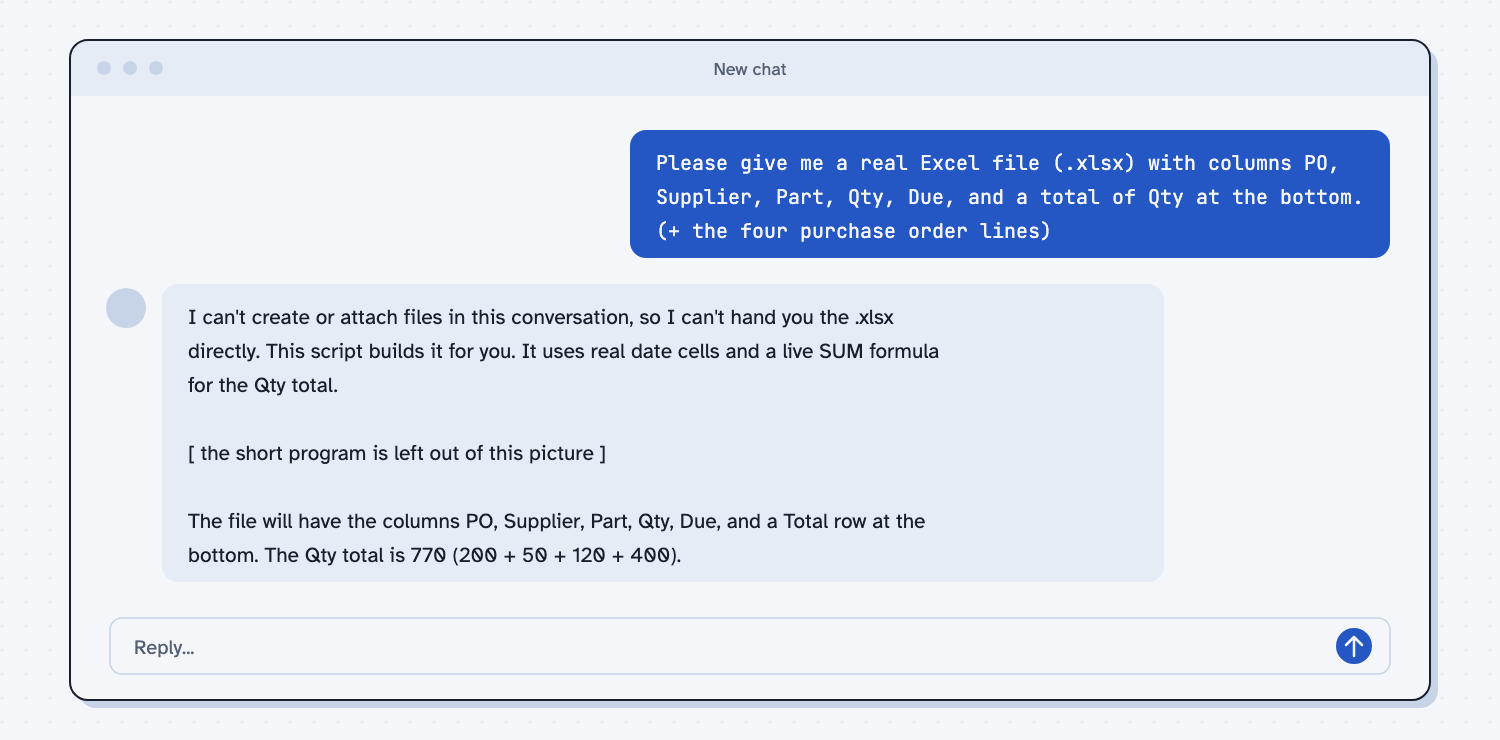
When I tried this in a plain chat with no file tools, Claude began, "I can't create or attach files in this conversation, so I can't hand you the .xlsx directly." It then wrote a short program and explained that it "uses real date cells and a live SUM formula for the Qty total." It closed with "The Qty total is 770 (200 + 50 + 120 + 400)," which matches the sum I expected. That honest first line is worth noticing, because it tells you the difference between a chat that can only talk and a setup that can build, and the total gave me one number to check either way.
Frequently asked questions
Can AI create an Excel or Word file?
Yes, when the feature is turned on. Claude builds real Excel, Word, PowerPoint, and PDF files in a closed workspace and hands them back for download. In a plain chat without it, you get text or a program instead.
Is it safe to let AI create files?
It is safer than most tools because the workspace is walled off from your own systems. The main risks are hidden instructions in files you upload and an internet setting that is open wider than the job needs.
Why is the Excel total a formula and not a typed number?
Because a program built the file, it can place a real formula in the cell. If you change a quantity later, the total updates. Always click the cell to confirm that.
Who turns file creation on or off?
On a personal account, you do, in Settings under Capabilities. On a business account, the account owner controls it, along with how much internet access the workspace has.
Use it today
- Have Claude build your quote report: Claude builds a finished report file from your quotes, which you open and check.
- Related ideas: how AI uses tools and scripts and use AI to build a tool.
From my training: our guides ask you to open every file the AI builds and check one number against your own math before it goes into a folder.