Is It Safe to Put Company Data in AI? What Happens to What You Paste
With Josh Schultz ·
Answer. It can be safe, but the answer depends on the plan you use and the settings behind it, not on the AI itself. When you paste text into an AI tool, it travels to the company that makes the tool, and your plan decides how that company may use it. Free and personal plans carry the most risk, and business plans usually add stronger promises.
The picture
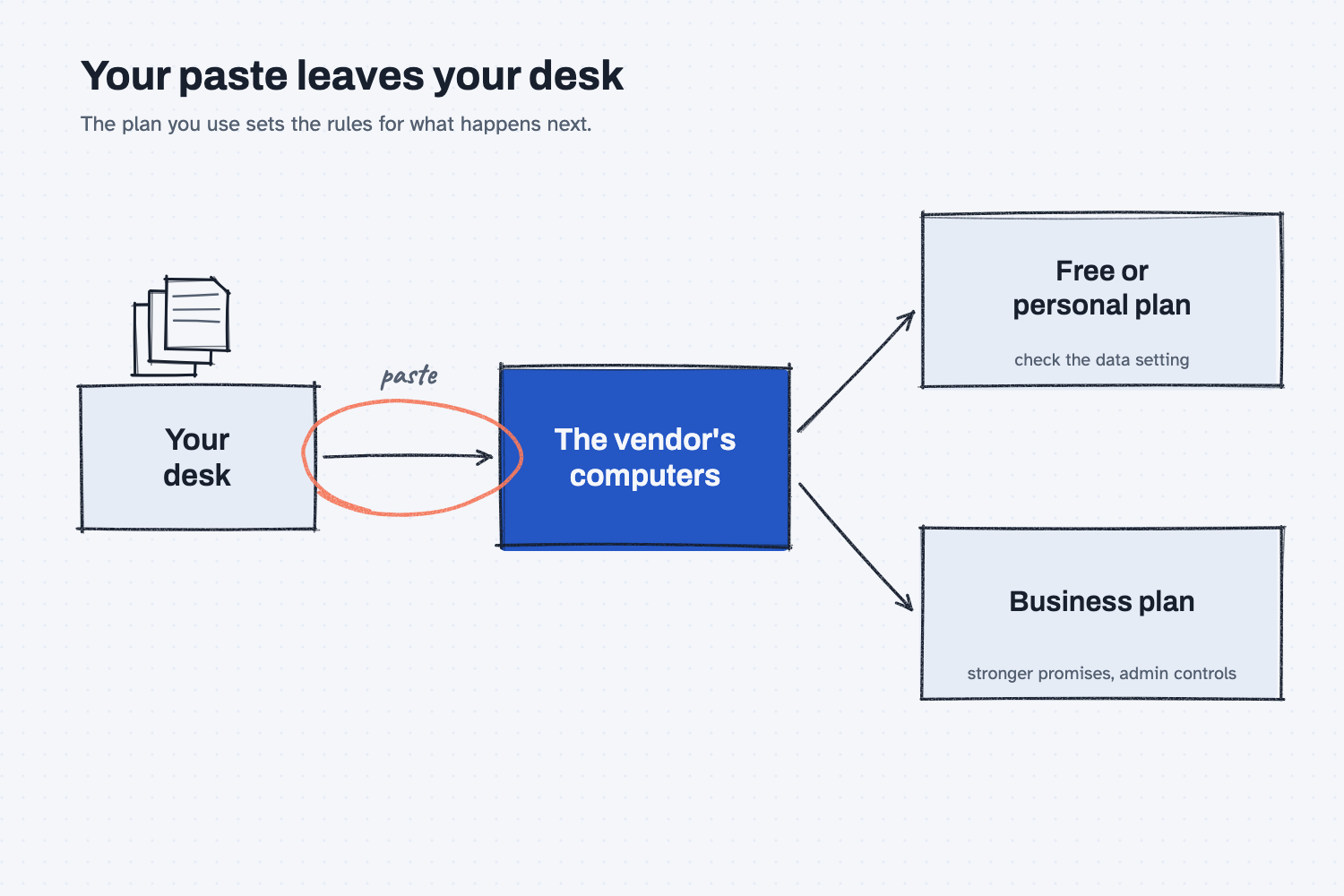
The picture starts at your desk on the left, where your file lives. When you paste something into a chat, it travels along the arrow to the computers of the company that runs the AI, which is the step most people forget about. From there the rules split in two, and which path you are on depends on the plan you signed in with. A free or personal plan leaves a lot to a setting you have to check yourself, while a business plan usually comes with written promises and an administrator at your company who controls the settings.
Think of it like this
Imagine you need a contract copied, and you walk it down to a copy shop. Before you hand it over, you would want to know a few things. Does the shop keep a copy? Who behind the counter can read it? Does the shop's own paperwork say anything about what it does with the pages?
For a walk-in customer, the shop's rules are short and can let the shop keep some things. If your company has an account and a signed agreement with the shop, the rules are longer, and they favor you. An AI tool works the same way. The words you paste are the pages, the company behind the tool is the shop, and your plan is the paperwork that says what the shop may do.
Why does it matter at work?
It matters because a paste cannot be undone, and nothing warns you when you cross a line. Most of the time nothing visible happens, which is exactly why people get comfortable.
Here is an example. Dana Ortiz is the senior buyer at Mesquite Ridge Metal Works, and she wants help comparing three casting quotes. One quote comes from Lakeview Castings, and it includes contract pricing that Mesquite Ridge agreed to keep private. If Dana pastes it into her personal free account, she has sent a supplier's confidential prices to a third company, and she could also have broken the agreement she signed. If she uses the tool her company approved, with its business settings, the same paste follows rules her company chose on purpose. The task and the AI are the same, and only the plan changed.
How does it work?
Three things decide how safe a paste is: what the tool does with your text, which plan you are on, and what you chose to paste in the first place. The first two are settings you can check, and the third is your own judgment.
What happens to a paste. Your text is sent to the vendor's computers so the AI can read it and write a reply. Vendors keep chats for some time, and on some plans they can use them to improve their products. Because these rules differ by company and change over time, the vendor's own privacy and data pages are the place to check, not a news article or a coworker's memory.
Free plans versus business plans. Free and personal plans usually give you a setting that controls whether your chats can be used to improve the tool, and you have to look for it yourself. Business plans usually promise that your chats are not used to train the vendor's models, and they often add controls that a company administrator manages. Neither plan type is magic, so check the data settings on your own plan and ask your IT team which plan the company approved.
What never to paste. Some things stay out of any tool until your company says otherwise. These are customer names and contact details, prices and terms from contracts, anything covered by a nondisclosure agreement, employee records such as pay or health details, drawings and specifications that belong to a customer, and passwords or account numbers. If you are not sure whether something belongs on this list, treat it as if it does and ask.
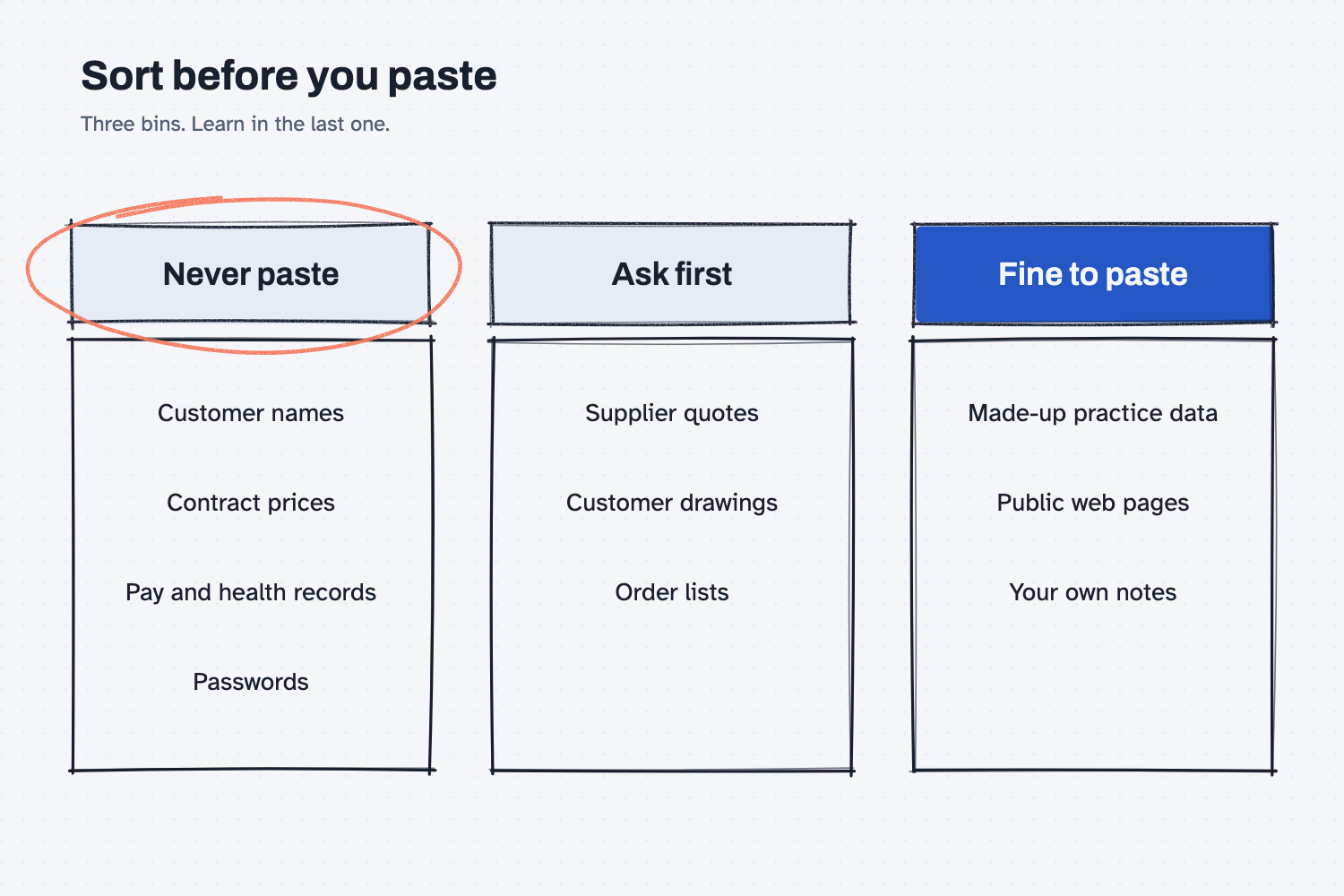
The second picture sorts what you could paste into three bins. The "never" bin holds the items that carry real names, real prices, or real people. The "ask first" bin holds ordinary work files that are fine on an approved tool but not on a personal one. The "fine" bin holds made-up practice data and public pages, and that bin is where you should learn.
Where do people get it wrong?
Most mistakes come from treating all AI tools as one thing. These are the three I see most often.
- Using a personal account for work files. It is quick and nothing stops you, but a personal plan was not set up with your company's promises in mind. Use the tool your company approved for anything real.
- Assuming "I deleted the chat" means the data is gone. Deleting a chat removes it from your list, but the vendor's retention rules decide what happens next, and those are written on the vendor's data pages.
- Skipping the sample-data step. People practice on the real file because it is faster, and that is how real prices end up in a free tool. A few minutes of scrubbing lets you practice with nothing at risk.
Try this in 2 minutes
This test shows how to turn a real email into safe practice data. You can use any chat tool, and the email below is made up, so it is safe to paste.
- Open a new chat and paste this:
I want to practice with AI on a real supplier email, but I must not paste real names, prices, or part numbers. Rewrite this email as safe practice data. Replace every company name, person name, part number, and price with a made-up one, keep the same layout, and then list what you changed.

Hi Dana, Delta Freight Lines quoted $4,180 per load for the Houston run on part MR-77412, 14 gauge steel coil, net 30. Our contract with Hartwell Fabrication expires March 3, so please confirm before Friday. Call Mike Ortega at 555-0142 if the price moves.
- Read the new email, then read its list of changes.
- Check that no original name, price, or part number is left behind.
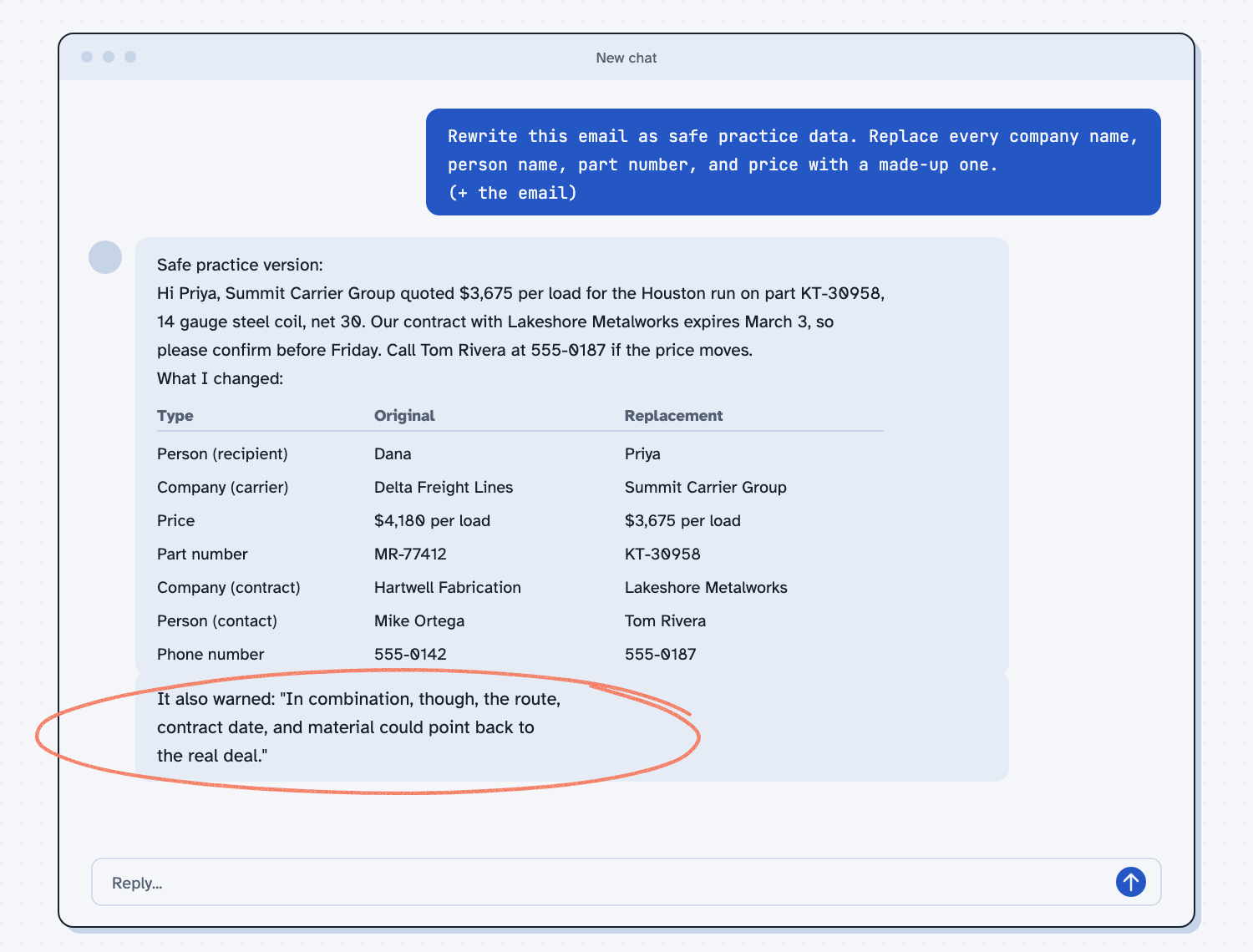
When I tried this, the reply swapped every name and number and then showed a table of what it changed. It even caught the phone number, noting "I replaced the phone number even though you didn't list it, since it identifies a person." It also left Houston, March 3, and the steel details alone, and it added a useful warning: "In combination, though, the route, contract date, and material could point back to the real deal."
That warning is the lesson. Scrubbing names and prices is the first layer, but a few ordinary details together can still point to a real deal. So read the practice version once yourself before you paste it anywhere, and change the city or the date if the combination feels too specific.
Frequently asked questions
Does AI learn from what I type?
It depends on the vendor, the plan, and your settings. Some plans can use chats to improve the tool unless you turn that off, and business plans typically promise they do not. Check the data settings on your own plan.
Is a business plan always safe?
It is usually safer, but it is not automatic. Check what your company turned on, how long chats are kept, and who can see them. Then keep the never-paste list in mind anyway.
What if I already pasted something I should not have?
Tell your manager or IT team soon, and say what it was and which tool you used. Reporting early lets them check the settings and decide what to do next. Hiding it only makes it harder to fix.
Can I use free AI at home to practice?
Yes, as long as you use made-up or public examples. Build a fake quote with invented names and prices, practice the steps, and then repeat them on the real file in the approved tool at work.
Use it today
- Safe use notes: six plain rules to read before you use real work data with any AI tool.
- Email suppliers about what's missing from their quotes: practice the whole flow with sample quotes first.
- Related idea: How to test an AI tool.
- Related idea: A brain with no hands.
From my training: before anyone uses a real file, we practice the same steps on made-up data first.