- Claude
AI app. An AI chat app. You type or paste text, or add a file, and it writes back.
Answer. To email suppliers about missing quote terms and errors, have Claude run a small script on your quote data. The script finds what each quote is missing or got wrong, fills the same email template for each supplier, and makes one page of drafts. You read each draft and send it from your own email. About 15 minutes.
Time and cost. 15 minutes the first time, about 5 after that. $0 to practice with the sample quotes on the free Claude plan. Who this is for. Buyers and estimators who have compared quotes and now need to chase every supplier for what they left out.
The comparison from Compare supplier quotes the same way every time told you what is wrong. Panhandle left out its address, quote number, expiry date, payment terms, and minimum order. Cedar Flats has a math error and a saw cut charge you never asked for. Now someone has to write those emails, and an item slips through when you type them by hand at the end of the day.
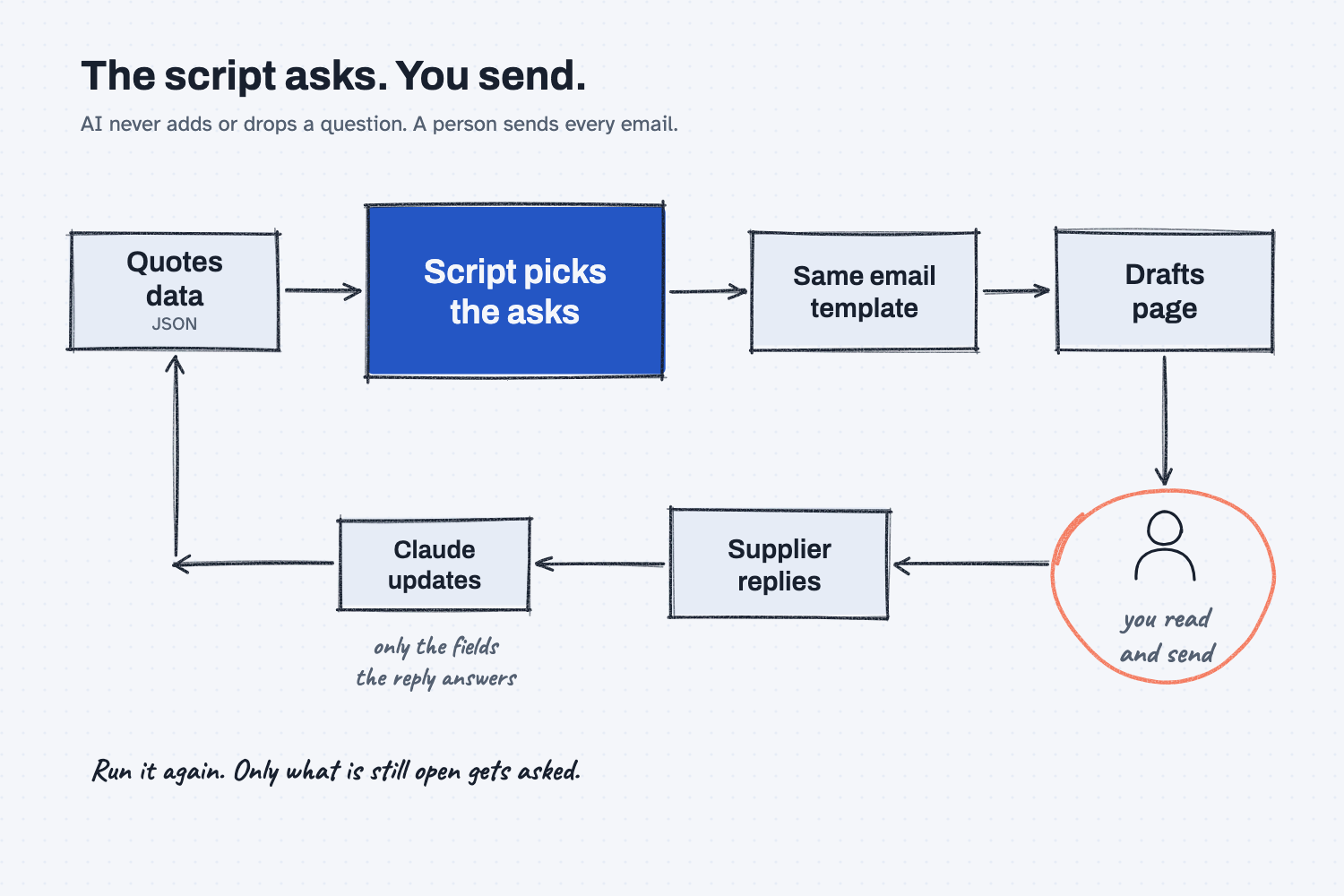
You could ask AI to write them, and it will write nice emails, but it picks a different list of questions each time. So this guide uses the same split as the comparison guide: a script decides what to ask, a fixed template words it, and you read and send each draft.
What will I learn besides writing follow-up emails?
You will learn five methods you can reuse for late PO chasers, invoice disputes, and any other email that comes from a list of problems. Each one has a short "why" later in this guide.
- Let a script decide what to ask. The asks come from fixed checks, so AI never adds or drops one.
- Fill a fixed template. Every email has the same parts in the same order.
- Keep the rules in one place. The emails use the same checks as the comparison page, so the two always agree.
- Keep a person in the loop. The script makes drafts. You read them and you send them.
- Close the loop with the data. When a supplier answers, update their quote data and run it again, so you only ask for what is still open.
What do I need before I start?
You need the quote data from the comparison guide, two scripts, and Claude. There is nothing to install.
- Claude at claude.ai with Code execution and file creation turned on (Settings, then Capabilities). The free plan works for practice.
- Your quotes JSON file from the comparison guide. JSON is a plain-text file of labels and values that a script can read, and it is the file Claude made when it read your quotes. To practice, use the sample: quotes-MRMW-RFQ-1142.json.
- build_comparison.py, the script from the comparison guide. You may already have it in your RFQ folder.
- build_followups.py, the new script. It reads the same checks from build_comparison.py, so the two files always travel together. You never open either one, because Claude runs them for you.
Safe use. Real quotes hold prices and supplier names. Check your company rules before you attach them to any AI tool, and use the sample data to learn. Nothing in this guide sends email. Read the safe use notes.
How do I write follow-up emails to every supplier?
Have Claude run build_followups.py on your quotes JSON, read the page of drafts it makes, and send each one yourself. Then, when a supplier replies, update their quote and run it again. Seven steps.
Step 1. Put the new script in the RFQ folder
Copy build_followups.py into the RFQ folder you made in the comparison guide, next to build_comparison.py and quotes-MRMW-RFQ-1142.json.
One folder per RFQ keeps the quotes, the comparison, and the follow-ups together, which helps when someone asks in six months what you asked a supplier.
Step 2. Attach the quotes JSON and both scripts to a new chat
Open claude.ai and start a new chat. Click the + button at the bottom left of the message box and choose Upload a file, or drag the files onto the chat. Attach quotes-MRMW-RFQ-1142.json, build_followups.py, and build_comparison.py, so you see three file chips above the box.
Step 3. Paste the follow-up prompt with your sign-off
Copy the prompt below. Replace [JSON FILE] with your file name, and replace the three sign-off lines with how you sign your emails. If you want your output to match the sample in this guide exactly, add one more line at the end: Use --date 2026-11-23 as today.
Write the follow-up emails to my suppliers.
Run the attached build_followups.py on my quotes JSON file exactly as it is. It uses the checks in build_comparison.py, so keep both files in the same folder.
Do not change either script. Do not write, add to, shorten, or reword the emails yourself. The script decides what to ask each supplier.
Command: python3 build_followups.py [JSON FILE] --txt --json
Sign the emails with these lines (one --sign per line):
[YOUR NAME]
[YOUR TITLE]
[YOUR COMPANY]
Give me the HTML file it makes and the lines it prints. If the script prints an error, show me the error and stop.
The prompt tells Claude to run the script and nothing else, because the script is the only thing that decides what to ask. Claude replies with followups-MRMW-RFQ-1142.html and a line that counts the asks for each supplier.
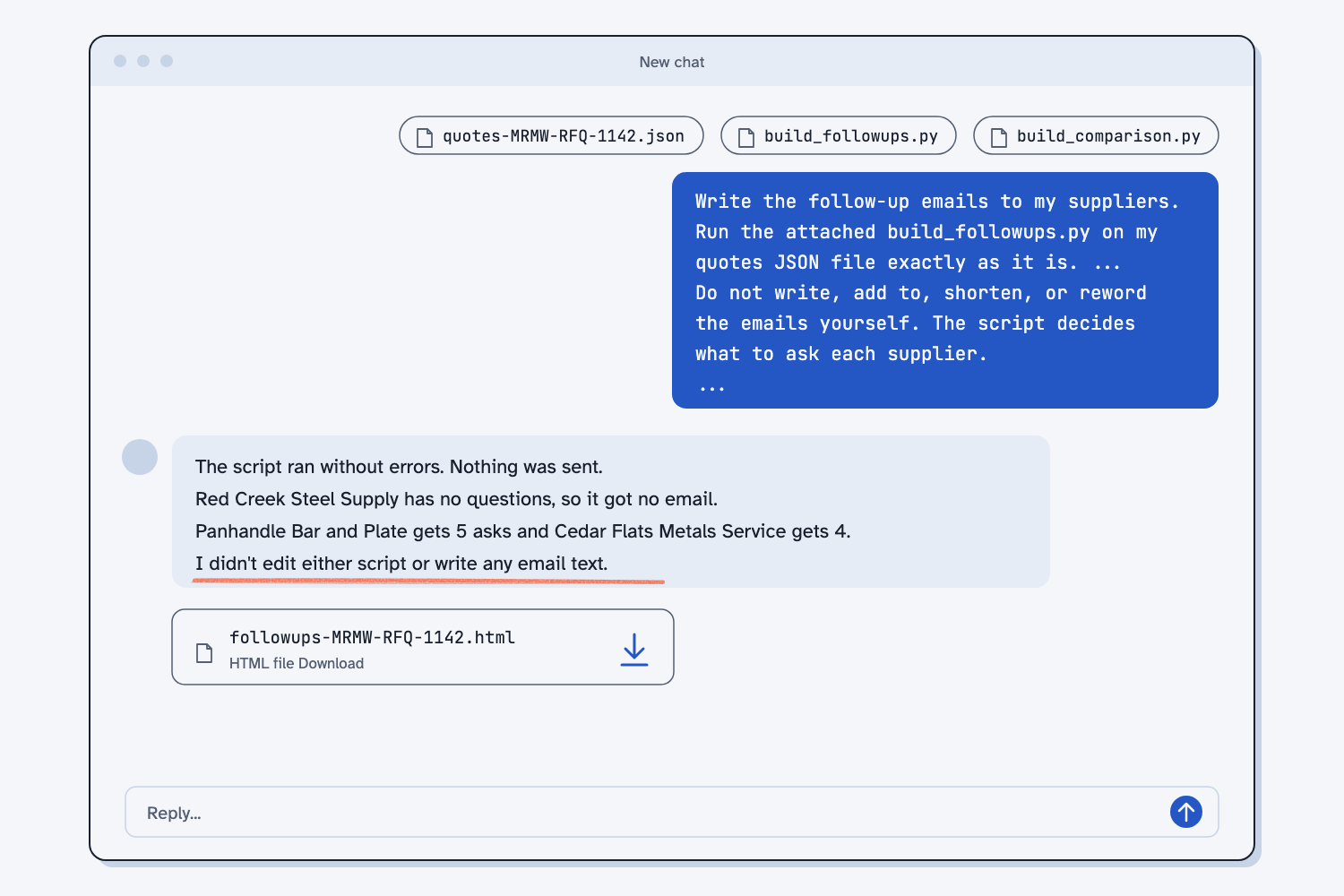
Check that the reply says it ran the script. If Claude wrote the emails itself, turn on code execution and send the prompt again.
Step 4. Open the drafts page and read each email
Download the HTML file (the file type web pages use) and double-click it to open it in your browser. At the top, a short table lists each supplier, how many asks they get, and the email address from their quote. Below that is one card per supplier.
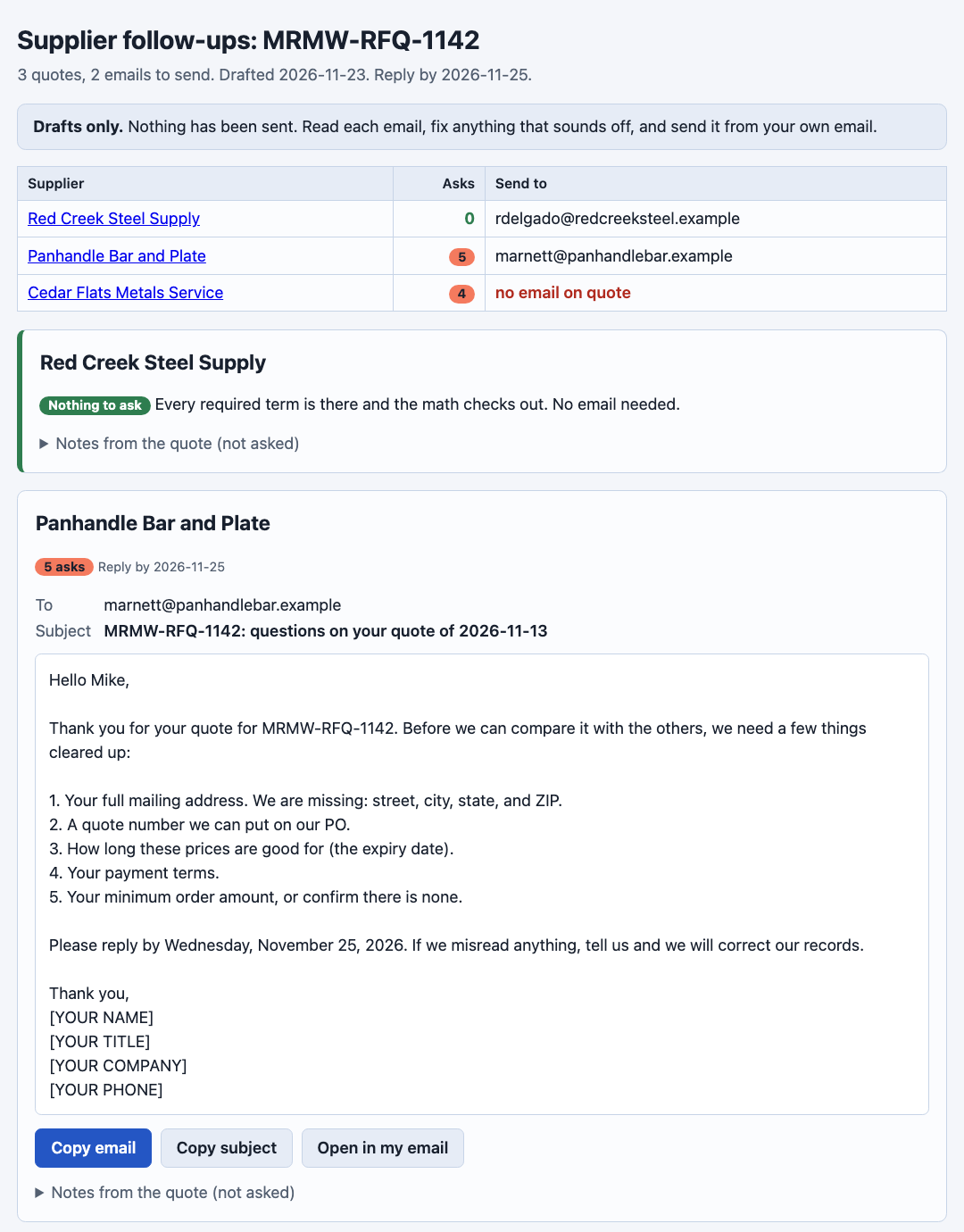
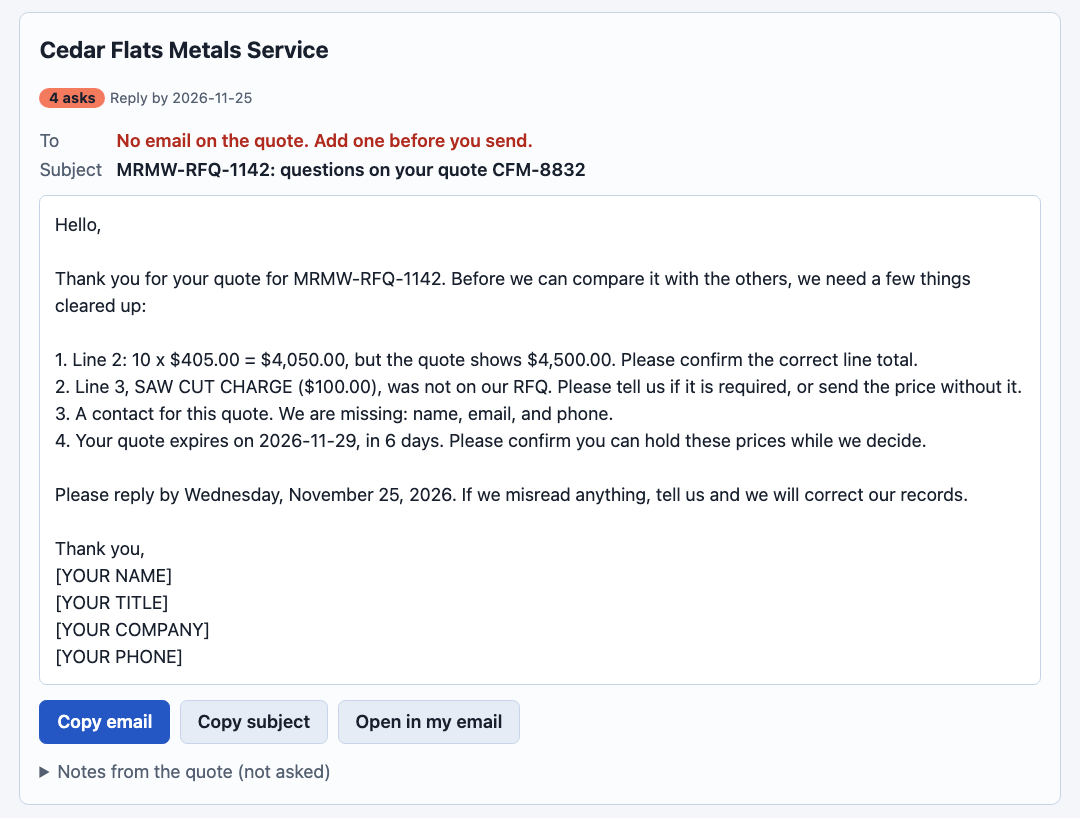
Each email has the same parts: a subject with your RFQ and their quote number, a short thank-you, one numbered list of what you need, a reply-by date, and your sign-off. Red Creek's quote is complete, so its card says "Nothing to ask." I show that card on purpose, because three quotes in should mean three cards out.
Read every draft against the comparison page. Each ask should match a flag or a MISSING mark there. Under each email, Notes from the quote (not asked) lists odd things Claude wrote down when it read the quote, like Panhandle's "random lengths." Notes need your judgment, so the script never turns them into questions. If one needs an answer, add it to the email yourself.
Step 5. Send each email from your own email
Click Open in my email on a card. Your email program opens a new message with the address, subject, and body filled in. Read it once more, change anything that sounds off, and send it. If nothing opens, your computer has no default email program set, so click Copy email and Copy subject and paste them into a new message instead.
Cedar Flats put no contact on its quote, so its card says "No email on the quote." Call them or check your supplier list first. The script never makes up an address and never sends anything, because a person stays in the loop and clicks Send.
Step 6. Save the page and write down when you sent each email
Save followups-MRMW-RFQ-1142.html and followups-MRMW-RFQ-1142.json in the RFQ folder. Then open a plain text file named followups-sent.txt and add one line for each email: the date you sent it, the supplier, and the reply-by date.
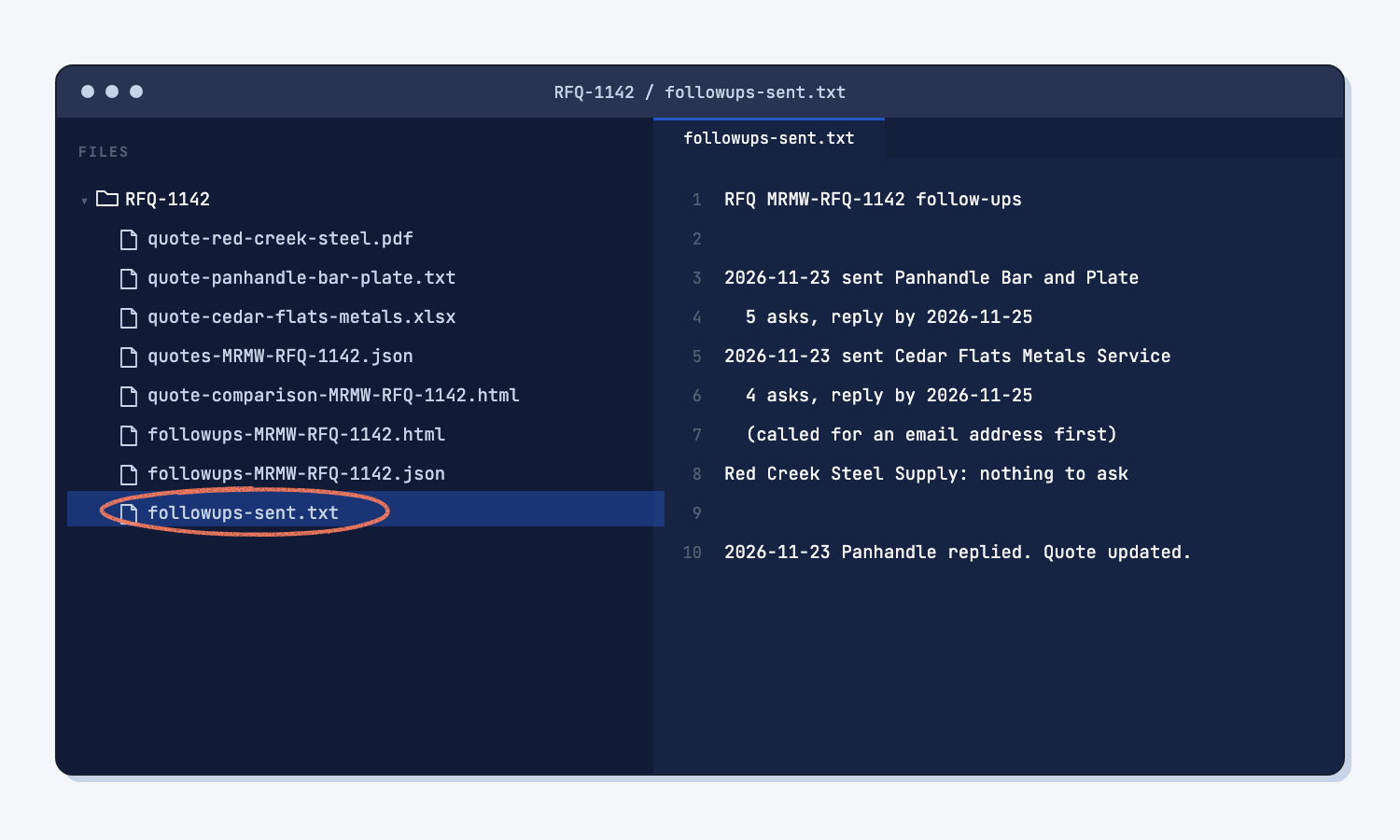
The page shows what you asked, and the sent file shows when it went out. Together they are a small record of what was done and when, which helps when a supplier says they never got your question.
Step 7. When a supplier replies, update their quote and run it again
Attach the quotes JSON and both scripts to a Claude chat, paste the prompt below, and paste the supplier's reply where it says [PASTE THE REPLY HERE]. To practice, use the sample reply from Panhandle: reply-panhandle-bar-plate.txt.
A supplier answered my follow-up email. Their reply is below. Update that supplier's quote in my quotes JSON file to match the reply.

Rules:
1. Change only the fields the reply answers. Leave every other value, and every other supplier, exactly as it is.
2. Same rules as the first time: plain numbers, dates as YYYY-MM-DD, null if the reply does not say. Do not guess.
3. If the reply says they do not have something, like a quote number, keep it null and add a note that says so.
4. If the reply gives a new price or line total, copy it exactly. Do not do the math for them.
5. Add one note: "Updated from reply of [DATE OF REPLY]: " and the fields you changed.
6. Before you save, show me a list of each change: the field, the old value, the new value, and the words in the reply that say so.
7. Save the JSON with the same file name. Then run build_comparison.py and build_followups.py on it, exactly as they are, and give me both pages.

Reply:
[PASTE THE REPLY HERE]
Claude first lists each change: the old value, the new value, and the words in the reply that say so. Check that list, because this is the one place AI touches the data. Then it saves the JSON and runs both scripts again.
With the sample reply, Panhandle's address, expiry date, payment terms, and minimum get filled in. Mike says they do not use quote numbers on email quotes, so that stays empty, and Panhandle drops to one ask. That is how you close the loop: the open list gets shorter each round, and the comparison page updates too.
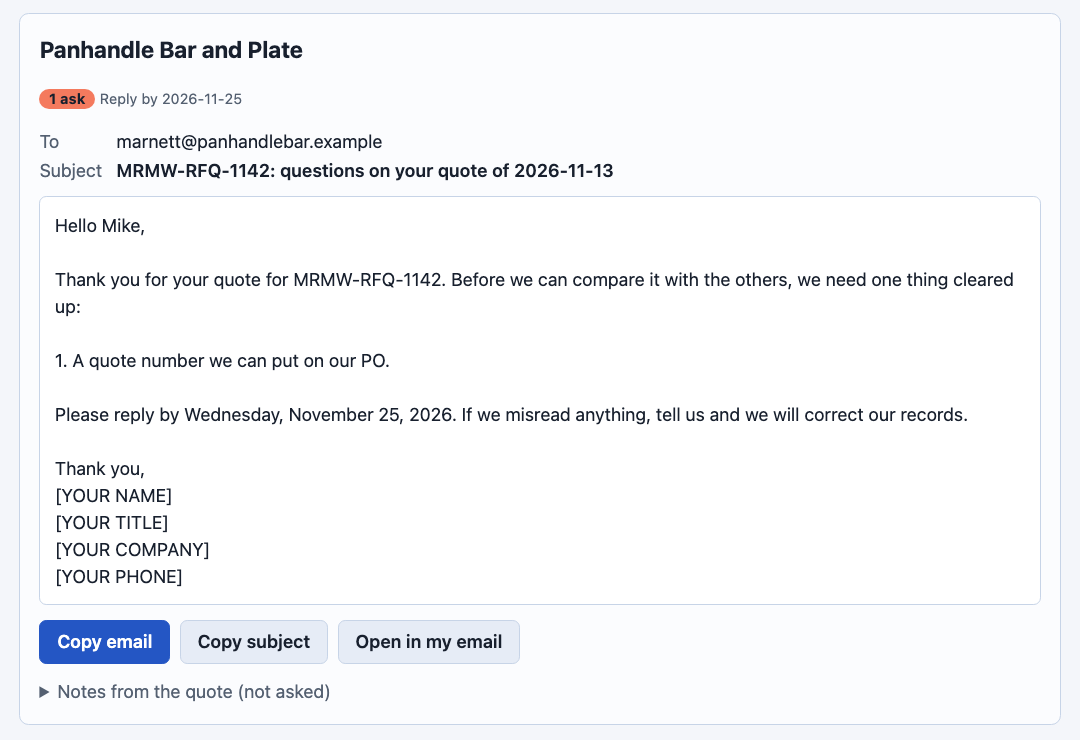
You do not need to send that one, since Mike already answered it. The script follows rules, and you decide when a rule does not fit.
How do I change how the emails sound?
Ask Claude to change the email template inside build_followups.py, not the emails themselves. The template is the opening, closing, subject, and thank-you lines at the top of the script. Claude then runs the old and new versions and proves the list of asks did not change.
Change the wording of the emails that build_followups.py writes. I want them to sound [friendlier / firmer / shorter].

Rules:
1. Change only section 1 of the script, the email template: subject, greeting, opening, closing, and thank-you lines.
2. Do not change section 2 (the asks) or any of the checks. The list of asks must stay exactly the same.
3. Run the old script and the new script on my quotes JSON with the same --date and with --json. Confirm the asks in the two JSON files match word for word.
4. Show me one email from the old script and the same email from the new one.
5. Give me the new build_followups.py to save.
When I asked for "firmer, because these suppliers are slow to answer," the subject became "ACTION NEEDED," and Claude confirmed all nine asks matched word for word. It also added "Without it, we cannot include your quote in our comparison" and flagged that I might not want to say that. Read new wording with that in mind, because a firmer tone can promise something you did not decide.
Changing the template once gives every future RFQ the new tone, which is the idea behind fixing the instructions, not the output. To soften one email only, edit it in your email program.
What does good look like?
With the sample quotes and 2026-11-23 as today, the drafts page shows these asks. Answer key, sample data. The script made them, and I checked each one against the comparison page and the quote files. You can open the sample drafts page.
| Supplier | Asks | What it asks for |
|---|---|---|
| Red Creek Steel Supply | 0 | Nothing. Every required term is there and the math checks out. |
| Panhandle Bar and Plate | 5 | Full address, a quote number, an expiry date, payment terms, and the minimum order |
| Cedar Flats Metals Service | 4 | Line 2 math ($4,050.00, not $4,500.00), the $100.00 saw cut charge, a contact, and an expiry 6 days away |
Every email asks for a reply by Wednesday, November 25, 2026, two business days after the drafts were made. After Panhandle's sample reply, Panhandle drops to 1 ask. Run the same file with the same date twice and you get the same page, word for word.
What can go wrong?
Most problems come from AI being helpful in the wrong place. These are the ones to watch for.
- Claude writes the emails itself. AI is built to sound helpful, and it picks each word as likely, not as right. With no script, Claude sent Red Creek four questions though its quote was complete. It picked different reply-by dates per supplier and told Cedar Flats "we have assumed $405.00 per sheet for now," a position you never took. The script stops that.
- A tone change rewrites the asks. When I asked plain chat to make the drafts firmer, it reworded two of the asks and added "we will proceed with the other suppliers." Change the template instead, so the asks stay word for word.
- There is no email address. Cedar Flats left out its contact. The card says so, and the To line in your email program will be empty.
- The script asks again for something already answered. Panhandle said it has no quote numbers, and the script still asks for one, because the field is still empty. You decide not to send it.
- A good question is not on the list. Red Creek's mill surcharge and Panhandle's random lengths are real questions, but they are notes, not rules. Read the notes and add any that matter.
- The date changes the asks. "Today" is the computer's date. Run it a week later and Cedar Flats gets "your quote expired" instead of "expires in 6 days." That is correct, but it is why the sample uses a fixed date.
How do I check the answer?
Check the drafts against the comparison page, not against Claude, the way you test an AI tool against answers you know. The two scripts use the same checks, so they should agree.
- Each supplier on the comparison page has a card on the drafts page.
- Each MISSING mark and each flag on the comparison page shows up as an ask.
- No email asks for something the comparison does not show.
- The ask counts in Claude's reply match the numbers on the drafts page.
- Every To line is a real address you recognize.
Why does this way work?
It works because each part of the job goes to the tool that is best at it: rules to a script, wording to a template, reading replies to AI, and judgment and sending to you.
Let a script decide what to ask. A missing payment term is a yes-or-no fact, so a rule should catch it. A script gives the same list every time, which people call deterministic, while AI picks what sounds right.
Fill a fixed template. The quote data is a form AI filled in, and the email is a form the script fills in. One numbered list and one reply-by date make each ask quick to answer, because the supplier can reply "1. Net 30, 2. no minimum" and you can match it line by line.
Keep the rules in one place. build_followups.py does not have its own idea of what "missing" means. It borrows the checks from build_comparison.py, so if you change a rule once, both pages change together. That is why one set of rules for every report beats two scripts that drift apart.
Keep a person in the loop. Drafting is where a script saves you time, and sending is where a wrong word costs you a supplier. On the levels of automation, this guide stops at "drafts for a person to send" on purpose, until the drafts earn your trust.
Close the loop with the data. The reply goes back into the same quote data, not into your memory. Both pages are rebuilt from it, so the comparison is current and the next email only asks for what is still open.
Frequently asked questions
Can Claude send the emails for me?
It could be set up to, but this guide does not do that on purpose. A follow-up goes to a supplier you work with every week, so a person should read it first. The page makes sending fast: one click opens the email with everything filled in, and you click Send.
Will this work with Outlook or Gmail?
Yes. Open in my email opens your computer's email program, often Outlook. For Gmail in a browser, use Copy email and Copy subject and paste them into a new message.
What if I want to ask about something the script does not check?
Add it to that one email before you send it. If it comes up on every RFQ, like a mill surcharge, ask Claude to add a new check to build_comparison.py and a matching ask to build_followups.py. Test it on the sample quotes, so both pages learn it together.
Can I make this one step instead of attaching files?
Yes. Save it as a Claude skill, which is a saved set of instructions Claude loads when the job comes up (what a skill is). The skill carries both scripts. Then you attach the quotes JSON and say "write the follow-ups." Download it in the next section.
Where did the script come from?
Claude wrote it from a plain description of the emails I wanted, and I tested it on the sample quotes until every ask matched the comparison. Now it runs for free every time. That is the pattern of using AI to build the tool once instead of asking it to do the job every time.
Take this with you
Two prompts, one script, and one skill. Together they turn any quotes JSON into follow-up drafts and keep them current as replies come in.
1. The follow-up prompt and build_followups.py (it needs build_comparison.py next to it).
Write the follow-up emails to my suppliers.
Run the attached build_followups.py on my quotes JSON file exactly as it is. It uses the checks in build_comparison.py, so keep both files in the same folder.
Do not change either script. Do not write, add to, shorten, or reword the emails yourself. The script decides what to ask each supplier.
Command: python3 build_followups.py [JSON FILE] --txt --json
Sign the emails with these lines (one --sign per line):
[YOUR NAME]
[YOUR TITLE]
[YOUR COMPANY]
Give me the HTML file it makes and the lines it prints. If the script prints an error, show me the error and stop.
2. The reply prompt, for when a supplier answers.
A supplier answered my follow-up email. Their reply is below. Update that supplier's quote in my quotes JSON file to match the reply.

Rules:
1. Change only the fields the reply answers. Leave every other value, and every other supplier, exactly as it is.
2. Same rules as the first time: plain numbers, dates as YYYY-MM-DD, null if the reply does not say. Do not guess.
3. If the reply says they do not have something, like a quote number, keep it null and add a note that says so.
4. If the reply gives a new price or line total, copy it exactly. Do not do the math for them.
5. Add one note: "Updated from reply of [DATE OF REPLY]: " and the fields you changed.
6. Before you save, show me a list of each change: the field, the old value, the new value, and the words in the reply that say so.
7. Save the JSON with the same file name. Then run build_comparison.py and build_followups.py on it, exactly as they are, and give me both pages.

Reply:
[PASTE THE REPLY HERE]
3. Or save it as a Claude skill. Download quote-followups.zip. In the Claude app, go to Settings, then Capabilities, then Skills, and upload the zip. In Claude Code, unzip it into .claude/skills/. The skill carries both scripts and the reply rules. Then attach the quotes JSON and say "write the follow-ups." When a reply comes in, paste it and say "Panhandle replied."
Next RFQ: compare the quotes, say "write the follow-ups," read and send each draft, log the date, and run it again when the replies come back.
What's next?
- Compare supplier quotes the same way every time, the guide that makes the quotes JSON this one reads.
- Compare three supplier quotes, the quick chat version, for a one-time look.
- Turn a messy ERP export into a clean report, the same idea for ERP data.
- Human in the loop AI, why a person sends every email.
- What does deterministic mean?, why a script picks the asks.