What Is Structured Output in AI? Make It Fill In Your Form
With Josh Schultz ·
Answer. Structured output means you tell AI the exact shape to fill in, every time. You give it a blank form, often in JSON (a plain text form computers read). Every quote comes out the same way. Then you can compare them fairly, and scripts can do the rest.
The picture
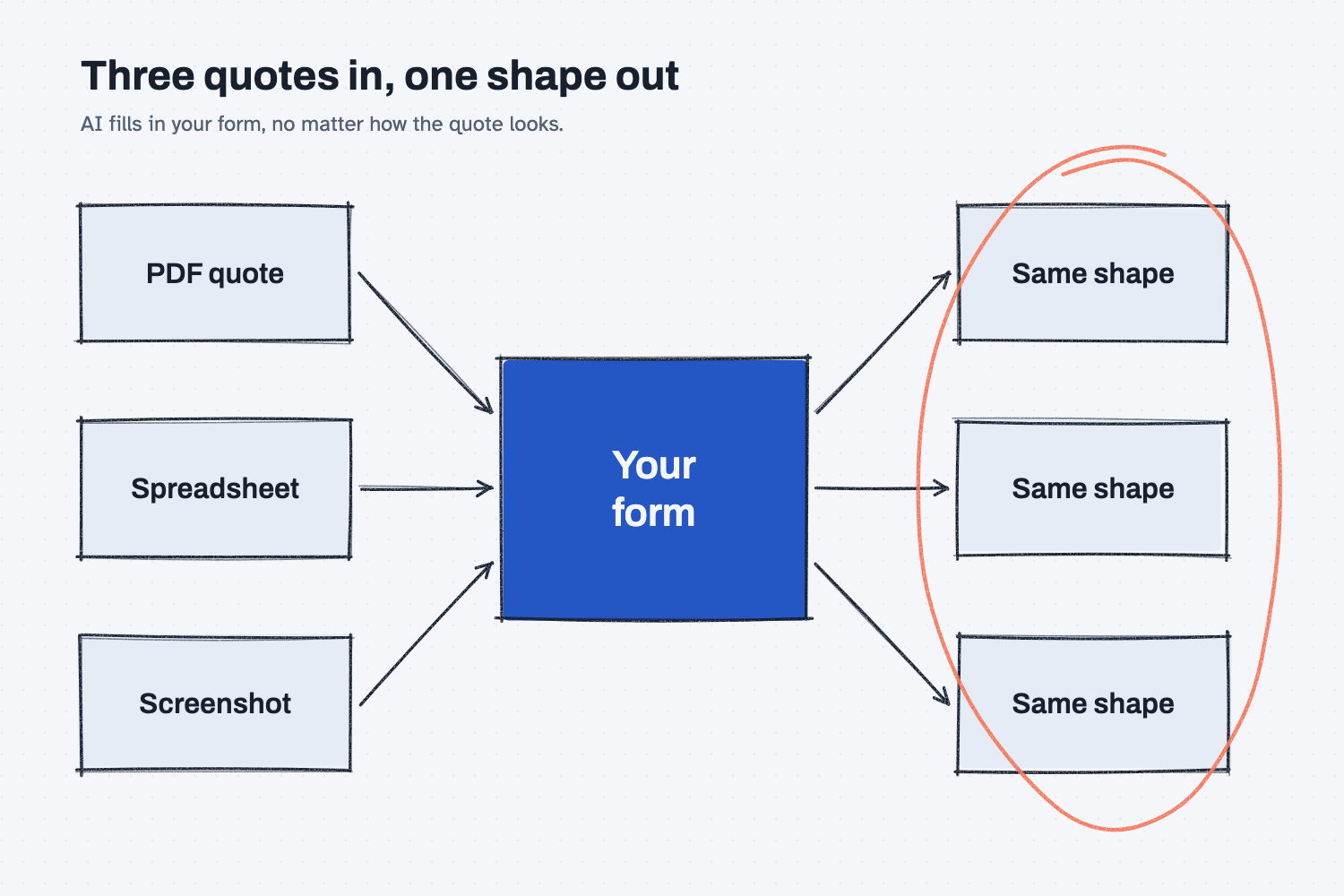
Three quotes go in, and none of them look alike. One form sits in the middle. Three matching shapes come out. That's normalizing (making them all the same shape), and it's the whole idea.
Think of it like this
Think about the receiving form on your dock.
Every truck brings different paperwork. One packing slip lists the PO at the top. Another hides it at the bottom. A third has it handwritten on the box. Your receiving clerk doesn't file the packing slips as they are. They fill in your form: PO number, part, quantity, date, who signed.
Now every receipt in the file looks the same. Anyone can find the quantity in a second. Anyone can add up the week.
Structured output is that receiving form, for AI. Without it, AI hands you back whatever shape it feels like. With it, AI fills in your boxes, in your order, every time.
Why does it matter at work?
It matters because you can't compare things that are shaped differently. And a script can't work on data that changes shape.
Here's how that plays out. Kevin Thao buys electronics at Mesquite Ridge Metal Works. He has two quotes for the RL-230 control board. Northbay Circuit Assembly sent a PDF. Kestrel Electronics sent a spreadsheet. The terms are in different places. One shows freight on its own line. The other folds it into the price.
Kevin drops both into a chat and asks, "Which is better?" He gets an answer. But he can't see whether the two quotes were read the same way.
So he tries it a different way. He gives AI one form: header first, then line items. AI fills in that form once for each quote. Now he can put them side by side, box for box. Anything AI couldn't find is marked MISSING, so he knows what to ask the supplier.
How does it work?
You write the form once. AI fills it in for every new file. Here is what's on the form for a quote.
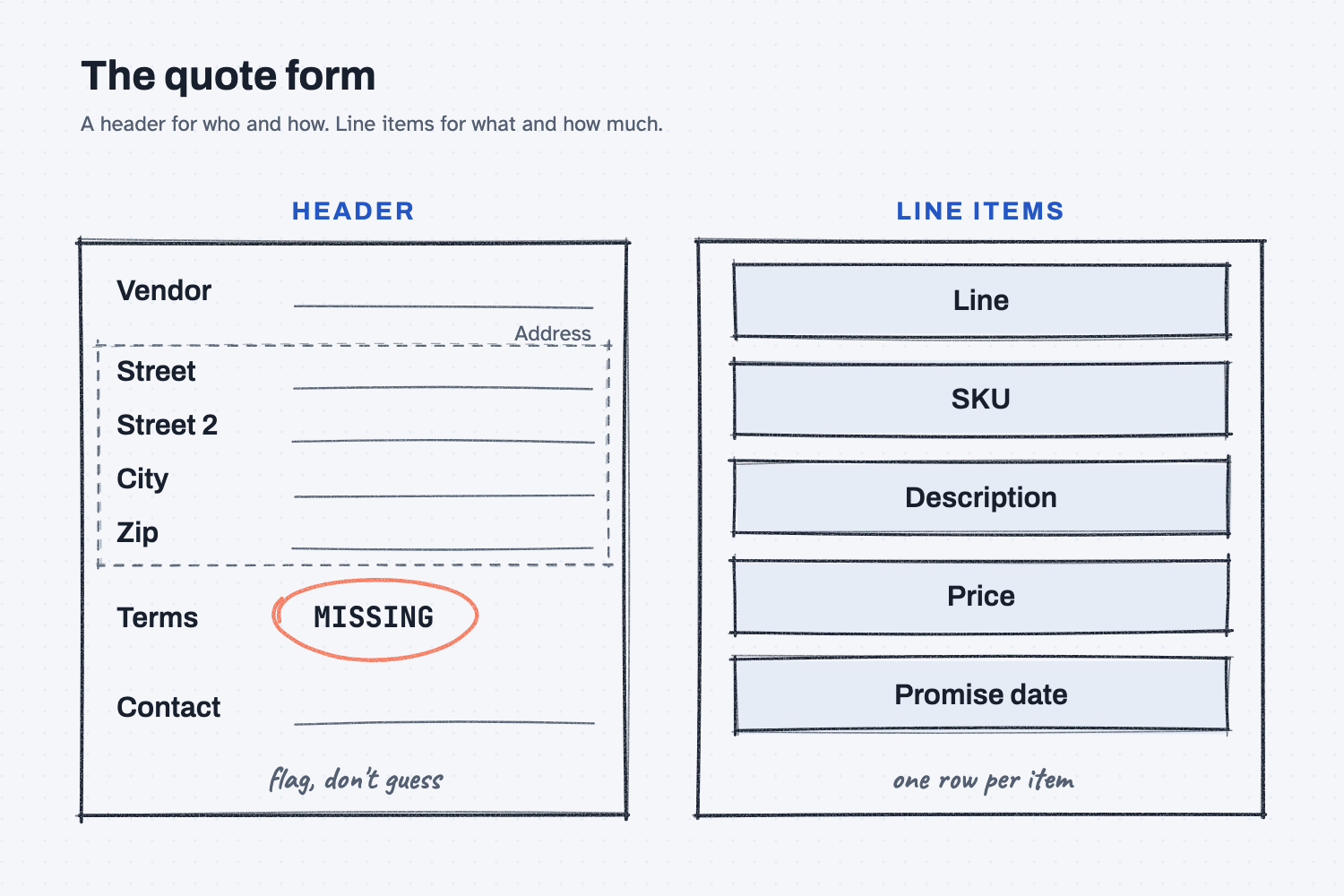
The header: who and how. Vendor, address, terms, contact. Even the address gets broken down: street, street 2, city, zip. Small boxes are easier to compare than one long line.
The line items: what and how much. Line number, SKU (the part number), description, price, and the date they promise. One row per item, always the same columns.
The rule for blanks. If a box isn't in the quote, AI writes MISSING. It doesn't guess. A guessed lead time looks just like a real one. A MISSING tag tells you to call the supplier.
What you get back. The same shape, whether the quote came in as a PDF, a spreadsheet, or a screenshot of a web page. That's what lets a script take over. The lesson on what deterministic means shows what the script does next.
What happens a year from now?
Your quote folder turns into a database (a file of records you can search). Every quote is in the same shape, so a script can read all of them.
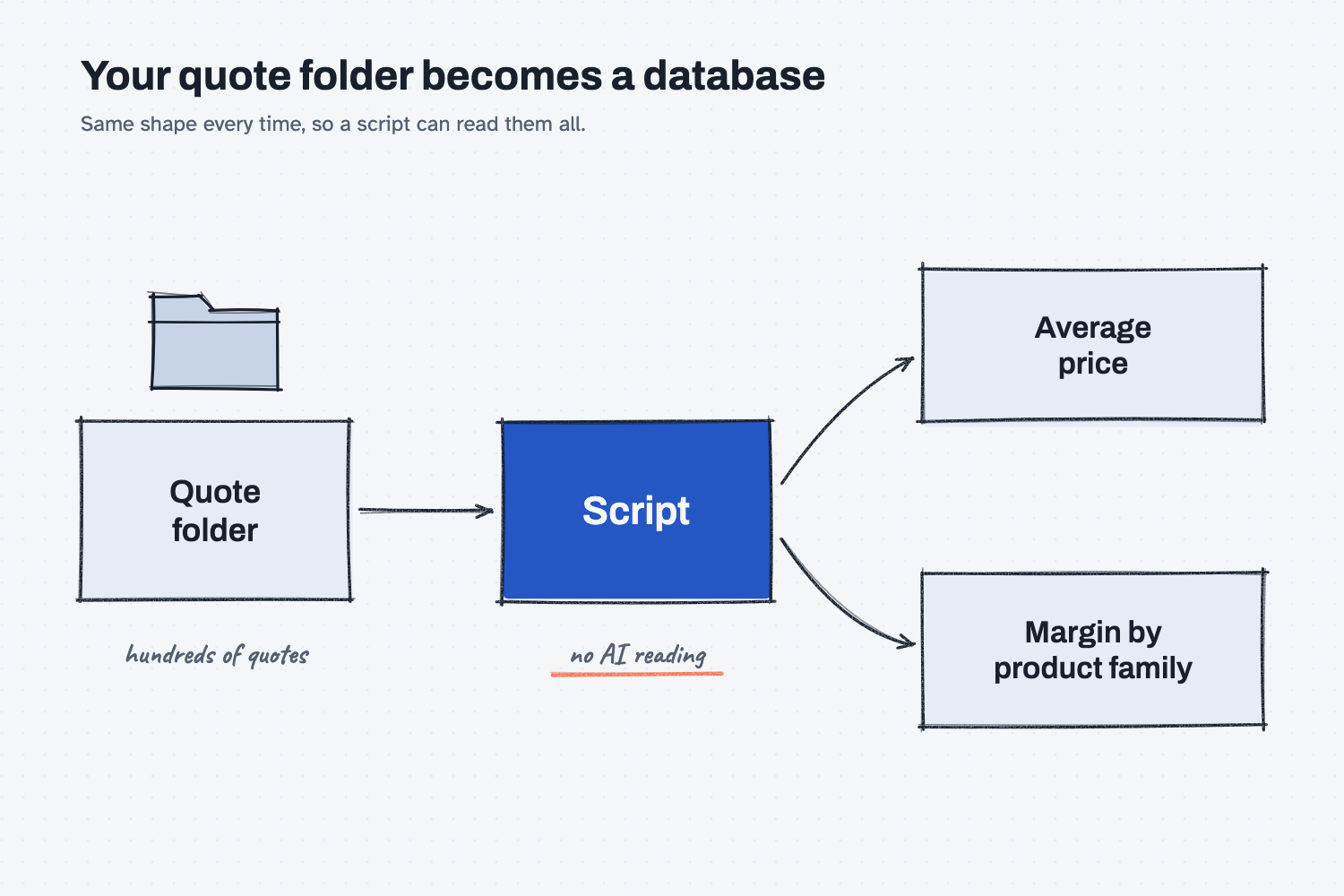
This is the payoff people don't see coming. When you have hundreds of quotes, that data isn't in 45 different formats. A script can scan the whole folder. It doesn't need AI to read each one. It just parses the data (reads it by the boxes).
So you can ask, "What's our average price on this part?" or "What's our margin on this product family?" And you get an answer in seconds.
Where do people get it wrong?
Most mistakes come from letting AI pick the shape.
- Asking "compare these" with no form. You get an answer, but you can't check how each quote was read. Give it the form first.
- Changing the form every time. If this month's form has "Terms" and next month's has "Payment terms," a script sees two different boxes. Write it once and save it.
- Letting AI fill the gaps. If you don't say "write MISSING," AI may fill a blank box with its best guess. Tell it not to.
- One long box for the address. Break it into street, city, and zip. Small boxes are what make sorting and matching work.
Try this in 2 minutes
This test shows AI filling in your form instead of its own. Use any chat tool.
- Open a new chat. Paste this:
Put this quote into the exact form below. Use the same box names.
If something is not in the quote, write MISSING. Do not guess.

FORM:
{
  "header": {
    "vendor": "",
    "street": "", "street_2": "", "city": "", "zip": "",
    "terms": "",
    "contact": ""
  },
  "lines": [
    { "line": "", "sku": "", "description": "", "price": "", "promise_date": "" }
  ]
}

QUOTE:
Lakeview Castings, 410 Mill Rd, Cedar Flats TX. Ask for Pat.
Line 1, MR-1010 gearbox housing, ductile iron, $86.00 each, ship in 5 weeks.
Line 2, RL-210 controller housing, $41.50 each, ship in 5 weeks.
- Read what comes back. Look at the zip, the terms, and the street 2 box.
- In the same chat, paste a second quote written a different way. Ask it to use the same form.
Here is what came back when I ran it in GPT-5 on Nov 19, 2026.
- First quote: street 2, zip, and terms came back MISSING. Nothing was made up. One slip: the form has no state box, so it wrote "Cedar Flats TX" in the city box. That is a form problem, not an AI problem. Add a state box.
- Second quote, written as a short email: it came back in the exact same shape. Street 2 was "Suite 4." Vendor came back MISSING, because the email only gives a web address, not a company name. That is the right answer. A guess would have looked fine and been wrong.
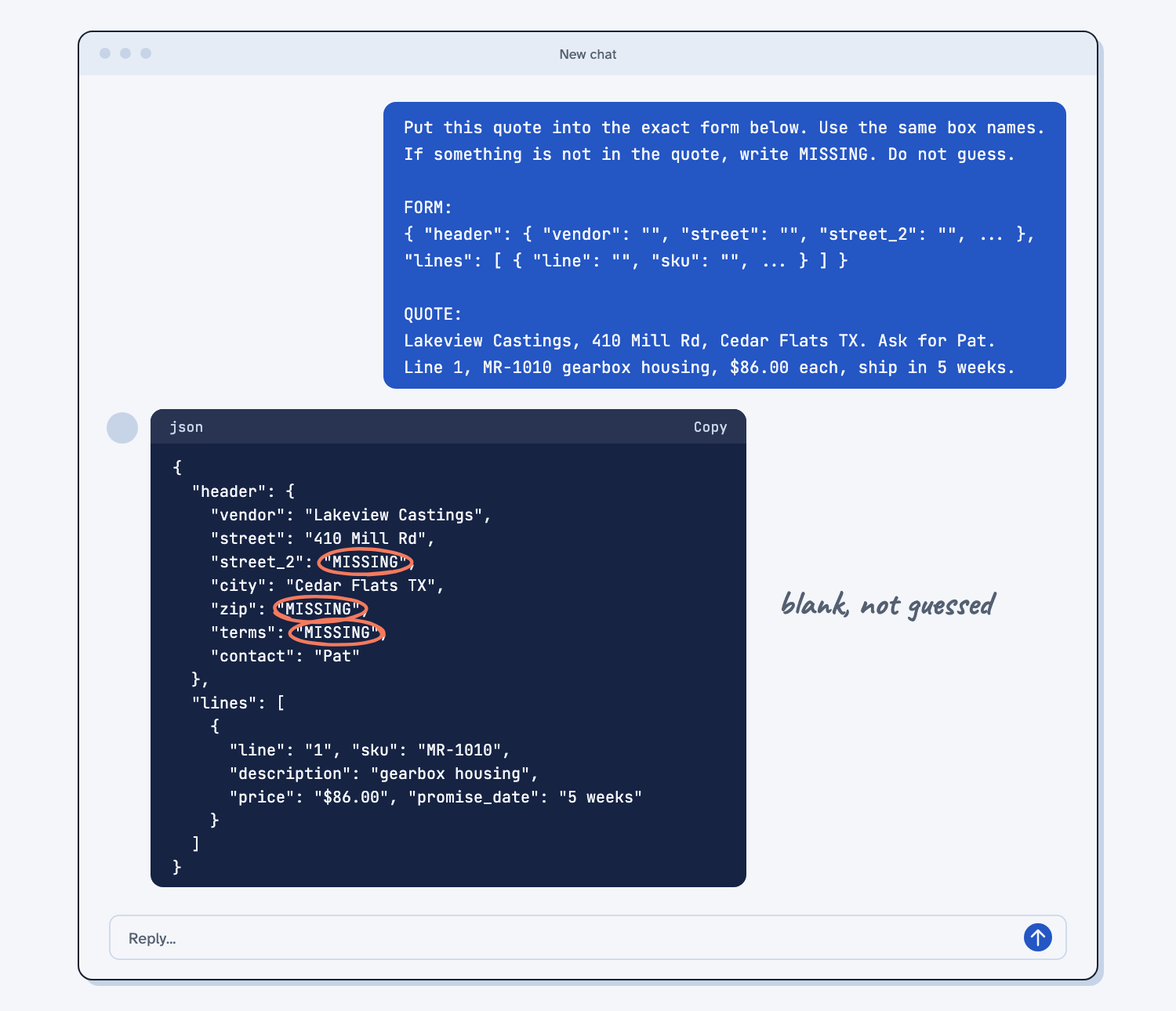
The zip, the terms, and street 2 aren't in the quote. They should come back MISSING, not made up. And both quotes should come back in the same shape.
Frequently asked questions
Do I need to know JSON to do this?
No. JSON is just labels and blanks in curly brackets. You can copy the form above and change the box names. You can also ask AI to write the form for you, then check it once.
Is normalizing the same as structured output?
Close. Normalizing is the goal: every file in the same shape. Structured output is how you get there with AI: you hand it the form to fill in.
Why not just ask AI to compare the quotes?
You can, once. But you can't check how it read each quote, and next time it may read them differently. With a form, you can see every box, and a script can compare them the same way every time.
What should I put on my form?
Start with what you compare today. For a quote, that's a header (vendor, address, terms, contact) and line items (line, SKU, description, price, promise date). Add a box only when you need it.
Use it today
- Have Claude build your quote report: every saved quote file has the same blanks, so one script reads them all.
- Email suppliers about what's missing from their quotes: the follow-up email is a form the script fills in.
- Compare supplier quotes with Claude: every quote goes into one form, so the comparison is fair.
- How to normalize supplier quotes with AI: Claude fills one quote shape, and a free page does the math and flags missing terms.
From my training: this is the first step I set up for any quote comparison.