Close the Loop With AI: Put Every Answer Back Into Your Data
With Josh Schultz ·
Answer. Closing the loop means that when someone answers a question you asked, you put their answer back into the same data your reports are built from, and then you run everything again. The open list gets shorter every round, and every report stays current, because the answer lives in your data instead of in your memory or in an old email.
The picture
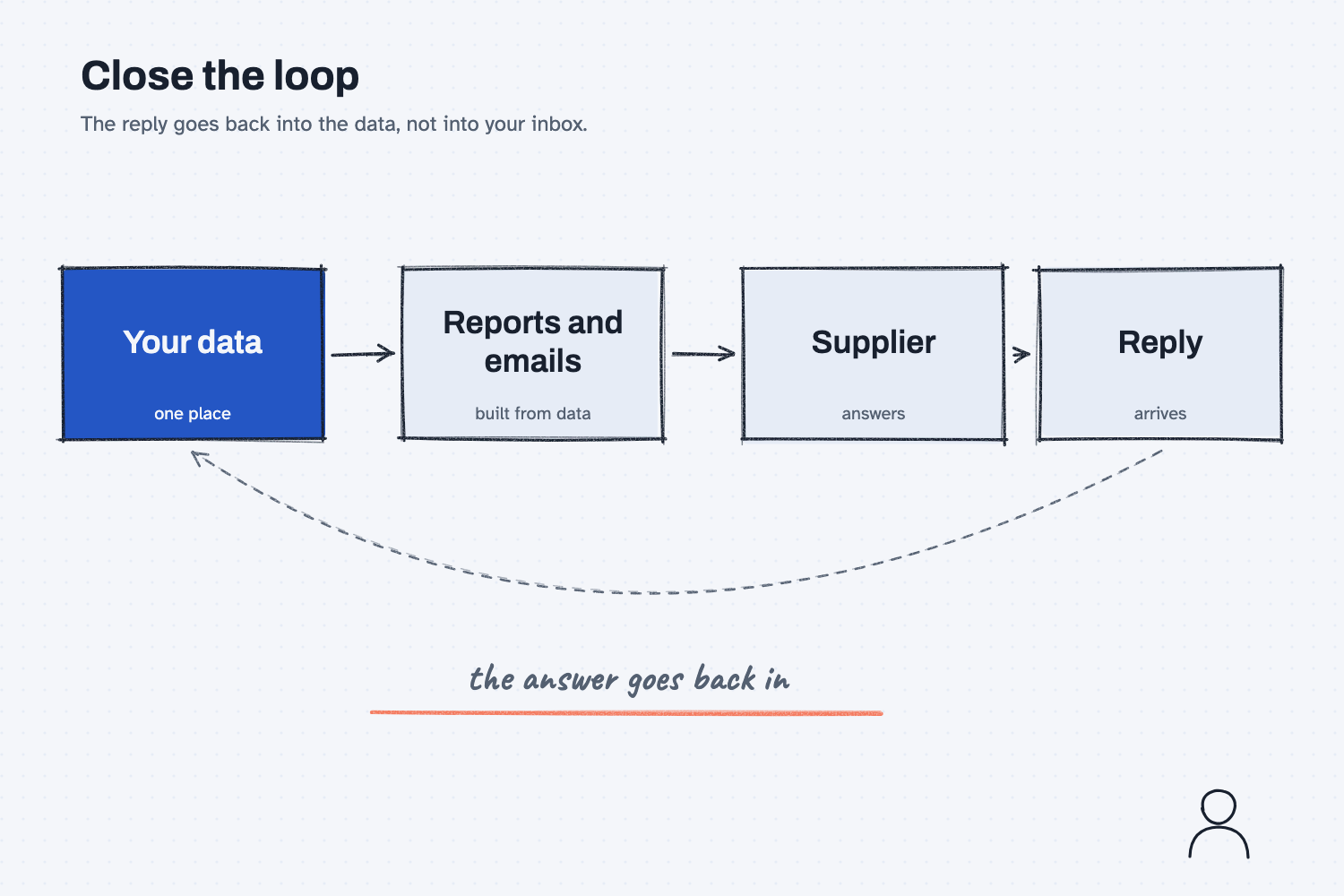
The picture starts at the left with your data, which feeds the reports and emails you send out. Those go to the supplier, and the supplier sends a reply back. The dashed arrow along the bottom is the one most people skip, because it carries the reply all the way back to your data instead of leaving it in an inbox. When that arrow is in place, the next round of reports starts from what is true today.
Think of it like this
Picture the open-items board on the wall of a receiving office, the one that lists every part you are still waiting on. When the missing part arrives, you walk over and erase that line, so the board is always right, and anyone who looks at it knows what is still outstanding.
Now imagine you never touched the board. When a part arrived, you just mentioned it to a coworker at lunch. By Friday the board would still say you were waiting, someone might order the part a second time, and nobody would trust the board anymore.
The data behind your AI work is that board. If the answers do not go back onto it, every report you build from it is out of date the day after you send it.
Why does it matter at work?
It matters because replies are where the work actually moves forward, and a reply that stays in an inbox changes nothing that you built earlier. The reports keep showing the old gaps, and the next round of questions repeats the old asks.
Here is an example from the sample company, Mesquite Ridge Metal Works. Dana Ortiz is a buyer, and she compared three supplier quotes. Panhandle Bar and Plate left out its address, quote number, expiry date, payment terms, and minimum order, so Dana sent a follow-up with five asks, and Mike at Panhandle answered the same afternoon.
If Dana only reads Mike's email and moves on, her comparison page still shows four gaps for Panhandle, and the next round of follow-ups would ask Mike the same five questions again. That looks careless, and it costs both of them time. If she puts his answers back into the quote data and runs the reports again, the comparison page fills in and Panhandle drops to one open ask. You can see the full steps in the supplier follow-up guide.
How does it work?
There are three parts. The data holds the truth, AI makes one narrow update to it, and the same reports run again from the new data.
The data is the one place the truth lives. In this example the quotes sit in a form with the same fields for every supplier, which is the idea behind making AI fill in your form. Because every answer has a named spot, there is an obvious place to put what the supplier said.
AI makes one narrow update. You ask AI to read the reply and change only the fields the reply answers. It should list each change, with the old value, the new value, and the words in the reply that support it, so you can check the list before anything is saved. That check is a small version of keeping a person in the loop, and it matters because this is the one moment when AI touches your data.
The same reports run again. Once the data is updated, you run the same script that made the first reports. A script gives the same result for the same data, which people call being deterministic, so nothing needs to be retyped and the new pages match the old ones except for what the reply changed.
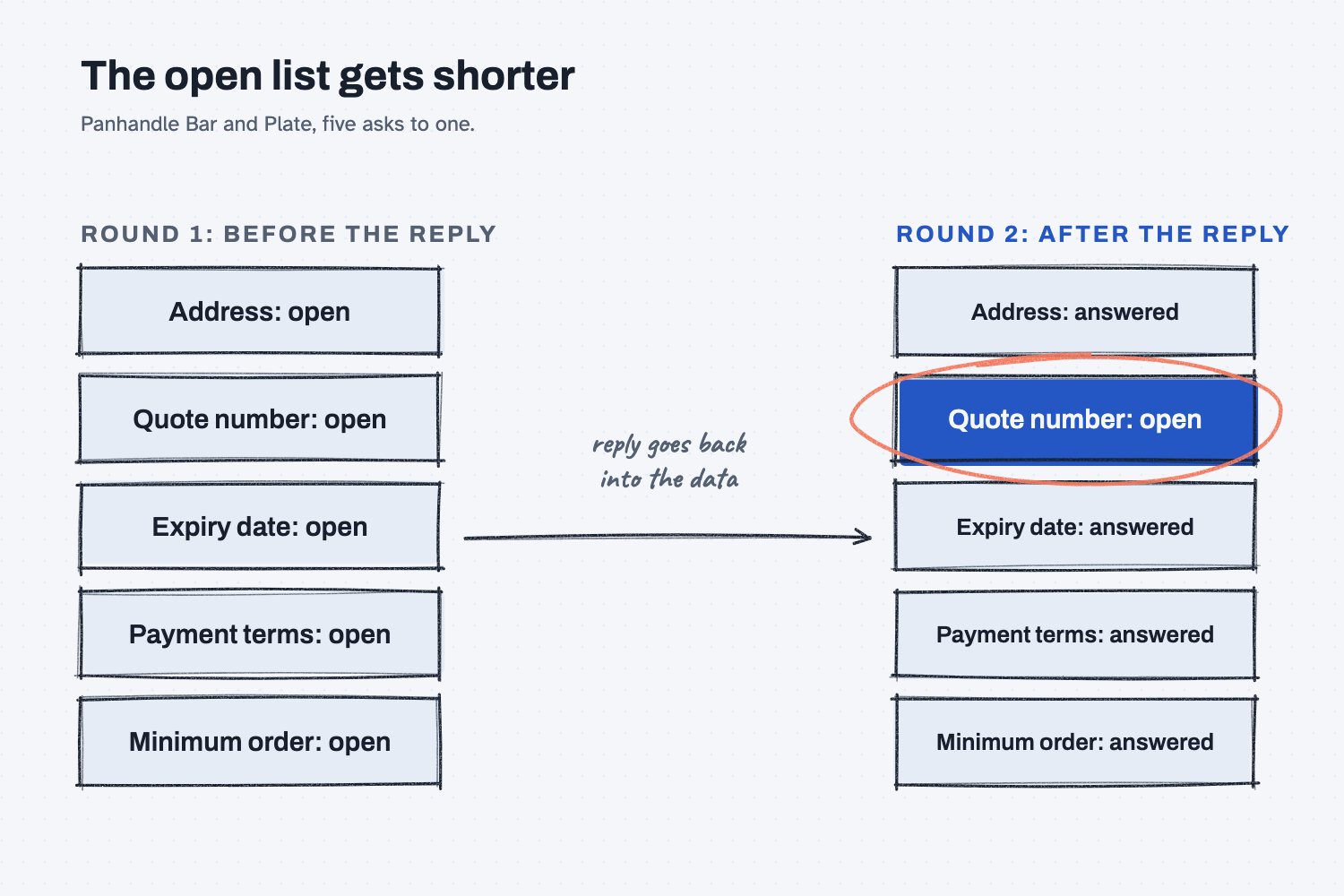
The second picture shows what you gain. Round one has five open items, and after one reply and one rerun only one is left. Each round the list can only get shorter or stay the same, which means you always know exactly what you are still waiting for.
Where do people get it wrong?
Most mistakes come from letting a reply drift away from the data. These are the four to watch for.
- The answer stays in the inbox. Reading a reply and remembering it feels like enough, but the reports and the next round of questions are built from the data, so they will not know.
- AI is allowed to rewrite everything. If you ask for "an updated file," AI may quietly change a price or reword a note. Ask it to change only the fields the reply answers, and to show you each change.
- AI fills a gap with a guess. If a reply is vague, the right result is a field that stays open. Leaving it open is more useful than a wrong date that looks finished.
- You treat a closed loop as a finished job. In the example, Panhandle said it does not use quote numbers, so that item stays empty and the script would ask for it again. You decide that it does not need to be sent, because the loop updates the data but you still use your judgment.
Try this in 2 minutes
This test gives AI a short list of open items and a supplier's reply, and asks it to update only what the reply answers. You can use any chat tool, and you do not need any files.
- Open a new chat and paste this:
Here is my list of what is still open on one supplier quote. Supplier: Panhandle Bar and Plate. RFQ: MRMW-RFQ-1142.
1. Address: open
2. Quote number: open
3. Expiry date: open
4. Payment terms: open
5. Minimum order: open

The supplier's reply:
"1. We are at 4410 Amarillo Hwy, Hereford, TX 79045. 2. We don't do quote numbers on email quotes. 3. Prices are good for 30 days from my first email. 4. Net 30 for you. 5. No minimum."

Update my list. Change only what the reply answers, and do not guess. Show the whole list again with each item marked answered or open, then tell me what is still open and what I should decide.
- Here is what I expect: the address, payment terms, and minimum order are answered. The expiry date should stay open, because the reply says "30 days from my first email" but this chat has not been told the date of that email. The quote number is a judgment call.
- Check that the whole list comes back, and that nothing was marked answered without words in the reply to support it.
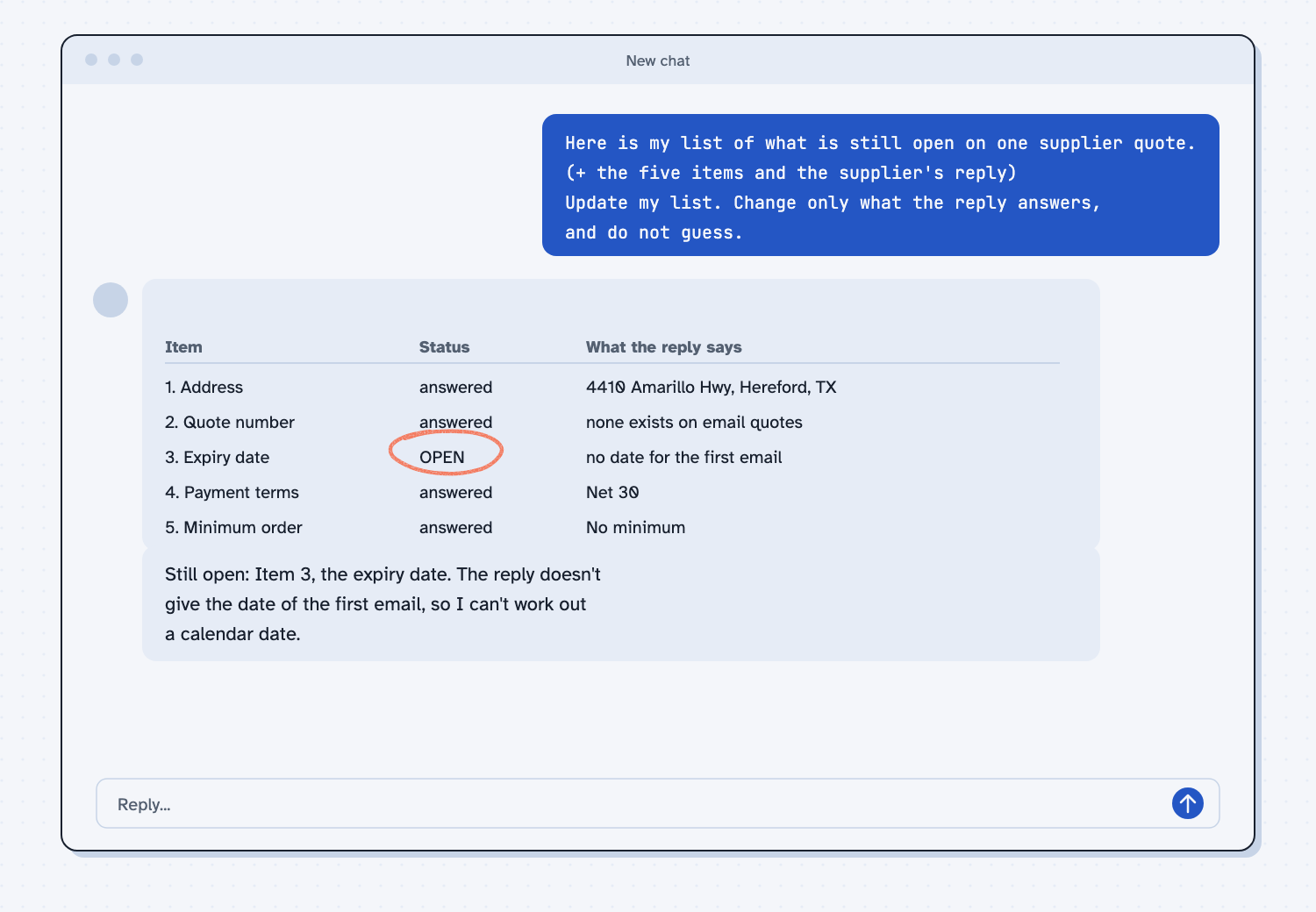
When I tried this, Claude marked the expiry date as open and explained why: "Prices are good for 30 days from the supplier's first email, but the reply doesn't give that email's date, so I can't work out a calendar date." It then summed up with "Still open: Item 3, the expiry date," and suggested checking the date on the first email and adding 30 days.
That is the behavior you want, because it did not guess a date to make the list look finished. It also made the quote number a decision for me: it marked it answered, with the note "The supplier doesn't issue quote numbers on email quotes, so none exists." In the guide, we treat that item as still empty and let you decide whether to ask again, which shows why the list needs your judgment as well as AI's reading.
Frequently asked questions
What does close the loop mean?
It means the answer to a question goes back into the place where the question started. You ask, the supplier answers, you update your data, and your next report already knows. The loop is closed because nothing is left in someone's head.
Do I need to know how to code?
No. In the supplier guide, Claude runs the scripts for you. Your part is to paste in the reply, read the list of changes, and decide what to send.
Why not just remember what the supplier said?
Memory is fine for one email, but it fails across ten suppliers and three weeks. Data is shared, checkable, and rebuilds every report at once, so it works when you are busy or when a coworker takes over.
What if the reply is unclear?
Leave that field open and ask a follow-up. An open item is honest, and a guessed answer can sit unnoticed in your reports for months.
Use it today
- Email suppliers about what's missing from their quotes: Step 7 puts a supplier's reply back into the quote data and runs it again.
- Related idea: Make every ask easy to answer, the other half of a good follow-up.
- Related idea: Keep the rules in one place, so the comparison and the follow-ups agree after each update.
From my training: the supplier follow-up workflow, where every reply goes back into the quote data before anything gets rebuilt.