What Is a System Prompt? The Standing Instructions Behind Every AI Chat
With Josh Schultz ·
Answer. A system prompt is the set of standing instructions an AI reads before your chat even starts. It can be written by the company that made the tool, by your own company, or by you in a settings page or a project. Your message arrives after those instructions, which is why the same question can get different answers in different tools.
The picture
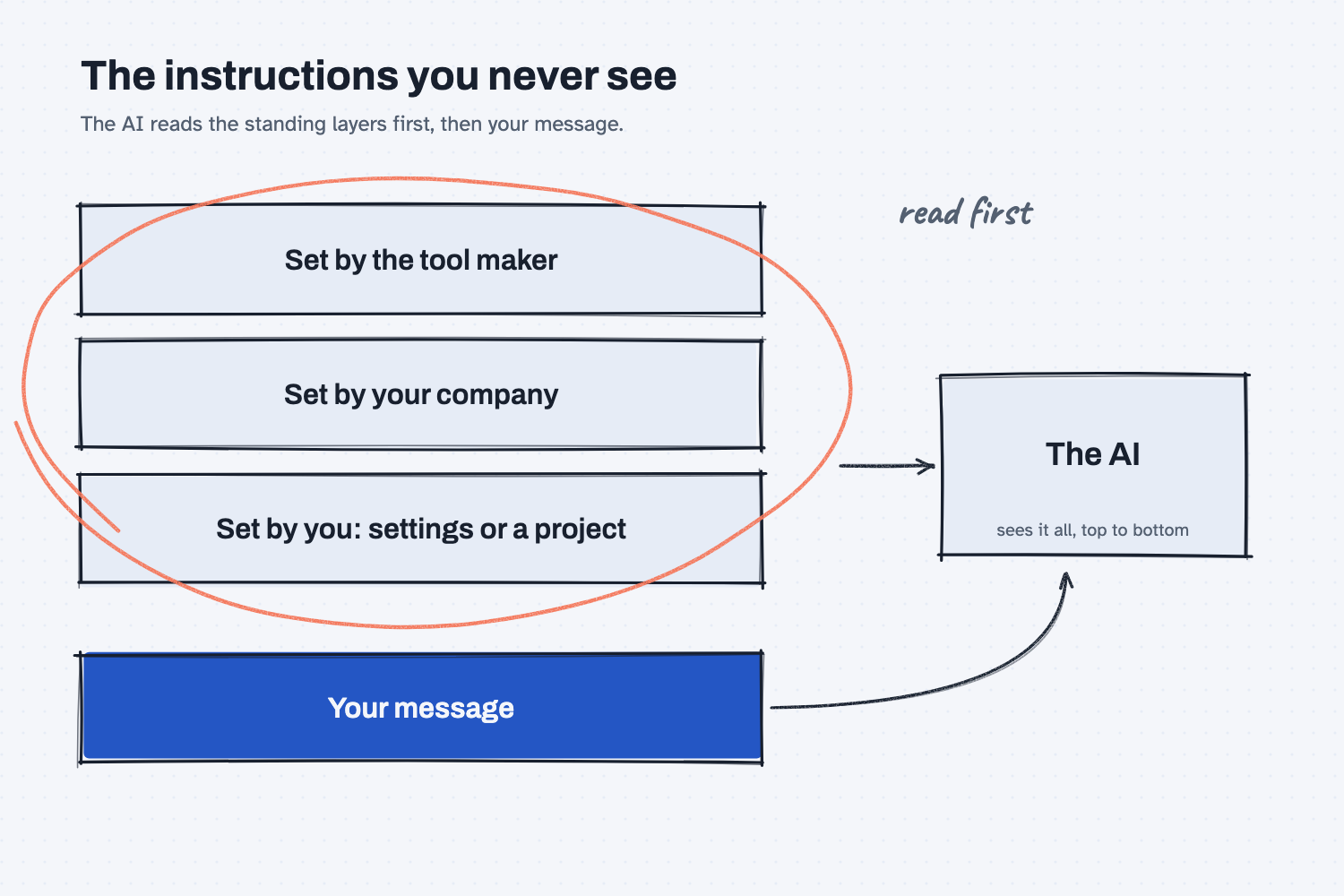
The picture shows what the AI is given every time you press Enter. At the top sit the standing instructions, which can come in up to three layers, and the AI reads them first. Your message sits at the bottom, below those instructions, and it is the only part you typed in this chat. The circle around the top layers is there because most people forget that they exist, and so they cannot understand why the AI acts the way it does.
Think of it like this
Walk up to any workstation on a shop floor and you will see a laminated work instruction posted above the bench. It says things like "wear glasses," "log every part number," and "stop and call the lead if the gauge reads out of range." It was there before the operator arrived, it stays up all day, and it applies to every job that comes through.
The job ticket is different. It arrives fresh with each job and says what to make right now. A good operator reads the posted instruction first, and then the ticket, and when the two disagree, the posted instruction usually wins.
A system prompt is the posted instruction, and your message is the job ticket. The AI reads the standing instructions before your message, every time, and it does not forget them halfway through. Just like a real shop, there can be more than one posted sheet, since the tool maker has one, your company may add one, and you may add a third.
Why does it matter at work?
It explains why the same question gets different answers in different tools, and it lets you set your rules once instead of retyping them in every chat.
Each tool has its own standing instructions, which is why two products built on the same AI can feel different. And because you can put your own rules in the standing layer, you do not have to repeat them each time.
Here is an example. The purchasing team at Mesquite Ridge Metal Works wants every answer from their AI helper to be short, to start with the first action to take, and to never promise a date to a customer. Typing those rules at the start of every chat would be a chore, and people would forget. Instead, they put the rules in the shared project's instructions once, and every chat in that project starts with them.
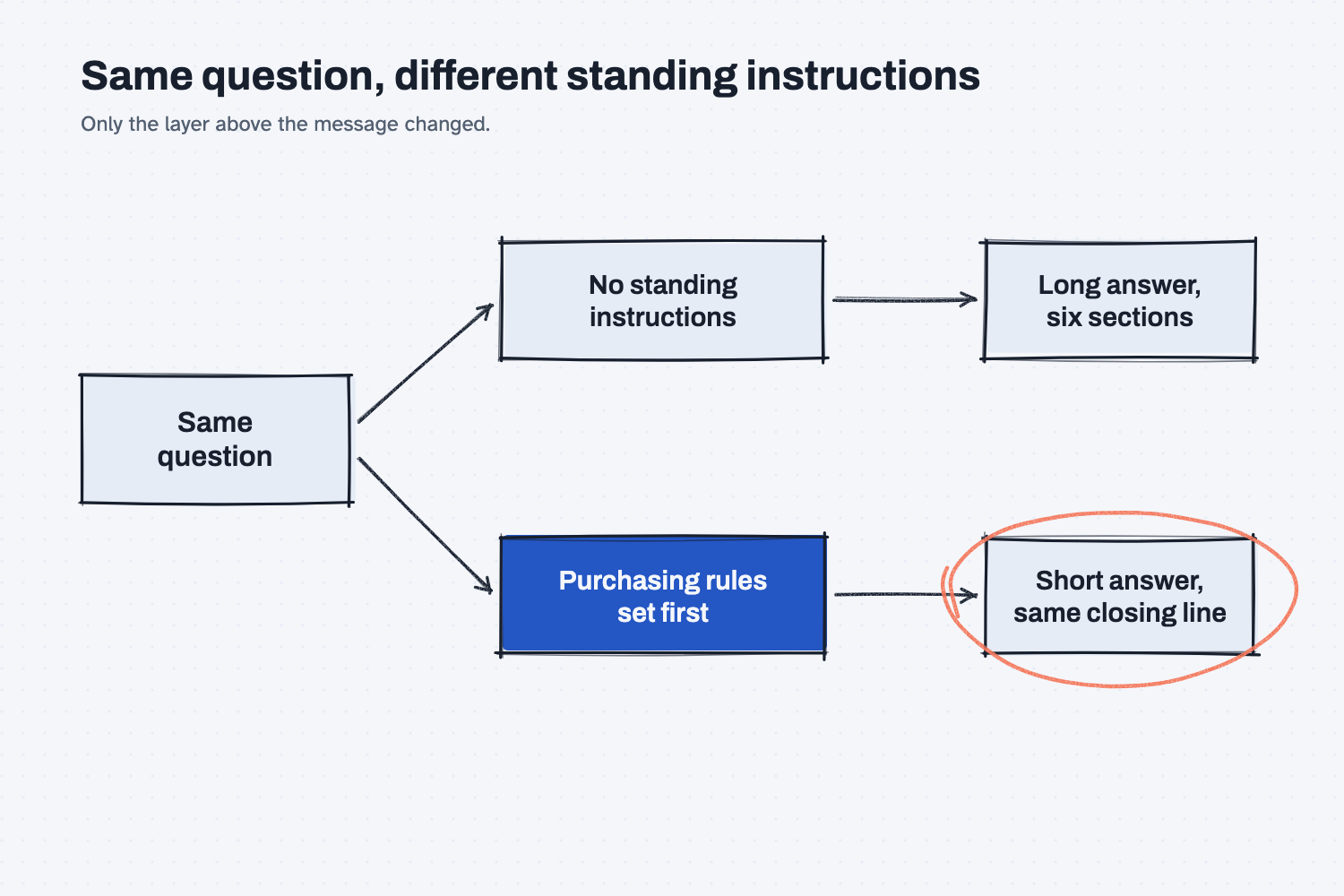
The picture shows the result. The question is the same on both paths, and the only thing that changes is what sits above it.
There is a question for IT or a vendor here as well: "What standing instructions does this tool run with, and who can change them?" If a company-approved tool acts strangely, a standing instruction you cannot see may be the reason. It is also a reason to check your own settings, because instructions you wrote months ago may still be shaping every answer. If you want to see how the layers fit together with the files and the question, read how to stack context for AI.
How does it work?
There are three sources of standing instructions, and the AI reads whatever applies, in order.
The tool maker's instructions. The company that built the chat tool writes a set of instructions that tells the AI how to behave in its product, such as how to format answers and what to refuse. You usually cannot see or change this layer, and it is one reason the same underlying AI can feel different in two products.
Your company's instructions. When a company builds its own assistant, or sets up a shared project or workspace, someone can write standing instructions for everyone who uses it. This is where you put things like your tone, your terms, and your rules for what must never be promised.
Your own instructions. Many tools let you add personal instructions in a settings page, sometimes called custom instructions or preferences, or in the instructions of a project. These apply to your chats without you typing them. The exact names and places vary by tool and by plan, so look in your settings.
All of these are read before your message, and your message is read last. That ordering is why standing instructions carry weight. Still, they are instructions to a model, not locks, so a long or odd request can sometimes pull the AI off them, and you should check the output for the rules that matter. If a rule is truly critical, such as nothing leaving the building without approval, enforce it with a person or a setting that does not rely on the AI's good behavior, as human in the loop explains.
Where do people get it wrong?
Most trouble comes from forgetting the standing layer exists.
- They blame the question when the cause is a hidden instruction. If an answer is oddly short, oddly formal, or refuses something, a standing instruction may be behind it. Look at your settings and project instructions first.
- They pile up old instructions. A rule written for last year's job may still be in your settings, quietly shaping this year's answers. Reread them every so often.
- They put changing facts in the standing layer. A price list or a schedule belongs in a file you can swap, not in standing instructions, because the instructions are meant for rules that rarely change. See keep rules in one place.
- They assume it is a guarantee. A system prompt steers the AI strongly, but it does not make the AI perfect, so keep checking the work.
Try this in 2 minutes
This test shows the same question answered with and without standing instructions. I set the instructions as the real system prompt for the second answer. In your own chat, you can get the same effect by pasting the instructions as your first message, or by putting them in a project's instructions.
- Open a new chat and ask:
Our supplier says the bar stock will be two weeks late. What should I do?
- Start a second chat, and begin with these standing instructions, then ask the same question:
You are the purchasing assistant at Mesquite Ridge Metal Works. Keep every answer under 60 words. Start with the first thing to do today. Never promise a date to a customer. End every answer with: Draft only. A person approves.

Our supplier says the bar stock will be two weeks late. What should I do?
- Compare the length, the first line, and the last line of the two replies.
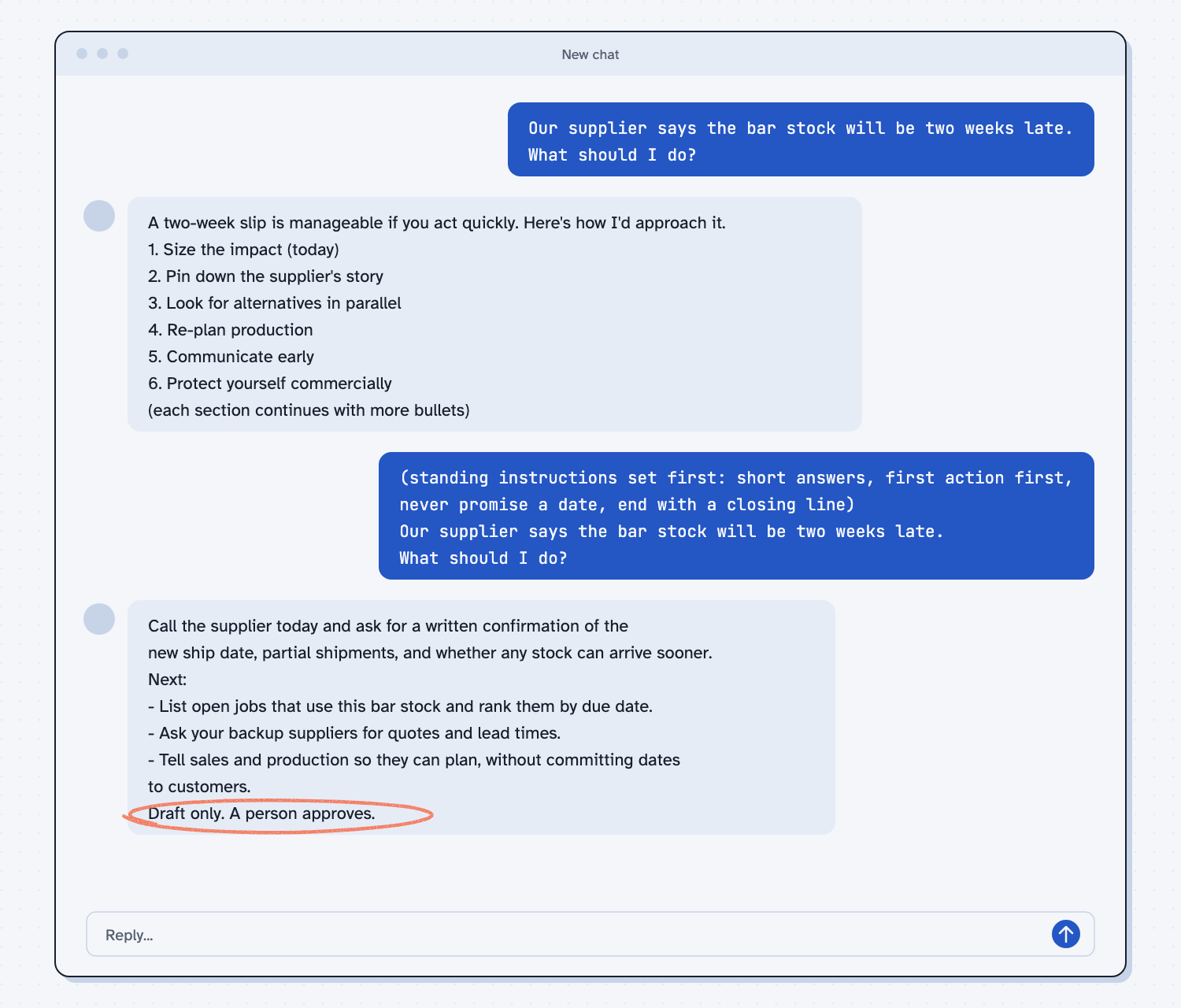
When I tried this, the first reply opened with "A two-week slip is manageable if you act quickly" and ran through six numbered sections, from sizing the impact to protecting yourself commercially. The second reply began "Call the supplier today and ask for a written confirmation of the new ship date," gave three short next steps, said "without committing dates to customers," and ended with "Draft only. A person approves." The question was identical both times. Only the standing instructions changed, and they changed the length, the first line, the rule about dates, and the closing line.
Frequently asked questions
What is a system prompt in AI?
It is the set of standing instructions the AI reads before your message. The tool maker, your company, or you can write it, and it shapes every answer in the chat.
Can I see the system prompt in my AI tool?
Often not for the tool maker's layer. You can usually see and edit your own layer, such as custom instructions, personal preferences, or a project's instructions, in settings.
Is a system prompt the same as a prompt?
A prompt is what you type in a chat. A system prompt is the standing part that comes first and applies to every chat, so a typed prompt is the job ticket and the system prompt is the posted instruction.
Do the instructions I add in settings count?
Yes. Custom instructions and project instructions are standing instructions you control, and the AI reads them before your message.
Does it make the AI follow my rules every time?
Usually, but not with a guarantee. Keep a person checking anything that matters, and test your instructions with a few real questions.
Use it today
- Turn a good chat into a reusable skill: save your standing rules once, so you stop retyping them.
- Related idea: How to stack context for AI.
- Related idea: What is an AI skill.
From my training: we teach people to write their standing rules once, in one place, and to test them with a few real questions before they share them.