Answer. To turn a good chat into a Claude skill, ask Claude, in that same chat, to build a skill folder: a short SKILL.md that holds the Contract (what every result must have) and points to your shop facts, your layout, a finished example, and a checklist. Upload the zip in Claude, then test it once on new input.
Time and cost. About 20 minutes the first time. $0 to practice with the sample shift notes on the free Claude plan. Who this is for. Anyone who does the same writing job every day or every week and finally got Claude to do it right once.
You know the feeling. After a few tries, a chat finally gives you the handoff, the email, or the summary exactly the way you want it, with the right order and nothing made up. Next week you open a new chat and it is gone, because Claude does not remember past chats, so you type all your corrections again.
A skill fixes that. A Claude skill is a saved set of instructions that Claude loads when the job comes up, much like a procedure binder for one job (what an AI skill is). In this guide we build one for a real repeat job at Mesquite Ridge Metal Works (sample data, a made-up company): turning 2nd shift's rough notes into the handoff that 1st shift reads at the 6 am meeting. This is part 1 of 2. Part 2, Tune your skill until it does the job every time, fixes what the first test finds.
What will I learn besides making a skill?
You will learn five methods that work for any job you repeat, such as late PO emails, quote follow-ups, or meeting notes. Each one has a short "why" later in this guide.
- Capture what worked while it is fresh. The chat that got it right holds every correction you would forget to write down.
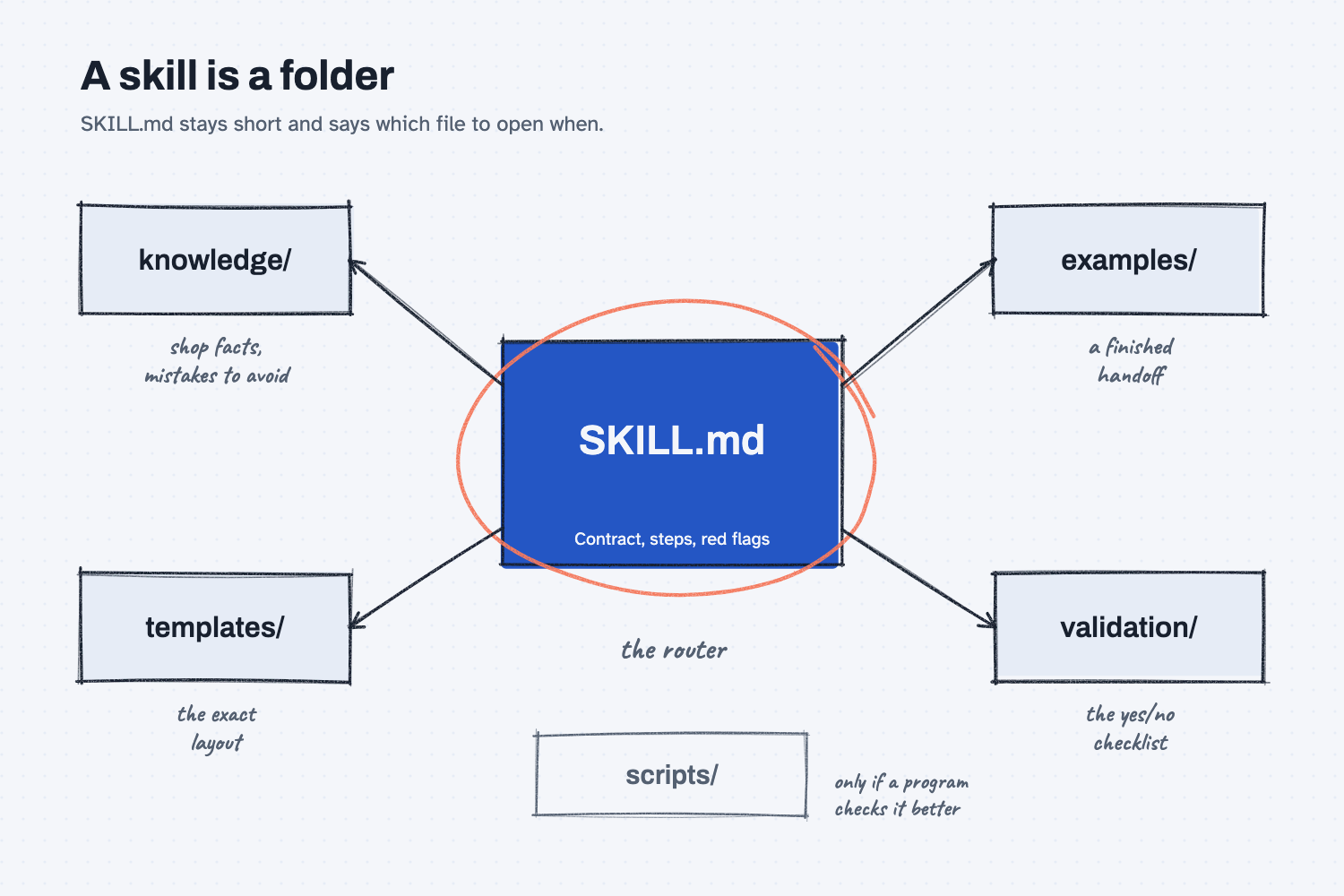
- Build the skill as a folder with a short router. SKILL.md stays short and says which file to open when, and the details live in their own files.
- Write a Contract you can check. A numbered list of what every result must have, each line a yes or no.
- Give it a template and a finished example. The template fixes the layout, and the example shows what done looks like.
- Test it once on new input. The skill is not tested until it works on notes it was not built from.
What do I need before I start?
You need Claude and two sample files. There is nothing to install, and you never open code: Claude builds the files, and you read and judge them.
- Claude at claude.ai, set up the way Set up Claude shows. The free plan works, as long as Claude can make files.
- The sample shift notes (sample data, a made-up company), one at a time or together in skill-starter-sample.zip, saved the way Download and unzip sample files shows:
- shift-notes-2026-11-16.docx, Monday's notes typed in Word. You build the skill from these.
- shift-notes-2026-11-17-email.pdf, Tuesday's notes as an email. This is the test.
- The answer key for the test, checklist-2026-11-17.md.
Safe use. Real shift notes can hold people's names, injuries, and customer orders. Check your company rules before you attach them to any AI tool, and practice with the sample notes first. Read the safe use notes.
How do I turn a good chat into a Claude skill?
Get one good result in a chat, ask Claude to build the skill folder from that chat, have it walk you through the folder, upload it, and test it once on new notes. There are six steps.
Step 1. Get one good result in a chat
Start a new chat at claude.ai, attach shift-notes-2026-11-16.docx (attach files to a chat), and send the prompt below. If you already have your own good chat for a different job, open it and skip to Step 3.
I attached my rough notes from 2nd shift at Plant 1. Turn them into the shift handoff that 1st shift and the plant manager read at the 6 am meeting.

Use these sections, in this order, every time:
1. Safety
2. Machines down or running slow
3. Hot jobs and jobs behind
4. Quality holds
5. People and overtime
6. Needs a call or a decision first thing
7. Open questions

Rules:
- Safety goes first, even when the notes mention it last.
- If a section has nothing, write "None reported." Do not drop the section.
- Keep every part number, machine number, count, and time exactly as the notes write them. Do not fix or round them.
- Do not add anything the notes do not say. If an owner, a time, or a status is missing, write "not stated."
- If the notes sound unsure ("I think," "maybe," a question mark) or two numbers disagree, add a line under Open questions that says so in plain words.
- One line per item, in plain sentences, and the whole handoff fits on one page. Spell out shorthand, like mtc for maintenance.
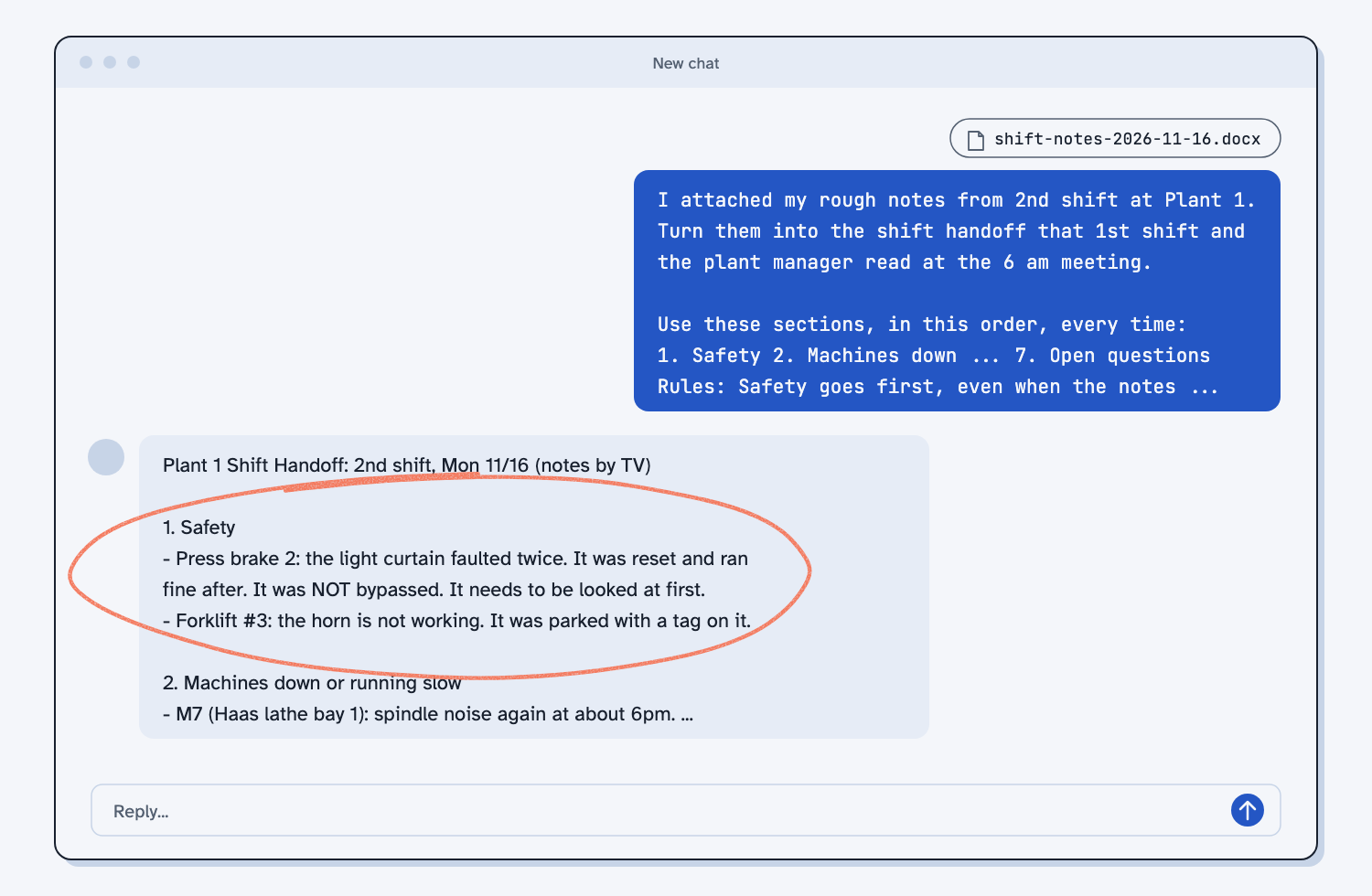
The prompt holds the seven sections and the rules a plant manager cares about, such as safety first, no made-up owners, and counts copied exactly. On the sample notes, Claude moves the press brake 2 light curtain and the forklift #3 horn to the top under Safety, even though the notes list them second and fifth.
Step 2. Correct it until it is right
Read the handoff the way the 6 am meeting would, and send each correction as a plain follow-up in the same chat. My first reply left owners off the to-do lines, put the unfinished 5S job under Open questions, and asked whether "8" meant pm, which anyone at the plant already knows. So I sent this:
Close. Three changes. In section 6, start each line with who should do it, or "Owner: not stated". Put small jobs like 5S under Hot jobs and jobs behind, not Open questions. And only ask about things that really are unclear, not things the shop already knows, like which saw or whether 8 means pm.
Your corrections are the most valuable part of the chat, because they are your judgment about what a good handoff looks like (teach AI your judgment). Stop when the handoff is one you would hand to the plant manager without changes. Mine matched the Monday answer key.
Step 3. Ask Claude to build the skill folder
In the same chat, send the prompt below. It names every part of the folder, so Claude builds the same layout every time and gives you one zip to upload.
This handoff is right. Turn this chat into a Claude skill I can upload, so I get a handoff like this every time without typing my rules again.

Build it as a folder named shift-handoff and give it to me zipped as shift-handoff.zip, with the folder inside the zip. Use this layout:

shift-handoff/
  SKILL.md                     the short router: what the skill promises, the steps, and which file to open when
  knowledge/shop-facts.md      facts from my notes: machines, parts, people, and shorthand (like mtc = maintenance)
  knowledge/antipatterns.md    each mistake I corrected in this chat: what it looked like, why it is wrong, what to do instead
  templates/handoff.md         the exact handoff layout, with blanks to fill
  examples/monday-11-16.md     my notes from this chat, then the final handoff above, word for word
  validation/checklist.md      one yes/no line for each Contract item, to check a finished handoff

Write SKILL.md in this order, and keep it under 80 lines:
1. The top: "name: shift-handoff" and a description under 200 characters. It says what the skill does, then "TRIGGER:" with the words I would use (like "shift handoff" or "write up my shift notes"), then "SKIP:" with jobs it is not for.
2. Files: one line per file, saying what it is and when to open it.
3. Contract: a numbered list of what every handoff must have. Each line is something I can check yes or no by looking at the handoff.
4. Steps: numbered, one action each, naming the file to open at each step.
5. Red flags: up to 5 signs a handoff is going wrong that I could point to on the page.
6. Validation: walk validation/checklist.md before giving me the handoff, and fix anything that fails.

Rules for building it:
- Every rule from my first message and every change I asked for after it goes into the Contract, the template, or antipatterns.md. Do not add rules I never gave. If you think one is missing, ask me at the end.
- SKILL.md only points to the other files. Do not copy the same text into two files.
- Shop facts come only from my notes. No made-up people, machines, or parts.
- Do not add a scripts/ folder unless a check would be more reliable as a small program. If you add one, tell me why.
Here is what each part does, in plain words. SKILL.md is the router: it holds the description, the Contract, the steps, and the red flags, and it says which file to open at which step, so it stays short (why SKILL.md stays short). knowledge/ holds the shop facts and the mistakes you already corrected, which the folder calls antipatterns. templates/ holds the exact layout, examples/ holds a finished handoff, and validation/ holds the yes/no checklist.
The description is how Claude decides when to load the skill. It says when to use it (TRIGGER, with the words you would really say) and when not to (SKIP, the nearby jobs it should leave alone), and it must be 200 characters or less. The Contract is the promise: a numbered list of what every handoff must have, and it is the target you check every test against (what a skill's contract is).
A skill can also carry a scripts/ folder, which is a small program for checks that should come out the same every time (what deterministic means). This job is reading and judgment, so Claude added no scripts and said why.
Step 4. Have Claude walk you through the folder, and judge it
You do not need to open the files yourself. In the same chat, send the prompt below, and Claude lists every file, quotes the description and the Contract, and points out anything you should look at.
Before I upload shift-handoff.zip, walk me through it in plain words. I do not read code. Do not change any files.

1. List every file in the folder, with one line on what it is for and when the skill opens it.
2. Copy the description and the Contract exactly as written.
3. Tell me if anything in the files is not something I asked for in this chat, if anything is a one-night event saved as a standing fact, or if any rule could disagree with another file.
4. Confirm the zip has a folder named shift-handoff with SKILL.md inside it, and that the name at the top of SKILL.md matches the folder.
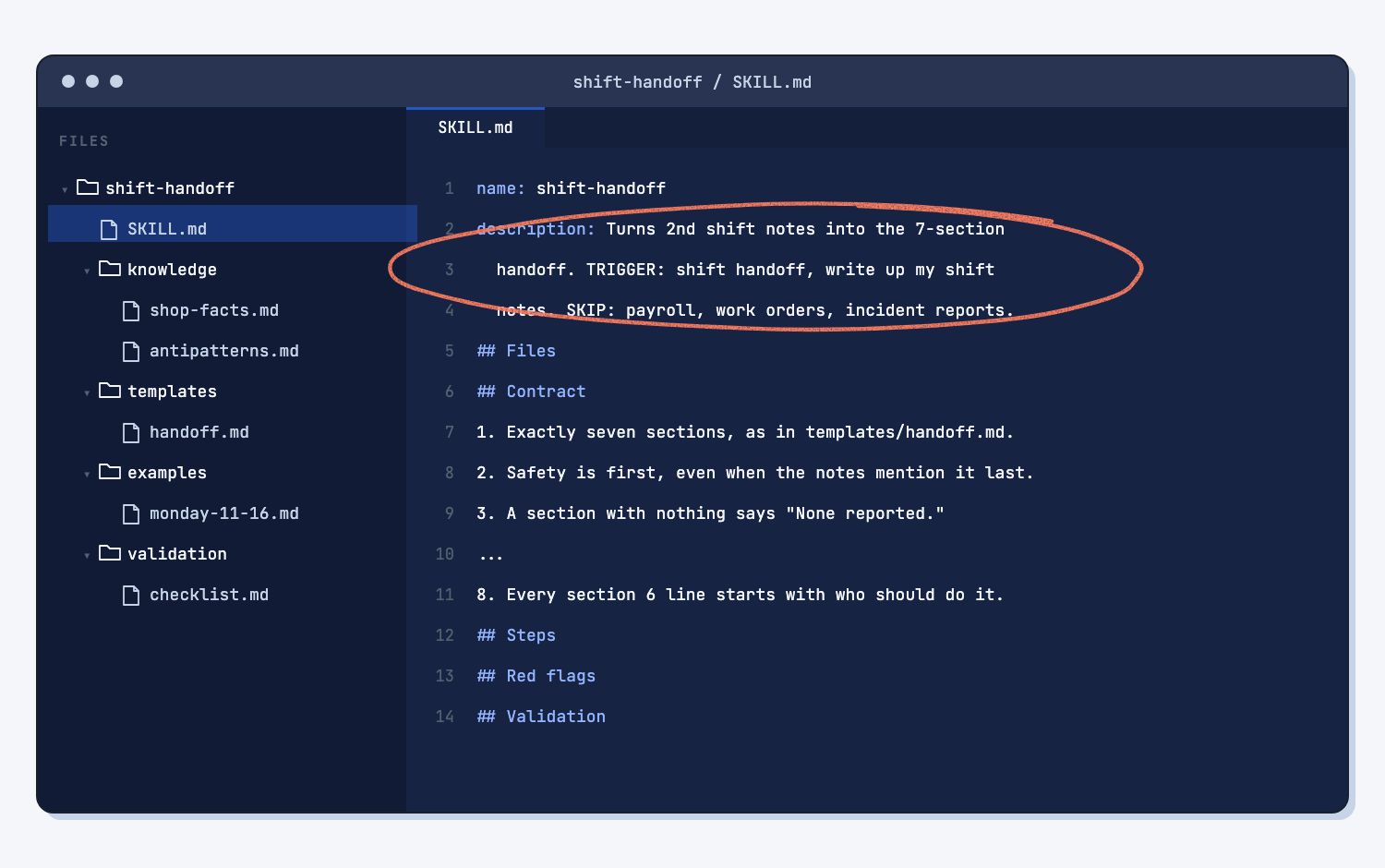
Judge three things as you read. Is every Contract line something you asked for? Are the TRIGGER words yours, and does SKIP name jobs it should stay out of? Is anything in the shop facts a one-night event? On the sample, Claude flagged that its SKIP list was a guess and that shop-facts.md held things like "Cruz stayed 2 hours overtime," which was true on Monday and not a standing fact. I sent one more line:
Trim the one-night events out of shop-facts.md and keep everything else as it is. Give me the new shift-handoff.zip.
Step 5. Upload the zip and turn the skill on
Upload shift-handoff.zip as it is, without unzipping it, the way Upload a Claude skill shows, and check that its switch is on.
Step 6. Test it once on new notes
Start a new chat, attach shift-notes-2026-11-17-email.pdf, and type Write the shift handoff from these notes. A new chat matters, because the old chat still remembers your corrections, and the test is whether the skill alone carries them (how to test an AI tool).
Check the handoff against the Tuesday checklist, one line at a time. Most lines passed in my test: the bandsaw guard, which the email mentions last, came out first under Safety, and M7 said "still down, same as yesterday" with nothing made up. Two lines failed:
- Quality holds said "Quality control looked at them" as a fact, but the notes say "i think."
- Press brake 2 showed up under both Safety and Machines.
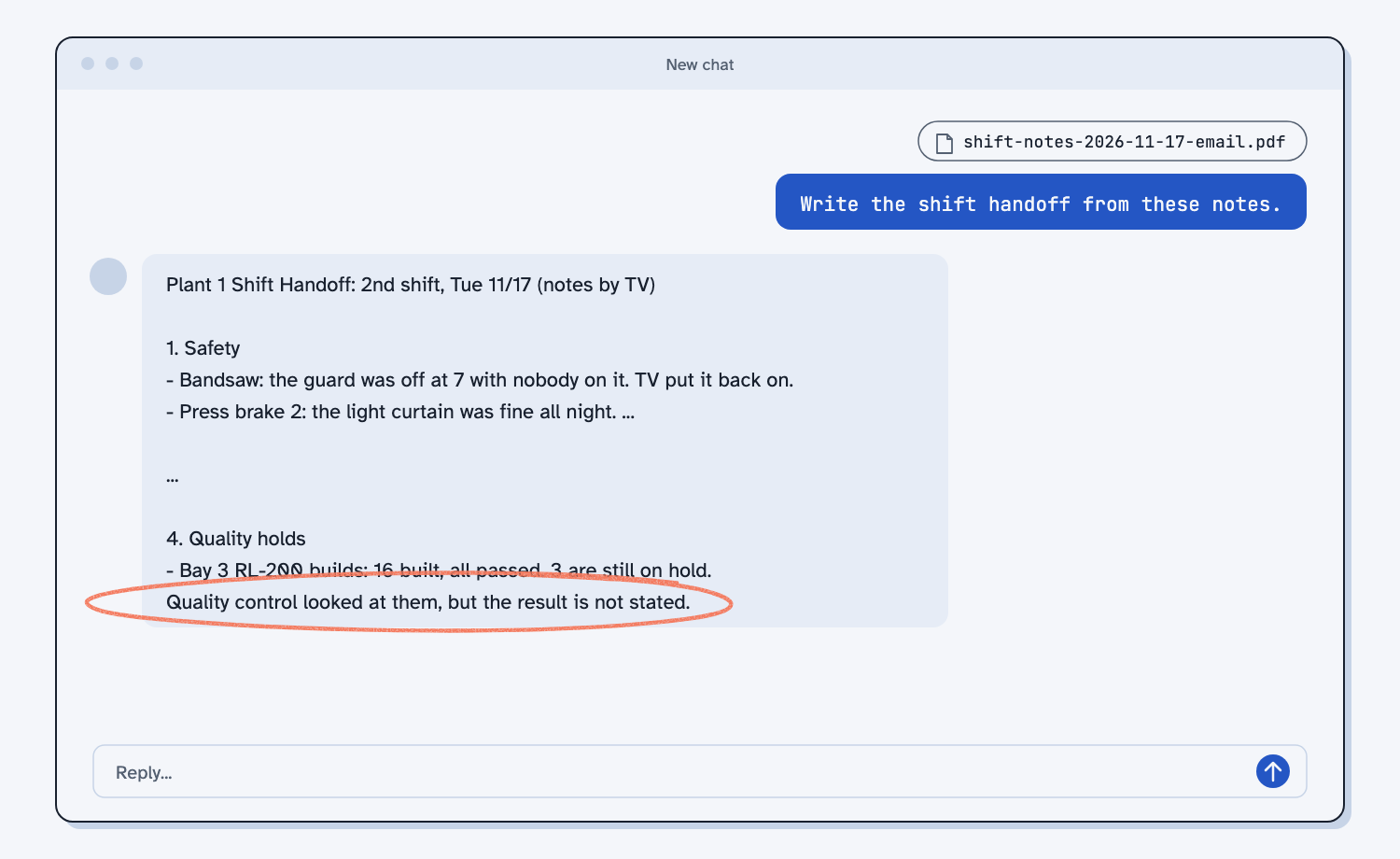
Claude also ended with "every line passes," which was not true. A skill checking its own work is a good habit, but it is not proof, so you check against the checklist yourself (make AI check its own work). Write each miss down in one line. Part 2 turns them into fixes. You can read my version 1 Tuesday handoff.
What does good look like?
A good first skill is a folder you can read in five minutes, and a first test where most checklist lines pass and every miss is easy to name. Answer key, sample data. This is what my version 1 folder holds.
| Part | What it holds on the sample |
|---|---|
| SKILL.md | 45 lines: description with TRIGGER and SKIP, Files, a 10-line Contract, 6 steps, 5 red flags, Validation |
| knowledge/shop-facts.md | Plant 1, the machines and bays, the jobs, the people, and a shorthand table (mtc, QC, HL, OT, vm) |
| knowledge/antipatterns.md | The three corrections from Step 2, each with what it looked like, why it is wrong, and what to do instead |
| templates/handoff.md | The title line and the seven sections, with blanks and "None reported." built in |
| examples/monday-11-16.md | The Monday notes, then the approved handoff word for word |
| validation/checklist.md | One yes/no question for each Contract line |
On the Tuesday test, version 1 passed 8 of the 10 checklist lines and failed lines 5 and 9. You can download my version 1 skill to compare with yours.
What can go wrong?
Most problems come from Claude filling a gap with its own guess, or from testing in a way that cannot fail. These all showed up while I built and tested this skill.
- One-night events become standing facts. Claude saved who called off and who covered the saw in shop-facts.md. On Thursday the skill could treat them as true. Keep only facts that stay true.
- The description is half Claude's. It wrote its own SKIP list and an extra trigger phrase. Change them to your words, because the description decides when the skill loads.
- The skill grades itself. It said every checklist line passed when two did not. Check the result against the checklist yourself.
- You test in the old chat. The chat you built the skill in still knows your corrections, so it passes for the wrong reason. Always test in a new chat.
- The upload fails. The zip must hold a folder with SKILL.md inside, and the folder name must match the name at the top of the file. Step 4's walk-through checks this for you.
- The skill does not load. If you ask in words the description does not cover, Claude may not pick it up. Say "use the shift-handoff skill," and add your usual words to TRIGGER.
How do I check the answer?
Check the skill against your chat, and the handoff against the notes, not against Claude's summary of what it did.
- Every Contract line is a rule you gave in the chat, and none of your corrections are missing.
- The TRIGGER words are ones you would say, and SKIP names a nearby job.
- Shop facts hold only things that stay true from night to night.
- On the test, every count, part number, and owner is in the notes, written the same way.
Why does this way work?
It works because a skill keeps the part of the chat that took longest to get right, which is your judgment, and it splits that judgment into parts that each do one job.
Capture what worked while it is fresh. At the end of a good chat, Claude can see every ask and correction you made, so it writes them down better than you could from memory next week. A skill stays in your list and loads whenever the job matches (what an AI skill is).
Build the skill as a folder with a short router. Claude reads SKILL.md every time, so it stays short and points to the other files only when a step needs them, the way a work instruction points to the drawing instead of copying it (SKILL.md is a router). Each rule lives in one file, so a change in one place cannot disagree with a copy somewhere else (keep rules in one place).
Write a Contract you can check. "A good handoff" means something different to everyone, while "every line in section 6 starts with Owner:" is a yes or no. The Contract is the target, and the checklist turns it into the test (what a skill's contract is).
Give it a template and a finished example. The template keeps the layout the same, and the example shows the tone and length, because one example says more than a long description. People decide what good looks like and AI does the writing (people plan, AI does the work).
Test it once on new input. The skill came from Monday's notes, so passing on Monday proves nothing. Tuesday's email has a different shape and different traps, and that is how you find what the skill does not know yet (how to test an AI tool).
Frequently asked questions
Do I need to know how to code to make a Claude skill?
No. This skill is plain text files in a folder. Claude builds them from your chat and zips them for you. You read them through Claude's walk-through, judge them, upload the zip, and test it.
Does this work on the free Claude plan?
Yes. Skills work on the free plan and on paid plans, as long as Claude can make files (Set up Claude). On a company account, an admin may need to turn on skills first.
Why a folder and not one long file?
One long file mixes the promise, the facts, the layout, and the example, so a change in one spot can disagree with another. In a folder, each part has one home, and SKILL.md stays short enough for Claude to read every time.
When does a skill need a scripts folder?
When a check should come out the same every time, like adding up totals or building the same page. A script does that the same way every run. See Have Claude build your quote report for a skill that carries one.
Can I use the skill in Claude Code or share it with my team?
Yes. In Claude Code, unzip it into a .claude/skills/ folder. To share it, send the zip and others upload it the same way. On Team and Enterprise plans, the skill's ... menu can share it with your organization.
Take this with you
Two prompts to use at the end of any good chat, plus my finished version 1 skill.
1. Build the skill folder. Change the names and the TRIGGER words to fit your job.
This handoff is right. Turn this chat into a Claude skill I can upload, so I get a handoff like this every time without typing my rules again.

Build it as a folder named shift-handoff and give it to me zipped as shift-handoff.zip, with the folder inside the zip. Use this layout:

shift-handoff/
  SKILL.md                     the short router: what the skill promises, the steps, and which file to open when
  knowledge/shop-facts.md      facts from my notes: machines, parts, people, and shorthand (like mtc = maintenance)
  knowledge/antipatterns.md    each mistake I corrected in this chat: what it looked like, why it is wrong, what to do instead
  templates/handoff.md         the exact handoff layout, with blanks to fill
  examples/monday-11-16.md     my notes from this chat, then the final handoff above, word for word
  validation/checklist.md      one yes/no line for each Contract item, to check a finished handoff

Write SKILL.md in this order, and keep it under 80 lines:
1. The top: "name: shift-handoff" and a description under 200 characters. It says what the skill does, then "TRIGGER:" with the words I would use (like "shift handoff" or "write up my shift notes"), then "SKIP:" with jobs it is not for.
2. Files: one line per file, saying what it is and when to open it.
3. Contract: a numbered list of what every handoff must have. Each line is something I can check yes or no by looking at the handoff.
4. Steps: numbered, one action each, naming the file to open at each step.
5. Red flags: up to 5 signs a handoff is going wrong that I could point to on the page.
6. Validation: walk validation/checklist.md before giving me the handoff, and fix anything that fails.

Rules for building it:
- Every rule from my first message and every change I asked for after it goes into the Contract, the template, or antipatterns.md. Do not add rules I never gave. If you think one is missing, ask me at the end.
- SKILL.md only points to the other files. Do not copy the same text into two files.
- Shop facts come only from my notes. No made-up people, machines, or parts.
- Do not add a scripts/ folder unless a check would be more reliable as a small program. If you add one, tell me why.
2. Walk through it before you upload. Send it in the same chat.
Before I upload shift-handoff.zip, walk me through it in plain words. I do not read code. Do not change any files.

1. List every file in the folder, with one line on what it is for and when the skill opens it.
2. Copy the description and the Contract exactly as written.
3. Tell me if anything in the files is not something I asked for in this chat, if anything is a one-night event saved as a standing fact, or if any rule could disagree with another file.
4. Confirm the zip has a folder named shift-handoff with SKILL.md inside it, and that the name at the top of SKILL.md matches the folder.
3. My version 1 skill. Download shift-handoff.zip and upload it the way Upload a Claude skill shows.
Next time a chat finally gets a repeat job right, ask for the skill folder before you close it, have Claude walk you through it, and test it once in a new chat.
What's next?
- Tune your skill until it does the job every time, part 2: turn each miss into an antipattern or a rule, and save every version.
- Have Claude build your quote report, a skill that carries a script, for jobs with math.
- Compare supplier quotes the same way every time, two skills that work together on a buying job.
- What is an AI skill?, the idea behind this guide.