SKILL.md Is a Router: How to Keep a Claude Skill Short
With Josh Schultz ·
Answer. SKILL.md is the one file Claude reads every time a skill loads, so it should stay short. It works as a router, which is a file that directs traffic: it states the promise and says which other file to open at which step. The details live in those files, and Claude reads only what the current step needs.
The picture
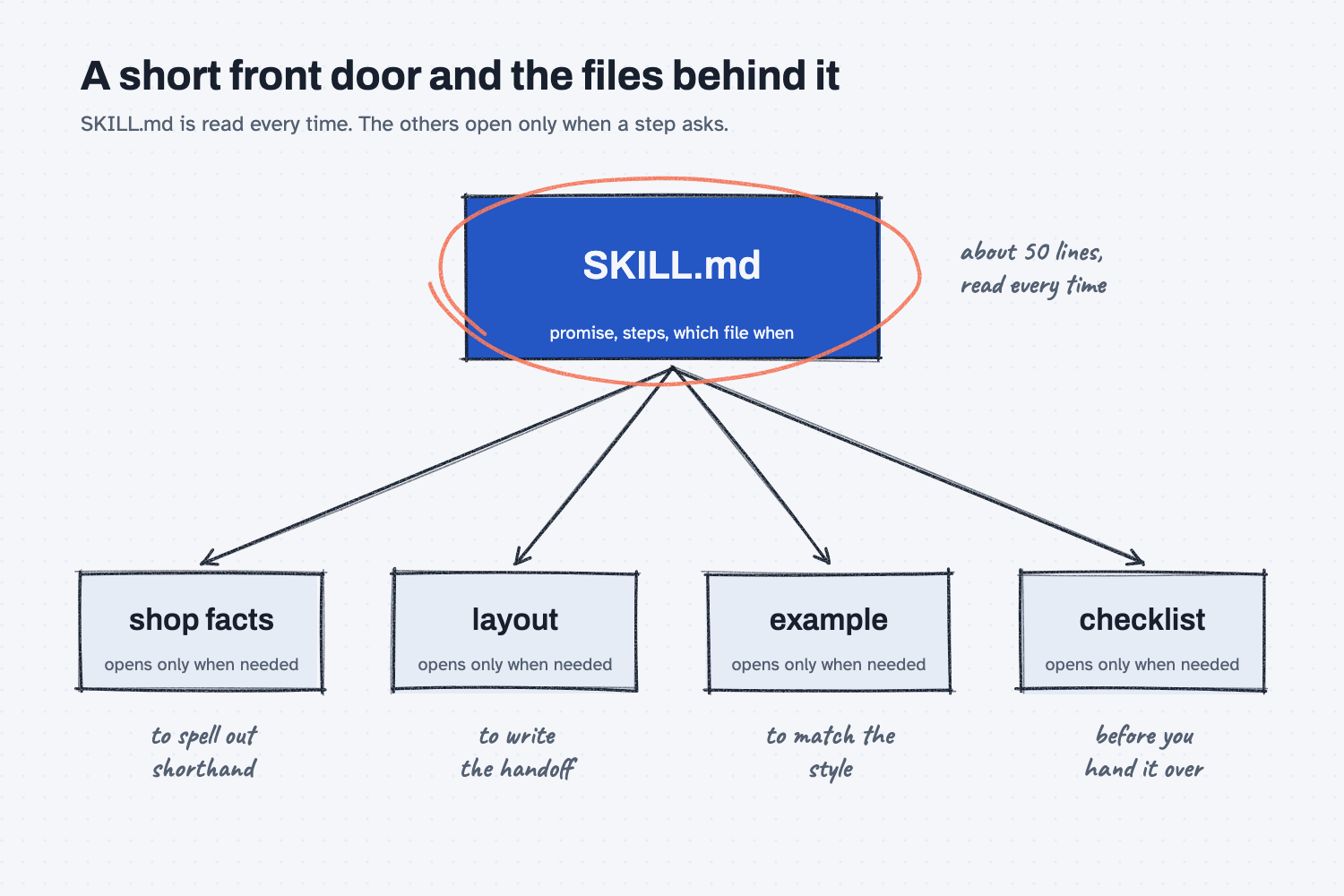
SKILL.md is the small box in the middle, and it holds only the promise, the steps, and a list of files. The four boxes around it hold the details: the shop facts, the exact layout, one finished example, and the checklist. Each arrow carries a note about when to follow it, such as "to spell out shorthand" or "before you hand it over," and that note is what makes SKILL.md a router and not a storage box.
Think of it like this
Every job in a shop travels with a traveler, which is the route sheet that moves with the job from station to station. A good traveler does not copy the drawing onto itself. It says "Operation 20: see the drawing" and "Operation 30: follow the work instruction," and the operator opens that document when the job reaches that station.
There is a reason for this. If the traveler held a copy of the drawing and the drawing was revised, you would have two versions on the floor, and someone would cut to the old one. So the traveler points and the drawing stays in one place.
SKILL.md is the traveler for a skill. It tells Claude what the job promises and which document to open at each step, and the shop facts, the layout, the example, and the checklist are the drawings and work instructions.
Why does it matter at work?
A short SKILL.md means Claude reads a page every time instead of a binder, and the part you change most often can change without touching the promise. When a supplier contact moves or a new mistake turns up, you edit one small file, and the rest stays as you tested it.
Here is how that looked in the guide that builds the shift handoff skill. At Mesquite Ridge Metal Works (a made-up company in our sample data), 2nd shift's notes become the handoff 1st shift reads at 6 am. Version 1 of the skill had a SKILL.md of 45 lines, and after the tuning in part 2 it was 50 lines.
In that same time the skill learned nine antipatterns, a fourteen-line contract, and a new shop fact. All of that went into the other files, which is why SKILL.md barely grew. If it had all been written into one long file, every new mistake would have made the skill harder to read, and a change in one spot could have disagreed with a copy of the same rule somewhere else (keep your rules in one place).
How does it work?
A skill is a folder, and SKILL.md is the front door of that folder. It holds four things, and the rest is left to the files it points to.
The description says when to load the skill. Claude reads the description first and decides from it whether this skill fits the job. It names the words you would really say to start the job and the neighboring jobs the skill should leave alone.
The contract states the promise. This is the numbered list of what every result must have (what a skill contract is). It stays in SKILL.md because Claude needs the promise in front of it at every step.
The Files list says what each file is and when to open it. This is the part that makes it a router. A line such as "knowledge/antipatterns.md: mistakes already corrected, open before sorting the notes" tells Claude both what the file holds and the moment to reach for it.
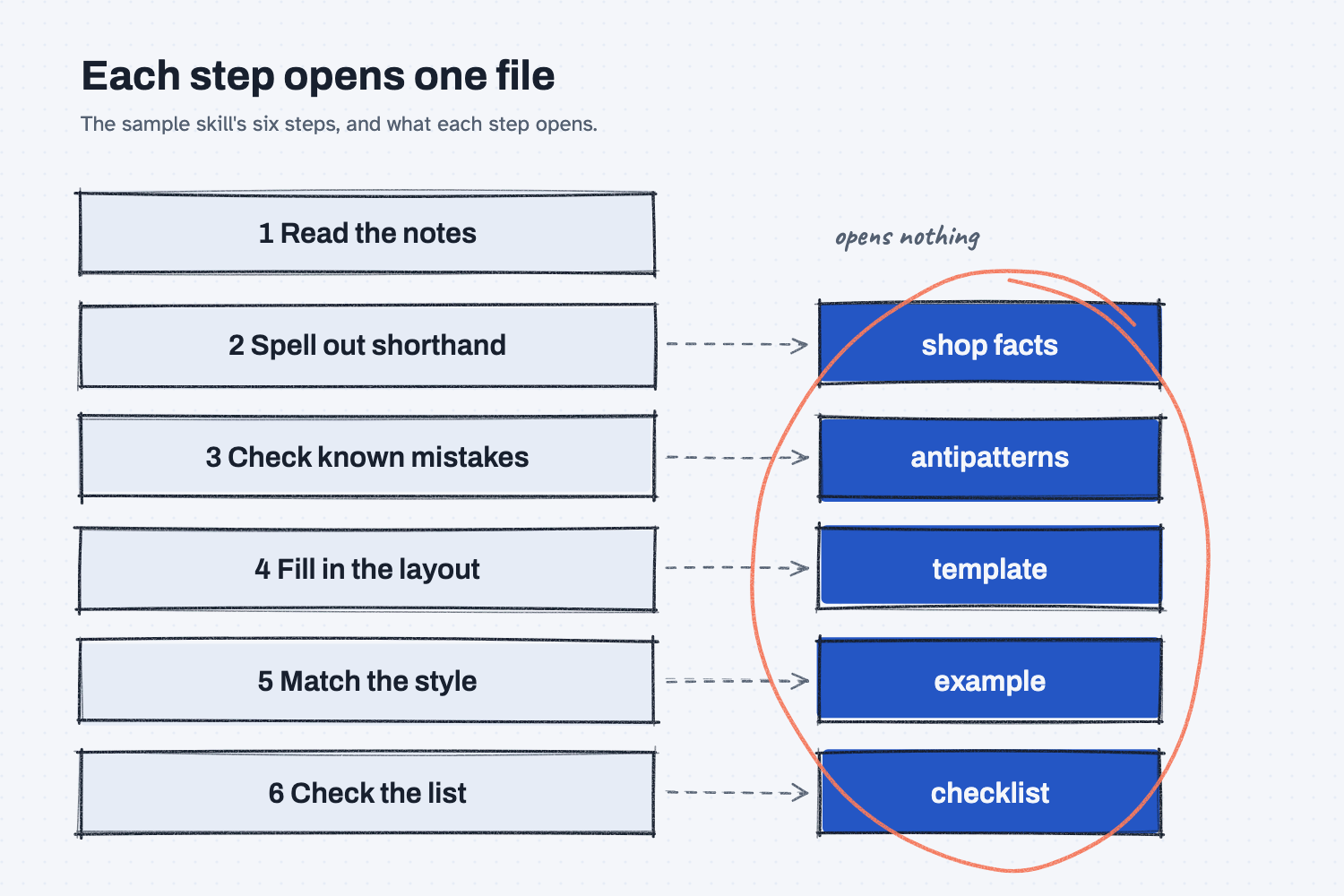
Each step names the file it needs. In the sample skill, the third step reads "Open knowledge/antipatterns.md and note which mistakes apply," and the fourth reads "Open templates/handoff.md and fill each blank." Claude opens a file at the step that needs it, so it is never loaded before it is useful.
The template I use for building skills warns when SKILL.md grows past about 150 lines. If a paragraph in SKILL.md could be found in another file, the template says to delete it from SKILL.md and leave a pointer.
Where do people get it wrong?
Most mistakes come from putting the details in the front door. These are the four I would watch for.
- Pasting the shop facts into SKILL.md. It feels convenient, but now every change to a name or a part number is a change to the promise.
- A Files list with no "when." If a line only names the file, Claude has to guess when to open it, so it may open everything or nothing.
- A step with no file. "Check the mistakes we know about" does not tell Claude where those mistakes are written down, so it may make something up.
- The same rule in two places. One copy gets updated and the other does not, and then the skill disagrees with itself.
Try this in 2 minutes
This test asks Claude to write a router for a job that has four support files, then checks whether it kept the details out. You can use any chat tool.
- Open a new chat and paste this:
I have four files for a skill that writes late PO follow-up emails:
knowledge/shop-facts.md (supplier names, buyer names, part shorthand)
templates/email.md (the exact layout of the email)
examples/late-po-red-creek.md (one finished email)
validation/checklist.md (yes or no questions about the email)

Write the SKILL.md file for this skill. Keep it under 25 lines. It needs a one-line description that says when to use the skill and when not to, a numbered Contract of 4 lines, and the steps, and each step must say which file to open. Do not copy anything from the four files into it, because they hold the details.
- Count the lines, and check that each step names one file.
- Look for anything that belongs in a support file, such as a supplier name or the email layout.
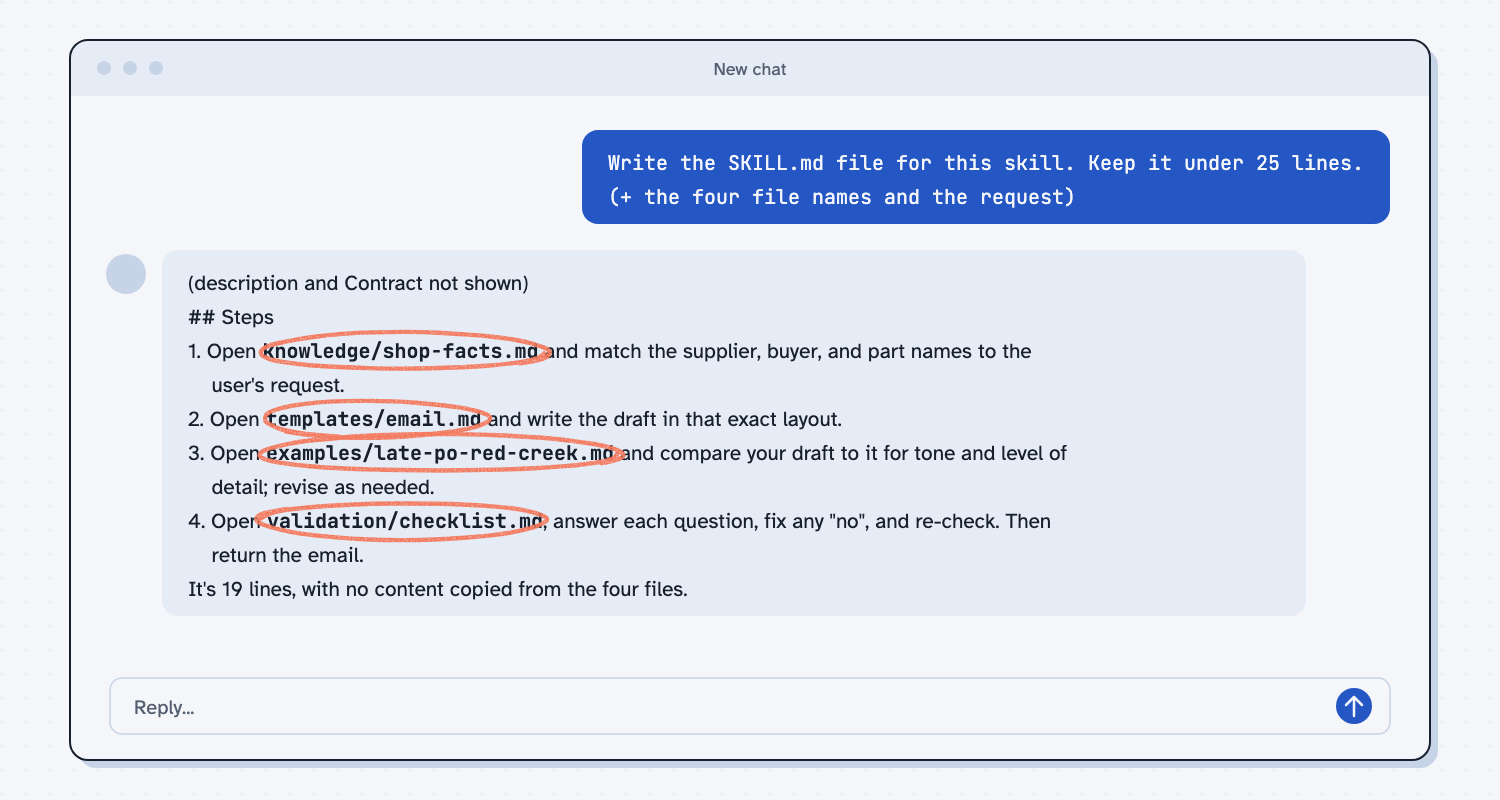
When I tried this, Claude wrote a short file and closed with "It's 19 lines, with no content copied from the four files." The steps pointed at one file each. The first read "Open knowledge/shop-facts.md and match the supplier, buyer, and part names to the user's request," and the last read "Open validation/checklist.md, answer each question, fix any "no", and re-check. Then return the email."
It also left two things for a human to fix. Its description said "Use when" and "do not use for" in plain words, where the template I use wants the labels TRIGGER and SKIP, and it had no separate Files list, so the file pointers appear only inside the steps. Both are one-line follow-ups, and they are the kind of miss you can catch only by reading the result.
Frequently asked questions
How long should SKILL.md be?
Short enough to read in a minute. The sample skill is about 50 lines. If yours grows far past that, some of what is in it probably belongs in another file.
What goes in SKILL.md, and what goes in the other files?
SKILL.md holds the description, the contract, the steps, and the red flags. Shop facts, mistakes to avoid, the layout, the example, and the checklist each get their own file.
Does Claude really skip the files it does not need?
It opens a file when a step tells it to. That is why each step should name its file, so Claude reads what the step needs and nothing more.
Can I use the same idea outside Claude?
Yes. In any tool, you can keep one short main sheet and several small reference sheets, and paste only the ones a job needs.
Use it today
- Turn a good chat into a reusable skill: ask Claude to build the folder with a short router, then read it in a walk-through.
- Tune your skill until it does the job every time: add each fix to the right file and keep SKILL.md short.
- Related idea: What is an AI skill?
From my training: this is the shape of every skill we build for client work, a short SKILL.md that points to the files behind it.