What Is Claude Cowork? Hand Over a Whole Task, With a Sign-Off Plan
With Josh Schultz ·
Answer. Cowork is the part of Claude that takes a whole multi-step task and carries it out for you, using your files, your connected apps, and a web browser. You describe the result you want, and Claude plans the steps and works through them. You stay in charge by choosing how often it must stop and ask you before it acts.
The picture
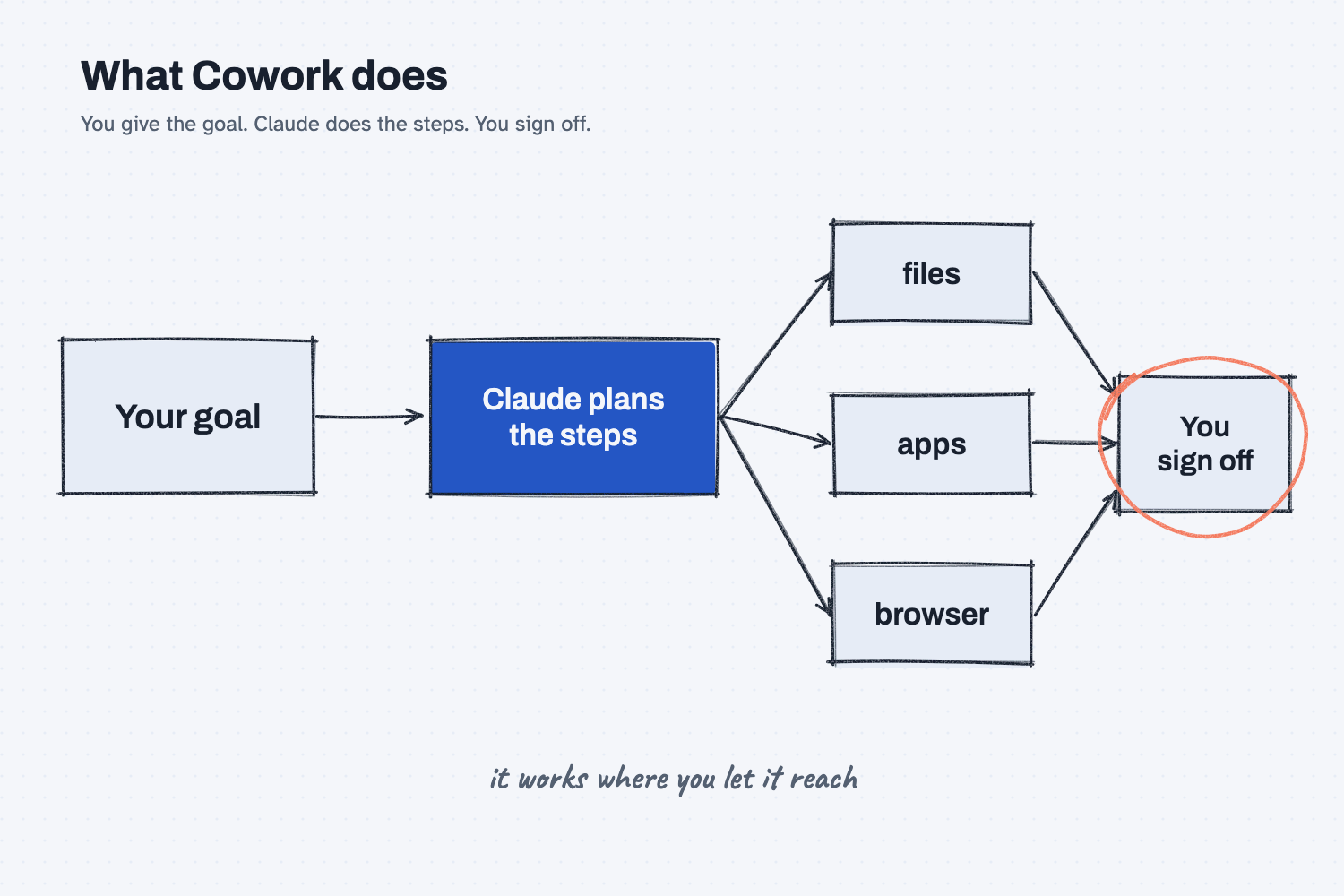
You give one goal on the left, and Claude turns it into steps. To do the steps it can reach into your files, your connected apps, and a browser, and that reach is what makes it useful and also what makes it worth watching. The circled box on the right is the part that stays yours, which is deciding what counts as done and what is allowed to leave the building.
Think of it like this
Think about the difference between asking a coworker a question and handing a coworker a job. If you ask "what does this supplier usually charge for freight?", you get an answer and you do the rest. If you hand over a job, you say "pull last month's invoices, check each one against its purchase order, and put the mismatches on one page." Then the coworker goes off, opens the folders, works through the stack, and comes back with the page.
A good manager does not give a new hire the keys to everything on the first day. They say what the job is, which drawers the person may open, and which things need a signature before they go out. Cowork works the same way. Chat is the question, Cowork is the job, and the sign-off plan is the manager's list of drawers and signatures.
Why does it matter at work?
It matters because a lot of office work is not one question. It is a pile of small steps across files and systems, which is the kind of work that eats an afternoon. Cowork is built for that kind of work, and Anthropic's help pages describe it as taking on "complex, multi-step tasks" and executing them on your behalf.
The same power is the risk. Anthropic's safety page says Cowork's risk depends mainly on what Claude can read and what it is allowed to do. A helper that can only read is a small risk, and a helper that can send, delete, or buy has a much bigger one. The page also states that you remain accountable for what Claude does for you, including messages sent and data changed.
Here is an example. Jen Nakamura at Mesquite Ridge Metal Works wants last month's freight invoices checked against the quotes. She gives Cowork one working folder with only those files in it, not her whole drive. She tells it to write a summary in a new file and not to change any original. She does not let it email anyone. When it finishes, she reads the summary and sends it herself. The task took one request, and the only things Claude could touch were the things she chose.
How does it work?
There are four parts: the goal, the reach, the approval setting, and the review.
You describe an outcome. You say what you want at the end, and Claude breaks it into steps. According to Anthropic's help pages, tasks run in the cloud and can keep going after you close the page, and results show up in your conversation when they are done. Cowork and ordinary chat are now one Claude, so you do not pick a mode first. Quick questions get quick answers, and bigger jobs get the multi-step treatment. This is the same idea as the difference between a chat and an agent, and it sits on the ladder in levels of AI automation.
You set the reach. On the desktop app, Claude can read and write files in folders you allow, and it can use connected apps and operate a browser to open pages, click, and fill in forms. Anthropic recommends a dedicated working folder instead of broad access, and keeping backups. Some of these abilities need the desktop app to be open and a paid plan, and the rollout is gradual, so what you see may differ from a coworker's. Set up Claude covers getting the app and plan ready.
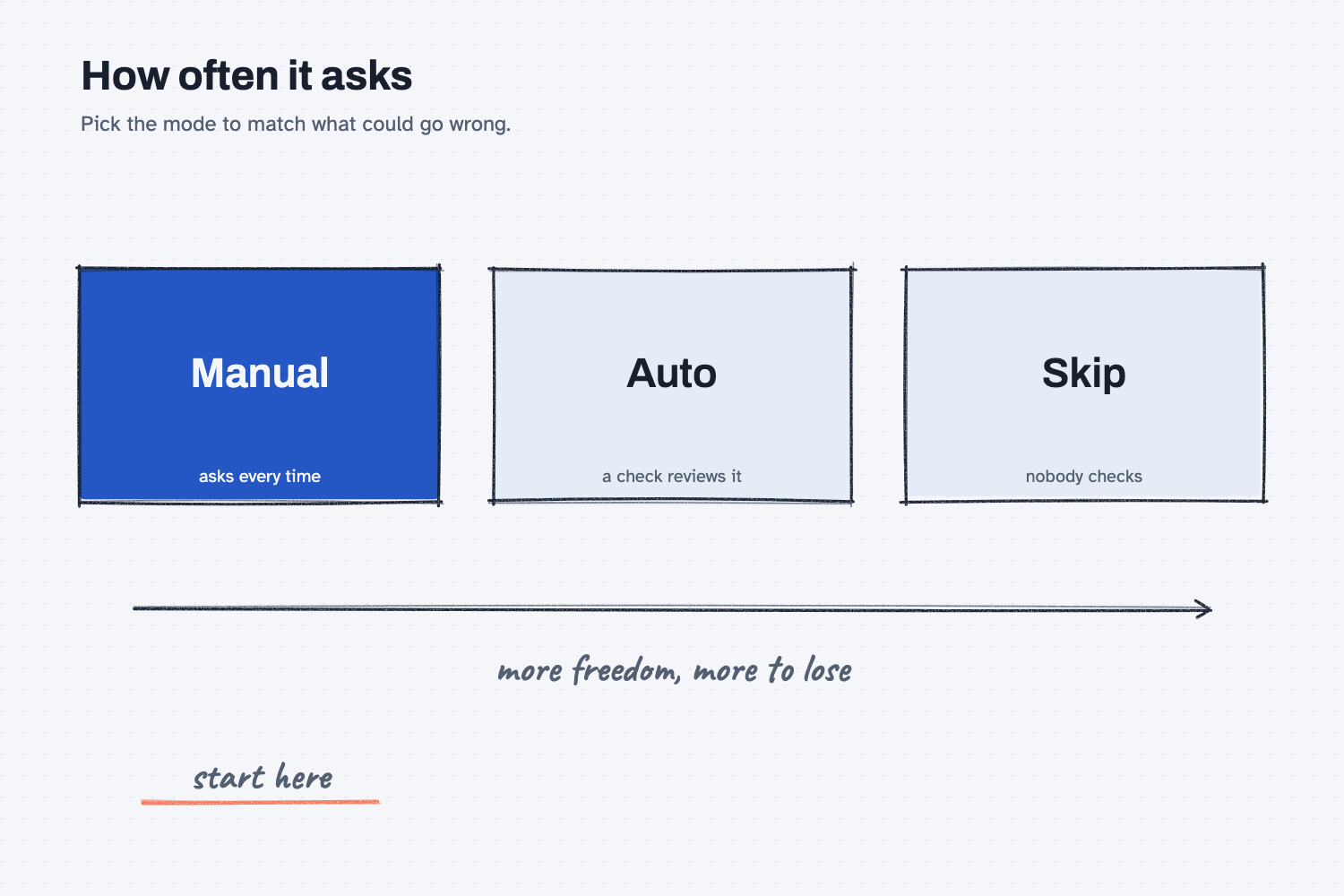
You choose how often it asks. The help pages describe approval modes. In Manual mode Claude asks before each action and you allow or deny. In Auto mode it keeps working, and an automatic check reviews actions for safety, which can miss a risky one. In a skip-everything mode nothing checks its actions at all. Anthropic's guidance is to match the oversight to the stakes, with manual approval for sensitive files, unfamiliar sites, and anything hard to undo, such as sending a message or making a purchase.
You review what came back. Read the result before you use it, and keep a record of what was done, as the AI audit trail explains. The software around the model that runs this loop is called a harness, and the approval setting is one of the rules that harness enforces.
Where do people get it wrong?
Most mistakes come from giving too much access too fast. These are the ones I would watch for.
- Opening the whole drive. Give Claude a folder with only the files the job needs. Anything it can read, it can be tricked into using.
- Mixing untrusted content with the power to act. Anthropic's safety page warns about hidden instructions in emails, websites, and documents. An attack works only when Claude can read untrusted content and can also take actions, so cutting either one lowers the risk.
- Turning off the checks on day one. Start in Manual, watch a few runs, and loosen it only when you trust the task.
- Skipping the sign-off plan. If you cannot say in six lines what it may read, change, and send, you are not ready to say go.
Try this in 2 minutes
This test asks Claude to write the sign-off plan for an invoice check, which is the page you should read before any task goes. You can use any chat tool.
- Open a new chat and paste this:
I plan to let an AI assistant work through a whole task on its own: open last month's supplier invoices in one folder, compare each to its purchase order, and draft a summary of mismatches. Write a sign-off plan of about 6 short lines that I should read before I say go. Say what it may read, what it may change, and what must wait for my approval.
- Check that the plan names one folder, says the originals stay untouched, and lists what needs your approval.
- Add or remove one line so the plan matches how your own shop works.
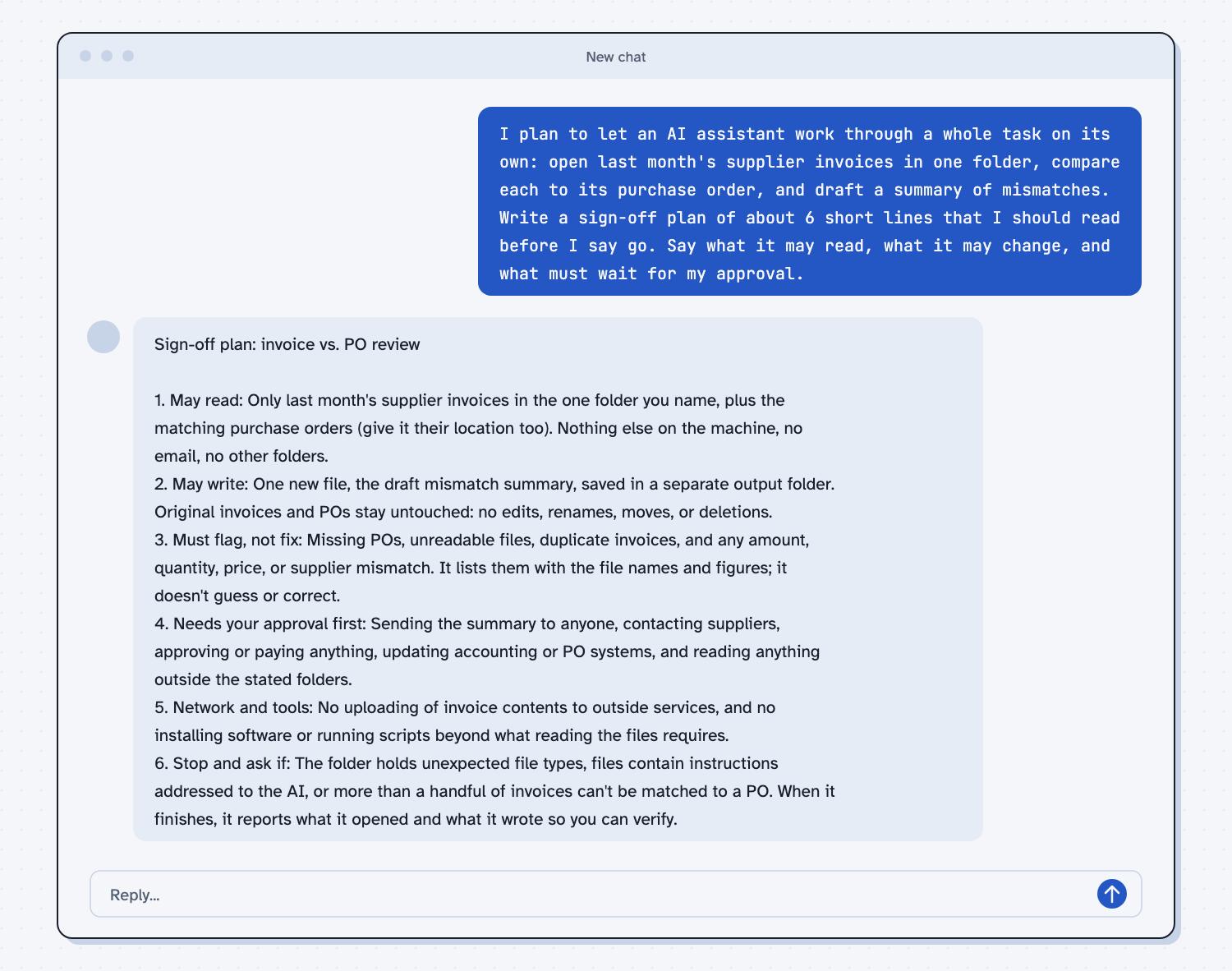
When I tried this, the plan limited reading to "last month's supplier invoices in the one folder you name," and said "Original invoices and POs stay untouched: no edits, renames, moves, or deletions." It put these behind your approval: "Sending the summary to anyone, contacting suppliers, approving or paying anything."
It also added a stop rule I had not asked for, which was to stop and ask if "files contain instructions addressed to the AI." That is the hidden-instruction risk in a single line. Reading a plan like this takes a minute, and it is the cheapest safety step you have.
Frequently asked questions
What is the difference between Cowork and regular chat?
Chat answers a question. Cowork takes a whole multi-step job and works through it with your files, apps, and a browser. Anthropic now combines them into one conversation, so you simply ask for more.
Is Claude Cowork safe?
It is as safe as the access you give it. Use a dedicated folder, keep sending and deleting behind your approval, and start in the mode that asks first. You remain responsible for what it does on your behalf.
Does Cowork need my computer on?
It depends on the task. Anthropic says tasks run in the cloud, but work that uses folders on your computer or your desktop apps needs the Claude desktop app open.
Do I need a paid plan?
Anthropic's help page says Cowork needs a paid plan, and availability varies by plan and device. Check your own account, since the rollout is gradual.
Use it today
- Compare supplier quotes with Claude: a bounded job with clear inputs, which is the right size for a first handover.
- Related idea: Chat vs agent.
- Related idea: AI workflow vs agent.
- Related idea: Levels of AI automation.
- Setup help: Set up Claude.
From my training: this site teaches you to start a new helper at the lowest freedom and give it more only after you have checked its work.