Can AI Do Math? Let It Write the Formula and Let the Sheet Add
With Josh Schultz ·
Answer. AI is good at setting up math, such as deciding which numbers to multiply and writing the formula, but it adds a long list by predicting digits, the same way it predicts words, so it can slip without any warning. Let AI write the formula and let your spreadsheet do the adding. Then check one total yourself.
The picture
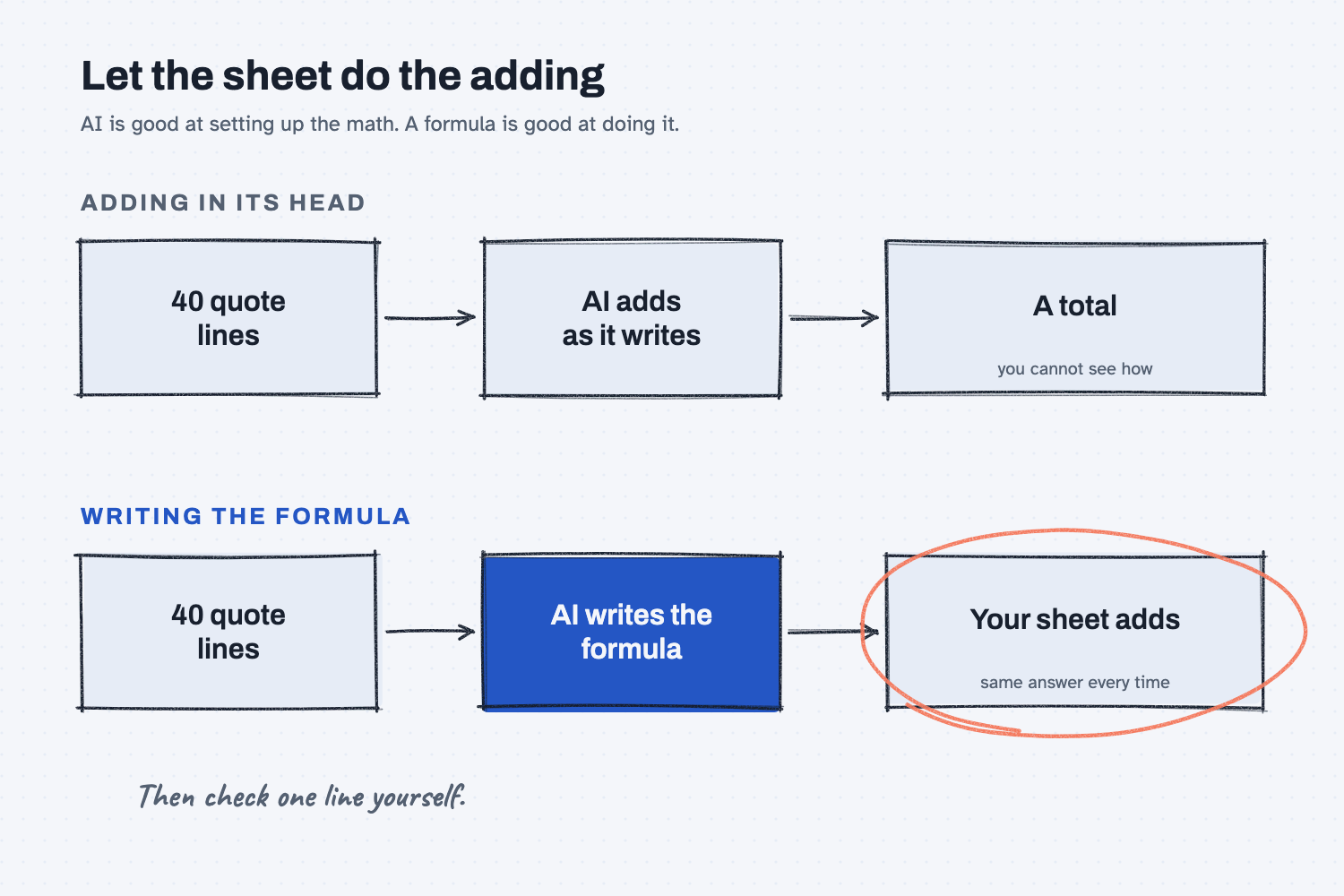
The top row shows the quick way, where you hand AI the lines and it answers with a total. The bottom row shows the sturdier way, where AI writes the formula and your sheet does the adding. Both start with the same 40 lines, but only the bottom row lets you see how the number was made and get the same answer again tomorrow.
Think of it like this
Think of an estimator you trust, someone who knows which items belong on a job, which unit each price is quoted in, and how to set up the costing so nothing gets missed. Ask that person to add a short column in their head, and they will usually be right.
Now hand them a quote with 100 lines and ask for the total on the spot, with no calculator. They are still sharp, but nobody would sign a 100-line total from memory. The reason is not that they cannot add, but that one small slip in the middle would look exactly like a right answer.
AI is that estimator. It is very good at the judgment part, which is figuring out what to add and how. It is less dependable at the long adding, and the calculator in this picture is your spreadsheet.
Why does it matter at work?
A total that is off by a little is more dangerous than one that is off by a lot, because nobody questions it, and it keeps being wrong in the budget, the purchase order, or the margin check.
Here is an example. Luis Ramos, the controller at Mesquite Ridge Metal Works, gets a quote with 100 lines and asks AI for the total. The answer comes back in a second with the confident look of a number that has been checked, and nothing on the screen tells him whether it was added correctly. Next month the quote arrives again with new prices, and he would have to ask again and hope for the same care. With a formula in a sheet, the total shows its work and updates when a price changes.
How does it work?
There are four ideas to hold onto, and they explain both why AI is good at the setup and where the risk sits.
AI writes digits the way it writes words. There is no calculator inside it unless the tool gives it one, so it predicts the digits of a total one after another, as described in how AI writes. Short sums usually come out right, but a long list gives it more places to slip, and a slip leaves no mark.
Setting up the math is the strength. Reading "24 pieces at $318.40 each" and knowing that it means multiply is language work, which is what AI does well. It can also choose the right formula, handle rounding, and explain what each part does.
A formula or script does the adding. A formula gives the same answer every time, which is what the lesson on what deterministic means is about. Some AI tools can also run a small program behind the scenes to do the math, and when they do, they usually tell you. If yours does not say it ran anything, treat the total as written from memory.
You check one line and one total. Pick one line and work it out on a calculator, then compare the sheet's total to what AI gave you. It takes a minute, and it catches both a slip in the adding and a mistake in the setup.
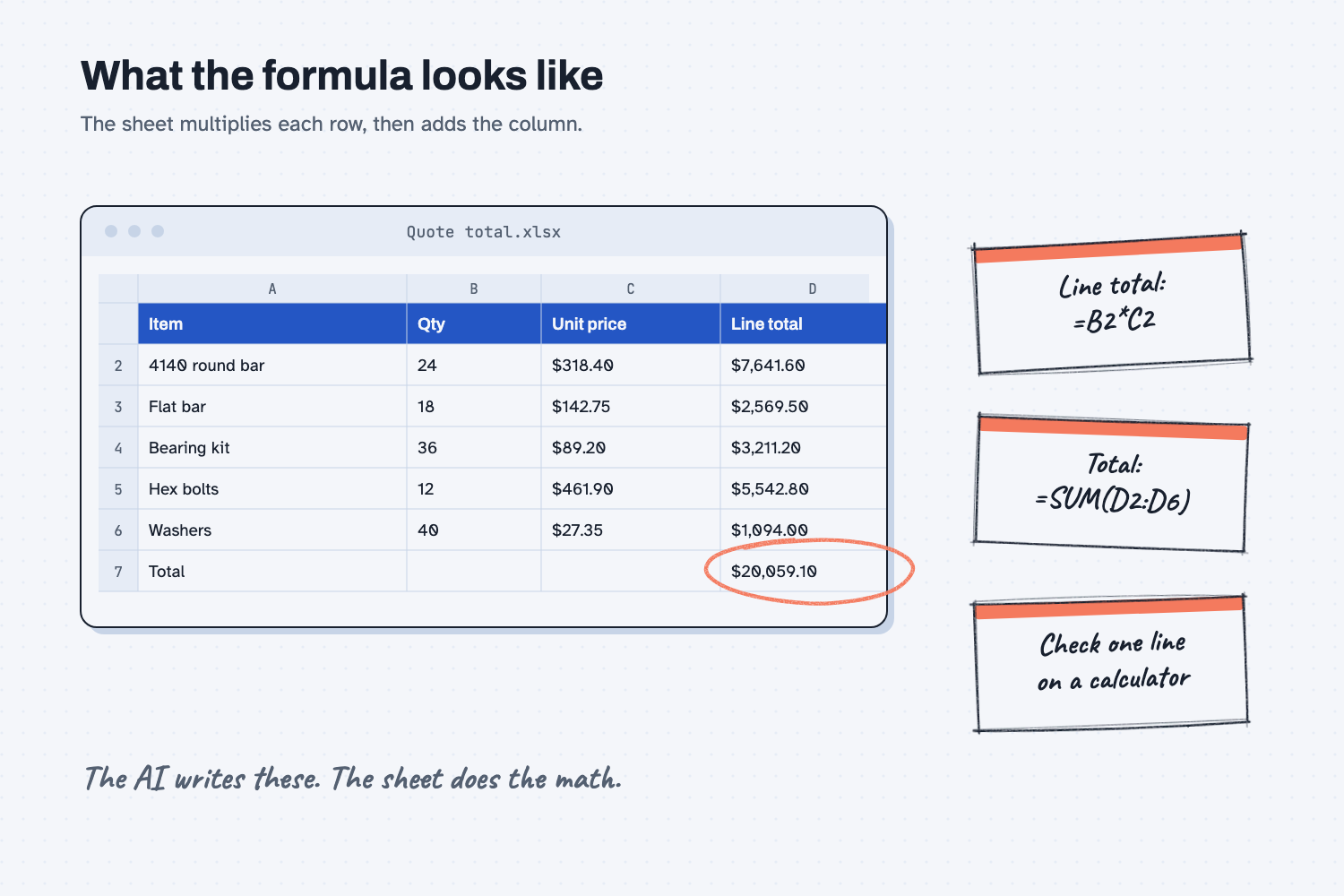
The line total is quantity times unit price, the total is the sum of the line totals, and every number traces back to its row.
Where do people get it wrong?
Most trouble comes from trusting a number that cannot show how it was made.
- They trust a confident total. A smooth, specific number feels checked, but it is only as good as the adding behind it.
- They total numbers that came from a messy PDF. If the AI misreads one digit when it reads the PDF, the math afterward is perfect and the total is still wrong. Check the numbers first, then the total.
- They forget the units. If a price is "per hundred" and the formula treats it as "each," the sheet adds flawlessly and the answer is off by a hundred times. The setup needs your eyes too.
- They ask again until the answer looks right. The same question can come back with a different total each time, which is a sign that nothing is anchoring the answer.
Try this in 2 minutes
This test compares AI's total with your sheet's total, so you can see how the two behave on your own list. Use a real quote with 30 or more lines, or fake numbers if your company has not approved a tool yet. If you do not have a list handy, ask AI to make up a list of 40 lines first.
- Open a new chat and paste your lines under this ask:
Here are the lines from a supplier quote.
[paste your lines: quantity and unit price]

What is the total for all the lines? Give me just the number.
- Put the same lines in a sheet, with quantities in column B and unit prices in column C, and add them up with a formula.
- Now ask the AI for the formula:
I will put the quantities in column B and the unit prices in column C of an Excel sheet, starting in row 2. Write the formula for the total of all lines, in one cell, and say in one sentence how it works.
- Compare the AI's total with the sheet's total, and compare the AI's formula with what you typed.
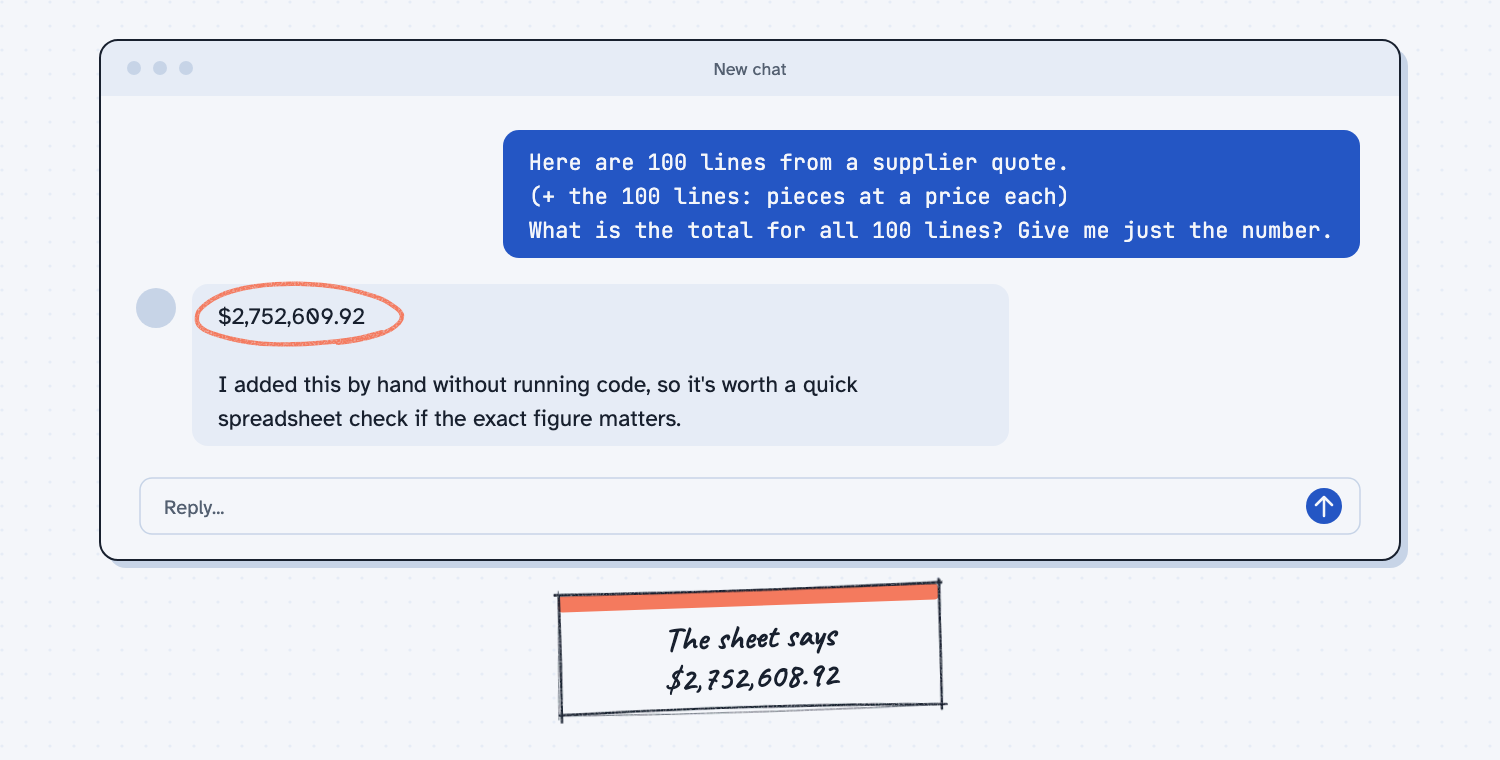
When I tried this, a 12-line list and a 40-line list both came back with totals that matched my sheet exactly, so this tool is better at adding than many people expect. On the 100-line list, one answer was "$2,752,608.92," which matched the sheet, and another was "$2,752,609.92," which was exactly one dollar over. The reply was just as confident either way, and it added a note: "I added this by hand without running code, so it's worth a quick spreadsheet check if the exact figure matters."
That one-dollar gap is the whole lesson. The tool did well on most lists and was honest about how it got the number, yet it gave two different totals for the same question. When I asked for the formula, it wrote =SUMPRODUCT(B2:B17, C2:C17) for a 16-line list, which multiplies each quantity by its price and adds the results, and that formula gives the same answer every time. Your result may differ with a different tool or list, and that is also worth learning.
Frequently asked questions
Can AI do math?
Yes, for short problems, and it is strong at setting up formulas. It is less dependable at adding long lists in its head and can slip without warning, so use a sheet for the adding and check one total.
Why does AI get it right sometimes and wrong other times?
It writes each digit by prediction, so a long total has many chances to go off, and the answer can change from one try to the next. A formula has no such variation. It runs the same steps every time.
What if my AI tool can run code?
Then it can do the adding with a real program, which is much safer, and many tools say so when they do it. If the reply has no such note, assume the total was written from memory.
What should I check?
Check one line by hand, then check the total against a sheet's sum. Also look at the units and the rounding, because the formula can be perfect and still be set up for the wrong unit.
Use it today
- Check supplier invoices against PO prices: AI reads the invoices, a script checks every price and quantity against the PO.
- Have Claude build your quote report: Claude writes a small script, and the script does the math the same way every time.
- Related ideas: If a script can do it, use the script and When not to use AI.
From my training: the same rule runs through our quote guides, where AI reads the messy files and a script does the math.