Answer. To check supplier invoices against PO prices, have Claude read every invoice into one fixed JSON shape (a set list of labeled blanks). Then Claude runs a small script that matches each line to your open PO export and does the math. You get a spreadsheet of lines billed over the PO price or quantity, duplicates, and charges not on the PO.
Time and cost. 25 minutes the first time, about 10 after that. $0 to practice with the sample invoices on the free Claude plan. Who this is for. AP clerks, controllers, and buyers who approve supplier invoices and want the overbilling found before the check goes out.
Invoices arrive in every shape: clean PDFs, a scan with a received stamp across it, and the same bill again by email because the supplier "hasn't seen a check yet." Checking each line against the PO by hand is slow, so most shops check the big ones and pay the rest, which is how a $16 price creep or a second copy of a bill gets paid.
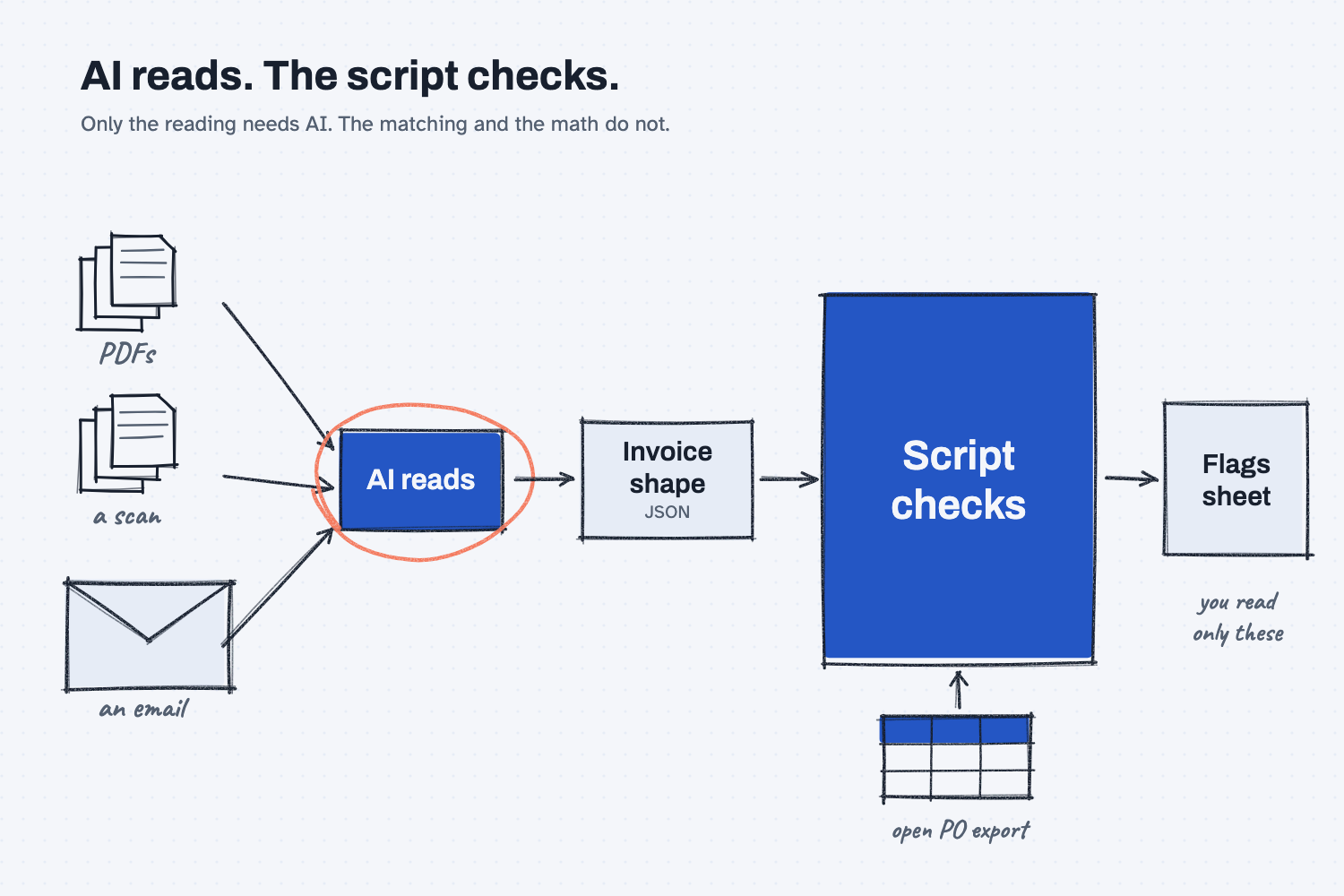
You could paste the invoices into a chat and ask, "Do these match my POs?" You would get an answer, but you could not trust its math, and tomorrow's answer would look different. So this guide splits the job in two. Claude reads the invoices and writes down what they say, which only AI can do. A script (a small program that runs the same steps every time) does the matching and the math, so the same invoices always give the same flags.
What will I learn besides checking invoices?
You will learn five methods you can reuse on freight bills, credit card statements, and receiving paperwork. Each one gets a short "why" later in this guide.
- Split reading from checking. AI reads the invoices, and a script checks them.
- Give AI a shape to fill. Every invoice gets the same blanks, with null (empty on purpose) when the invoice does not say.
- Push the matching and the math to a script. The dollar difference comes out the same every time.
- Keep the rules in one place. The units table and the price tolerance sit at the top of the script, where you can see them.
- Look only at the exceptions. Clean lines pass quietly, so your time goes to the flags.
What do I need before I start?
You need Claude, the sample files, and the script. Nothing to install.
- Claude at claude.ai, with file creation on so it can run code. The free plan works for practice. If you have not set it up yet, follow Set up Claude first (about 10 minutes, once). To add files to a chat, see Attach files to a chat, and to add a skill, see Upload a Claude skill.
- The sample batch: ap-invoices-sample.zip. If you need help with the zip, follow Download and unzip sample files. Inside are seven invoice files for the made-up company Mesquite Ridge Metal Works (PDFs with letterheads, one scanned invoice, and one email saved as text), the open PO export
open-po-export.xlsxfrom their ERP, and ananswer-keyfolder. - The script: check_invoices.py. You never open it, because Claude runs it for you.
Safe use. Real invoices hold prices, bank details, and supplier names. Check your company rules before you attach them to any AI tool, and use the sample batch to learn. Read the safe use notes.
How do I check supplier invoices against PO prices with AI?
Have Claude read the invoices into one JSON shape, check that it read them right, then have Claude run a fixed script against your open PO export. Seven steps.
Step 1. Put the batch in one folder
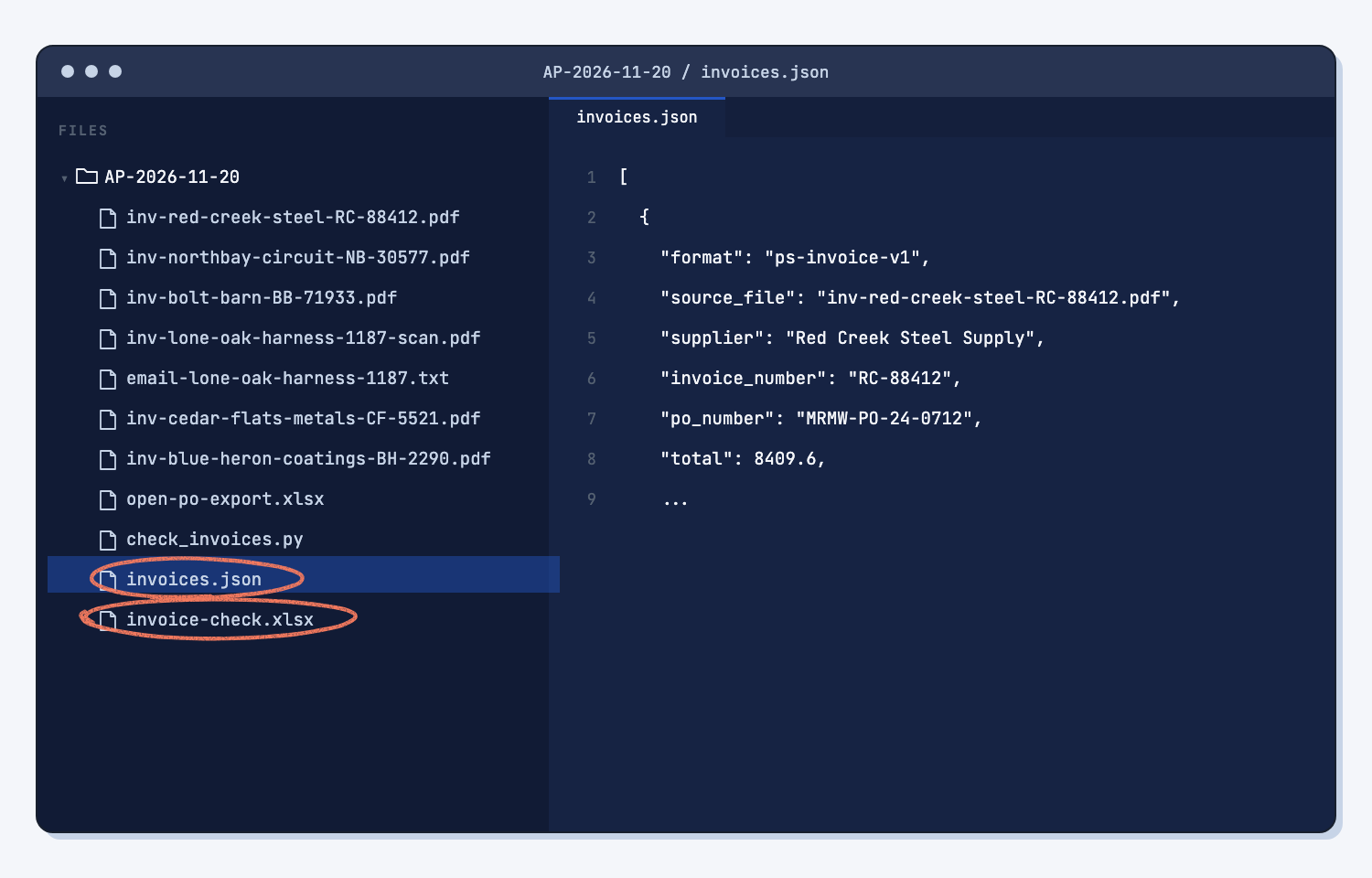
Make a folder named for the day, like AP-2026-11-20. Put the seven invoice files, open-po-export.xlsx, and check_invoices.py inside it. Leave the answer-key folder out, because Claude should not see the answers.
One folder per batch keeps everything together, so you can answer "why did we short-pay this?" six months from now.
Step 2. Attach the invoices to a new Claude chat
Open claude.ai and start a new chat. Attach the seven invoice files. Attach only the invoices for now, not the PO export or the script. You should see seven file chips above the box.
Step 3. Paste the read prompt
Copy the prompt below and send it. You do not need to fill anything in. Claude can read the scanned invoice too, because AI reads PDFs and pictures, not only typed text. It replies with one block of JSON (a plain-text format of labels and values that programs can read) and a file named invoices.json. This takes a minute or two.
Read the supplier invoices I attached. Put each one into the JSON shape below.

Rules:
1. One entry per file. If two files look like the same invoice, keep both. Do not merge or skip any file.
2. Use this exact shape. Do not add, rename, or remove any keys.
3. If the invoice does not say it, write null. Do not guess.
4. Numbers are plain numbers, like 1250.5. Not "$1,250.50". Dates are YYYY-MM-DD.
5. Copy quantities, units, and prices exactly as billed. Do not convert units. Do not fix the supplier's math. If the invoice shows ordered, shipped, and backordered, qty is the quantity billed.
6. Every charge is a line, even freight, delivery, fuel, or a fee shown below the subtotal. For a charge like that, put the dollar amount in ext_price, and write null for qty, uom, and unit_price if the invoice does not show them. Sales tax goes in tax, not in lines.
7. our_part is our part number, only if the invoice labels it as ours (Your Part, Cust P/N). supplier_part is any other part or item number on the line. If none is shown, write null.
8. source_file is the file name, exactly as attached.
9. Put anything odd in notes: a backorder, a price per 100, a stamp, handwriting, a resend.
10. Reply with one JSON code block that holds a list, one entry per file. If you can make files, also save it as invoices.json.

Shape:
{
  "format": "ps-invoice-v1",
  "source_file": null,
  "supplier": null,
  "invoice_number": null,
  "invoice_date": null,
  "po_number": null,
  "terms": null,
  "subtotal": null,
  "tax": null,
  "total": null,
  "lines": [
    { "line": 1, "our_part": null, "supplier_part": null, "description": null, "qty": null, "uom": null, "unit_price": null, "ext_price": null }
  ],
  "notes": []
}
The prompt holds the shape. Every invoice gets the same blanks: the file name, the supplier, the invoice and PO numbers, the totals, and one row per line with part numbers, quantity, unit, and price.
Step 4. Spot-check the JSON against the invoices
Before you check anything else, check the read, the same way you would test any AI tool against answers you know. With the sample batch, look for these five things. It takes about five minutes.
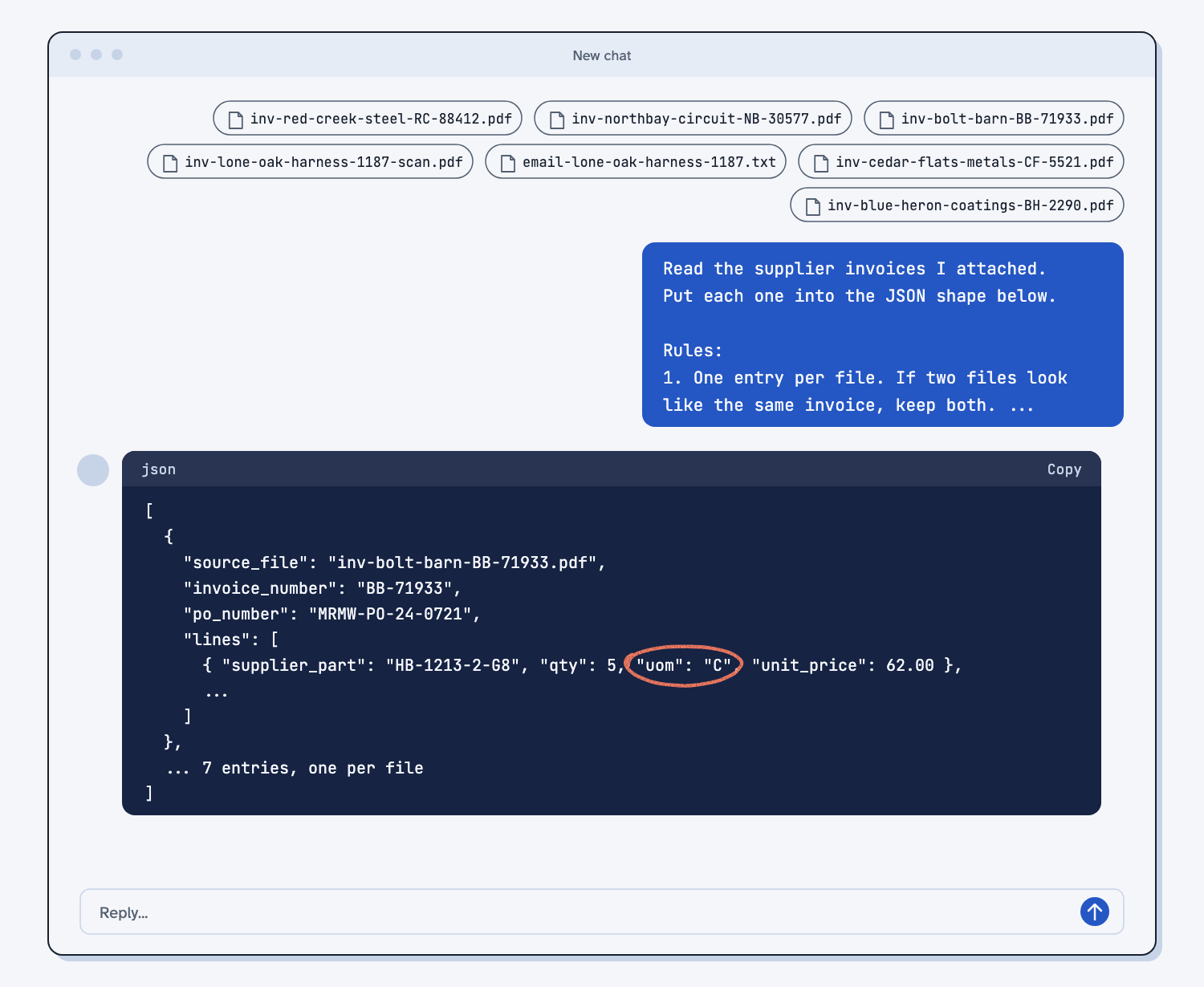
- There are seven entries, one for each file. Invoice 1187 from Lone Oak Harness shows up twice, once from the scan and once from the email, and both should be there.
- Bolt Barn's unit is still
C(per 100), with qty 5 and unit_price 62. Claude should copy it as billed, not turn it into 500 each. - Cedar Flats has two lines, and the second is the $95.00 delivery charge from below the subtotal.
- Northbay's qty is 60, the quantity shipped and billed, not the 100 ordered.
- The scan reads 40 at 38.50, for a total of 1,540.00.
If something is wrong, tell Claude which value to fix in this same chat. The answer key in the sample zip has the correct read in answer-key/invoices.json.
Step 5. Have Claude run the check script
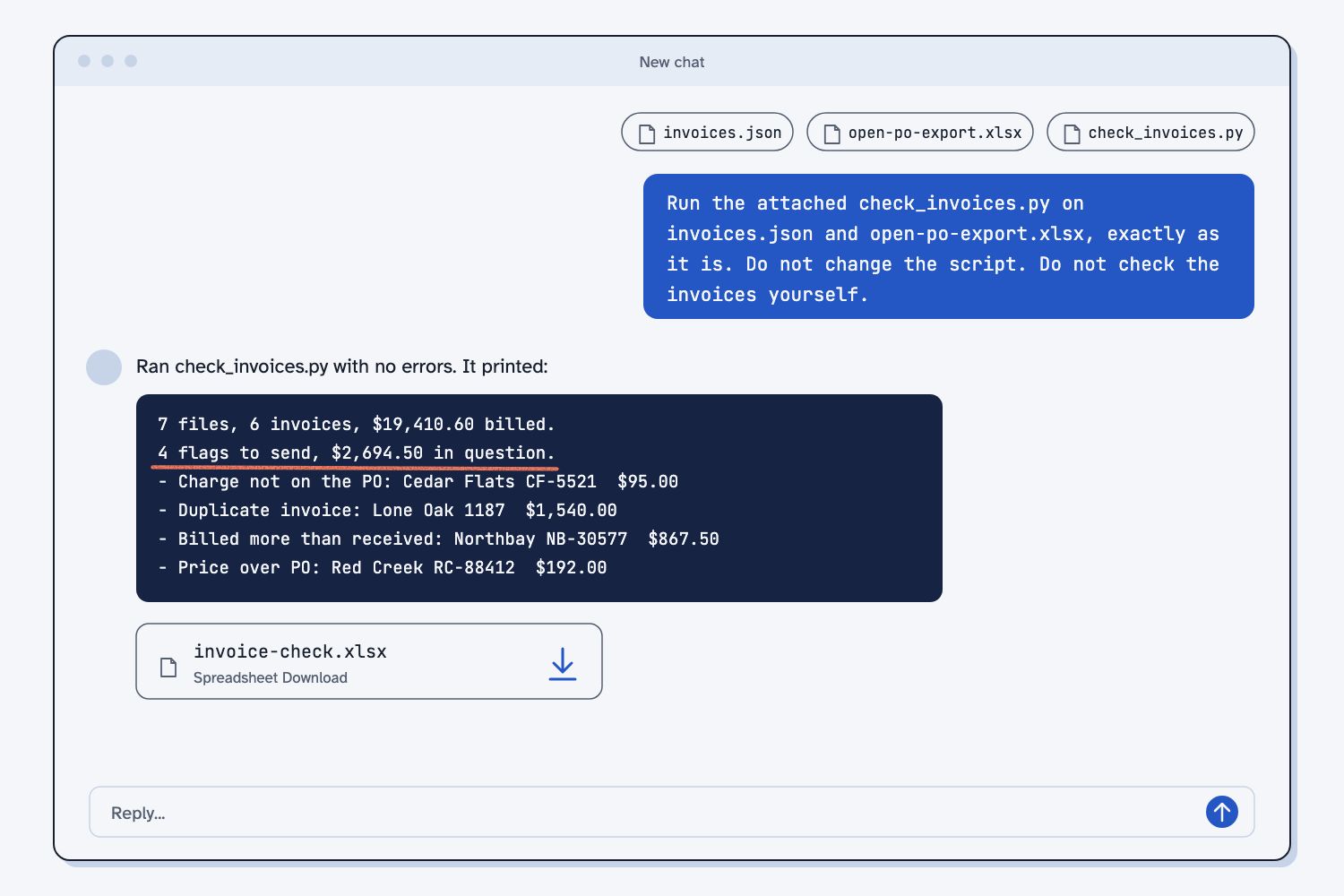
In the same chat, attach open-po-export.xlsx and check_invoices.py, then send the prompt below. Claude runs the script on the JSON it just made. It does not check the invoices itself, and that is the point, because the script checks them the same way every time.
Run the attached check_invoices.py on invoices.json and open-po-export.xlsx, exactly as it is.
Do not change the script. Do not check the invoices yourself.
Command: python3 check_invoices.py invoices.json open-po-export.xlsx
Give me the invoice-check.xlsx file it makes, and paste the lines it printed. If the script prints an error, show me the error and stop.
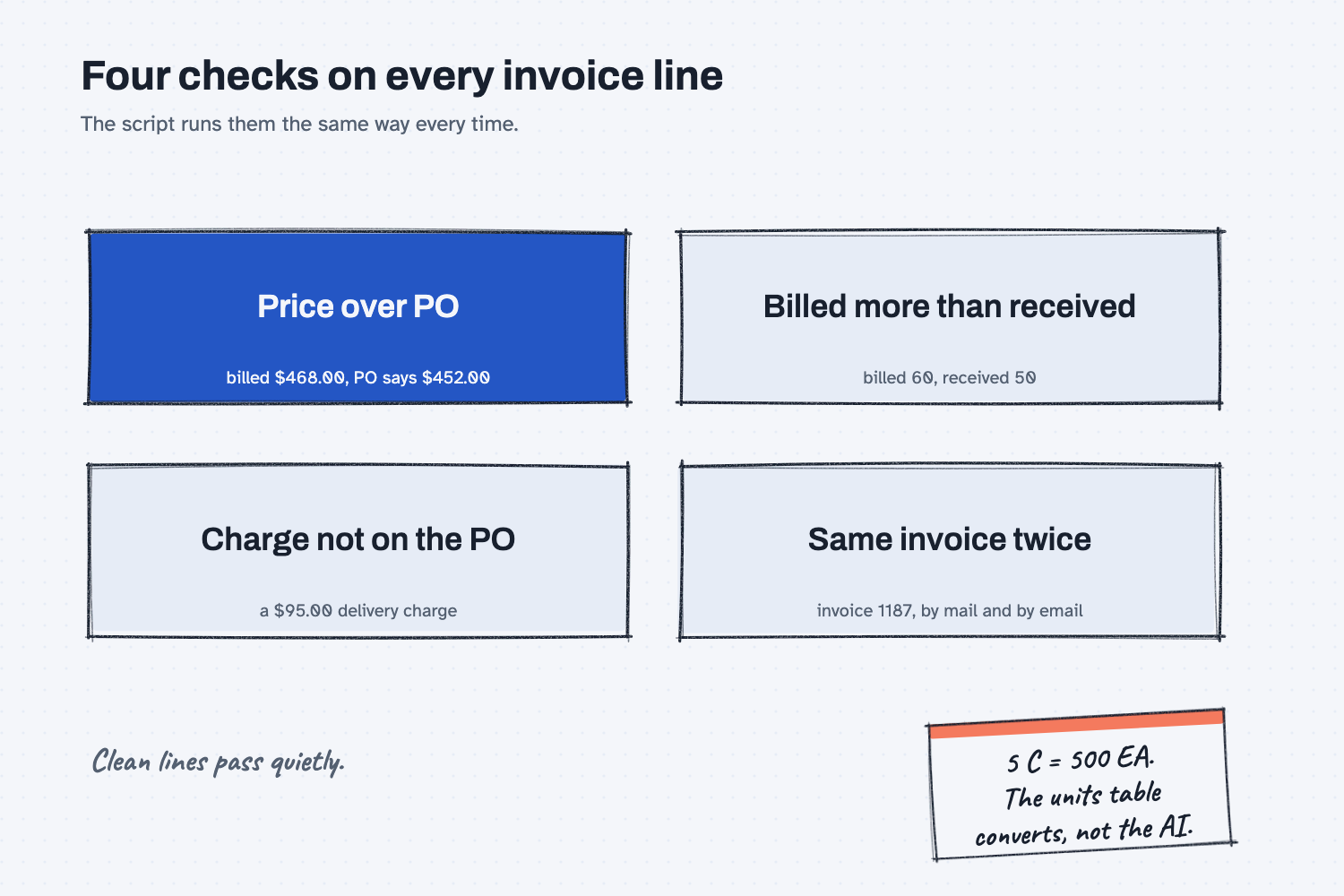
The script runs four checks on every invoice line. It matches the line to the PO by PO number and part number, changes the invoice unit into the PO unit with a fixed units table, and then compares.
Claude replies with the lines the script printed and a file named invoice-check.xlsx. If the script finds bad data, it stops and names the value, for example unit_price must be a number. It says "$468.00". That is a good stop, because a loud stop beats a quiet mistake. Ask Claude to fix that one value in the JSON, then run the script again.
Step 6. Open the spreadsheet and read the Flags sheet
Download invoice-check.xlsx, save it in your batch folder, and open it in Excel. It has four sheets.
- Flags. One row per problem: what was billed, what the PO says, the dollar difference, and the words to send. The total in question is at the bottom.
- Send to supplier. The same flags grouped by supplier.
- All lines. Every invoice line, OK or not. Bolt Barn's note says
5 C = 500 EA at $0.62. - Rules. The units table and the price tolerance the script used.
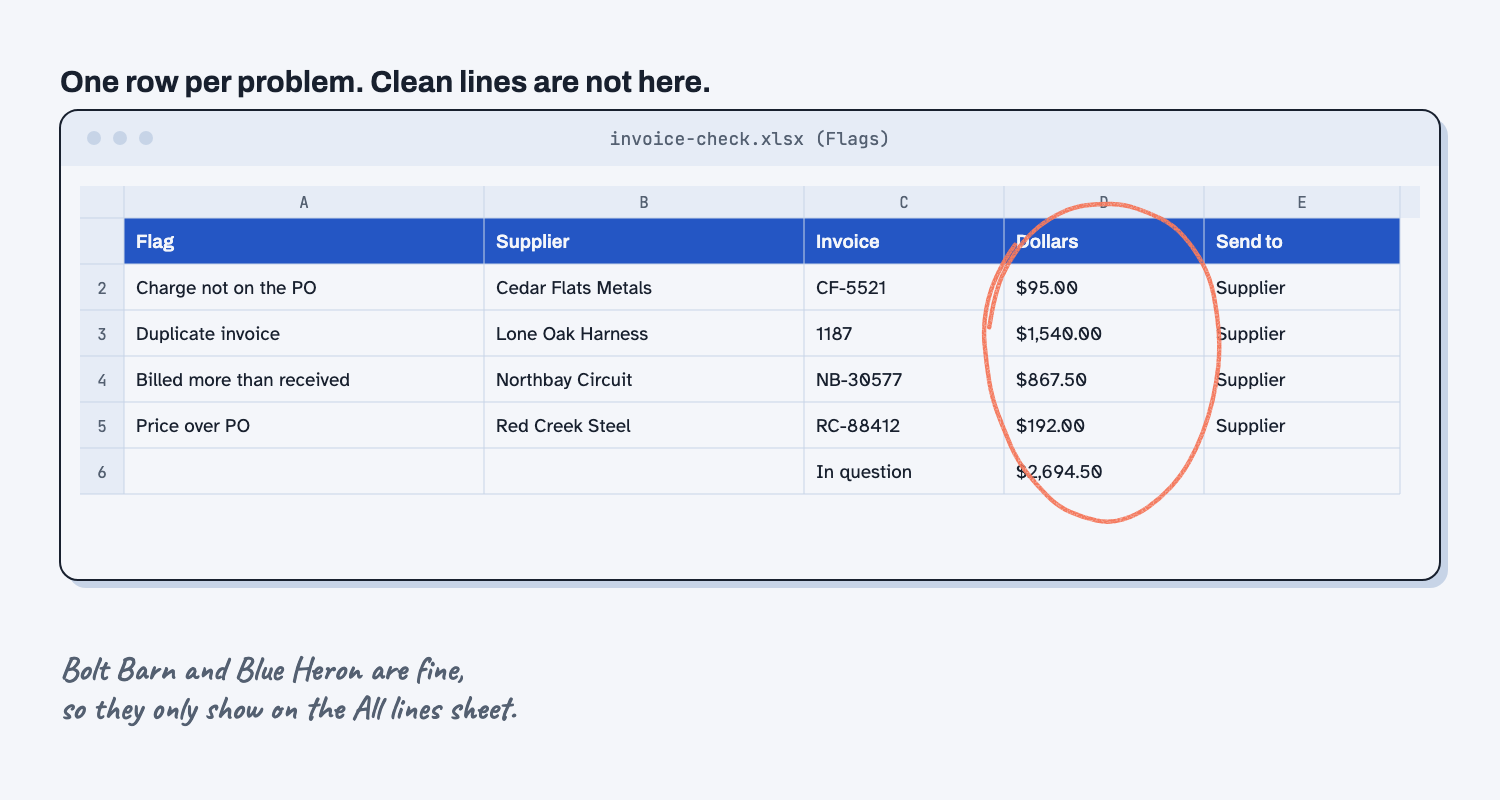
Read each flag before anything goes out, because you know things the script does not. A "billed more than received" flag may only mean receiving has not posted yesterday's truck yet, so walk to the dock first.
Step 7. Draft the supplier emails and check the numbers
In the same chat, send the prompt below with your name in the last rule. Claude writes one short email per supplier from the Send to supplier sheet. Claude only writes the words here, since the numbers were already set by the script and the prompt tells Claude to copy them.
Open the "Send to supplier" sheet in invoice-check.xlsx. Write one short email to each supplier on that sheet.

Rules:
1. Use only what is on that sheet. Copy every invoice number, line, part, quantity, and dollar amount exactly.
2. Do not add a claim, a number, a fee, or a deadline that is not on the sheet. Do not change what it says we will pay.
3. Plain and polite. Put the invoice number in the subject line. Keep each email under 120 words.
4. Sign each one: [YOUR NAME, TITLE, COMPANY]
5. Reply with the emails, one after another, and nothing else.
Check every dollar amount, invoice number, and line number in each email against the Flags sheet before you send it. Then save invoices.json and invoice-check.xlsx in the batch folder. The spreadsheet is your record of what you paid, what you held, and why.
What does good look like?
With the sample batch, the script prints this summary: 7 files, 6 invoices, $19,410.60 billed, 4 flags to send, and $2,694.50 in question. Answer key, sample data. The script did the math, and I checked each line by hand. You can open the sample spreadsheet to compare.
| Supplier | Invoice | Flag | Billed | PO says | Dollars |
|---|---|---|---|---|---|
| Red Creek Steel Supply | RC-88412 | Price over PO | $468.00 per sheet | $452.00 per sheet | $192.00 |
| Northbay Circuit Assembly | NB-30577 | Billed more than received | 60 boards | 50 received | $867.50 |
| Lone Oak Harness | 1187 | Duplicate invoice | 2 copies | pay once | $1,540.00 |
| Cedar Flats Metals Service | CF-5521 | Charge not on the PO | $95.00 delivery | delivered, no charge | $95.00 |
Two invoices pass. Bolt Barn bills 5 C at $62.00, which the units table turns into 500 each at $0.62, the PO price. Blue Heron Coatings matches line for line. Neither shows on the Flags sheet, and that is what you want, because it means your attention goes only to the four rows that need it.
What can go wrong?
Most problems start in Step 3, when AI reads a line in a way you did not expect. The rules in the prompt stop most of them, and the script catches a few more, but check anyway.
- A part number has no label. Lone Oak's invoice shows
RL-235under "Part," without saying whose part it is. If AI leaves both part fields empty, the script cannot match the line, and it flags the whole $1,540.00 as "not on the PO." Rule 7 puts any unlabeled number in supplier_part, and the script matches it against both part columns on the PO. If a line you know is on the PO gets flagged, look for an empty part number in the JSON. - AI drops a charge below the subtotal. A delivery or fuel charge often sits under the subtotal instead of in the line table. If it goes missing from the JSON, the lines will not add up to the invoice total, and the script flags it as Check the read with the gap in dollars. Fix the JSON before you trust the other flags.
- AI merges the two copies. Two files with the same invoice number look like one bill, and AI likes to tidy up. If it keeps only one, the duplicate disappears. Rule 1 says to keep both, and Step 4 has you count seven entries.
- AI converts units on its own. It turns 5 C at $62.00 into 500 EA at $0.62, so the JSON no longer matches the paper and you cannot check it. The units table in the script does the converting.
- Receiving is behind. The script trusts your PO export, so if a delivery is not posted yet, an honest invoice looks like it bills more than you received.
- The script does not run. If file creation is off, Claude may check the invoices itself. The reply should show the lines the script printed. On your own computer, if the script says it needs openpyxl, run
pip install openpyxlonce.
How do I check the answer?
Check what went into the script, not the script's math, because the math is fixed.
- Count the entries in the JSON. It should be one per file you attached.
- Pick one flag and check it by hand against the invoice and the PO, including the dollar difference.
- Open the All lines sheet and confirm every line says OK or names a flag.
- Read every email draft against the Flags sheet, number by number.
- Make your own call on each flag. The sheet tells you what is different, and you decide what to do about it.
Why does this way work?
It works because each part of the job goes to the tool that is best at it. Here is the short "why" behind each method.
Split reading from checking. AI is good at reading a scanned invoice with a stamp across it, which is a job a script cannot do. AI is not reliable at matching 40 lines to a PO list and adding up the differences the same way twice, because AI is not a calculator. So AI reads, and the script checks. That split keeps AI on the work AI does well and away from the work where AI is the wrong tool.
Give AI a shape to fill. (What is structured output?) A script can only check data it can find in the same place every time. The shape makes every invoice arrive as the same blanks, whether it came as a PDF, a scan, or an email. Null means "the invoice did not say," so a gap stays a gap instead of becoming a guess.
Push the matching and the math to a script. The script gives the same flags for the same invoices every time, which is what deterministic means. That matters when a flag becomes a short-pay and a letter to a supplier, because you need to show your work. It also costs nothing to run, so you can check every invoice, not only the big ones.
Keep the rules in one place. The units table (C is 100 each, CWT is 100 pounds) and the price tolerance live at the top of the script, and the Rules sheet shows them in every spreadsheet it makes. When you add a unit or change the tolerance, you change it once, and every batch after that uses the new rule. That is the idea behind keeping your rules in one place.
Look only at the exceptions. The sample has eleven invoice lines in seven files, and only four flags need a person. The script clears the rest quietly and shows you only the four, with the reason and the dollars. That is human in the loop done the useful way: the routine work is cleared for you, and your judgment goes where it changes the outcome.
Frequently asked questions
Do I need to know how to code to use this?
No. You attach files and paste three prompts, Claude runs the script for you, and you open the result in Excel. If you want the script to work differently, ask Claude to change it, then test it on the sample batch against the answer key.
My ERP export has different column names. Will it still work?
Not at first. The script looks for columns named "PO Number," "Our Part," "Received Qty," and so on, and it stops with a message that names the column it could not find. Ask Claude to change PO_COLUMNS at the top of the script to match your export, one time, then save that copy of the script and use it from then on.
Does this replace a three-way match in my ERP?
No. If your ERP already matches invoices to POs and receipts, keep using it. This is for the invoices that never get matched: the ones keyed by hand, the scans, and the emailed copies. It is also a good way to spot-check what your ERP lets through.
What if the supplier name on the invoice is different from the PO?
That is fine. The script matches on the PO number and the part number, not the supplier name, because names vary. Bolt Barn calls itself "Bolt Barn Industrial Supply" on its letterhead, while the PO says "Bolt Barn Industrial," and the lines still match.
Can I use ChatGPT or Copilot instead of Claude?
Yes. The prompts are plain text and the shape is the same, so any AI that can read your attached files can do Step 3. The script does not care which AI made the JSON. If your tool cannot run code, someone with Python can run it with python3 check_invoices.py invoices.json open-po-export.xlsx.
Take this with you
Three prompts and one script. Together they work on any stack of supplier invoices, in any format.
1. The read prompt. Attach the invoices and paste it as is.
Read the supplier invoices I attached. Put each one into the JSON shape below.

Rules:
1. One entry per file. If two files look like the same invoice, keep both. Do not merge or skip any file.
2. Use this exact shape. Do not add, rename, or remove any keys.
3. If the invoice does not say it, write null. Do not guess.
4. Numbers are plain numbers, like 1250.5. Not "$1,250.50". Dates are YYYY-MM-DD.
5. Copy quantities, units, and prices exactly as billed. Do not convert units. Do not fix the supplier's math. If the invoice shows ordered, shipped, and backordered, qty is the quantity billed.
6. Every charge is a line, even freight, delivery, fuel, or a fee shown below the subtotal. For a charge like that, put the dollar amount in ext_price, and write null for qty, uom, and unit_price if the invoice does not show them. Sales tax goes in tax, not in lines.
7. our_part is our part number, only if the invoice labels it as ours (Your Part, Cust P/N). supplier_part is any other part or item number on the line. If none is shown, write null.
8. source_file is the file name, exactly as attached.
9. Put anything odd in notes: a backorder, a price per 100, a stamp, handwriting, a resend.
10. Reply with one JSON code block that holds a list, one entry per file. If you can make files, also save it as invoices.json.

Shape:
{
  "format": "ps-invoice-v1",
  "source_file": null,
  "supplier": null,
  "invoice_number": null,
  "invoice_date": null,
  "po_number": null,
  "terms": null,
  "subtotal": null,
  "tax": null,
  "total": null,
  "lines": [
    { "line": 1, "our_part": null, "supplier_part": null, "description": null, "qty": null, "uom": null, "unit_price": null, "ext_price": null }
  ],
  "notes": []
}
2. The run prompt and check_invoices.py. Save your PO export as open-po-export.xlsx, or change the file name in the prompt.
Run the attached check_invoices.py on invoices.json and open-po-export.xlsx, exactly as it is.
Do not change the script. Do not check the invoices yourself.
Command: python3 check_invoices.py invoices.json open-po-export.xlsx
Give me the invoice-check.xlsx file it makes, and paste the lines it printed. If the script prints an error, show me the error and stop.
3. The email prompt. Put your name, title, and company in rule 4.
Open the "Send to supplier" sheet in invoice-check.xlsx. Write one short email to each supplier on that sheet.

Rules:
1. Use only what is on that sheet. Copy every invoice number, line, part, quantity, and dollar amount exactly.
2. Do not add a claim, a number, a fee, or a deadline that is not on the sheet. Do not change what it says we will pay.
3. Plain and polite. Put the invoice number in the subject line. Keep each email under 120 words.
4. Sign each one: [YOUR NAME, TITLE, COMPANY]
5. Reply with the emails, one after another, and nothing else.
4. Or save the first two as Claude skills (saved instructions Claude loads when the job comes up; here is what a skill is). Download invoice-read.zip and invoice-check.zip. To add each zip to Claude, follow Upload a Claude skill. In Claude Code, unzip them into .claude/skills/. The check skill carries the script inside it, so it checks the same way every time.
Next batch: make the folder, attach the invoices, say "read these invoices," check the JSON, attach the PO export and say "check them," read the flags, and save both files.
What's next?
- Compare supplier quotes the same way every time, the same method one step earlier: get the price right on the quote, before it becomes a PO.
- Email suppliers about what's missing from their quotes, another job where a script decides what to ask and AI only writes the words.
- Turn a messy ERP export into a clean report, for when your open PO export needs cleaning before the script can read it.
- What does deterministic mean?, why the dollar math goes to a script.
- Human in the loop AI, explained, why you read four flags instead of eleven lines.