How to Keep AI Working Until the Job Is Done
With Josh Schultz ·
Answer. To keep AI working until the job is done, give it a finish line it can prove, such as a count or a test result, and let a separate checker decide when the line is crossed. The one doing the work should not be the one who says "done," just as a machinist does not sign off their own first part.
The picture
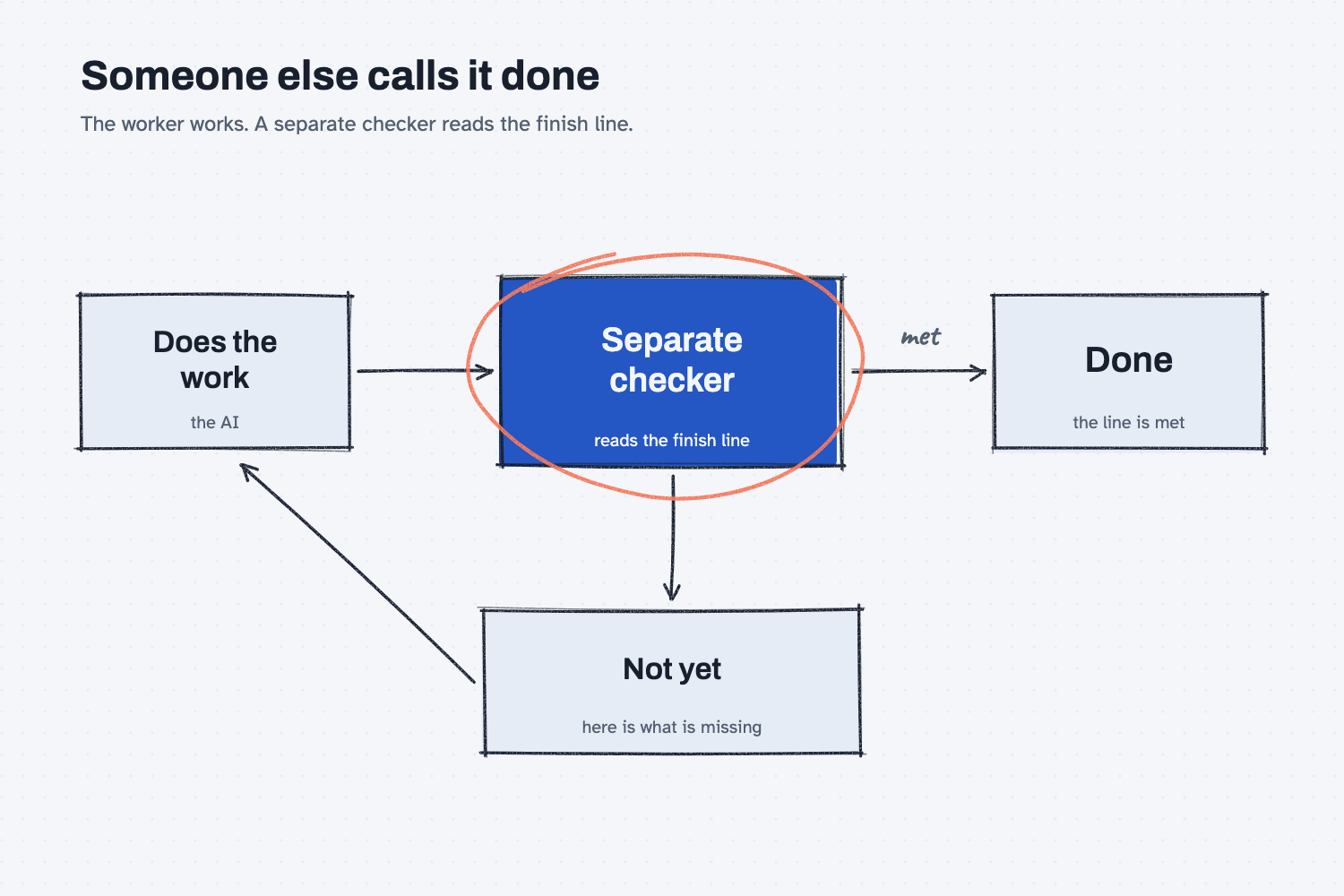
Start on the left, where the AI does a round of work. After each round, the box in the middle checks the work against the finish line you wrote, and it answers yes or not yet. If the line is crossed, the job is done and the arrow goes right. If it is not, the checker says what is still missing, and that note goes back to the AI for another round. Your part is only to write the finish line, because the loop runs itself until the checker is satisfied.
Think of it like this
Picture a machinist running a batch of brackets. When the last one comes off the machine, the machinist is sure the batch is good, and honestly they usually are. Even so, a plant does not let the operator be the only judge, because anyone who has just finished a job is too close to it to see its flaws.
So a person from quality takes the drawing and the gauge and checks the parts against the drawing. That person does not need to know how the machine runs. They only need to know what "good" means and what the operator can show them.
Keeping AI working until done follows the same pattern. The AI is the machinist, the finish line is the drawing, and a second AI plays the inspector who decides whether the batch passes.
Why does it matter at work?
Without a finish line, you end up in one of two bad spots. Either the AI stops the moment it feels finished, which is often too early, or you stay in the chat and say "keep going" after every step, which defeats the purpose of handing it the job.
Take Kevin Thao, the buyer for electronics and assembly parts at Mesquite Ridge Metal Works. A supplier sends a long price list with blank prices, some part numbers listed twice, and prices typed as text, so Excel cannot add them up. Kevin does not want to babysit the cleanup.
So he writes a finish line instead. Every row has a part number and a numeric price, no part number appears twice, and Claude must show the before and after counts. He adds one more rule, which is that no price that was already valid may change. Then he lets it work, and he comes back to a file he can trust far more than one that Claude simply called finished.
How does it work?
You state the finish line, the AI works in rounds, and after each round a separate checker reads what the AI has shown and gives a verdict. In Claude Code, a tool for working with files and commands, this is built in as a command called /goal, and the same idea applies to any AI helper.
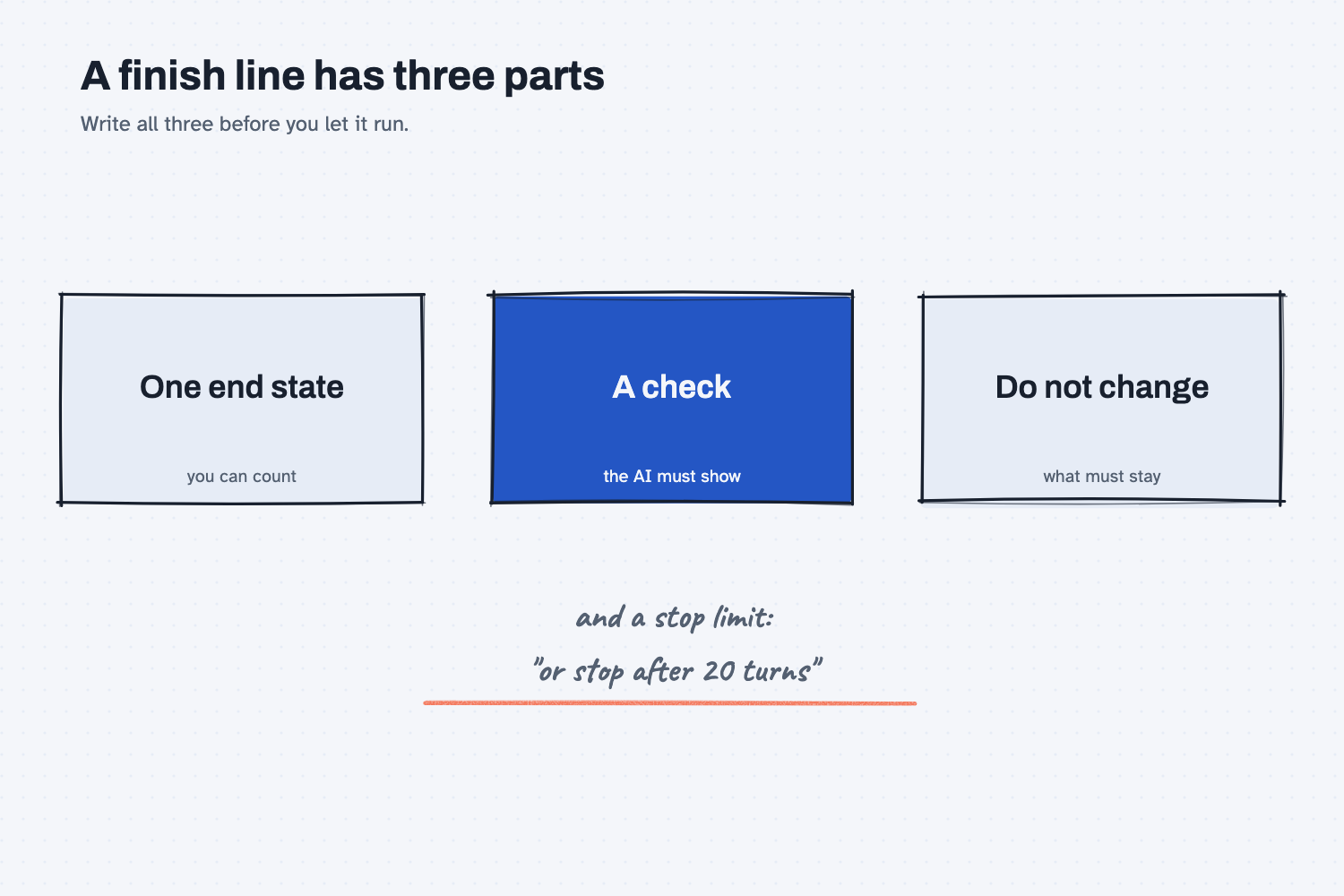
The picture above shows the three parts of a good finish line, plus the stop limit, and the paragraphs below take them in order.
You write the finish line. Claude's documentation says a good one has "one measurable end state," "a stated check" that shows how Claude proves it, and "constraints that matter," meaning anything that must not change on the way. Examples are a test result, a file count, or an empty queue.
A different model judges. After each round, the condition and the conversation so far go to a separate, smaller and faster model. It answers that the condition is not yet met, that it is met, or that it can never be met. Because a fresh model decides, the one doing the work does not grade itself.
The checker only reads. It does not open files or run anything on its own, so it can only judge what the AI has put on the page. That is why the finish line should be something the AI's own output can prove, such as a printed count, rather than "the file looks good."
You can set a limit. You can add a clause such as "or stop after 20 turns," so the job cannot run forever. Starting a goal does not change your permission settings, so in the careful mode it still asks before any action your settings do not already allow. Button names and commands change as products update, so check the current help page before you rely on them.
Where do people get it wrong?
Most failures come from a finish line the checker cannot test. These are the ones to watch for.
- The finish line is a feeling. "Make it clean" cannot be checked, but "no blank prices and no repeated part numbers" can.
- No proof is required. If you do not ask for a count or a result, the checker has nothing to read except the AI's own claim.
- Nothing says what must not change. An AI that is racing to the finish line may fix a problem by deleting good rows, so name what must stay untouched.
- There is no stop limit. Put a turn limit in the condition, so a stuck job ends and returns to you.
- "Done" is treated as "correct." The checker judges evidence, not truth, so still spot-check a few rows yourself. Make AI check its own work and count it before you argue show how.
Try this in 2 minutes
This test asks Claude to write a finish line for a price list cleanup, and then to explain why a separate checker is safer. You can use any chat tool.
- Open a new chat and paste this:
I am not technical. I want an AI helper to keep working on cleaning up a supplier price list until the job is truly done, without me checking in after every step. Write me a 'done' condition in 3 short lines: (1) one end state I can measure, (2) how the AI must prove it, (3) one thing it must not change along the way. Then, in 2 plain sentences, say why a separate checker deciding 'done' is safer than the AI that did the work deciding.
- Look for three things in the reply. The end state should be something you could count, the proof should be something the AI can show on the page, and the "must not change" line should protect what was already right.
- Rewrite any line that is vague until a stranger could check it with a pencil.
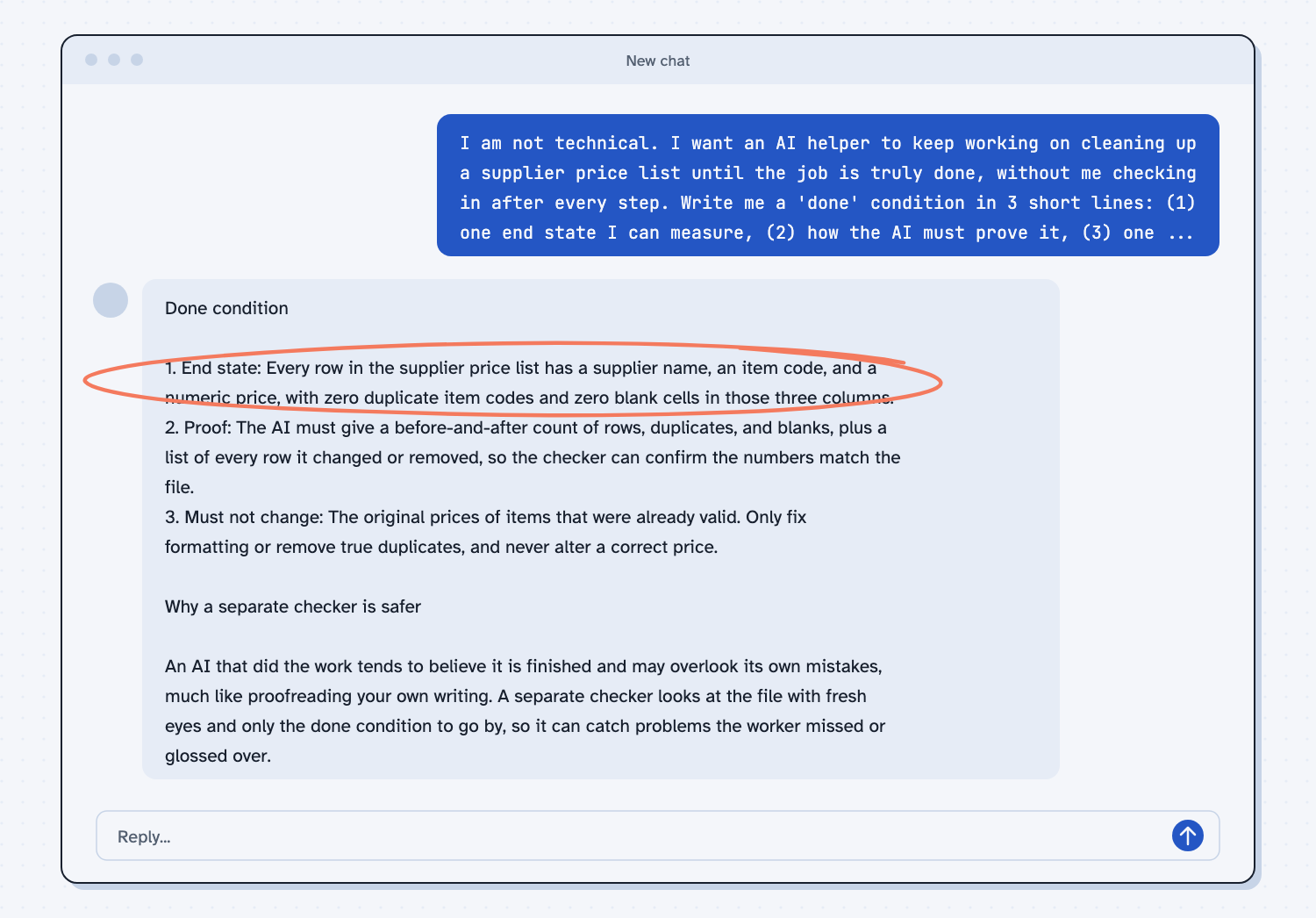
When I tried this, the end state it wrote was "Every row in the supplier price list has a supplier name, an item code, and a numeric price, with zero duplicate item codes and zero blank cells in those three columns." That is a good finish line, because you can check every part of it by counting. For the proof, it asked for "a before-and-after count of rows, duplicates, and blanks," which gives the checker numbers to read. It also explained the checker with the line "much like proofreading your own writing," which is the same point as the machinist and the inspector.
Frequently asked questions
Can AI really work for hours without me?
Yes, when the job has a finish line that can be proved and your settings allow the actions it needs. Expect it to pause for approvals, errors, or usage limits, so set a turn limit and check back at the end.
Why not let the AI decide when it is done?
It tends to believe its own work, much like a person proofreading their own writing. A separate checker sees only the finish line and the evidence, so it is more likely to notice what is missing.
What if the job cannot be finished?
The checker can judge a finish line impossible, and the loop then stops and records why. That is a useful result, because it tells you the finish line or the data needs to change.
Is this the same as a scheduled task?
No. A scheduled task starts a job on a clock, such as every Monday. A finish line keeps one job going until a condition is met.
Use it today
- Check supplier invoices against PO prices: a ready check you can turn into a finish line, such as "every invoice line matches its PO price or is listed as an exception."
- Related idea: What are AI evals.
- Related idea: Check what a fix changed.
From my training: this site teaches a finish line as the drawing the inspector holds, because a job you can check is a job you can hand off.