What Is a Claude Artifact? The Finished Page Beside the Chat
With Josh Schultz ·
Answer. An artifact is a finished piece of work, such as a document, a slide deck, a dashboard, or a small tool, that Claude builds in its own panel beside the chat instead of burying it in a reply. Anthropic describes it as "anything Claude makes for you that you'd put in front of someone." You can ask for changes, come back to it later, and share it with other people.
The picture
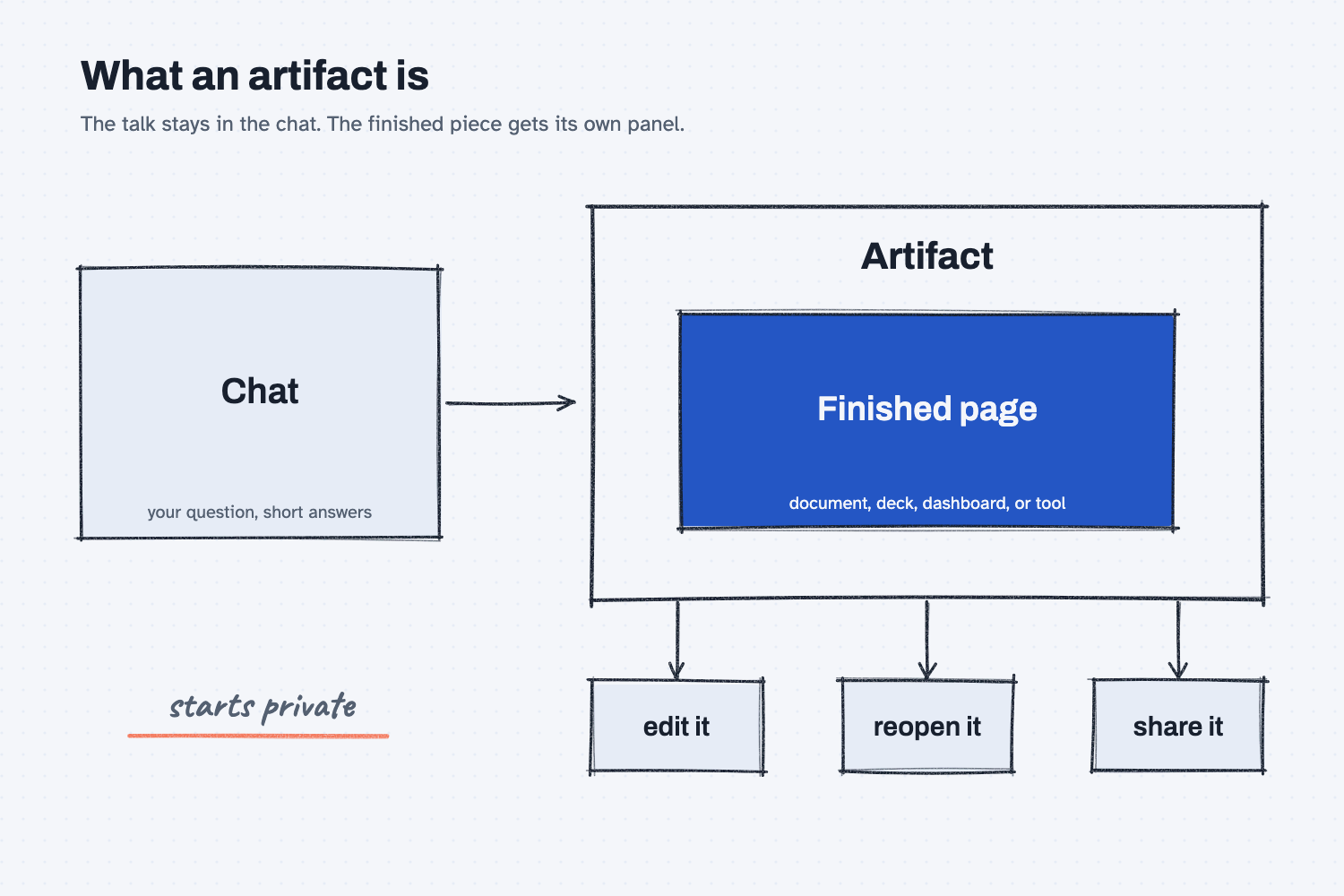
The box on the left is the chat, where you and Claude talk back and forth. The large panel on the right is the artifact, which is the thing you walk away with. The three small boxes under it are what make it different from a reply, because you can change it, find it again, and pass it on. The note reminds you that nobody else can see it until you decide to share it.
Think of it like this
Picture a customer standing at your service counter. You talk through the job together, and that talk is useful, but when it ends nothing is left except what each person remembers. Then you write up the work order, a clean sheet with the part numbers, the quantities, and the due date. You clip it to the job, and from then on everyone works from that sheet, not from the conversation.
A chat answer is the talk at the counter, and an artifact is the work order. The talk is how you get to the right result, and the work order is the thing you hand to the next person. Claude keeps the two apart on purpose, so the finished piece does not get lost in a long scroll of messages.
Why does it matter at work?
It matters because most of what you want from AI is not an answer, it is a thing you can use, such as a comparison sheet, a schedule view, or a short deck. In an artifact you can fix one line, ask for a new layout, and keep the result, without copying text out of the chat.
Here is an example. Hector Lee, the planner at Mesquite Ridge Metal Works, asks Claude for a one-page view of the week's open orders sorted by due date. Claude builds it as an artifact. He says "move the late orders to the top," and the same page updates. On Thursday he opens the Artifacts tab in the sidebar, finds that page, and asks Claude to refresh it with the new list. That is a much better day than scrolling up through a chat to find the version he liked.
Because an artifact looks finished, it also invites a little too much trust. A tidy page with neat numbers is still AI work, so the check you would give any draft still applies (see human in the loop AI).
How does it work?
There are four parts to know: what you can ask for, how you change it, where it lives, and who can see it. Menu names in the app change from time to time, so look for the idea, not the exact button.
You ask for it in plain words. You can ask in any chat, or pick an output type from the message box. Anthropic's help pages list documents, slides, designs, dashboards, spreadsheets, and whiteboards. The best way to ask is to describe what you want to see and not how to build it, as in describe the output, not the code. If you want to go further and have Claude build a working tool, use AI to build a tool shows how.
You change it by talking to it. You tell Claude what to adjust, and in some kinds of artifact you can also edit the page directly. Editing an earlier message in the chat starts a separate version with its own artifacts, so it is worth keeping the versions you like, as save every working version explains.
It is saved where you can find it. Anthropic's help page says everything you make is saved to the Artifacts tab in the sidebar, and some kinds can be exported, for example a document to Word or PDF and a deck to PowerPoint. If a document ends up as a plain text file with simple markings, that is a markdown file, which is one of the export choices.
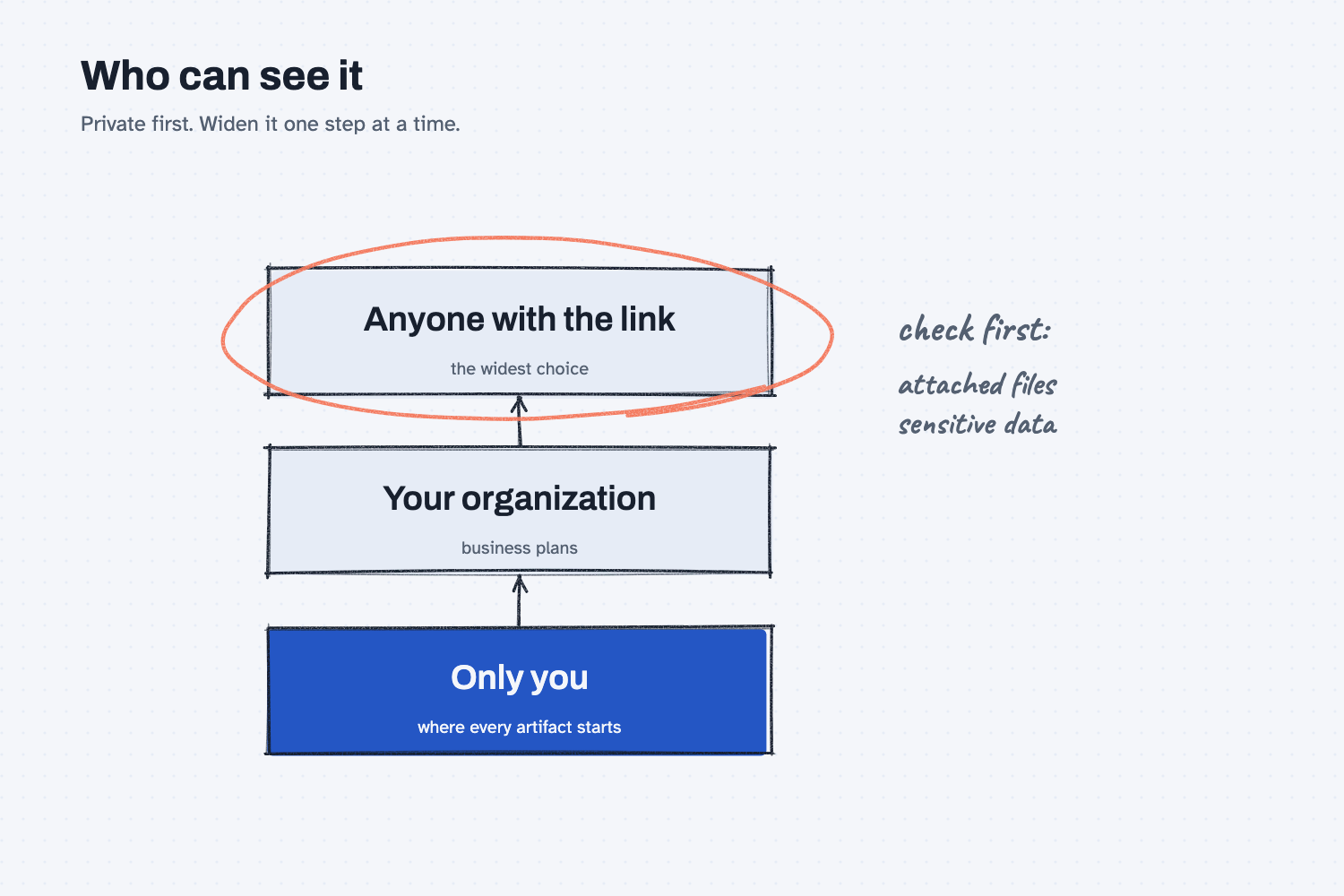
It starts private, and you choose who sees it. According to the sharing page, an artifact belongs to you alone until you share it. You can share by link, with your whole organization on business plans, or by invitation to specific email addresses. Some artifacts can also store data between visits. Whoever builds the artifact decides which data is personal and which is shared with everyone who opens it, so check that before you type anything sensitive into one. If a feature is missing in your account, the plan and the file-creation setting are the first two places to look, and set up Claude covers the account side.
Where do people get it wrong?
Most mistakes come from treating a polished page as a checked page, or from sharing too fast. These are the ones to watch for.
- Trusting the look. A clean table is not a correct table. Check the prices, the totals, and any figure Claude filled in on its own, because it can make mistakes.
- Sharing without looking. Sharing an artifact that came from a chat can also expose that chat's attached files, according to Anthropic's sharing page. Read what is attached before you send a link.
- Forgetting how sharing works. A link can be opened by anyone who has it, and a link-shared artifact that uses your connected apps shows each viewer their own data, not yours. Pick the narrowest sharing choice that does the job.
- Opening a stranger's artifact. The same page says to open shared artifacts only from people you trust, the way you would treat a file from an unknown sender.
Try this in 2 minutes
This test asks Claude to explain the difference between a chat answer and an artifact for a buyer, and to name what to check before sharing. You can use any chat tool, though real artifacts only appear in Claude.
- Open a new chat and paste this:
I am a purchasing manager and not technical. In plain words, explain how a finished document or small tool that Claude builds beside the chat (called an artifact) differs from a normal chat answer. Give one example for a buyer, and name two things to check before sharing it with a coworker. Keep it under 150 words.
- Check that the reply gives one buyer example and two checks.
- Then, in Claude, ask it to build a one-page supplier comparison for three made-up suppliers and see whether it opens beside the chat.
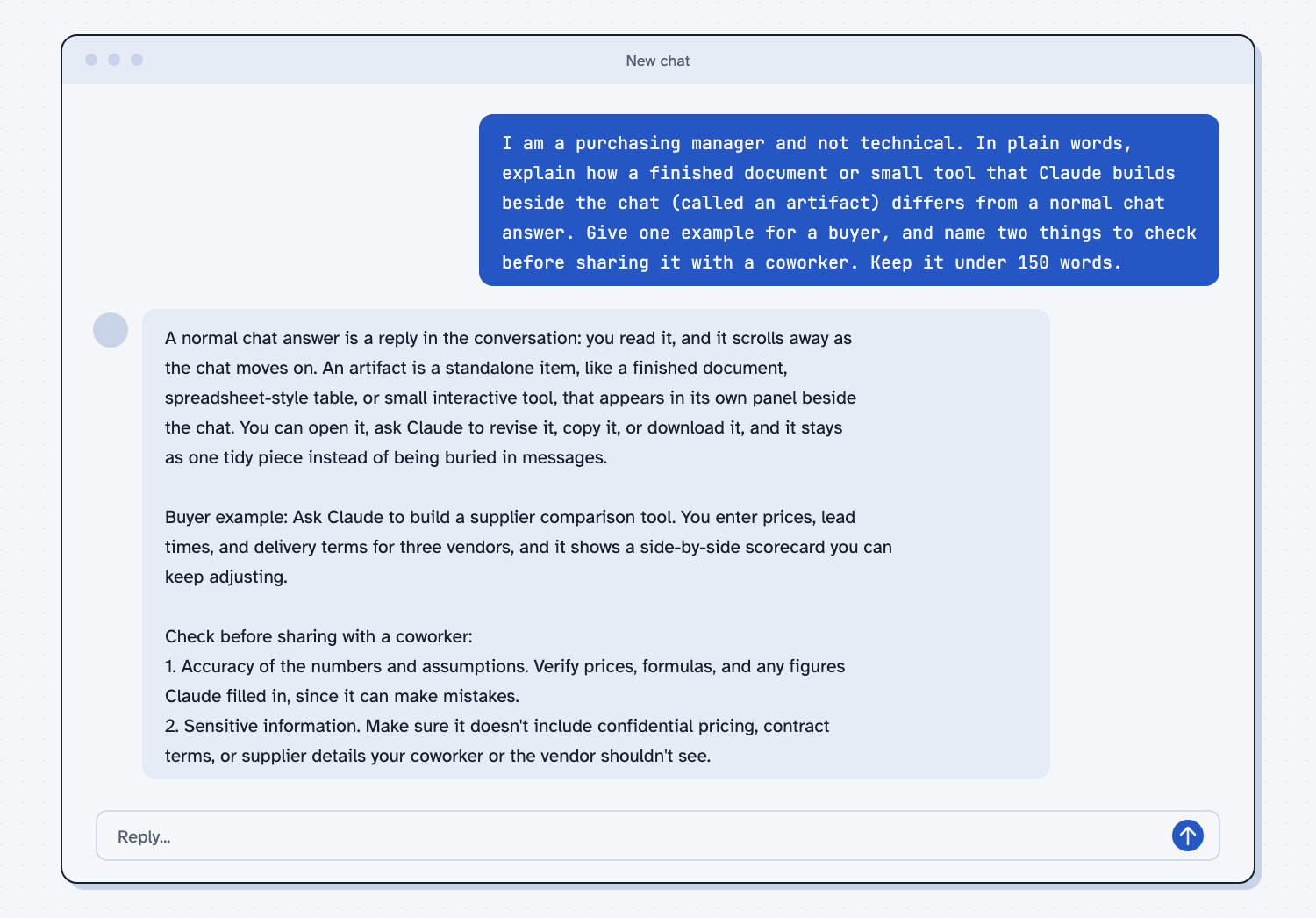
When I tried this, the reply said "An artifact is a standalone item, like a finished document, spreadsheet-style table, or small interactive tool, that appears in its own panel beside the chat." It gave the buyer example of a supplier comparison tool "you can keep adjusting."
The two checks are the useful part. The first was "Accuracy of the numbers and assumptions," because Claude "can make mistakes." The second was "Sensitive information," meaning confidential pricing or contract terms that your coworker or the vendor should not see. Those are the same two checks to run on any artifact before it leaves your hands.
Frequently asked questions
What is the difference between an artifact and a chat answer?
A chat answer is a reply in the conversation that scrolls away. An artifact is a separate finished item that opens beside the chat, which you can edit, find again later, and share.
Can other people see my artifact?
Not until you share it. Artifacts start private to you. You can then share by link, with your organization on business plans, or with named people, so choose the narrowest option that works.
Can I get an artifact out of Claude?
Often yes. Some kinds can be exported, such as a document to Word or PDF and a deck to PowerPoint or PDF. Which export choices you see depends on the kind of artifact and your plan.
Is an artifact always correct?
No. It is AI work that looks finished, so check the numbers and facts as you would for any draft, and read it again before you share it.
Use it today
- Have Claude build your quote report: a worked example of turning a messy job into a report you can reuse.
- Related idea: Use AI to build a tool.
- Related idea: Describe the output, not the code.
- Related idea: Save every working version.
- Setup help: Set up Claude.
From my training: this site teaches you to ask for the finished thing you want to see, then check it before it goes to anyone else.