What Are Instructions and Styles? Tell Claude How You Like It Done
With Josh Schultz ·
Answer. Instructions are standing notes you give Claude so you do not repeat yourself. You can set them for all of your chats or for one project, and on Team and Enterprise plans an owner can set them for the whole company. Style is the tone and shape of an answer, such as short and plain, and you can set it in your instructions or ask for it in one message.
The picture
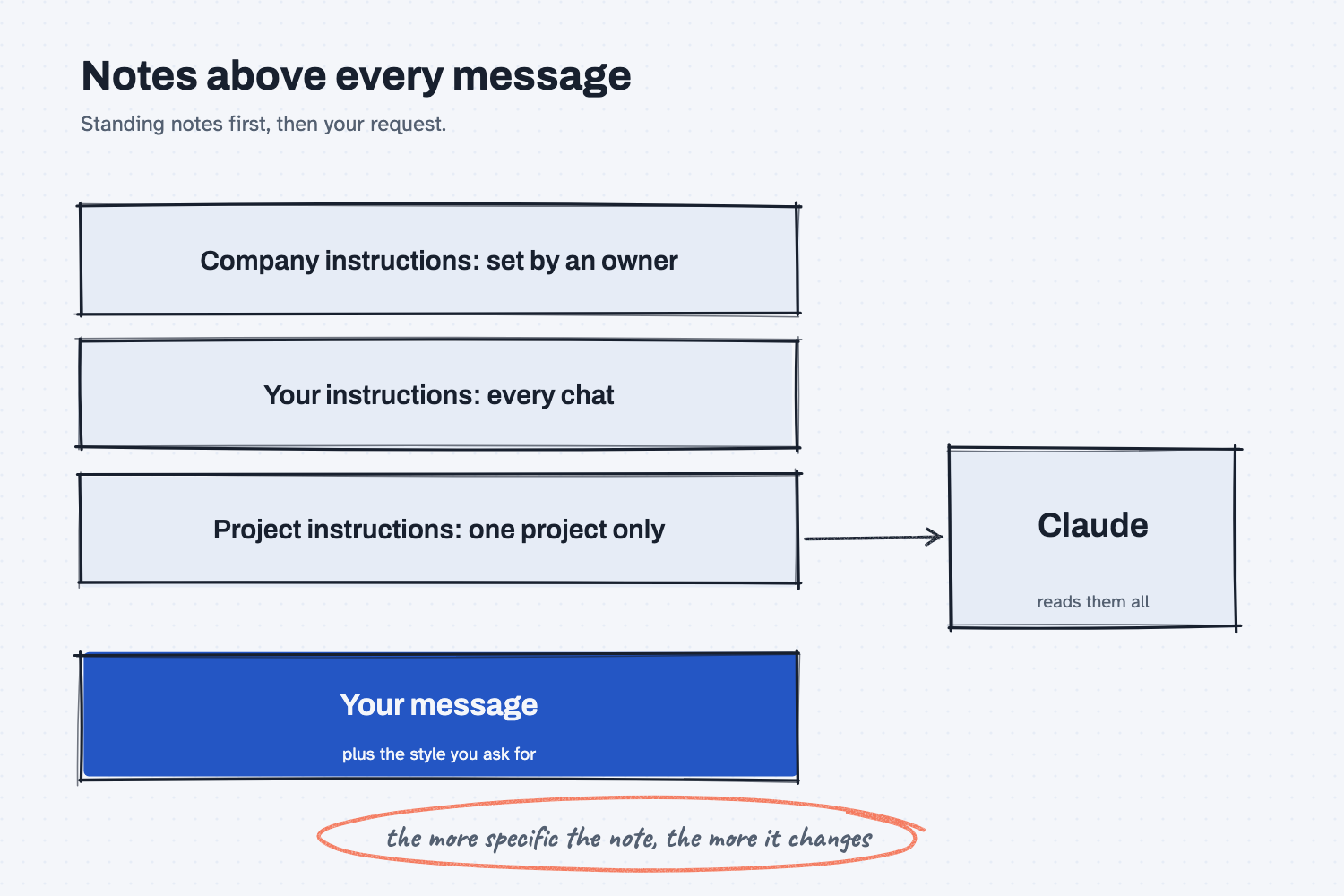
The picture shows the notes that can sit above any message you send. A company owner can set the first, you set the second for all of your own chats, and the third belongs to a single project. Underneath is your actual request, along with any style you ask for. The circled line is the lesson of the whole article, because a vague note changes almost nothing, while a specific one changes the answer you get.
Think of it like this
Imagine you are handing work to a very capable temp who has never been to your plant. You would not explain your preferences every morning. You would give them a card to keep in their wallet that says how you like things done, such as plain words and the first action first. You would put a folder on each job with the details for that job. And on the company bulletin board there might be a rule from the front office that applies to everyone.
Then, on any one task, you could add a sticky note that says "keep this one short, it's going to the plant manager." That sticky note is the style. The wallet card is your instructions, the job folder is a project's instructions, and the bulletin board is the company's.
Why does it matter at work?
It saves you from retyping the same rules, and it makes answers more alike from one day to the next. If you have ever wondered why AI answers sound generic, one common reason is that nobody told it what a good answer looks like in your shop, which why AI answers sound generic covers in more detail.
Here is an example. The purchasing team at Mesquite Ridge Metal Works wants every supplier note to be short, to open with the one thing they need, and to avoid promising a payment date. Instead of typing that every time, the team lead puts it in the project instructions for the supplier project, and every chat in that project follows it. Each buyer also keeps a personal line in their own instructions, such as "write at a sixth-grade reading level."
There is a risk to think about, because standing notes apply every time. An old instruction you forgot about can quietly shape every answer, and an instruction that contradicts another one can make Claude follow neither. The help pages also say that company instructions cannot turn off Claude's built-in safety rules, and that after you save them you should test them. If a company tool behaves strangely, ask IT, "What standing instructions does this run with, and who can change them?" The system prompt lesson explains the layers underneath.
How does it work?
There are four things to know.
Instructions for Claude apply to all of your chats. The help pages describe these as account-wide settings. Open Settings and look for Your Claude, which older versions call Account, and find the Instructions box. Good things to put there are the way you like to work, the terms you use, and the kinds of jobs you do.
Project instructions apply only inside one project. On the project's main page you choose to set project instructions, write them, and save. They are the right place for rules that belong to one job, such as the supplier-note rules above. Memory is a separate feature, and each project keeps its own, so see does AI remember past chats.
Company instructions come from an owner. On Team and Enterprise plans, owners can set instructions that cover communication standards, formatting, and compliance for everyone. The help page says that when a company instruction and a personal one both apply, the company one takes precedence, and your own instructions still apply to anything the company ones do not cover.
Style is how the answer is shaped. Tone and format can be set in your instructions, such as "short, plain, first action first," or asked for in one message. The help pages also say that skills can adjust tone and format. If your screen shows a style or tone option, it does the same job, and if it does not, just say what you want in the message.
If you have not set Claude up yet, start with set up Claude.
Where do people get it wrong?
The common mistakes are about wording and about forgetting.
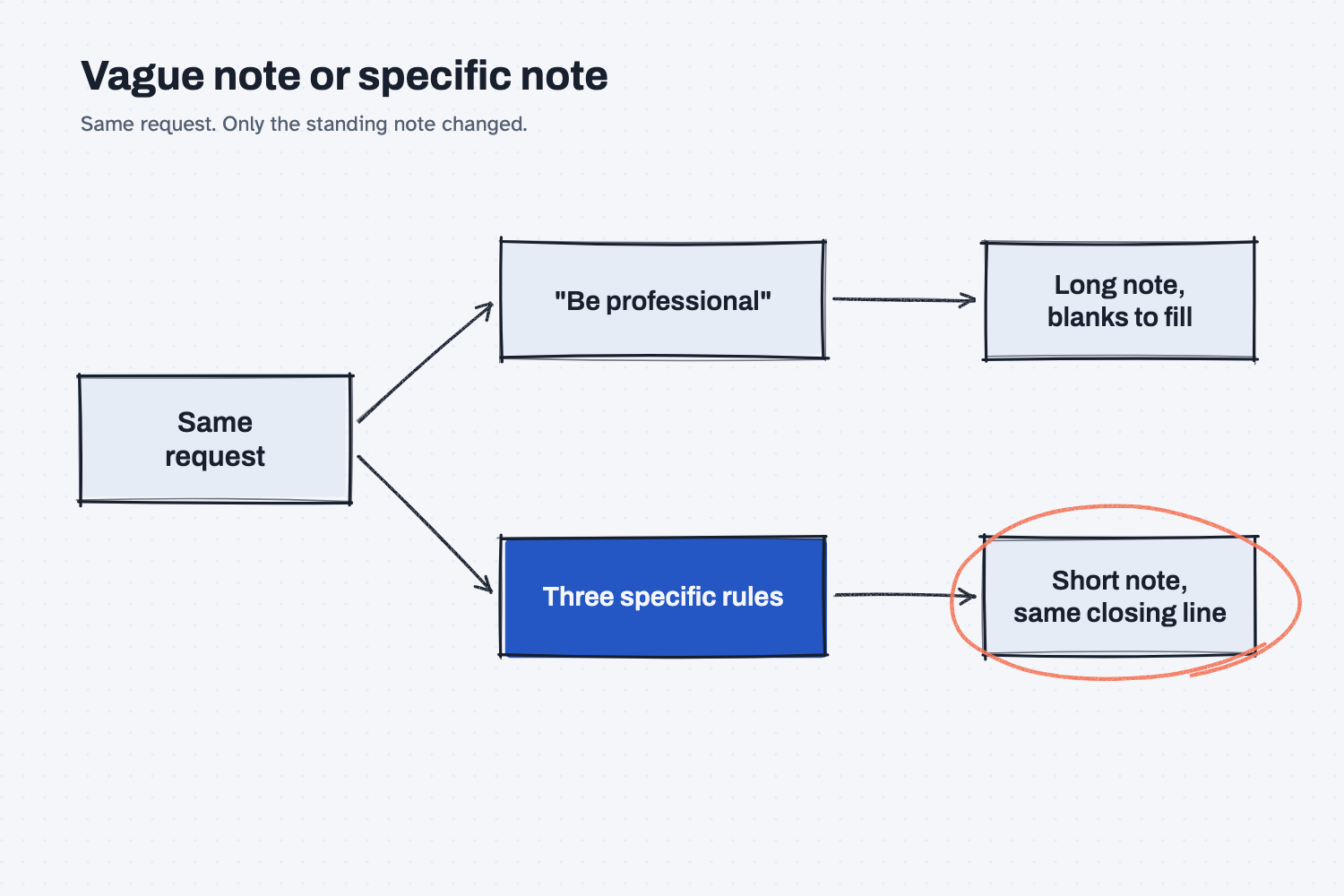
- Writing a vague note. "Be professional" tells Claude almost nothing it was not already doing, and the test below shows this.
- Treating instructions as locks. They are requests that Claude follows most of the time, so check the output.
- Putting private data in them. Instructions are standing text, so keep out anything you would not paste into every chat.
- Forgetting they are on. Read your instructions every few months and delete the ones that no longer fit.
- Writing rules that fight each other. Short and detailed at once confuses the result, so pick one.
Try this in 2 minutes
This test shows the difference between a vague note and a specific one. Open a new chat and paste the request on its own first:
Write a short note to a supplier asking for a new ship date on PO 4471.
Then paste it again with this line on top, and compare:
Standing instructions: Write at a sixth-grade reading level. Keep every note under 60 words. Start with the one thing you need. Never promise a payment date. End with: Please reply by Friday.
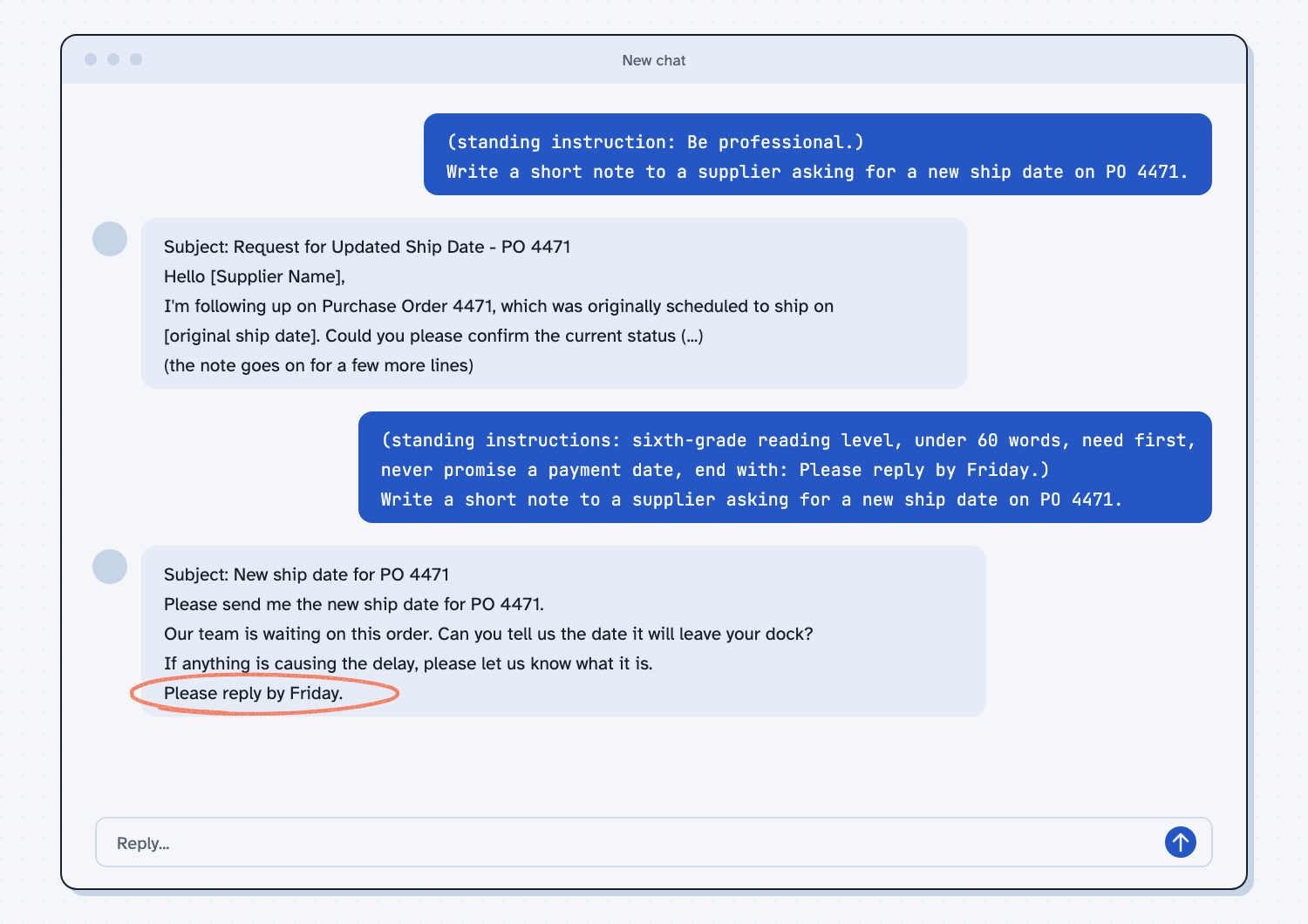
In my test, I placed the instructions where a standing instruction would sit, which is what the settings box does for you. With no instructions, the note was a long email with a subject line and blanks to fill in, and it asked for a reply "by [date]." Adding only "Be professional" gave nearly the same note.
The specific version changed it. The note opened with "Please send me the new ship date for PO 4471," it stayed short, and it ended with "Please reply by Friday." So when you write instructions, make each one something you can check, and then put the good ones in your settings or a project.
Frequently asked questions
What is the difference between instructions and a prompt?
A prompt is what you type for this one request. Instructions are standing notes that apply to many chats, so you do not retype them.
Where do I set instructions in Claude?
Open Settings and look for Your Claude, called Account in older versions, for instructions that apply everywhere. For one project, open the project and choose to set project instructions.
Which one wins if two instructions conflict?
The help pages say company instructions take precedence over your own when both apply. If your own notes contradict each other, Claude may not follow either reliably.
Can instructions make Claude always follow a rule?
No. They are requests, not locks, so check the output and test your instructions after you save them.
Use it today
- Try turn a good chat into a reusable skill to save a job's steps, not just its tone.
- Related ideas: how to write a good prompt, keep rules in one place, and what is a system prompt.
From my training: we teach people to write a rule they can check, and to put it in one place.