- Claude Code
Harness. An AI helper that works in a folder of files. It writes and fixes code, and some office people use it to build small tools.
Part 3 of 5: Build and run a twin of your shop. Before: Part 2, measure today before you change anything. Next: Part 4, try the cheap fixes before you buy a machine.
Answer. To find the bottleneck in your shop with a digital twin, look for the machine that is busy almost all the time and almost never waits for work, while the machines after it sit waiting. Then test your bad days one at a time against today: a breakdown on that machine, a missing person, and a rush order. Rank them by how much on-time delivery they cost.
Time and cost. 25 minutes. Claude Pro or higher; twin-flow is free. Who this is for. Plant managers, planners, and owners who need to know which machine to protect and which promises they cannot keep.
Every shop has one machine that sets the pace. Work piles up in front of it and the machines after it wait. Josh puts it plainly in his rules for running an operation: "Know your bottleneck, always, and set it on purpose rather than letting it happen to you." Most shops do not know it for sure. They know the machine with the biggest pile in front of it, which is often a different thing.
In Part 2 you counted today. Now you use that count twice. First, you prove which machine holds Mesquite Ridge back. Second, you find out how fragile today is: what a breakdown, a sick day, or a customer's rush order does to the number you saved as version 1.
What will I learn besides finding the bottleneck?
You will learn five methods that work on any process, from a machine shop to an office. Each has a short "why" near the end.
- Find the bottleneck first. An hour lost there is an hour lost for the whole shop.
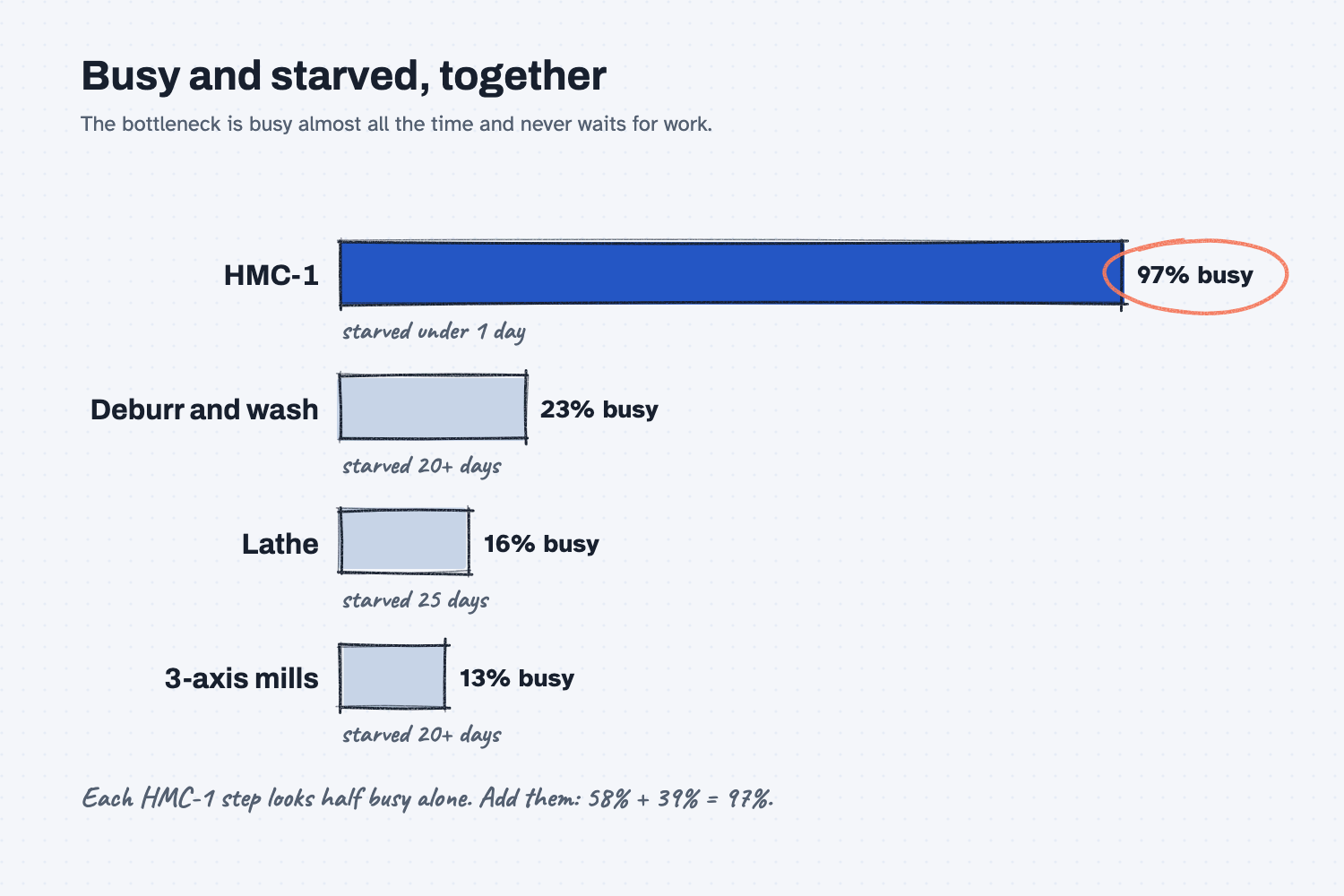
- Read busy and starved together. Busy alone can fool you. The bottleneck is busy and never waiting.
- Change one thing at a time. Each bad day is its own test, compared with today.
- Test the bad days on purpose. Learn what breaks you on a quiet Friday, not in the middle of a crisis.
- Rank by evidence. Put the bad days in order by what they cost, so you protect against the worst one first.
What do I need before I start?
You need the shop-twin folder with version 1 from Part 2: shop.yaml, data/orders.csv, and results/v1-today.md. If you have not set up Claude Code and twin-flow yet, follow Install Claude Code and Install twin-flow first (about 15 minutes, once).
- The answer-key what-if files (sample data) if you want to compare your test files with ours.
Safe use. The sample shop is made up. If you run this on your own shop, the shop file and orders go to Claude when Claude Code reads them. Check your company's AI rules first. Read the safe use notes.
How do I find the bottleneck and test bad days?
Write down everyone's guess, have Claude read busy and starved time from today's run, check the answer, then test each bad day by itself and rank them. Six steps. You choose the questions and the bad days. Claude builds the test files and runs them. The twin does the math, and you check the story against the floor.
Step 1. Write down everyone's guess first
Before you ask the twin, write down what people think. At Mesquite Ridge, Walt says HMC-1 and wants a second one. Hector says the night shift is short a machinist. Ray thinks the weld cells, because that is where the big frames pile up.
Writing the guesses down is not a formality. When the twin answers, you will see whose picture of the floor was right, and the next argument starts from that.
Step 2. Find the bottleneck from busy and starved time
Start Claude Code in your shop-twin folder and paste this prompt. It reads today's run and does not change anything.
Find the bottleneck, using today's run from results/v1-today.md. Do not change any files except the one you write.

The bottleneck is the machine that is busy almost all the time and almost never sits waiting for work (starved). The machines after it wait for it. Get busy and starved for each step from the run's report.html or run_detail.json. If two steps share one machine, judge the machine, not the steps: a step can look starved while its machine is busy with the other step.

Write results/v1-bottleneck.md with:
1. A table: machine, busy share, days starved, and the late orders that go through it.
2. Two sentences: which machine is the bottleneck, and the evidence.
3. One line on what this means for the late orders.
Two words do the work here. Busy is the share of working time a machine is running a job. Starved is time a machine sits idle because no work has reached it. The bottleneck is busy nearly all the time and almost never starved. The machines after it are the opposite: lightly busy, and starved for days, because they are waiting on the bottleneck.
On the sample, Claude wrote results/v1-bottleneck.md and named HMC-1: busy about 97% of on-shift time and starved less than a day of the 30-day run. The next busiest machine was busy about a quarter of the time. Every order at risk goes through HMC-1.
Step 3. Check the evidence, not just the answer
Read the table Claude wrote and check three things.
- Busy and starved point the same way. HMC-1 is the most busy and the least starved. If the busiest machine were also starved a lot, it would not be the bottleneck.
- Shared machines are judged as one. HMC-1 does two parts, so the twin reports two steps, and each step looks starved on its own while the machine is busy with the other. The prompt asks Claude to judge the machine. Check that it did.
- The late orders line up. Every late order in version 1 is a gearbox housing or a manifold block, and both go through HMC-1. The weld frames, which Ray suspected, all ship on time.
If Claude gives you a number in seconds, like "551,000 s of waiting," ask for it in hours. That one is about 153 hours of jobs waiting in front of HMC-1.
Step 4. Choose your bad days
Now plan the stress test. Pick the three or four bad days that really happen in your shop. For Mesquite Ridge they are:
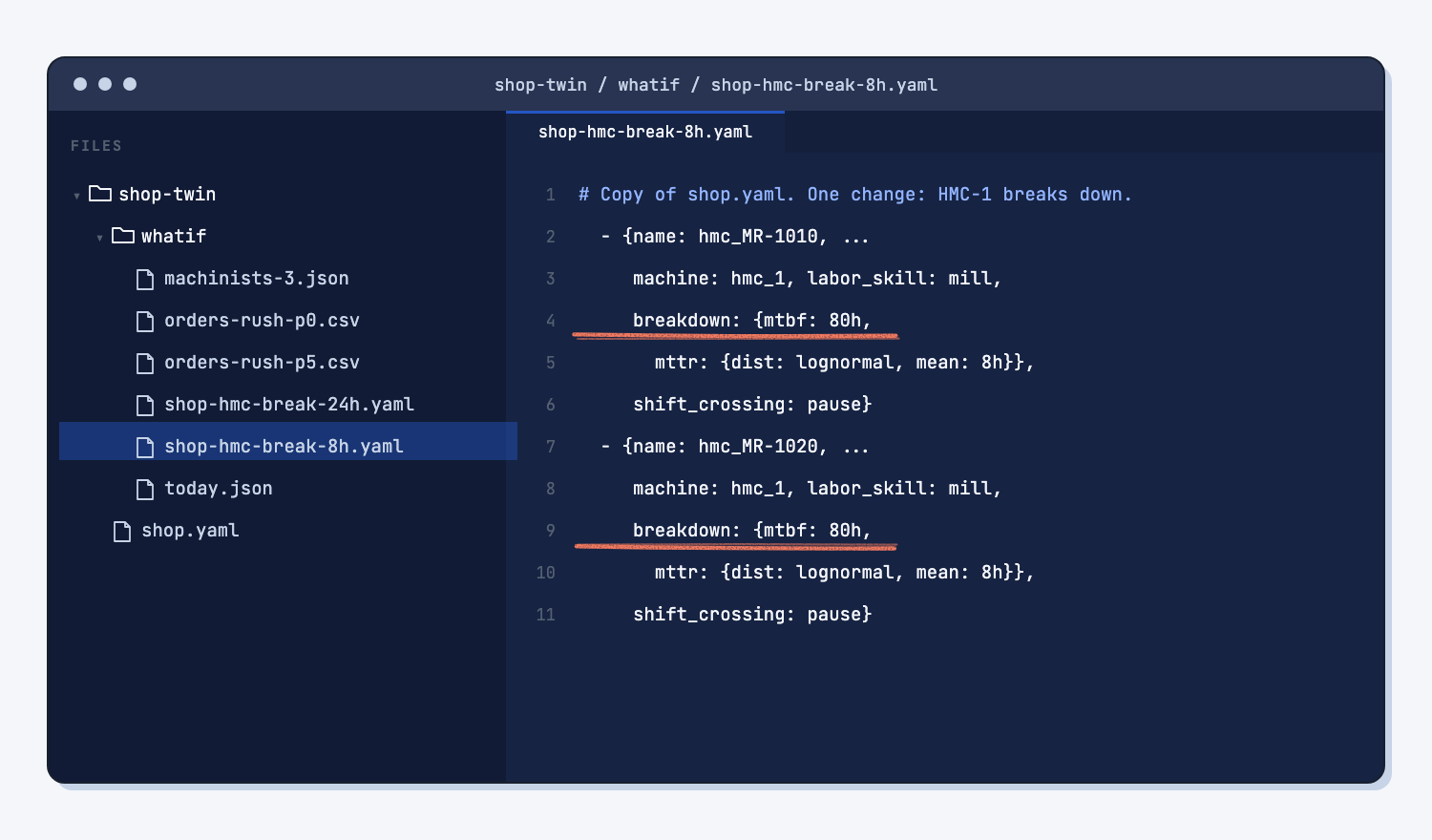
- HMC-1 goes down. Breakdowns about every 80 hours of running, with 8-hour repairs, and again with 24-hour repairs when a part has to be ordered.
- A person is out. Three machinists per shift instead of four.
- A rush order. Prairie Wheel wants 30 more manifold blocks, released Tuesday, December 1, due Friday, December 4.
Each one is tested by itself against today, so you know exactly what each one costs (change one thing at a time).
Step 5. Test each bad day against today
Paste this prompt with your bad days filled in. For the sample, use the three above. Claude makes one test file per bad day in whatif/, never touches shop.yaml or the orders, and runs each one 20 times. It takes about five minutes.
Test our bad days against today, one at a time. Compare each one to results/v1-today.md, with 20 runs each.

1. [BOTTLENECK MACHINE] breaks down about every 80 hours of running, with 8-hour repairs. Then again with 24-hour repairs.
2. A person is out: [PERSON TEST].
3. A rush order: [RUSH ORDER]. Run it twice: once with priority 5 (it goes first), once with priority 0.

Put each test in its own file in whatif/. Never edit shop.yaml or data/orders.csv. If a test needs a changed shop file or orders file, make a copy in whatif/ and change only the one thing.

Write results/v1-bad-days.md: one row per test with on-time %, late orders per run, and the change from today. Rank them from hurts most to hurts least. Then add one line on what the rush order does to the other orders.
Step 6. Read the ranking and write what it means
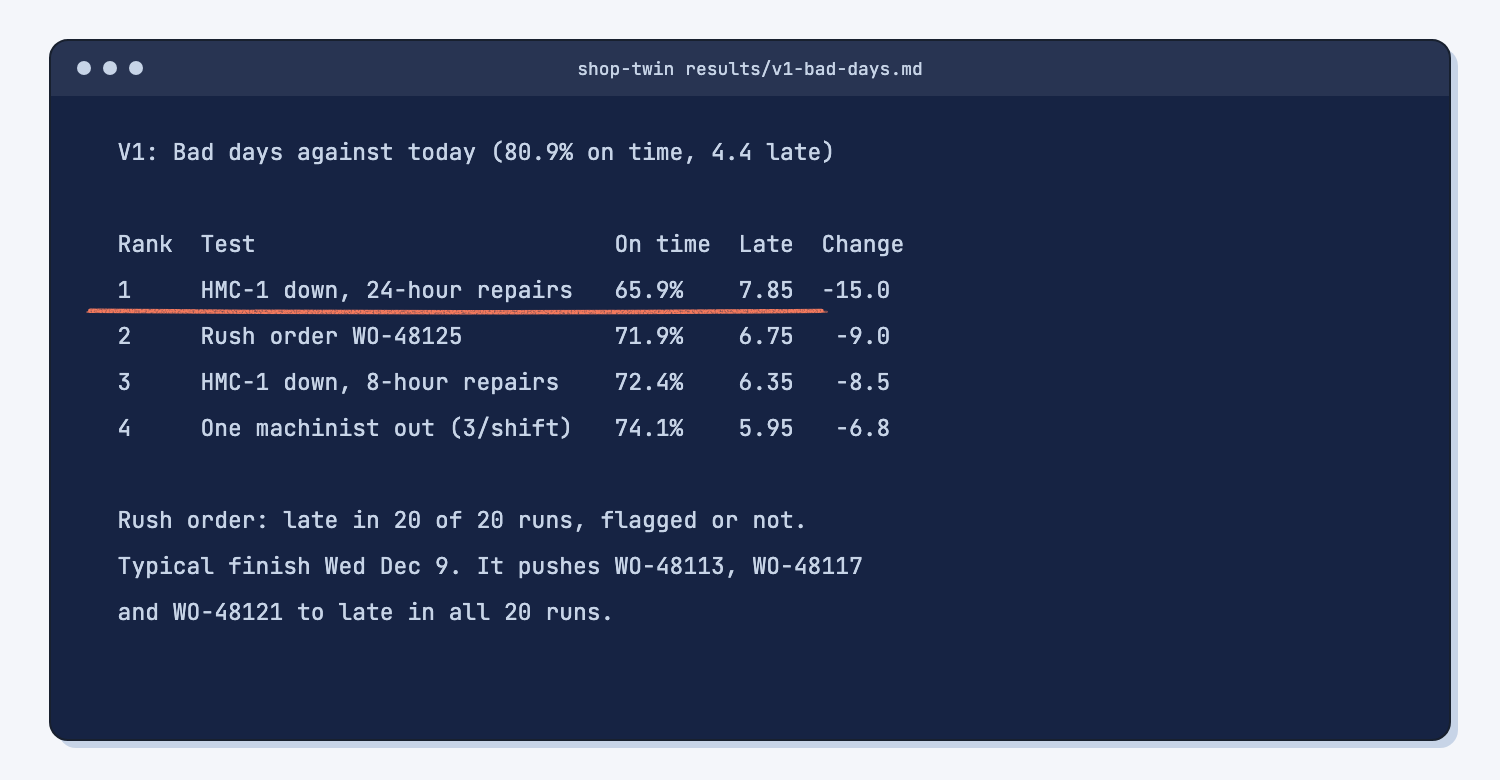
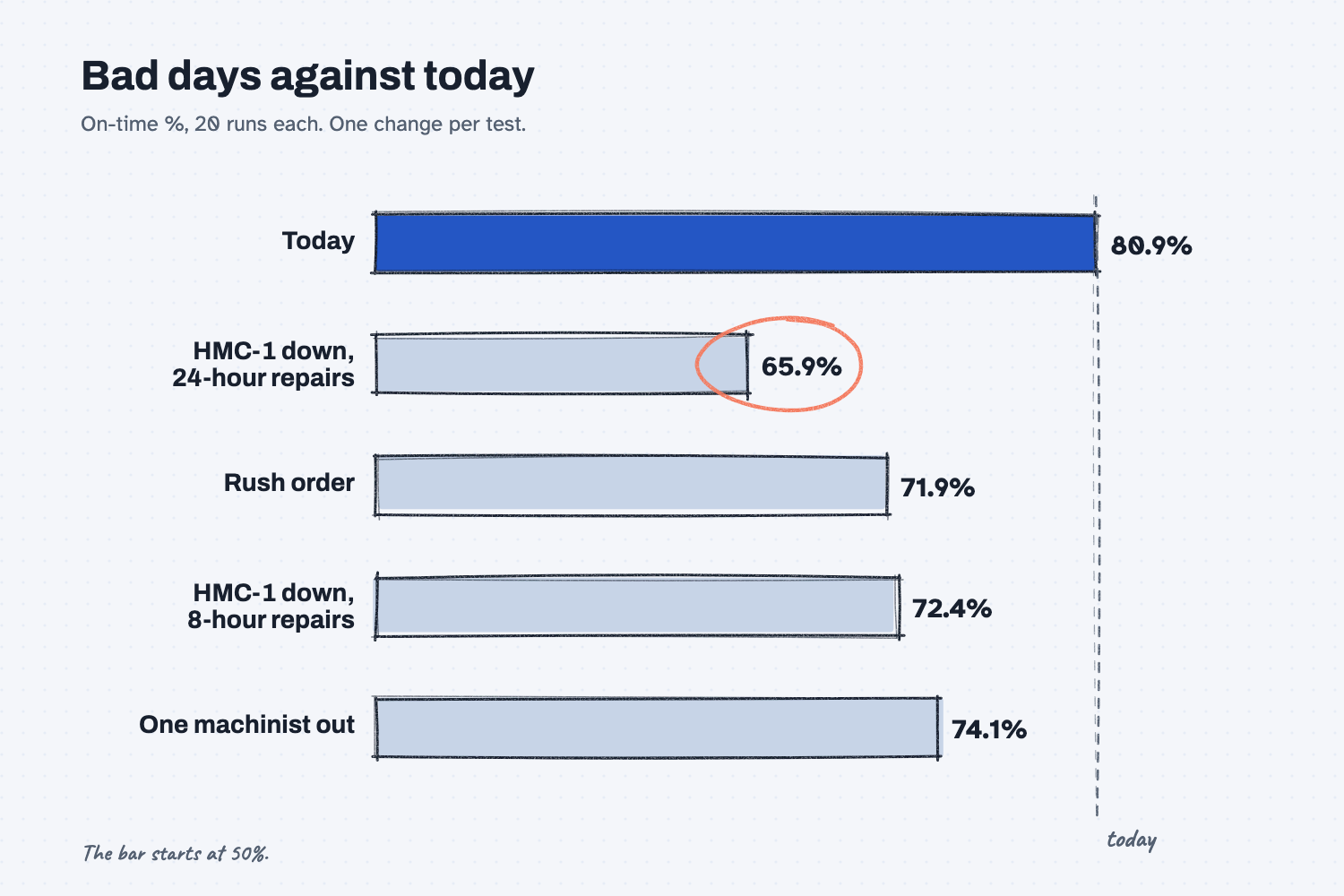
The ranking tells you where to put your protection. On the sample, a long HMC-1 breakdown costs the most, the rush order and a short breakdown cost about the same, and a missing machinist costs the least of the four. Every one of them lands on HMC-1.
Read the rush order line slowly. The rush order was late in all 20 runs, whether it was flagged to go first or not, and it pushed four other manifold orders later. Claude caught that the flag made no difference and said why: HMC-1 is already full, and a rush flag only moves a job ahead of others waiting at the same step. The honest answer to Prairie Wheel is not "yes, Friday." The twin says the order finishes Wednesday, December 9, in a typical run, and Thursday, December 10, in a bad one, so quote Thursday. That is the point of a twin: you stop quoting dates you cannot hit.
Write two or three sentences under the table in your own words, for example: "HMC-1 is our bottleneck. A long breakdown on it is the worst bad day we have. We cannot promise a Friday rush on manifolds without moving other Prairie Wheel orders." That paragraph is what you bring to the Monday meeting.
What does good look like?
Good is one machine named with evidence, and a short ranked list of bad days with real numbers. Answer key, sample data (answer-key shop file, 20 runs each). With a shop file you drafted yourself, expect the same order and numbers within about half a point.
| Test | On time | Late orders per run | Change from today |
|---|---|---|---|
| Today (version 1) | 80.9% | 4.4 | |
| HMC-1 breakdowns, 24-hour repairs | 65.9% | 7.85 | -15.0 points |
| Rush order WO-48125, flagged or not | 71.9% | 6.75 | -9.0 points |
| HMC-1 breakdowns, 8-hour repairs | 72.4% | 6.35 | -8.5 points |
| One machinist out (3 per shift) | 74.1% | 5.95 | -6.8 points |
The bottleneck: HMC-1, busy 97% of on-shift time (58% gearbox housings and 39% manifold blocks), starved under a day. The rush order itself is late in 20 of 20 runs, finishing Wednesday, December 9, in a typical run. It pushes WO-48108 from late in 9 runs to 14, and WO-48113, WO-48117, and WO-48121 to late in all 20.
One more thing worth noticing: losing a machinist hurts, but in Part 4 you will see that adding one does not help. The likely reason: with three machinists for five machines, HMC-1 sometimes waits for a person, and with four it rarely does, so a fifth has little to fix.
What can go wrong?
These are the real traps on the sample. The fix for each is in a file or a prompt, not in arguing with a number.
- The biggest pile fools you. Big weld frames take up floor space, so they look like the problem. The twin shows the weld cells busy about a quarter of the time. Space is not time.
- Steps hide a shared machine. Each HMC-1 step looks only half busy and often starved. Added together, the machine is 97% busy. Always judge machines, not steps.
- The rush flag does nothing. In this shop, the flag cannot move a rush order ahead on HMC-1, because the machine serves two steps. Do not read "flagged" as "on time." Read the finish dates.
- A breakdown is set on one step only. twin-flow stops if two steps that share a machine are given different breakdowns. Claude handled it by putting the same breakdown on both HMC-1 steps, in a copy of the shop file. That is correct: one machine, one failure clock.
- Two changes at once. If a test changes the machine and the people together, you cannot tell which one did the damage. One file, one change.
- Seconds on the screen. Ask for hours. The house rule in
CLAUDE.mdasks for this, but it can slip in a long answer.
How do I check the answer?
Check the bottleneck against busy, starved, and the late orders, then check the bad days against version 1.
- The named machine is the most busy and among the least starved.
- Every order late in version 1 passes through it.
- Each bad-day test changed one thing, in its own file in
whatif/. shop.yamlanddata/orders.csvare unchanged (ask Claude to compare them with the copies inversions/).- Each bad day's on-time % is below today's, which is what a bad day should do. If one is above, a test file is wrong.
Why does this way work?
It works because it asks the twin two different questions, in the right order: where is the limit, and how fragile is today.
Find the bottleneck first. An hour lost at the bottleneck is an hour lost for the whole shop, because everything behind it waits. An hour saved anywhere else is a mirage. So the bottleneck is where fixes pay, and where protection matters (find the bottleneck first).
Read busy and starved together. Busy alone can point at a machine that is busy because it is slow and has plenty of slack in the schedule. Starved tells you whether work is waiting on that machine or the machine is waiting on work. The bottleneck is the one that never waits.
Change one thing at a time. Each bad day gets its own file and its own run against the same today. That is how you know a long breakdown costs 15 points and a missing machinist costs 7, instead of "bad days hurt" (change one thing at a time).
Test the bad days on purpose. A twin lets you live through a breakdown on a quiet afternoon. You learn which promises are safe before a customer asks, which is the same reason people test any AI tool on cases they know.
Rank by evidence. With the ranking in hand, the conversation changes from "everything is urgent" to "protect HMC-1 first." Claude runs the tests and copies the numbers. You decide what the ranking means for the shop, which is humans plan, AI does in practice.
Frequently asked questions
What if two machines are both nearly 100% busy?
Fix the one earlier in the flow first, and test again. Often the second one drops once the first stops starving it. If both stay near full, you have two limits, and Part 4's tests will show which fix helps more.
Is the busiest machine always the bottleneck?
Usually, but not always. A machine can be busy because it is slow while work still flows past it in time. That is why you also check starved time and the late orders. All three should point at the same machine.
Why did losing a machinist hurt when adding one does nothing?
Because the limit moves. With four machinists, HMC-1 almost always has someone to run it, so the machine is the limit and a fifth person adds nothing the twin can measure. With three, HMC-1 sometimes waits for a person, so people become part of the limit. The twin shows both sides of that line.
How do I set up a breakdown if I do not know how often it happens?
Use your maintenance log. Count breakdowns on that machine in the last three months and the hours it ran. If you have no log, test a range, like every 40, 80, and 160 hours, and see whether the answer changes. If it does not, you do not need the exact number.
Can I test a rush order before I say yes to the customer?
Yes, and that is one of the best uses of a twin. Add the order to a copy of the orders file, run it, and read its finish date and what it does to the other orders. Quote that date, not the one you hope for.
Take this with you
Two prompts and a short list. Use them whenever someone says "we need another machine" or "can we take this rush?"
1. Find the bottleneck.
Find the bottleneck, using today's run from results/v1-today.md. Do not change any files except the one you write.

The bottleneck is the machine that is busy almost all the time and almost never sits waiting for work (starved). The machines after it wait for it. Get busy and starved for each step from the run's report.html or run_detail.json. If two steps share one machine, judge the machine, not the steps: a step can look starved while its machine is busy with the other step.

Write results/v1-bottleneck.md with:
1. A table: machine, busy share, days starved, and the late orders that go through it.
2. Two sentences: which machine is the bottleneck, and the evidence.
3. One line on what this means for the late orders.
2. Test the bad days. Fill in your bottleneck machine, your person test, and your rush order.
Test our bad days against today, one at a time. Compare each one to results/v1-today.md, with 20 runs each.

1. [BOTTLENECK MACHINE] breaks down about every 80 hours of running, with 8-hour repairs. Then again with 24-hour repairs.
2. A person is out: [PERSON TEST].
3. A rush order: [RUSH ORDER]. Run it twice: once with priority 5 (it goes first), once with priority 0.

Put each test in its own file in whatif/. Never edit shop.yaml or data/orders.csv. If a test needs a changed shop file or orders file, make a copy in whatif/ and change only the one thing.

Write results/v1-bad-days.md: one row per test with on-time %, late orders per run, and the change from today. Rank them from hurts most to hurts least. Then add one line on what the rush order does to the other orders.
3. Your bad-days list. Write down the three or four bad days that really happen in your shop, and test them again whenever the order book changes a lot.
What's next?
- Part 4: Try the cheap fixes before you buy a machine, the next step: test a setup cut, a WIP cap, and a job-order rule on HMC-1 before anyone signs a purchase order.
- Part 2: Measure today before you change anything, the step before.
- Part 5: Hand off the weekly "will we ship?" check, where this becomes a Monday habit someone else can run.
- Find repeat failures in a maintenance log, to get real breakdown numbers for the bottleneck.
- Find the bottleneck first, the idea behind this part.