- Claude Code
Harness. An AI helper that works in a folder of files. It writes and fixes code, and some office people use it to build small tools.
Part 2 of 5: Build and run a twin of your shop. Before: Part 1, draw the box and write your shop file. Next: Part 3, find the bottleneck and test your bad days.
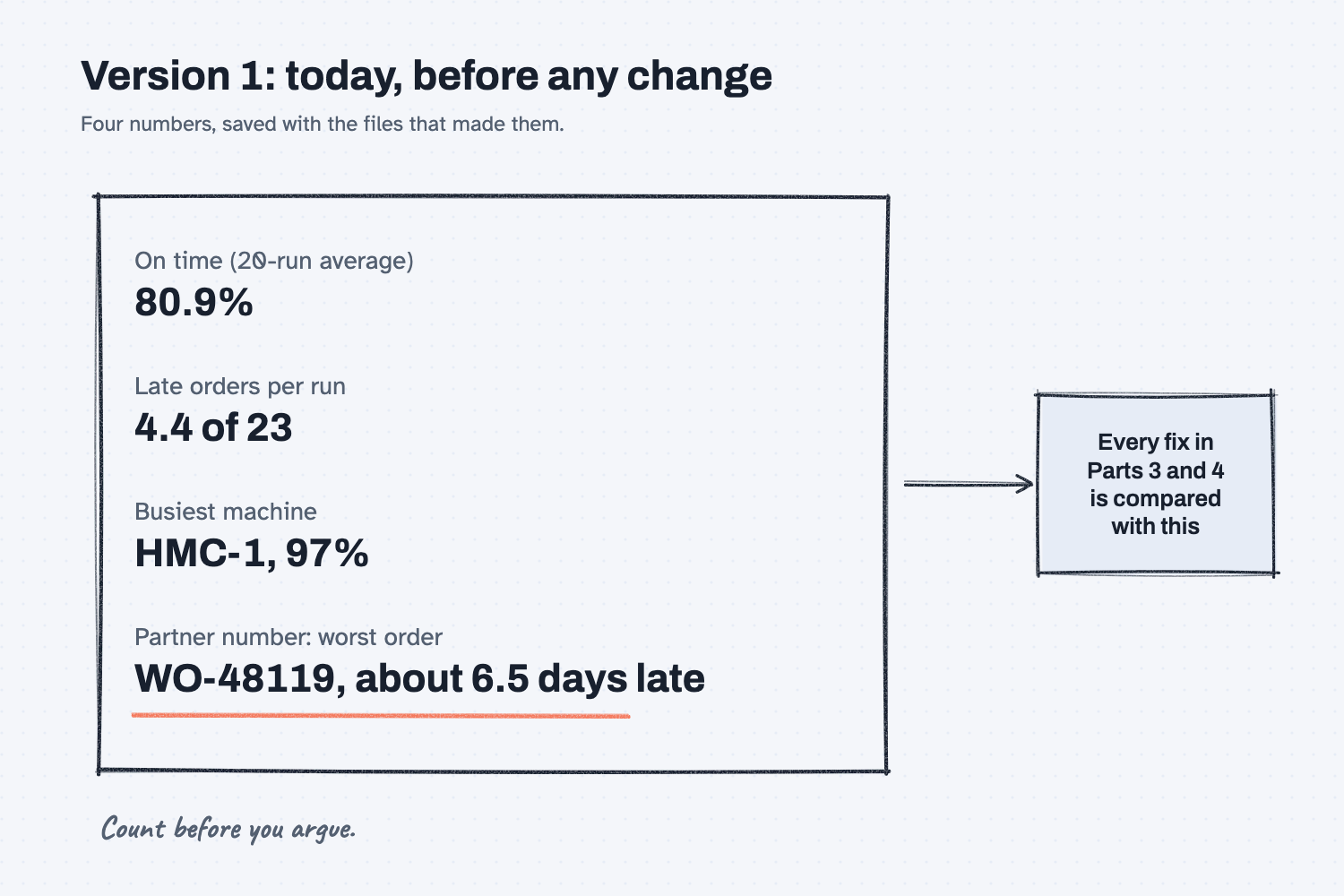
Answer. To measure today's on-time delivery with a digital twin, load your open orders into the twin, run them 20 times with nothing changed, and save the result as version 1. Write down four numbers: on-time %, late orders per run, the busiest machine, and a partner number that catches a fix that cheats. Every later test is compared with this.
Time and cost. 25 minutes. Claude Pro or higher; twin-flow is free. Who this is for. Plant managers, planners, and owners who want one honest number for today before anyone argues about fixes.
At Mesquite Ridge, Walt wants a second HMC and Hector wants one more machinist. Both are smart, and both are guessing, because nobody has counted how late the orders will really be. If you change something before you measure today, you will never know whether the change helped. So this part does one thing: it counts.
You will load the open orders, have the twin play out the next four weeks 20 times, and save what it finds. Claude runs the commands and copies the numbers. You decide what to count, and you check it against what you know about the floor.
What will I learn besides measuring on-time delivery?
You will learn five methods you can use before any improvement project, with or without a twin. Each has a short "why" near the end.
- Count before you argue. One honest number ends most debates before they start.
- Pick a partner number. Every number you chase gets a second number that catches cheating.
- Let a fixed tool do the math. The twin gives the same answer for the same files, every time.
- Make bad data stop the run. A part number that does not match stops everything, instead of quietly dropping an order.
- Save the baseline as version 1. Today's files and numbers, saved together, so every later test has something fair to beat.
What do I need before I start?
You need the shop-twin folder from Part 1, with Claude Code and twin-flow set up. If you have not set them up yet, follow Install Claude Code and Install twin-flow first (about 15 minutes, once), then do Part 1.
- Your shop file from Part 1 (
shop.yaml), or the answer-key shop.yaml if you want your numbers to match this guide exactly. - The open-orders export (sample data, made up): open-orders-2026-11-20.xlsx, the ShopLine ERP export of every open work order in Plant 1, run Friday, November 20.
Safe use. Real order books hold customer names and dates. Check your company's AI rules before you give Claude Code a real export. Read the safe use notes.
How do I measure today with a twin?
Load the orders, decide what to count, run today 20 times, check the numbers, and save them as version 1. Six steps. The plan is yours: what to count and what "good" means. Claude does the converting and running. Scripts check first, then you check.
Step 1. Put the export in the folder and start Claude Code
Copy open-orders-2026-11-20.xlsx into your shop-twin folder, open a terminal there, and type claude. Claude Code reads your house rules from CLAUDE.md when it starts, so it already knows to use 20 runs, to talk in hours, and to show you changes first.
Step 2. Make the orders file
The twin needs a plain orders file with one row per work order. Your ERP export has extra columns, title rows on top, and orders that are already done. Paste this prompt, with your export's file name in place of [EXPORT FILE].
Make the orders file for the twin from my open-orders export: [EXPORT FILE]

twinflow needs data/orders.csv with these columns, and the header on row 1:
work_order_id,customer,part,qty,start_date,due_date,priority
start_date is the release date. Dates are YYYY-MM-DD. priority is 0 for every order.

Rules:
1. Keep only orders that still need work. Skip any order that has fully shipped, and tell me which ones you skipped.
2. Every part must match a part in shop.yaml exactly. If one does not, do not fix it and do not guess. Leave it out and show me the row.
3. If an order is on hold, or anything else looks odd, leave it out and ask me.
4. Copy every quantity and date exactly as the export shows it.

Then tell me how many orders went in, the first and last due dates, and every row you left out and why.
On the sample, Claude wrote 22 orders and left out three rows, each for a reason you can check:
- WO-48099 has fully shipped, 120 of 120.
- WO-48117 says
MR1020, with no dash. The shop file saysMR-1020. Claude did not fix it, because the rule says not to guess. - WO-48124 is on HOLD for Lakeside Ag Dealers.
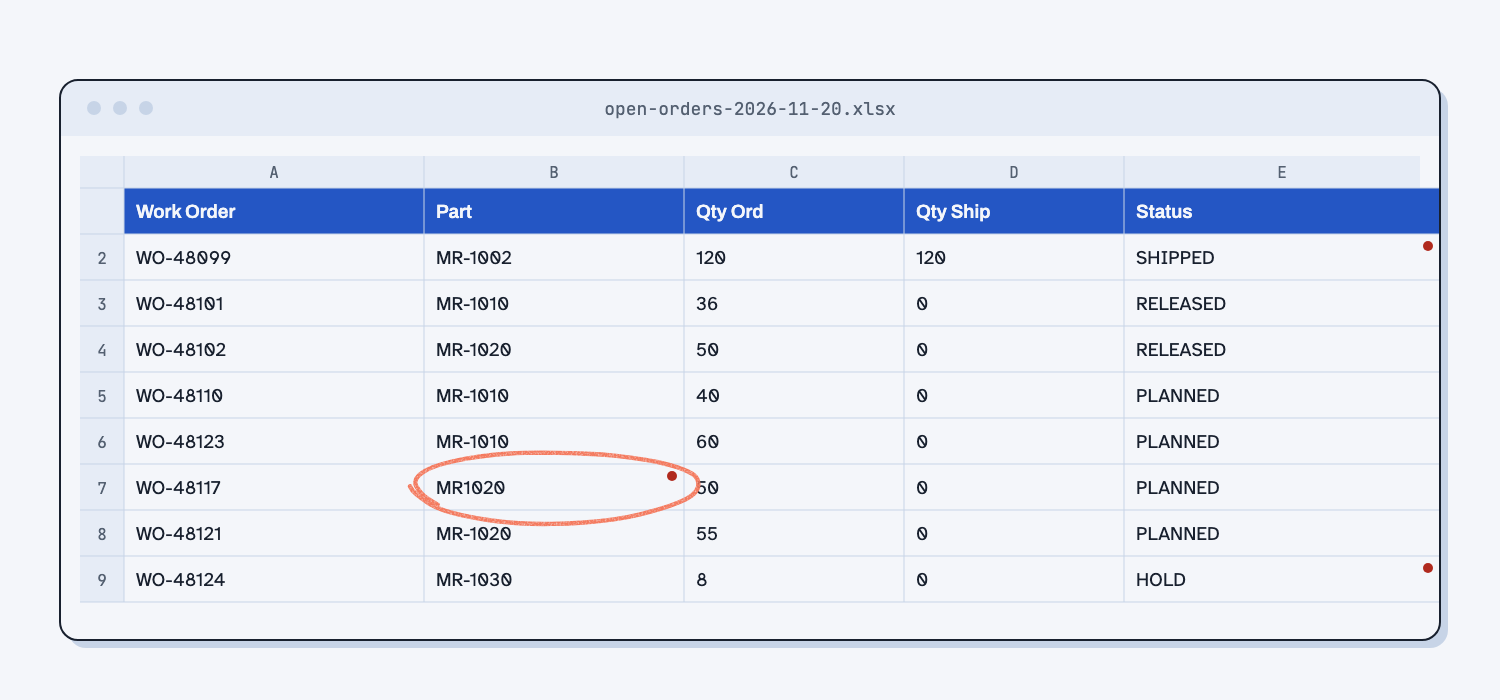
Now you decide. For the sample, tell Claude: "WO-48117 is MR-1020. Add it. Leave the HOLD order out. I will fix the part number in ShopLine myself." The last sentence matters most. The typo lives in the ERP, so fixing it there fixes it for every report, not just this one. That is fixing the system instead of the output. For a deeper look at this job, see turn your open-orders export into a twin orders file.
If a part number had slipped through, the twin itself would have stopped with a message naming the row, which is exactly what you want from a tool that does math (make bad data stop the script).
Step 3. Decide what you will count
Before you run anything, write down what you will count and why. This is the plan, and it is your job, not Claude's. For Mesquite Ridge it is four numbers:
- On-time %: the share of orders that finish by their due date, averaged over 20 runs.
- Late orders per run: how many orders are late in a typical run.
- The busiest machine and how busy it is, because that is where to look first in Part 3.
- The partner number: the worst order, meaning how many days late it runs in a bad case.
The partner number is there to catch a fix that cheats. You could raise on-time % by letting one big order slide two weeks so three small ones make it. On-time % would look better while a customer waits half a month. The worst order's days late shows that right away. Telling AI what matters, and what must not get worse, is giving AI your priorities.
Step 4. Run today 20 times
Paste the measuring prompt. Claude runs the twin twice: once to list every order, once to get the 20-run averages. It takes about two minutes.
Measure today before we change anything. Use shop.yaml and data/orders.csv exactly as they are.

1. Run: twinflow run shop.yaml --plan data/orders.csv --reps 20 --orders
2. Make whatif/today.json, a one-point sweep that changes nothing: set the machinists' headcount to the number already in shop.yaml. Run: twinflow balance shop.yaml --plan data/orders.csv --sweep whatif/today.json --reps 20
3. Write results/v1-today.md with:
- the date, and the files it used
- on-time %: the 20-run average from balance (not the "on-time" line from run, which is the first run only)
- late orders per run, from the summary.json that balance wrote
- the busiest machine and how busy it is. If two steps share one machine, add them together.
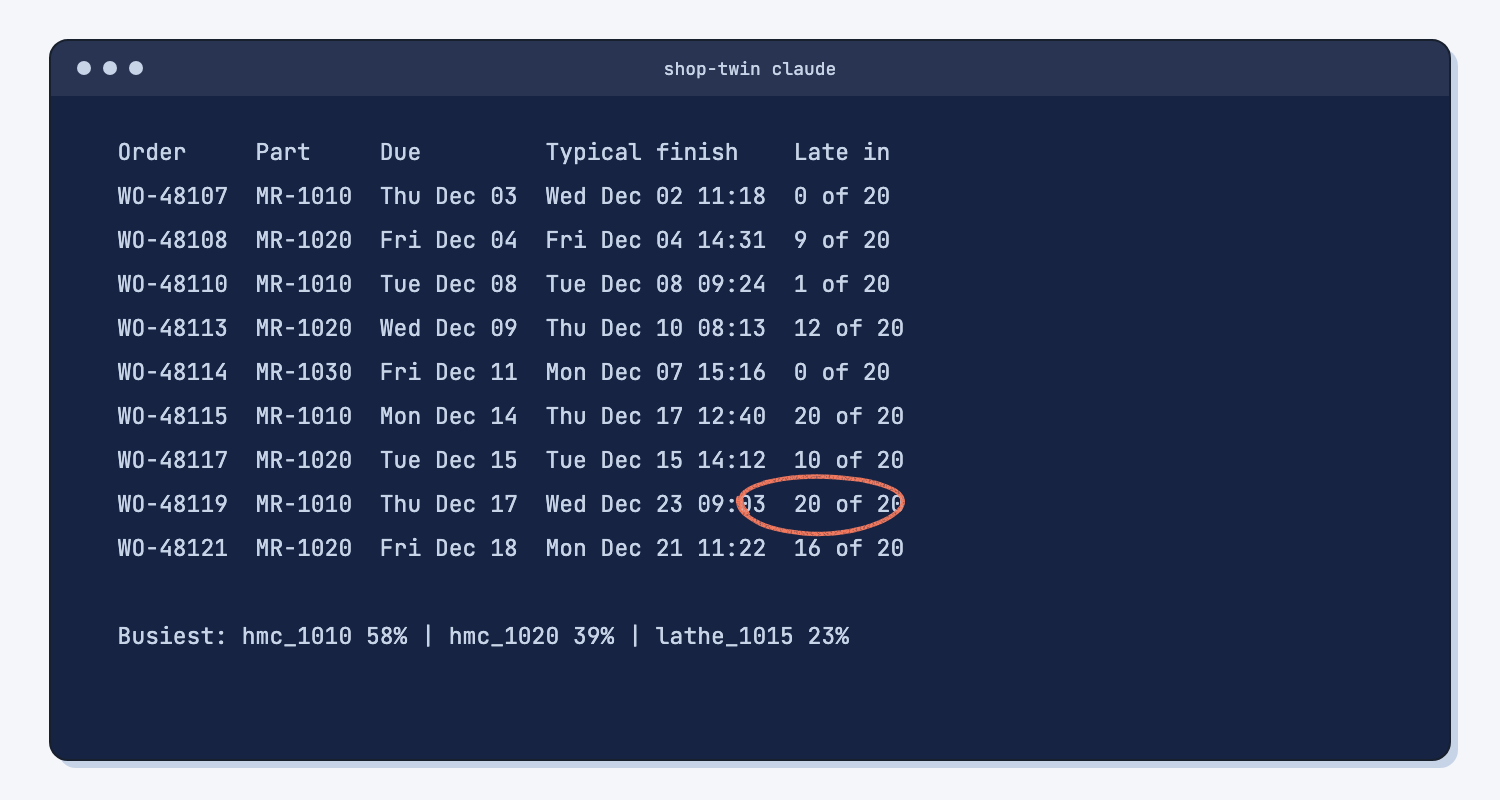
- every order that was late in 5 or more of the 20 runs, with its due date and its typical finish
- the partner number: the worst order, meaning the one whose bad-case finish is furthest past its due date, and how many days late that is
Copy every number from the twinflow output. Do not estimate. Times in days and hours, not seconds.
Why 20 runs? A real week never goes exactly to plan. Times wander, so the twin plays the weeks 20 times with normal ups and downs and tells you how often each order is late. "Late in 20 of 20 runs" means it will be late. "Late in 9 of 20" means it is a coin toss you should watch.
Step 5. Check the numbers, script first, then people
Claude wrote results/v1-today.md. Check it in two passes.
The script pass. These numbers came from the twin, not from Claude's head, and the twin gives the same answer for the same files every time (what deterministic means). So check that Claude copied them right: the on-time % in the file should match the balance line, not the first-run line. On the sample, the run command prints "on-time 17 (74%)" for the first run only, and the 20-run average is 80.9%. Saving 74% as version 1 would make every fix look better than it is.
The people pass. Read the late list with someone who knows the floor. On the sample, every order at risk is a gearbox housing or a manifold block, and both go through HMC-1. Hector should nod at that. If the twin says the weld cells are the problem and everyone knows they sit idle, stop and fix the shop file before you go on. A twin that disagrees with the floor is a twin with a wrong number in it, and the read-back from Part 1 will show you where.
Step 6. Save it as version 1
Type to Claude Code: Save shop.yaml as versions/shop-v1.yaml and data/orders.csv as versions/orders-v1.csv. Add both file names to the top of results/v1-today.md. Now version 1 is a set: the shop file, the orders, and the numbers they made. Anyone can rerun it next month and get the same answer, which is a small audit trail you can show the boss.
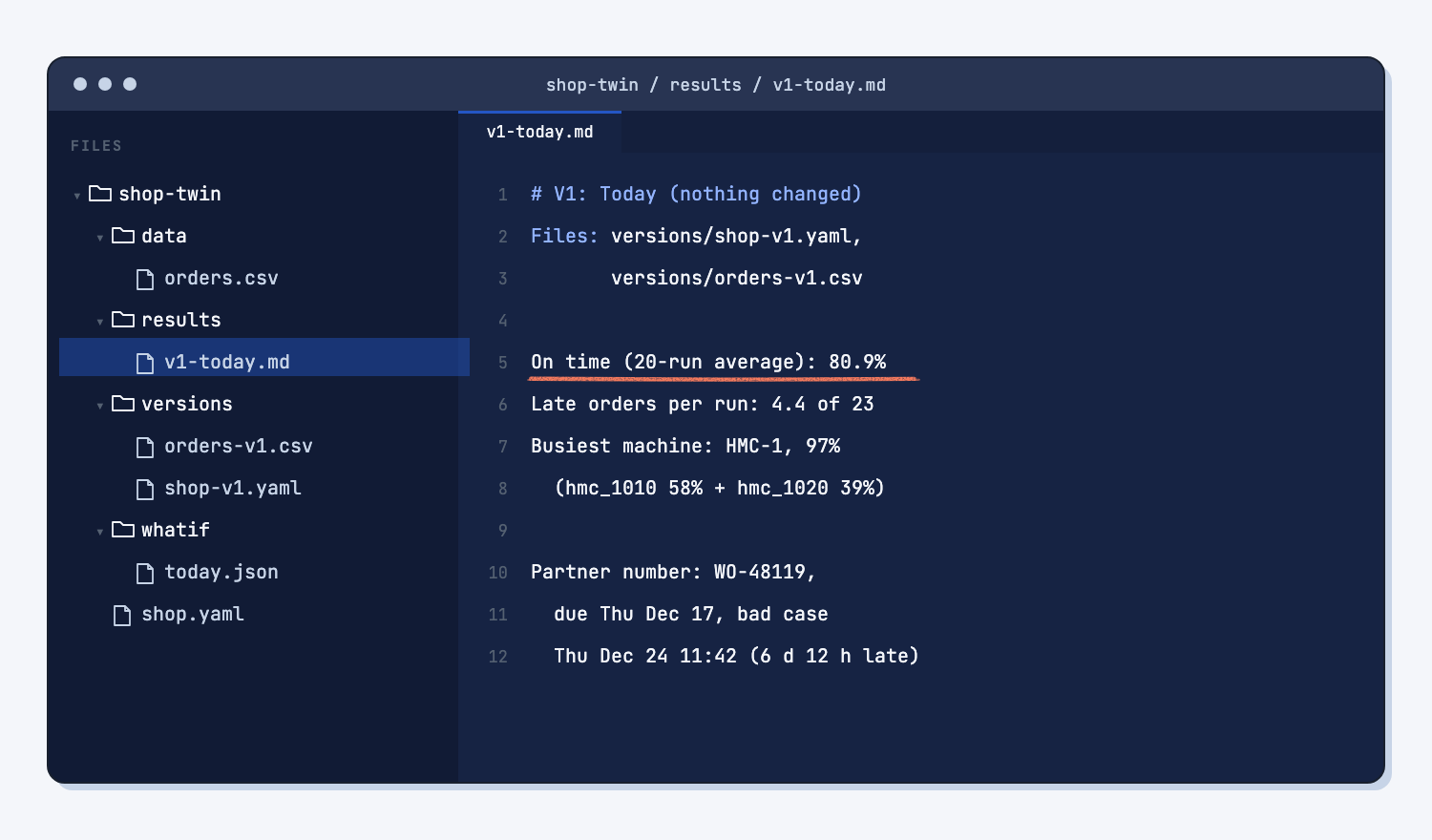
What does good look like?
Version 1 is four numbers, the list of orders at risk, and the names of the files that made them. Answer key, sample data. These come from the answer-key shop.yaml and orders.csv. A shop file you drafted in Part 1 lands close: in our build, 81.3% and 4.3 late orders.
| Number | Mesquite Ridge, today |
|---|---|
| On time (20-run average) | 80.9% |
| Late orders per run | 4.4 of 23 |
| Busiest machine | HMC-1, 97% of on-shift time (58% gearbox housings + 39% manifold blocks) |
| Partner number, worst order | WO-48119, due Thu Dec 17, bad case Thu Dec 24 at 11:42, about 6.5 days late |
Orders late in 5 or more of 20 runs:
| Order | Part | Due | Typical finish | Late in |
|---|---|---|---|---|
| WO-48108 | MR-1020 | Fri Dec 4 | Fri Dec 4, 2:31 pm | 9 of 20 |
| WO-48113 | MR-1020 | Wed Dec 9 | Thu Dec 10, 8:13 am | 12 of 20 |
| WO-48115 | MR-1010 | Mon Dec 14 | Thu Dec 17, 12:40 pm | 20 of 20 |
| WO-48117 | MR-1020 | Tue Dec 15 | Tue Dec 15, 2:12 pm | 10 of 20 |
| WO-48119 | MR-1010 | Thu Dec 17 | Wed Dec 23, 9:03 am | 20 of 20 |
| WO-48121 | MR-1020 | Fri Dec 18 | Mon Dec 21, 11:22 am | 16 of 20 |
Notice what is not on the list: the weld frames, the brackets, and the drive shafts all make their dates. That already says something about Walt's machine and Hector's machinist, and Part 3 will say it with evidence.
What can go wrong?
Each of these happened or nearly happened on the sample, and each fix goes into a file or a prompt so it cannot happen again.
- The first-run number gets saved.
runprints one run's on-time %. Only the 20-run average frombalancebelongs in version 1. The prompt says so on purpose. - A typo drops an order. A part like
MR1020would leave an order out of the twin, and on-time would look better than it is. The rule "leave it out and show me" makes the gap visible, and fixing it in the ERP stops it coming back. - Shipped or held orders sneak in. A shipped order run again looks like extra load. Check the "left out" list every time.
- Busy is split across steps. Two steps share HMC-1, and the run line shows them separately: 58% and 39%. Add them. The machine is 97% busy.
- The twin and the floor disagree. Do not argue with the twin, and do not ignore the floor. Find the wrong number in the shop file and fix it there.
- Somebody changes a file afterward. If
shop.yamlchanges after version 1, today is no longer today. That is why version 1 saves copies of both files.
How do I check version 1?
Check it against the twin's output, then against the floor.
- On-time % matches the
balanceline (80.9% on the sample), not the first-run line. - Late orders per run matches
summary.json(4.4). - Every order in the late list goes through the machine named as busiest.
- Someone who runs the floor agrees the late list is believable.
versions/holds the shop file and the orders file that made these numbers.
Why does this way work?
It works because it separates three things that usually get mixed up: what we want to know, what the numbers say, and what we think.
Count before you argue. The loudest complaint is often one memorable bad week, not the thing that costs the most. A count turns "I think" into "the twin says 4.4 orders a run, all on one machine." Arguments get shorter and fairer. This is also why the bottleneck comes first: you cannot find it until you have counted.
Pick a partner number. Ask of every number, "how could somebody hit this while making things worse?" The answer is its partner. On-time % can rise while one customer waits two weeks, so the worst order's days late rides along. You decide the partner, because only you know what "worse" means for your customers.
Let a fixed tool do the math. Claude is good at reading an export and explaining a table. It is not the right tool to simulate four weeks of a shop in its head. The twin is, and it gives the same answer for the same files, so Claude's job is to run it and copy the numbers (what deterministic means).
Make bad data stop the run. A mistake that stops the run costs you a minute. A mistake that quietly drops an order costs you a wrong decision (make bad data stop the script). That is why the prompt says "do not fix it, show me."
Save the baseline as version 1. Every fix in Parts 3 and 4 changes one thing and is compared with today (change one thing at a time). That only works if today is written down and cannot drift (save every working version).
Frequently asked questions
Why 20 runs and not 1?
One run is one possible month. Twenty runs show how often each order is late when times wander the way they really do. An order late in 20 of 20 runs needs a call now. An order late in 3 of 20 needs watching. One run cannot tell you which is which.
Will I get the same numbers if I run it again?
Yes. twin-flow uses the same random draws every time, so the same shop file and orders give the same numbers. If your numbers change, a file changed. That is useful: it makes every test in this series fair.
My numbers are a little different from the guide. Is that wrong?
If you used a shop file you drafted in Part 1, a point or so of difference is normal, because Claude names and orders steps its own way. Use the answer-key shop file if you want an exact match. What should match is the story: the same machine, the same parts at risk.
Can I load orders straight from my ERP?
Yes, from an export like the sample. The prompt works on most open-orders exports that have an order number, part, quantity, release date, and due date. Turn your open-orders export into a twin orders file goes deeper on messy exports.
What if most of my orders are already late?
Then the twin will say so, and version 1 will be ugly. That is fine. A low starting number is still the right starting number, and it makes the fixes in Part 4 easier to see.
Take this with you
Two prompts and one habit. Run them in your twin folder any time you want a fresh "today."
1. Make the orders file. Put your export's name where it says [EXPORT FILE].
Make the orders file for the twin from my open-orders export: [EXPORT FILE]

twinflow needs data/orders.csv with these columns, and the header on row 1:
work_order_id,customer,part,qty,start_date,due_date,priority
start_date is the release date. Dates are YYYY-MM-DD. priority is 0 for every order.

Rules:
1. Keep only orders that still need work. Skip any order that has fully shipped, and tell me which ones you skipped.
2. Every part must match a part in shop.yaml exactly. If one does not, do not fix it and do not guess. Leave it out and show me the row.
3. If an order is on hold, or anything else looks odd, leave it out and ask me.
4. Copy every quantity and date exactly as the export shows it.

Then tell me how many orders went in, the first and last due dates, and every row you left out and why.
2. Measure today and save it as version 1.
Measure today before we change anything. Use shop.yaml and data/orders.csv exactly as they are.

1. Run: twinflow run shop.yaml --plan data/orders.csv --reps 20 --orders
2. Make whatif/today.json, a one-point sweep that changes nothing: set the machinists' headcount to the number already in shop.yaml. Run: twinflow balance shop.yaml --plan data/orders.csv --sweep whatif/today.json --reps 20
3. Write results/v1-today.md with:
- the date, and the files it used
- on-time %: the 20-run average from balance (not the "on-time" line from run, which is the first run only)
- late orders per run, from the summary.json that balance wrote
- the busiest machine and how busy it is. If two steps share one machine, add them together.
- every order that was late in 5 or more of the 20 runs, with its due date and its typical finish
- the partner number: the worst order, meaning the one whose bad-case finish is furthest past its due date, and how many days late that is
Copy every number from the twinflow output. Do not estimate. Times in days and hours, not seconds.
3. The habit. Before any change to the shop, write down four numbers: on-time %, late orders, the busiest machine, and a partner number. Save the files that made them next to them.
What's next?
- Part 3: Find the bottleneck and test your bad days, the next step: prove which machine holds the shop back, then see what a breakdown, a missing person, and a rush order do to version 1.
- Part 1: Draw the box and write your shop file, the step before.
- Part 4: Try the cheap fixes before you buy a machine and Part 5: Hand off the weekly "will we ship?" check.
- Turn a messy ERP export into a clean report, the same clean-up idea for any export.
- Find the bottleneck first, the idea behind Part 3.