- Claude Code
Harness. An AI helper that works in a folder of files. It writes and fixes code, and some office people use it to build small tools.
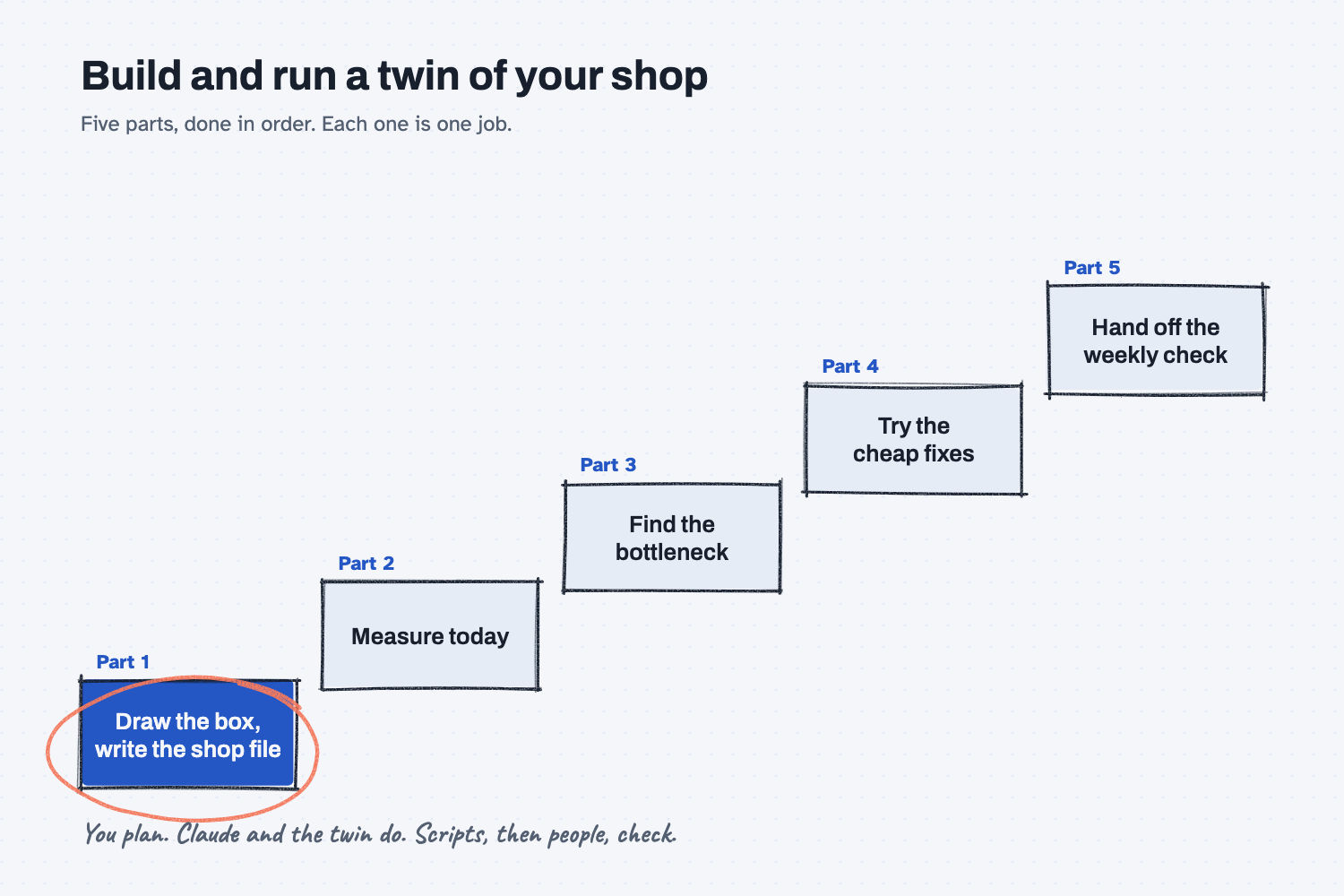
Part 1 of 5: Build and run a twin of your shop. Next: Part 2, measure today before you change anything.
Answer. To write the shop file for a digital twin, first draw the scope box: where the work starts and where it ends, in events a stranger could watch. Then let Claude Code interview you one question at a time, read your notes and routings, and draft the file. The twin's own check must pass, and you check the read-back against the floor.
Time and cost. 25 minutes, once Claude Code and twin-flow are set up. You need Claude Pro or higher (about $20 a month). twin-flow is free and runs on your own computer. Who this is for. Plant managers, planners, and owners who want to test a change on a copy of the shop before they spend money on the floor.
Every plant has the argument. Walt wants to buy a second machine, Hector says one more person on nights would fix it, and the orders keep shipping late while everyone is sure they are right. A digital twin settles it with numbers. It is a software copy of your shop that plays out the next few weeks of orders many times, with normal ups and downs, so you can see which orders will be late and what a change would really do.
This series builds one for Mesquite Ridge Metal Works, Plant 1 (a made-up shop), and then runs it the way you would run your own. Each part is one job of 30 minutes or less, done in order. This part is the most important one, because a twin is only as good as its description of the floor. If you want to see a finished twin first, ask a sample shop twin "what if?" takes 30 minutes and uses a ready-made shop.
What will I learn besides writing a shop file?
You will learn five methods that work on any process you want to improve or automate. Each one has a short "why" near the end.
- Draw the scope box first. Agree on where the work starts and ends before anyone describes it.
- Let AI interview you. One question at a time pulls out what is only in your head.
- Show AI an example. A finished sample file teaches the layout better than any description.
- Check the model against the floor. A script checks the file, then a person checks what it says.
- Save every working version. The first good file is version 1, and you can always go back to it.
What do I need before I start?
You need a paid Claude plan, Claude Code, twin-flow, and the sample files. If you have not set them up yet, follow Install Claude Code and Install twin-flow first (about 15 minutes, once).
- Claude Pro or higher. Claude Code is not on the free plan.
- Claude Code. This is Claude running on your own computer, inside a terminal, which is a plain window where you type instead of click. You type to it in normal English, the same as a chat. The difference is that Claude Code can open the files in one folder, run programs, and save new files. That makes it an agent instead of a chat, which is what this job needs, because the twin is a program somebody has to run. Claude Code asks before it does anything new, and you can say yes once or yes for the session; here is how AI tools and permissions work.
- twin-flow, the free twin tool by Josh Schultz. It needs no account and sends nothing over the internet.
- The Mesquite Ridge sample (made-up data):
- plant1-floor-notes.pdf, the plant manager's one-page notes: machines, people, shifts, closed days, and costs
- plant1-routings.xlsx, the ERP routing export: each part's steps with setup and run minutes
- shop.yaml (answer key), a finished shop file to compare with yours at the end
Safe use. The sample shop is made up. twin-flow runs on your computer, but Claude Code sends what it reads to Claude. Check your company's AI rules before you point it at real routings or costs. Read the safe use notes.
How do I write the shop file for a twin?
Start Claude Code in a folder, write the house rules, draw the scope box, answer Claude's questions, and check what it wrote. Six steps.
You plan and answer; Claude does the typing and the converting; the twin's check and your eyes do the checking. That split is the idea of humans plan, AI does, and it runs through all five parts.
Step 1. Start Claude Code in a new folder with your files
Make a folder named shop-twin in your home folder and put the two sample files in it: plant1-floor-notes.pdf and plant1-routings.xlsx. Open a terminal in that folder and type claude. (On a Mac, type cd ~/shop-twin first; the terminal reference shows how on Windows.)
Claude Code only sees the folder you start it in, which is a good thing: it cannot wander into the rest of your computer. Every part of this series starts Claude Code in this same folder.
Step 2. Write the house rules
Paste this prompt into Claude Code and press Enter. When it asks to run a command, read the line and choose yes. It takes about half a minute.
Get this folder ready for a twin of my shop. A twin is a software copy of the shop that I can test changes on before I try them on the floor.

1. Find twin-flow on this computer. Look for a folder named twin-flow in this folder, then in my home folder. If you cannot find it, stop and tell me to install it first.
2. Prove it works. Run its check on the sample shop that comes with it:
   uv run --project <the twin-flow folder> twinflow validate <the twin-flow folder>/examples/showcase/cnc-job-shop/shop.yaml
   No output means it passed.
3. Write a file named CLAUDE.md in this folder with these house rules. Put the real twin-flow folder in the first rule.

# House rules for this shop twin
- Run twinflow from this folder like this: uv run --project <the twin-flow folder> twinflow <command>
- twinflow counts time in seconds, and speed in pieces per second. Always tell me times in minutes or hours.
- Use 20 runs (--reps 20) for every test, so tests compare fairly.
- Change one thing at a time.
- Never edit shop.yaml or data/orders.csv without showing me the change first.
- Before any change to shop.yaml, save a copy in versions/ with the date and a short reason in the name.
- Every number you report comes from twinflow output or a file. Never estimate a result.

Then tell me in plain words where you found twin-flow and whether the check passed.
Claude finds twin-flow, runs its check on the sample shop that comes with it (no output means it passed), and writes CLAUDE.md, a short notes file that Claude Code reads every time it starts in this folder.
The house rules are your rules written once and kept in one place, so you never type them again (why rules belong in one place). The twin counts time in seconds and speed in pieces per second, which nobody on a shop floor thinks in, so one rule makes Claude say minutes and hours. Another keeps every test at 20 runs, so tests compare fairly. Another says "never edit the shop file without showing me first."
Step 3. Draw the scope box
Before anyone lists machines, decide where the work starts and where it ends. Paste the interview prompt below with your file names filled in. For the sample, replace [YOUR FILES, or none] with plant1-floor-notes.pdf and plant1-routings.xlsx.
Help me build the shop file for a twin of my shop. We go one step at a time.

Files to read first: [YOUR FILES, or none]

1. The scope box. Ask me where the work starts and where it ends. Both ends must be something a stranger could stand there and watch happen, like "a work order is released to the floor" or "the parts are loaded on the truck." Not a feeling or a status.
2. The interview. Ask me one question at a time, and wait for my answer. Cover the machines and how many of each, the people in each skill group and how many per shift, the shifts and closed days, the steps each part goes through with setup and run times, any step done outside (like paint), and what each part sells for and what a late day costs. If my files already answer a question, do not ask it. Tell me what you found instead.
3. The draft. Use twin-flow/examples/showcase/cnc-job-shop/shop.yaml as the example. Same layout, same kind of plain comments. Put the scope box at the top as a comment, with what is inside the box and what is outside. Convert my minutes and hours into the seconds and rates twinflow needs, and put my original number in a comment next to each one.
4. The check. Save it as shop.yaml in this folder, run twinflow validate on it, and fix the file until validate passes.

Do not invent anything I did not tell you or my files do not say. If something is missing, ask me.
Claude reads both files first and tells you what they already answer: the machines, the crews, the shifts, Thanksgiving, the routings, the outside powder coat, and the money. Then it asks its first question, where the work starts, with choices like "a traveler is placed on the rack" or "the casting arrives from Plant 2."
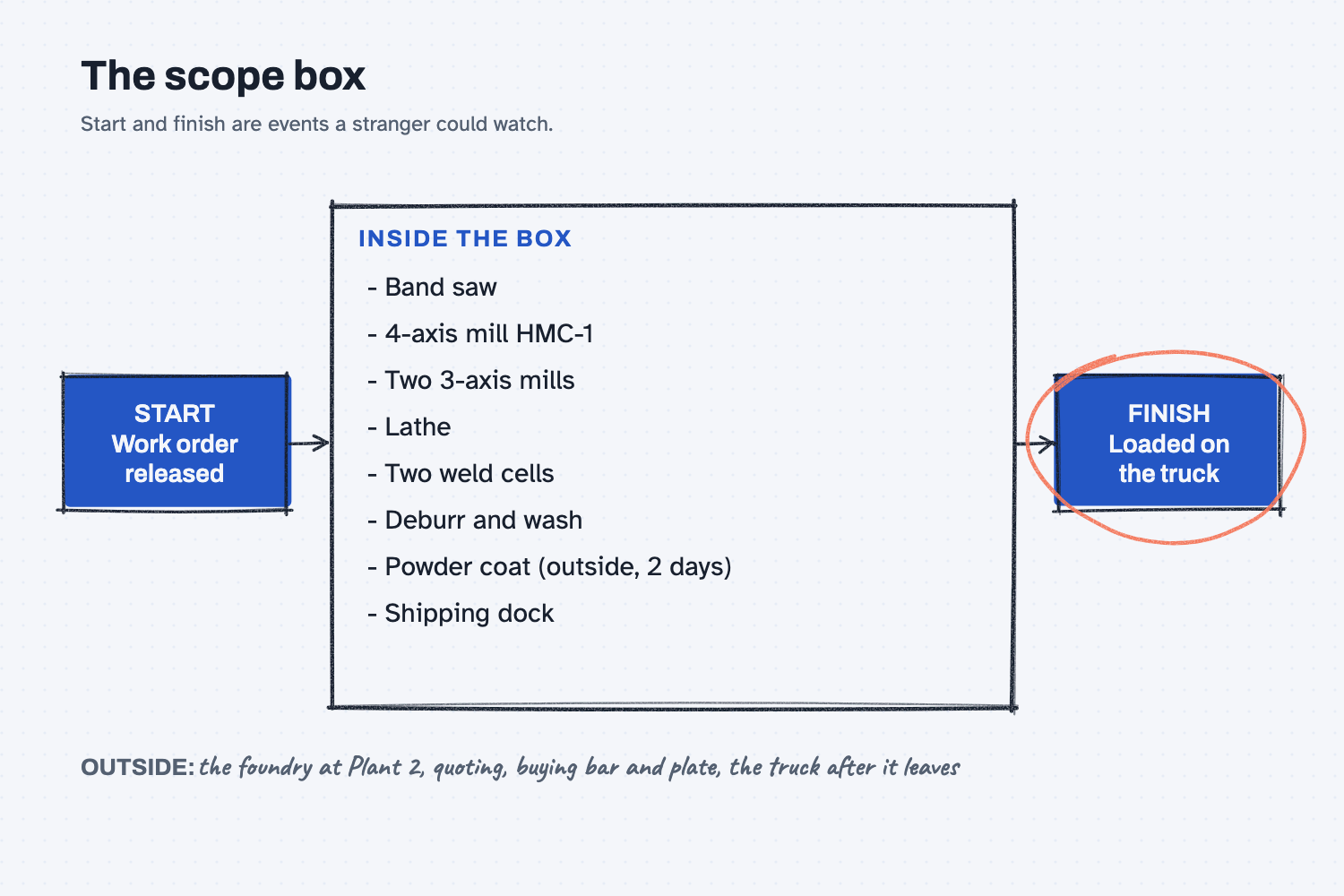
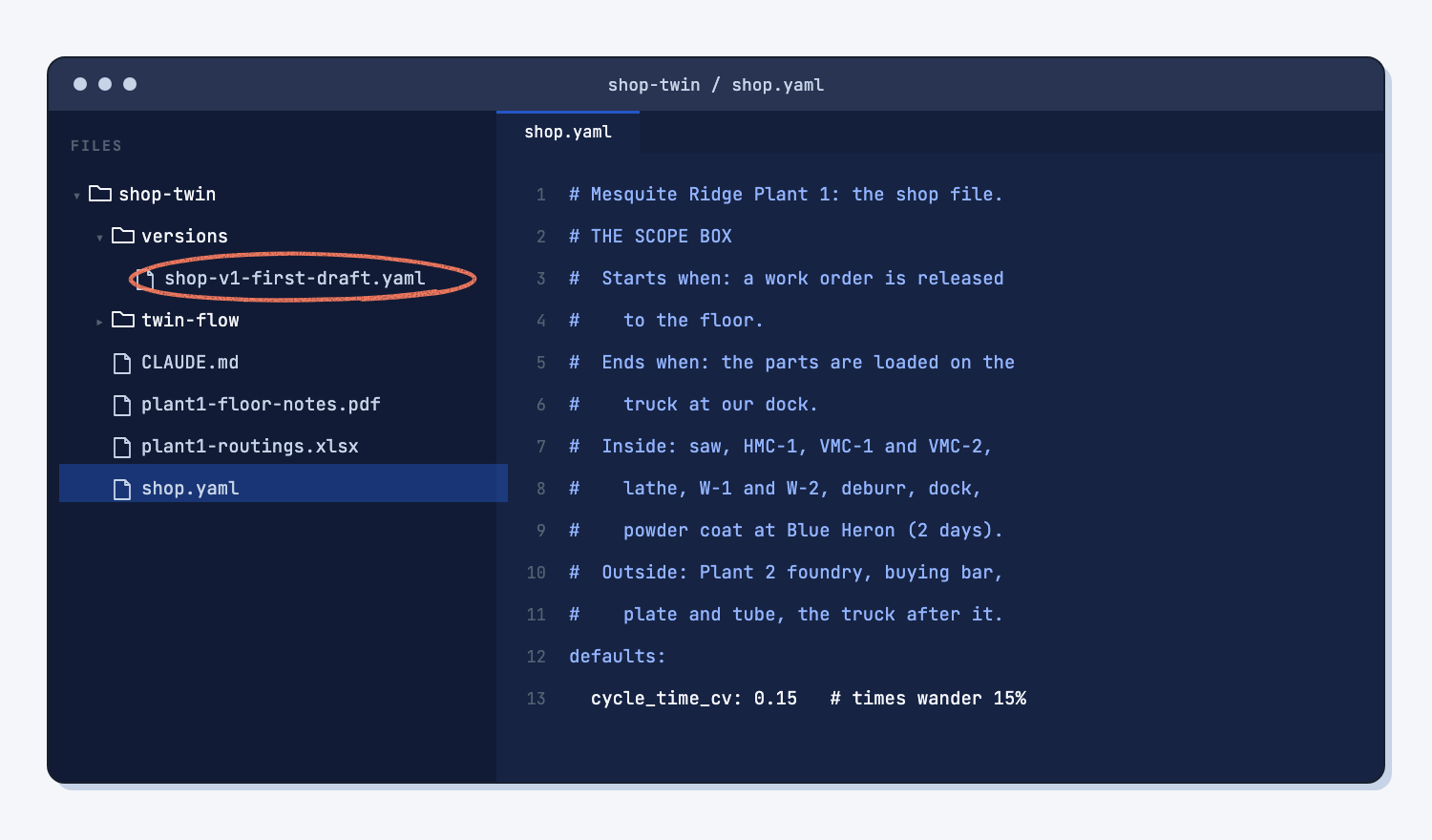
Answer with an event a stranger could stand there and watch. For the sample, the box starts when "a work order is released to the floor" and ends when "the parts are loaded on the truck at our dock." Everything between those two events is in the twin. The foundry, quoting, and buying steel are outside it. The test is simple: could a visitor point at the moment it starts and the moment it ends? "When the job is ready" fails that test, because nobody can watch "ready."
Step 4. Answer Claude's questions one at a time
Claude asks one question, waits, and asks the next. Answer in plain words, the way you would tell a new supervisor. With the sample, the questions were about things the files do not say, and they are the same things a good industrial engineer would ask:
- How do the 2 days at the powder coater count? (Calendar days, weekends included, starting when the part is ready.)
- Is the machinist at the machine for the whole run, or only the setup? (The whole run, for every step.)
- Is the flatbed load the same dock and the same clerk? (Yes, and it ties up the dock.)
- How far do real times wander from the routing times? (About 15%.)
- Do any steps scrap parts? (Leave scrap out for now.)
- Which Monday is time zero? (Monday, November 23, at 6:00 am, Central time.)
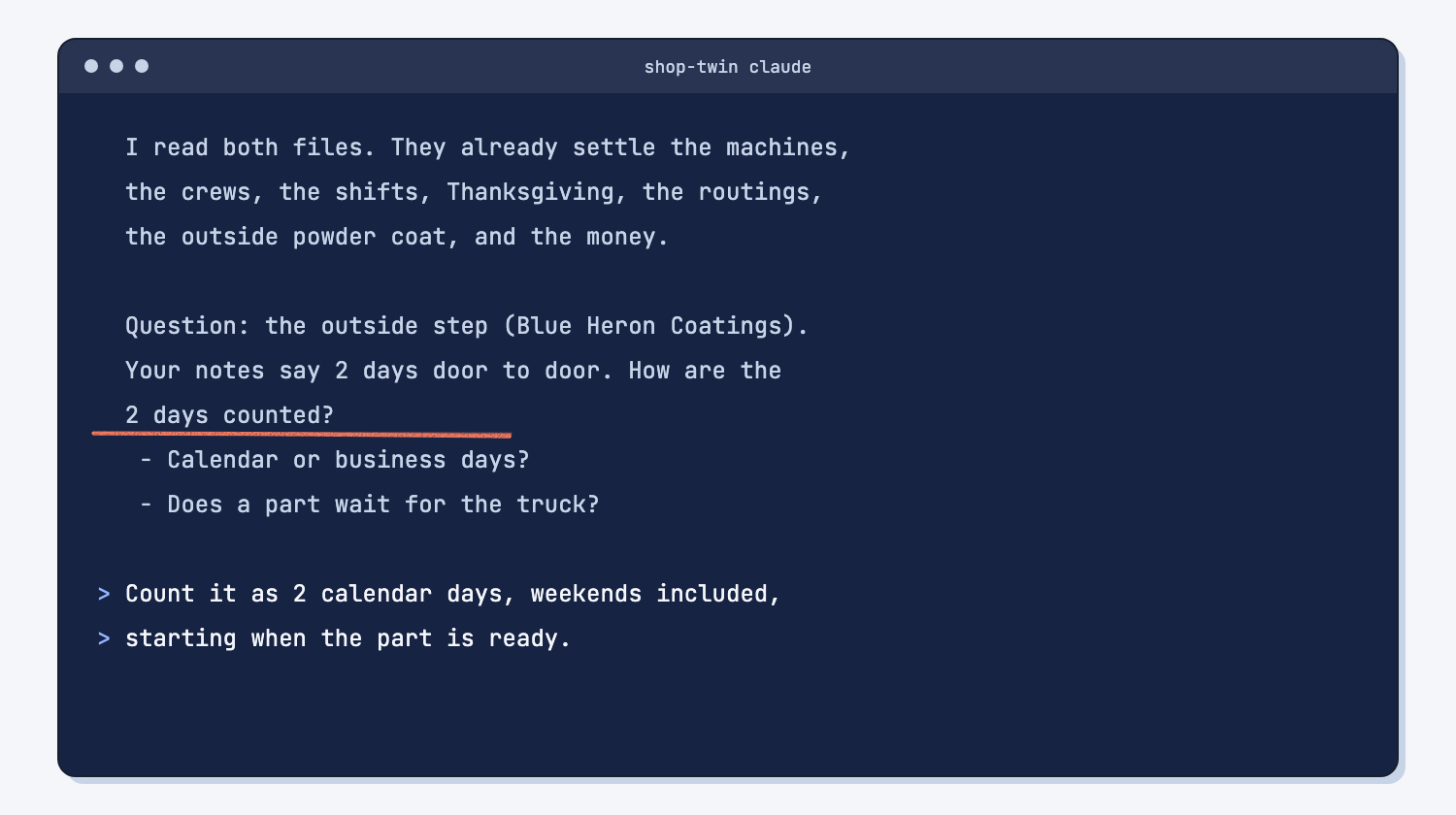
This is the part people skip, and it is where a twin goes wrong. The prompt says "do not invent anything," so when the notes do not give a number, Claude asks instead of copying one from the example. When it has enough, it writes shop.yaml using twin-flow's sample shop file as the pattern (why one good example beats a long description). It converts every minute into the seconds the twin needs, keeps your original number in a note beside it, and runs the twin's check until it passes. A shop file the check rejects never gets used, which is the same idea as making bad data stop the script.
Expect 9 or 10 questions and about 12 minutes. When it finishes, Claude lists what it wrote and the choices it had to make, such as "the outside coater is set up as a stand-in machine with no limit."
Step 5. Check the read-back against the floor
The twin's check only proves the file is well formed. It cannot know that your lathe setup is really an hour. A person has to look, so ask Claude to read the file back in plain words.
Read shop.yaml back to me in plain words, so I can check it against the floor. Do not change anything.

1. One table with a row for each step: part, step, machine, who runs it, setup time, and run time for one piece. Times in minutes or hours, not seconds.
2. Then list each machine and how many there are, the people in each group per shift, the shift hours, and the closed days.
3. Then list anything in the file that did not come from me or my files, like a value copied from the example.
Mark any number you are not sure of with a question mark.
You get one table with a row for each step: part, step, machine, who runs it, setup time, and run time, in minutes and hours. Walk it like a traveler. For the sample, HMC-1 shows 2.5 hours of setup and 40 minutes a piece on the gearbox housing, the welders show 6 hours a skid, and the shipping clerk works 7:00 to 3:30 only.
The last list matters most: everything in the file that did not come from you or your files. In the sample read-back it named the 15% wander, the Monday start date, the Central time zone, and the stand-in 1000 for the powder coater's "no limit." Confirm each one or correct it. This is how to test an AI tool: check its work against things you already know to be true.
Step 6. Save version 1 of the shop file
When the read-back matches the floor, type this to Claude Code: Save a copy of shop.yaml in versions/ as shop-v1-first-draft.yaml. Now you have a known good file to come back to, whatever changes later. Every change from here on gets the same treatment, which is save every working version.
What does good look like?
A good shop file reads like a plain description of your floor, starts with the scope box, and passes the check with no output. For the sample, it holds these. Answer key, sample data. Compare yours with the answer-key shop.yaml.
| Item | Mesquite Ridge Plant 1 |
|---|---|
| Scope box | Work order released to the floor, to parts loaded on the truck at our dock |
| Machines | Band saw, HMC-1, 2 three-axis mills, lathe, 2 weld cells, deburr and wash bench, dock, outside powder coat |
| People per shift | 4 machinists, 2 welders, 1 finisher; 1 shipping clerk on days only |
| Shifts | 6:00 am to 10:00 pm, Monday to Friday; shipping 7:00 to 3:30 |
| Closed | Thursday, November 26 and Friday, November 27 |
| Parts | 6 parts, 22 steps, every time with the original minutes in a note |
| Check | twinflow validate shop.yaml prints nothing |
Your file will not match the answer key line for line, because Claude names things its own way. That is fine. What must match is the floor: the same machines, people, hours, and times. In Part 2, a shop file drafted this way and the answer key land within about half a point of each other on on-time delivery.
What can go wrong?
Most problems come from a file that says something the floor does not, so the fixes all happen in the shop file or the prompt, never by arguing with the output.
- A number gets copied from the example. The sample shop that comes with twin-flow says times wander 15%. If your draft has a number you never gave, the read-back in Step 5 lists it. Confirm it or replace it.
- The box drifts. Halfway through the interview someone says "and quoting is slow too." Write it on a parked list and keep it out of the box. A twin of everything gets finished never.
- Times land in seconds on the screen. The twin thinks in seconds, so Claude sometimes repeats them, like "551,000 s of waiting." The house rule asks for hours. Say "in hours, please" and it will.
- Two steps share one machine. HMC-1 does two parts, so the file has two steps that name the same machine. That is correct. Do not let anyone "fix" it into two machines, or the twin will think you own two.
- The check passes but the file is wrong. Validate cannot tell a 1-hour setup from a 10-hour one. Only the read-back and your eyes can.
- An opinion sneaks in. The notes say "Walt wants a second HMC." That is a question for Part 4, not a fact for the shop file.
How do I check the shop file?
Check it twice: once by the script, once by a person who knows the floor.
twinflow validate shop.yamlprints nothing. (Claude runs it, but you can ask to see the result.)- Every step in the read-back has the setup and run time from your routing, in minutes or hours.
- The people per shift and the shift hours match the schedule on the wall.
- Every item in the "did not come from you" list is confirmed or fixed.
- A copy is saved in
versions/.
Why does this way work?
It works because each part of the job goes to whoever is best at it. You know the floor. Claude is patient with questions and good at formats. The twin's check never gets tired.
Draw the scope box first. Most stalled improvement projects are two people describing two different jobs, and both are right. One box, with a start and finish anyone could watch, ends that argument in a few minutes. It also keeps the first twin small enough to finish, which matters more than making it complete. That is part of cleaning up before you automate: you cannot improve, or model, work nobody has agreed on.
Let AI interview you. The way your shop really runs lives in people's heads. A form gets skipped, but a question asked at the right moment gets answered. Asking one at a time keeps each answer short and checkable, and the "do not invent" line makes Claude ask instead of guess. This is teaching AI your judgment in the most direct way: you answer the questions only you can answer.
Show AI an example. twin-flow's sample shop file shows the layout, the comments, and the way setup and run times are written. Claude copies the pattern, not the numbers (show AI an example), and you describe your shop in floor words instead of learning the file format (describe the output, not the code).
Check the model against the floor. Scripts first, then people. The twin's check catches a broken file every time, and a person catches a wrong one. Either check alone lets mistakes through. When something is wrong, fix the shop file, not the result, so the fix holds for every run after.
Save every working version. The shop file will change as the floor changes and as you test fixes. A dated copy of each good version means a bad change is one step from undone (save every working version).
Frequently asked questions
Do I need to know how to code or use a terminal?
No. You open the terminal and type claude, and after that you type plain English to Claude Code. Claude runs the commands and reads them back to you. The shop file is plain text with notes in plain words, so you can read it, but you never have to write it.
What if my shop has 40 machines?
Draw a smaller box. Start with the area where orders go late, or the machines one order book really touches. Mesquite Ridge Plant 1 has 14 CNC machines, but only 6 of them touch these orders, so the other 8 are outside the box. You can widen the box later.
Can I use my real ERP routings?
Yes, if your company allows it. An export with part, step, work center, setup time, and run time is enough. Real routings are often wrong in places; that is useful to learn, and the read-back is where you will see it. Fix the routing in the ERP too, so the next twin starts cleaner.
Why does the twin need seconds?
The twin counts time like a stopwatch so it can play out weeks very fast. You never need to think in seconds. Claude converts your minutes and hours, keeps your numbers in notes beside its numbers, and the house rule makes it answer you in minutes and hours.
What does "digital twin" really mean here?
A plain description of your machines, people, shifts, and steps, plus a program that plays out your orders on that description many times. It is not a 3D model and it does not connect to your machines. It is a "what if" calculator for your schedule. More in what is a digital twin.
Take this with you
The three prompts, in order, work on any shop. Run them in a new folder in Claude Code.
1. Get the folder ready and write the house rules.
Get this folder ready for a twin of my shop. A twin is a software copy of the shop that I can test changes on before I try them on the floor.

1. Find twin-flow on this computer. Look for a folder named twin-flow in this folder, then in my home folder. If you cannot find it, stop and tell me to install it first.
2. Prove it works. Run its check on the sample shop that comes with it:
   uv run --project <the twin-flow folder> twinflow validate <the twin-flow folder>/examples/showcase/cnc-job-shop/shop.yaml
   No output means it passed.
3. Write a file named CLAUDE.md in this folder with these house rules. Put the real twin-flow folder in the first rule.

# House rules for this shop twin
- Run twinflow from this folder like this: uv run --project <the twin-flow folder> twinflow <command>
- twinflow counts time in seconds, and speed in pieces per second. Always tell me times in minutes or hours.
- Use 20 runs (--reps 20) for every test, so tests compare fairly.
- Change one thing at a time.
- Never edit shop.yaml or data/orders.csv without showing me the change first.
- Before any change to shop.yaml, save a copy in versions/ with the date and a short reason in the name.
- Every number you report comes from twinflow output or a file. Never estimate a result.

Then tell me in plain words where you found twin-flow and whether the check passed.
2. Draw the box and interview me. Put your file names where it says [YOUR FILES, or none].
Help me build the shop file for a twin of my shop. We go one step at a time.

Files to read first: [YOUR FILES, or none]

1. The scope box. Ask me where the work starts and where it ends. Both ends must be something a stranger could stand there and watch happen, like "a work order is released to the floor" or "the parts are loaded on the truck." Not a feeling or a status.
2. The interview. Ask me one question at a time, and wait for my answer. Cover the machines and how many of each, the people in each skill group and how many per shift, the shifts and closed days, the steps each part goes through with setup and run times, any step done outside (like paint), and what each part sells for and what a late day costs. If my files already answer a question, do not ask it. Tell me what you found instead.
3. The draft. Use twin-flow/examples/showcase/cnc-job-shop/shop.yaml as the example. Same layout, same kind of plain comments. Put the scope box at the top as a comment, with what is inside the box and what is outside. Convert my minutes and hours into the seconds and rates twinflow needs, and put my original number in a comment next to each one.
4. The check. Save it as shop.yaml in this folder, run twinflow validate on it, and fix the file until validate passes.

Do not invent anything I did not tell you or my files do not say. If something is missing, ask me.
3. Read the shop file back to me.
Read shop.yaml back to me in plain words, so I can check it against the floor. Do not change anything.

1. One table with a row for each step: part, step, machine, who runs it, setup time, and run time for one piece. Times in minutes or hours, not seconds.
2. Then list each machine and how many there are, the people in each group per shift, the shift hours, and the closed days.
3. Then list anything in the file that did not come from me or my files, like a value copied from the example.
Mark any number you are not sure of with a question mark.
Then save the checked file as versions/shop-v1-first-draft.yaml. In Part 2 you load the open orders and measure today.
What's next?
- Part 2: Measure today before you change anything, the next step: load the open orders and save today's on-time numbers as version 1.
- Part 3: Find the bottleneck and test your bad days, then Part 4: try the cheap fixes before you buy a machine and Part 5: hand off the weekly "will we ship?" check.
- Ask a sample shop twin "what if?", the quick tour with a ready-made shop.
- Compare supplier quotes the same way every time, the same split of AI and scripts, for buyers.
- What is a digital twin?, the idea behind this series.