- Claude Code
Harness. An AI helper that works in a folder of files. It writes and fixes code, and some office people use it to build small tools.
Answer. To ask a sample shop twin "what if?", use twin-flow (a free digital twin tool) and have Claude Code run its sample shop. The twin plays out three weeks of orders 20 times and reports which orders will be late and which machine holds things up. Then it tests a second mill against a Saturday shift, side by side.
Time and cost. 15 minutes the first time. About 5 minutes after that. You need Claude Pro or higher, which is about $20 a month. twin-flow is free and runs on your own computer. Who this is for. Plant managers, planners, and owners who promise dates and decide on machines and overtime.
You know the moment. A customer wants a date, the valve-body mill is already backed up, and somebody asks whether a Saturday shift would fix it or whether it is time to buy a second mill. Most shops answer with a spreadsheet and a gut feel, and nobody finds out who was right until the orders ship late.
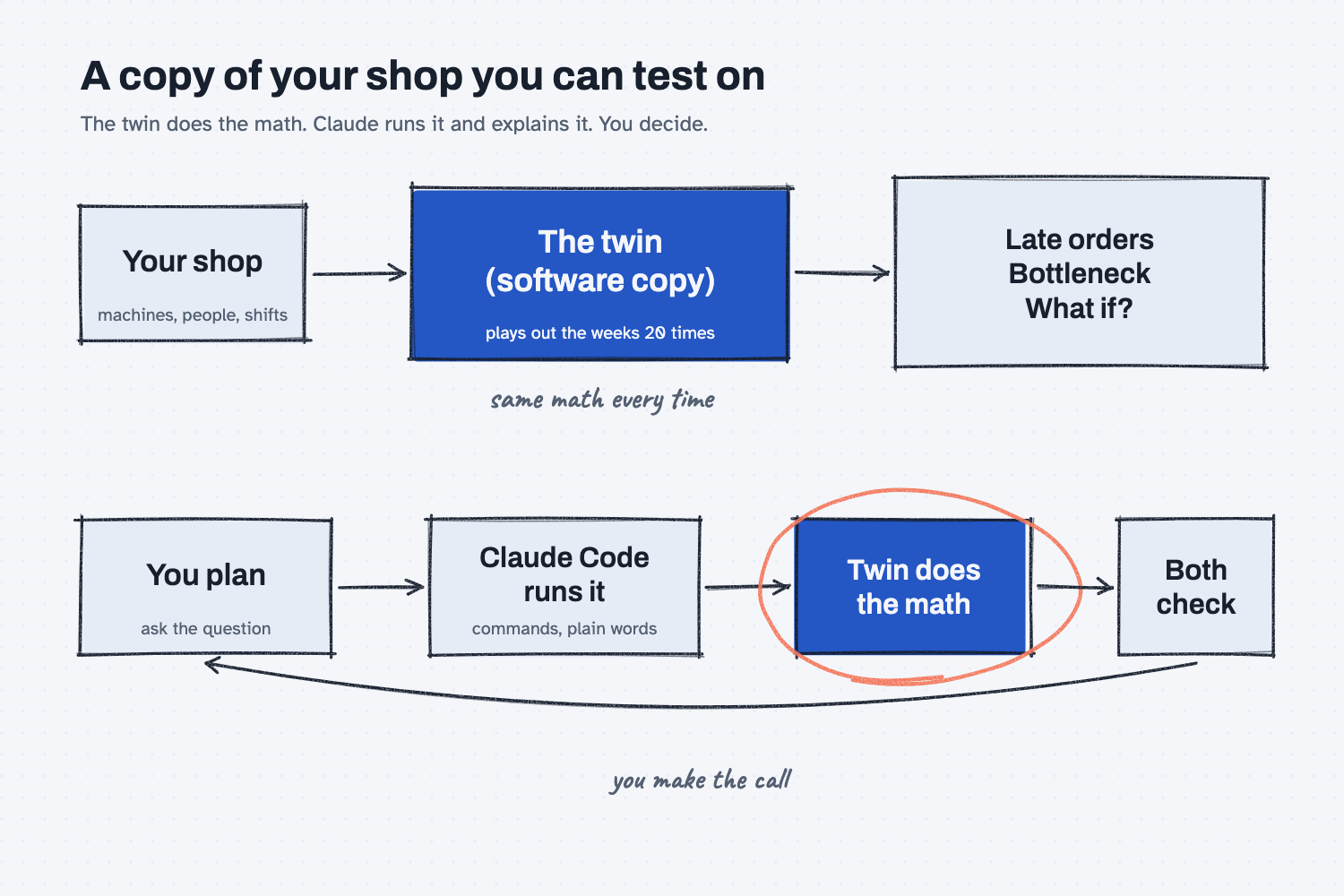
A digital twin is a software copy of your shop that you can run experiments on. It knows your machines, your people, your shifts, and the steps each part takes, so you can try a change on the copy before you spend money on the floor. This guide uses a made-up sample shop that comes with twin-flow, so you can learn the whole loop before you touch your own data. Part 2, turn your open-orders export into a twin orders file, shows how to feed it real orders.
What will I learn besides running a twin?
You will learn five methods that work on any planning question, with a short "why" for each later in this guide.
- Experiment on a copy, not on the floor. Try the change in the twin first.
- Let a fixed tool do the math. The twin calculates the same way every time, and Claude only runs it and explains it.
- Find the bottleneck first. Fix the machine everyone waits for, not the one that is easy to see.
- Change one thing at a time. Compare each fix to today with the same runs.
- Humans plan, the agent does, both check. You ask and decide, Claude does the steps, and you both check the numbers.
What do I need before I start?
You need a Mac or a Windows computer, a paid Claude plan, and about 15 minutes.
- Claude Pro or higher. Claude Code is not on the free plan.
- Claude Code, which is Claude in a terminal (a window where you type commands instead of clicking). In a normal chat, Claude can only talk. In Claude Code, Claude can run programs on your computer, which is what makes it an agent instead of a chat. It asks before it runs each one. If you have not set it up yet, follow Install Claude Code first (about 10 minutes, once). If you need a terminal, see Open a terminal.
- twin-flow, a free twin tool by Josh Schultz. It runs on your computer, needs no account, and sends nothing over the internet. If you have not set it up yet, follow Install twin-flow first (about 10 minutes, once). It also needs uv, which Install Python and uv covers.
- The sample shop. It comes inside twin-flow: Ridgeline Precision, a made-up CNC job shop with six machines, two shifts, and 15 open orders due over three weeks, with Thanksgiving closed.
Safe use. The sample shop is made up. The twin runs on your own computer, but Claude Code sends what it reads to Claude. Check your company's AI rules before you point it at real orders. Read the safe use notes.
How do I ask a shop twin "what if?"
Start Claude Code in the twin-flow folder, and paste two prompts: one for late orders and the bottleneck, one for the two fixes. Four steps.
Step 1. Start Claude Code in the twin-flow folder
Paste this, then press Enter:
cd ~/twin-lab/twin-flow
claude
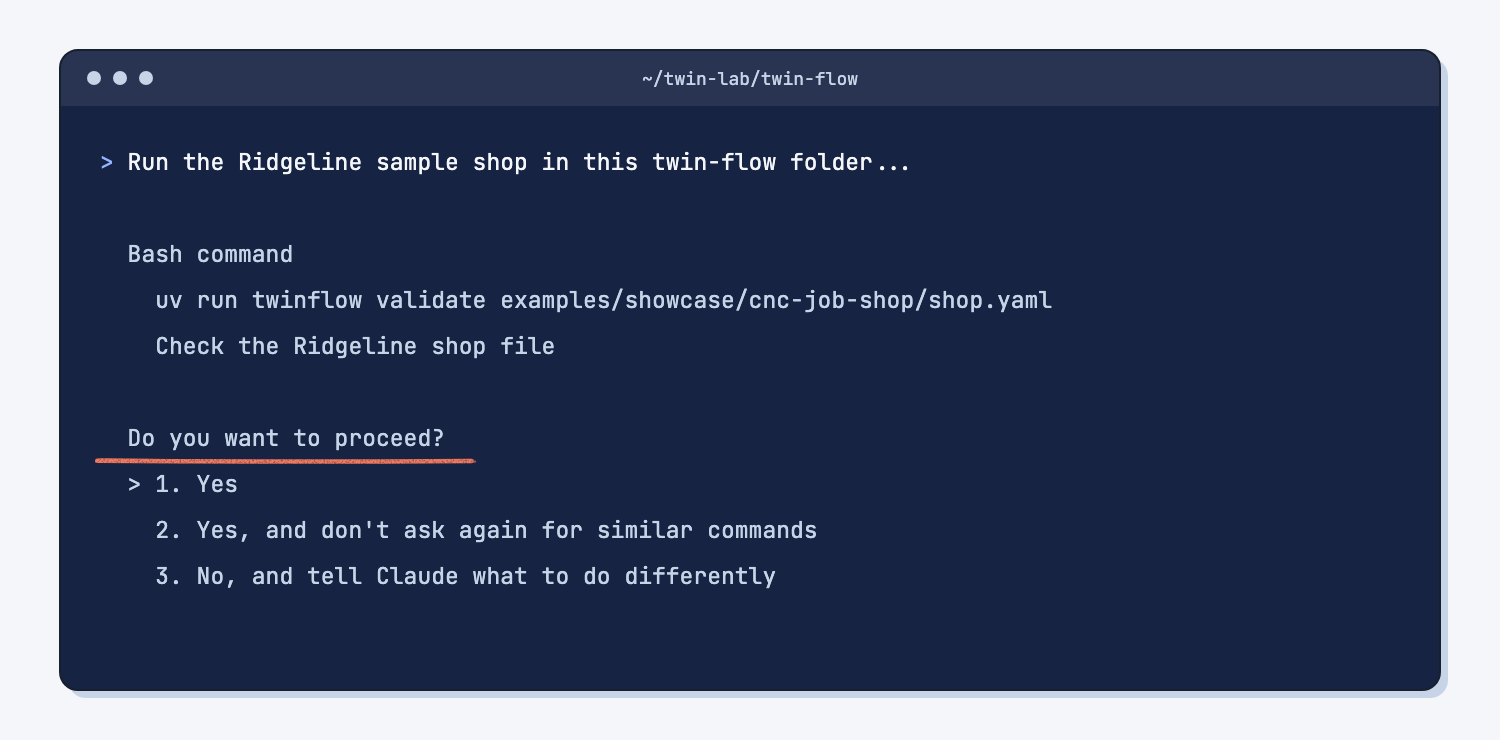
Claude Code starts inside the twin-flow folder, which matters because it works in the folder you start it in, so the prompts can use short file paths. Each time it wants to run a command, it shows you the command and asks "Do you want to proceed?" Choose 1. Yes for the twin commands in this guide. Choose No for anything that tries to delete or change files you did not ask about. That question is how you keep an agent's permissions in your hands.
Step 2. Ask which orders will be late
Paste the prompt below into Claude Code and press Enter. It tells Claude which twin commands to run, to use only the twin's numbers, and to turn the shop file's seconds into minutes and hours for you. It takes about half a minute, plus the time you spend saying yes.
Run the Ridgeline sample shop in this twin-flow folder and tell me which open orders will be late and which machine holds things up. The sample is in examples/showcase/cnc-job-shop.

Rules:
1. Do not change, move, or delete any file. Only run commands and read files. The twin saves each run in a runs folder, and that is fine.
2. Check the shop file first: uv run twinflow validate examples/showcase/cnc-job-shop/shop.yaml
   No output means it passed.
3. Run the open orders 20 times: uv run twinflow run examples/showcase/cnc-job-shop/shop.yaml --plan examples/showcase/cnc-job-shop/data/open-orders.csv --reps 20 --orders
4. The "on-time" line from that run is the first run only. For the on-time percent over all 20 runs, run: uv run twinflow balance examples/showcase/cnc-job-shop/shop.yaml --plan examples/showcase/cnc-job-shop/data/open-orders.csv --sweep examples/showcase/cnc-job-shop/scenarios/today.json --reps 20
5. Use only numbers the twin printed or the files say. Do not work out a schedule yourself.
6. The shop file gives times in seconds and rates in pieces per second. Turn every time into minutes or hours, and every rate into minutes per piece, before you show it to me.

Reply in plain words for someone who does not code:
- A table of the orders that are late in at least one run: order, customer, part, quantity, due date, typical finish, and late in how many of the 20 runs.
- The on-time percent over all 20 runs.
- The three busiest machines and how busy each one is. Then, in two sentences, say why the busiest one holds things up, using its minutes per piece and setup time from the shop file.
- The commands you ran, so I can run them again.
Claude replies with a table of late orders, the on-time percent over all 20 runs, the three busiest machines, and why the busiest one holds things up.
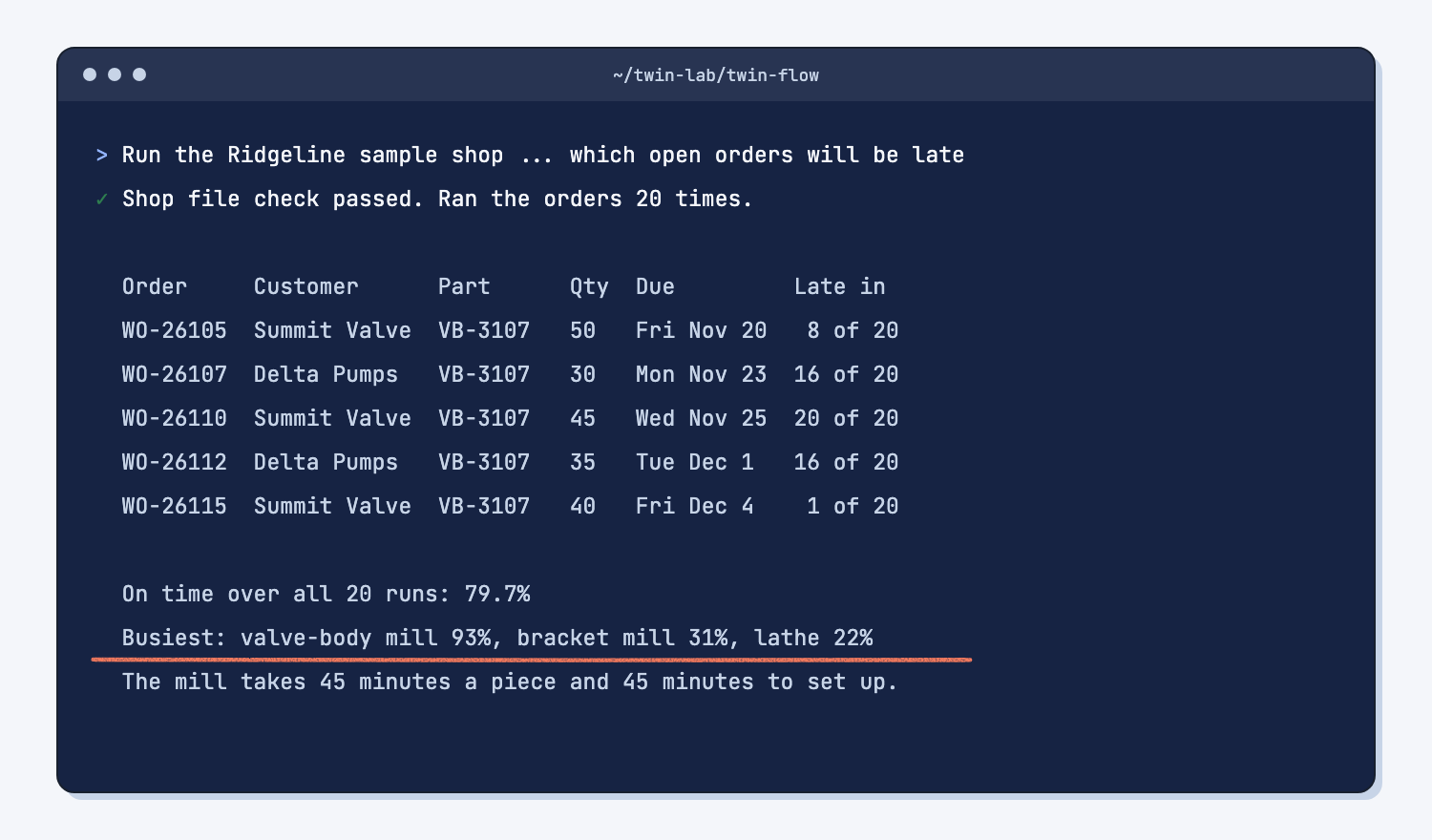
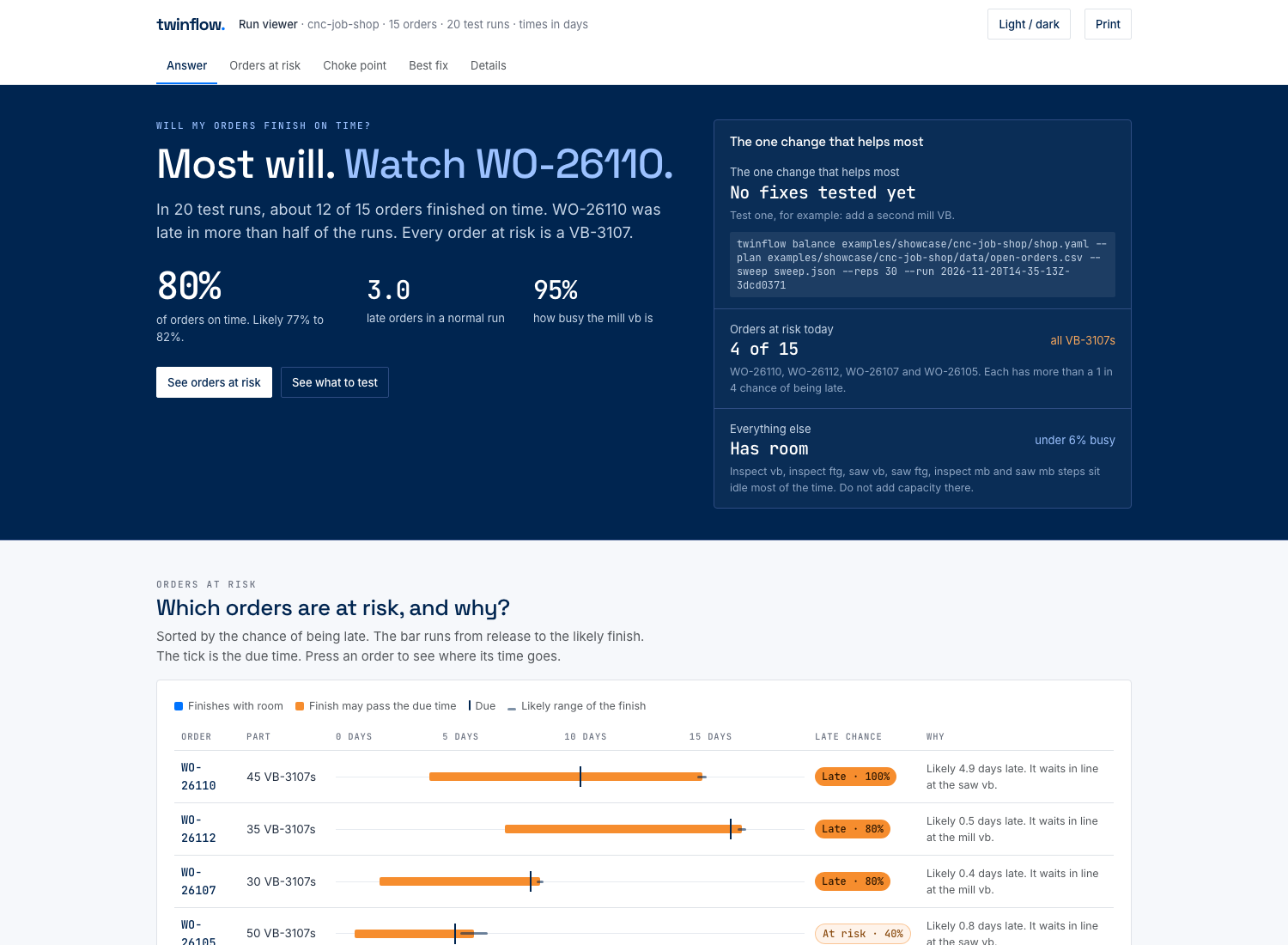
Every late order is a valve body, and the valve-body mill is busy 93% of its shift time. That machine is the bottleneck (the one step everything waits for), and it is where a fix will pay off.
The twin also writes a report page for each run. Claude's reply names a folder under runs/. Open report.html in that folder in your web browser if you want a picture of the same results.
Step 3. Test a second mill against a Saturday shift
Now ask the "what if." Paste this prompt. It runs today, a second valve-body mill, and a Saturday shift for the machinists, each 20 times with the same luck, so the only difference between them is the change.
Use the twin to test two fixes for the late orders in the Ridgeline sample shop (examples/showcase/cnc-job-shop), and show them side by side with today.

Fix A: a second valve-body mill (the mill_VB step gets capacity 2).
Fix B: a Saturday shift for the machinists. Use the file that is already there: examples/showcase/cnc-job-shop/scenarios/saturday-shift.json

Rules:
1. Do not change any file in examples. Put any new file in a new folder named my-tests.
2. Change one thing per test. Use --reps 20 every time, so all three runs see the same luck.
3. Today: uv run twinflow balance examples/showcase/cnc-job-shop/shop.yaml --plan examples/showcase/cnc-job-shop/data/open-orders.csv --sweep examples/showcase/cnc-job-shop/scenarios/today.json --reps 20
4. Fix A: write my-tests/second-mill.json with {"locations[mill_VB].capacity": [2]} and run the same balance command with that sweep file.
5. Fix B: run the same balance command with the Saturday file. It has two points: point-0000 is today's week, point-0001 adds Saturday.
6. For late orders per run, read late_orders_per_run in the summary.json file of each balance folder.
7. Use only numbers the twin printed or wrote. Turn any seconds into hours.
8. Read the shop file and tell me which hours the Saturday shift adds, and who gets it.

Reply in plain words for someone who does not code:
- One table with three rows (today, second mill, Saturday shift) and two columns: on-time percent over 20 runs, and late orders per run.
- Two or three sentences on what each fix changes in the shop, and what each one costs that the twin does not count.
- Do not pick a winner. I decide.
- The commands you ran.
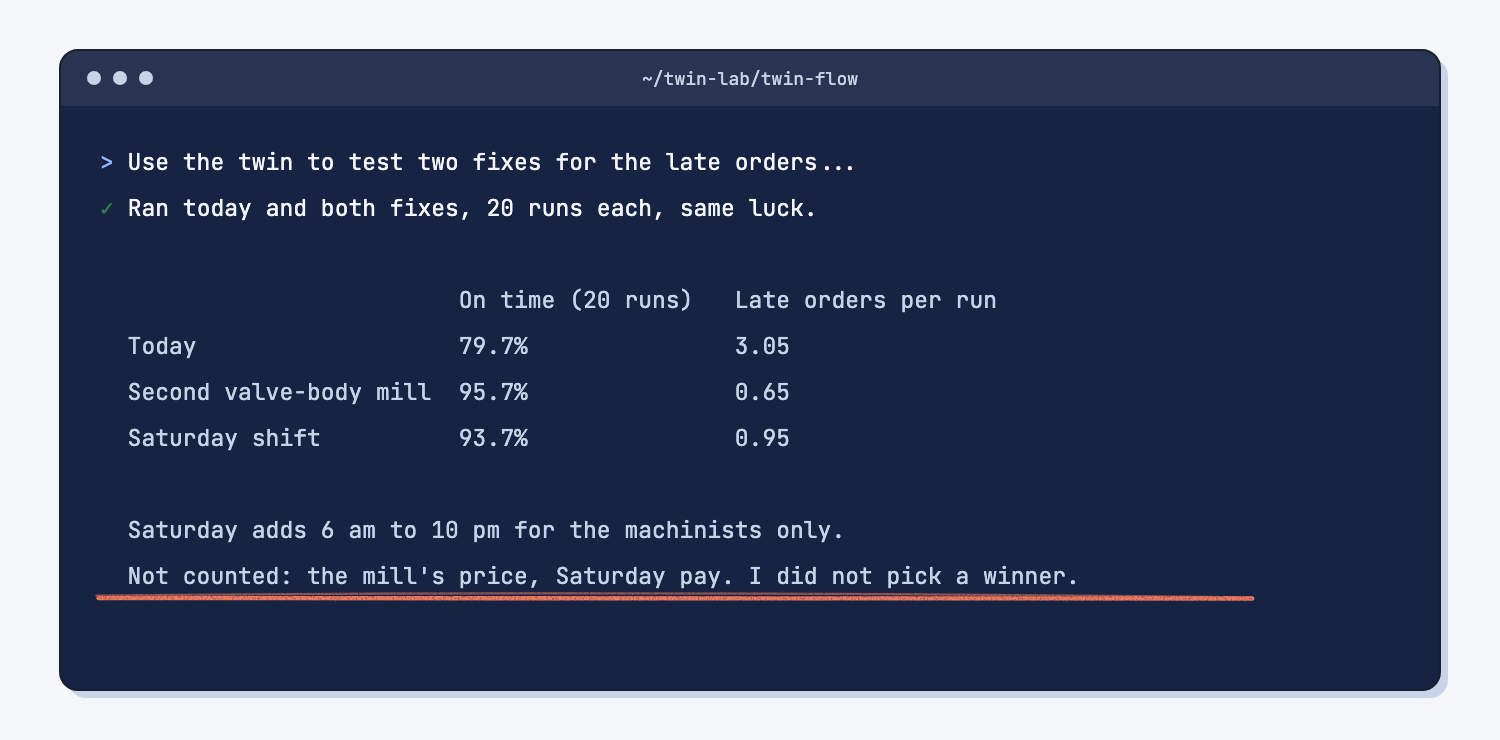
Claude writes one small file for the second mill in a new my-tests folder and leaves the sample alone. It replies with a side-by-side table and what each fix costs that the twin does not count.
Step 4. Check the numbers against what the twin printed
Scroll up in Claude Code and find the lines the twin printed itself: the Late in column, the on_time_pct lines, and the Busiest work centers line. Each number in Claude's tables should appear there. You can also compare with the answer key for the sample shop. When you are done, type /exit to close Claude Code.
What does good look like?
With the sample shop, the twin prints these numbers. Answer key, sample data. The twin did all of the math, and they come out the same every time you run it.
| Order | Customer | Due | Typical finish | Late in |
|---|---|---|---|---|
| WO-26105 | Summit Valve | Fri Nov 20 | Fri Nov 20, 6:45 pm | 8 of 20 runs |
| WO-26107 | Delta Pumps | Mon Nov 23 | Tue Nov 24, 11:30 am | 16 of 20 |
| WO-26110 | Summit Valve | Wed Nov 25 | Mon Nov 30, 5:58 pm | 20 of 20 |
| WO-26112 | Delta Pumps | Tue Dec 1 | Wed Dec 2, 11:42 am | 16 of 20 |
| WO-26115 | Summit Valve | Fri Dec 4 | Fri Dec 4, 1:44 pm | 1 of 20 |
The valve-body mill is busy 93% of its shift time, the bracket mill 31%, and the lathe 22%. The mill takes 45 minutes a piece and 45 minutes to set up for each job.
| Test | On time over 20 runs | Late orders per run |
|---|---|---|
| Today | 79.7% | 3.05 |
| Second valve-body mill | 95.7% | 0.65 |
| Saturday shift, 6 am to 10 pm, machinists only | 93.7% | 0.95 |
Both fixes work, and they are close. The second mill buys about two more points of on-time, but it costs a machine, while Saturday costs pay and goodwill every week. The twin cannot weigh that for you, and it is not supposed to.
What can go wrong?
Most problems come from reading the twin's output, not from the twin itself. These are the ones to watch for.
- The first line looks like the answer. The run prints "on-time 12 (80%)" at the top, but that is the first of 20 runs. The 20-run answer is 79.7%, which is why the prompt runs
balancefor it. - The report page shows slightly different numbers. It rounds to 80%, shows the mill at 95% busy, and lists 4 orders "at risk" because it counts only orders with more than a 1 in 4 chance of being late. Use the lines the twin printed as your record.
- A number has no unit. The twin also prints "busy hours" in its comparison, with no unit and no clear meaning. The prompt leaves that column out. If Claude shows you a number it cannot explain, ask what it measures before you use it.
- Seconds get mixed up with minutes. The shop file stores times in seconds and speeds as pieces per second, so 0.0003704 means one piece every 45 minutes. Rule 6 makes Claude convert them. Check one by hand: 2,700 seconds is 45 minutes.
- Claude worries about the runs folder. The twin saves every run in a
runsfolder. Without the line in the prompt that says this is fine, Claude may stop and ask whether it broke your "do not change any file" rule.
How do I check the answer?
Check Claude's tables against the twin's own lines, not against Claude. The twin's math is fixed, so you are checking the reading, not the arithmetic.
- Every order in Claude's late table has the same
Late incount as the twin's table. - The on-time percent matches the
on_time_pctline frombalance, not the first-run line. - Each time in minutes or hours matches the seconds in
shop.yamlwhen you divide by 60. - Claude did not pick a winner. You decide.
Why does this way work?
It works because each part of the job goes to the one that is best at it. Here is the short "why" behind each method.
Experiment on a copy, not on the floor. A digital twin is a software copy of your shop, so a bad idea costs you a few seconds instead of a month of late orders. It plays out the weeks 20 times with normal ups and downs, which gives you "late in 16 of 20 runs" instead of a single guess.
Let a fixed tool do the math. The twin gives the same answer every time you feed it the same files, which is what deterministic means. Claude is good at running commands and explaining results in plain words, and it is not reliable at working out a schedule in its head. So the twin does the math and Claude only runs it and explains it.
Find the bottleneck first. Every late order in the sample is a valve body, and they all wait for one mill. A fix anywhere else barely helps, which is why you find the bottleneck first and test fixes on it.
Change one thing at a time. Each test changes one thing and runs 20 times with the same luck as today. That way the gap between today and the fix comes from the fix, not from chance, which is the whole point of changing one thing at a time.
Humans plan, the agent does, both check. You wrote the question and you make the call. Claude Code did the steps. You both checked the numbers against what the twin printed. That split is humans plan, AI does, and it keeps the decision with the person who answers for it.
Frequently asked questions
Do I need to know how to code?
No. You paste two prompts. Claude Code runs the twin commands, and it asks before each one. If a command fails, paste the error into Claude Code and ask what it means.
Can I use the free Claude plan or claude.ai instead?
Not for this guide. Claude Code needs Claude Pro or higher. A claude.ai chat cannot run programs on your computer, and the twin has to run on your computer. You can still paste the twin's printed results into a chat and ask questions about them.
Is twin-flow safe to install?
It is a free tool from Josh Schultz, the author of this guide, published on GitHub. It runs on your computer and does not send your shop data anywhere. Claude Code does send what it reads to Claude, so follow your company's AI rules for real data.
Can I build a twin of my own shop?
Yes, but start with part 2, turn your open-orders export into a twin orders file. If you try uv run twinflow new my-plant --template job-shop, skip the "Next" command it prints, because that check fails on job-shop starters with "The model domain is None." Also note that the starter's README says job-shop.twin.yaml, but the file is named my-plant.twin.yaml.
Why 20 runs and not one?
Real cycle times wander, so one run can be lucky or unlucky. Twenty runs show you how often an order is late, which is what you need to promise a date. The twin uses the same luck every time, so your numbers match the answer key.
Take this with you
The two prompts and the check list work on any twin-flow shop, including your own once you have one.
1. The late-order prompt. For your own shop, change the three file paths.
Run the Ridgeline sample shop in this twin-flow folder and tell me which open orders will be late and which machine holds things up. The sample is in examples/showcase/cnc-job-shop.

Rules:
1. Do not change, move, or delete any file. Only run commands and read files. The twin saves each run in a runs folder, and that is fine.
2. Check the shop file first: uv run twinflow validate examples/showcase/cnc-job-shop/shop.yaml
   No output means it passed.
3. Run the open orders 20 times: uv run twinflow run examples/showcase/cnc-job-shop/shop.yaml --plan examples/showcase/cnc-job-shop/data/open-orders.csv --reps 20 --orders
4. The "on-time" line from that run is the first run only. For the on-time percent over all 20 runs, run: uv run twinflow balance examples/showcase/cnc-job-shop/shop.yaml --plan examples/showcase/cnc-job-shop/data/open-orders.csv --sweep examples/showcase/cnc-job-shop/scenarios/today.json --reps 20
5. Use only numbers the twin printed or the files say. Do not work out a schedule yourself.
6. The shop file gives times in seconds and rates in pieces per second. Turn every time into minutes or hours, and every rate into minutes per piece, before you show it to me.

Reply in plain words for someone who does not code:
- A table of the orders that are late in at least one run: order, customer, part, quantity, due date, typical finish, and late in how many of the 20 runs.
- The on-time percent over all 20 runs.
- The three busiest machines and how busy each one is. Then, in two sentences, say why the busiest one holds things up, using its minutes per piece and setup time from the shop file.
- The commands you ran, so I can run them again.
2. The what-if prompt. Describe each fix in one line, and keep one change per test.
Use the twin to test two fixes for the late orders in the Ridgeline sample shop (examples/showcase/cnc-job-shop), and show them side by side with today.

Fix A: a second valve-body mill (the mill_VB step gets capacity 2).
Fix B: a Saturday shift for the machinists. Use the file that is already there: examples/showcase/cnc-job-shop/scenarios/saturday-shift.json

Rules:
1. Do not change any file in examples. Put any new file in a new folder named my-tests.
2. Change one thing per test. Use --reps 20 every time, so all three runs see the same luck.
3. Today: uv run twinflow balance examples/showcase/cnc-job-shop/shop.yaml --plan examples/showcase/cnc-job-shop/data/open-orders.csv --sweep examples/showcase/cnc-job-shop/scenarios/today.json --reps 20
4. Fix A: write my-tests/second-mill.json with {"locations[mill_VB].capacity": [2]} and run the same balance command with that sweep file.
5. Fix B: run the same balance command with the Saturday file. It has two points: point-0000 is today's week, point-0001 adds Saturday.
6. For late orders per run, read late_orders_per_run in the summary.json file of each balance folder.
7. Use only numbers the twin printed or wrote. Turn any seconds into hours.
8. Read the shop file and tell me which hours the Saturday shift adds, and who gets it.

Reply in plain words for someone who does not code:
- One table with three rows (today, second mill, Saturday shift) and two columns: on-time percent over 20 runs, and late orders per run.
- Two or three sentences on what each fix changes in the shop, and what each one costs that the twin does not count.
- Do not pick a winner. I decide.
- The commands you ran.
3. Before you act on a twin answer:
- Did it use 20 runs, and the same 20 runs for each test?
- Does every number match a line the twin printed?
- Are times in minutes and hours, not seconds?
- What does each fix cost that the twin does not count?
- Who makes the call? You do.
Next time: open a terminal, run cd ~/twin-lab/twin-flow and then claude, paste the prompt, and check the numbers.
What's next?
- Turn your open-orders export into a twin orders file, part 2: feed the twin your own open orders, checked row by row.
- Draw the box and write your shop file, part 1 of the free series that builds a twin of your own shop.
- Turn a messy ERP export into a clean report, a gentler start with ERP data in Excel.
- What is a digital twin?, the idea behind this guide.
- Chat vs. agent, why this job needs Claude Code and not a chat.