- Claude Code
Harness. An AI helper that works in a folder of files. It writes and fixes code, and some office people use it to build small tools.
Part 5 of 5: Build and run a twin of your shop. Before: Part 4, try the cheap fixes before you buy a machine. Start of the series: Part 1, draw the box and write your shop file.
Answer. To hand off a weekly "will we ship?" check, save the steps as a Claude skill with a fixed script for the twin runs. Give it a trigger (Monday's export), an owner, and an approval stop, so Claude only drafts the one-page call and a person approves it. Write the failure plan first, and keep a log line for every week.
Time and cost. 25 minutes. Claude Pro or higher; twin-flow and the check script are free. Who this is for. Owners and plant managers who built the twin and want a planner to run it every week without them.
So far, you have run every step yourself. That is how it should start, because you had to learn what good looks like. But a check that only the boss can run stops the first week the boss is busy. Josh's order for any process is to understand it, clean it up, make it hard to get wrong, hand it off so someone else can do it, and only then let computers do more of it.
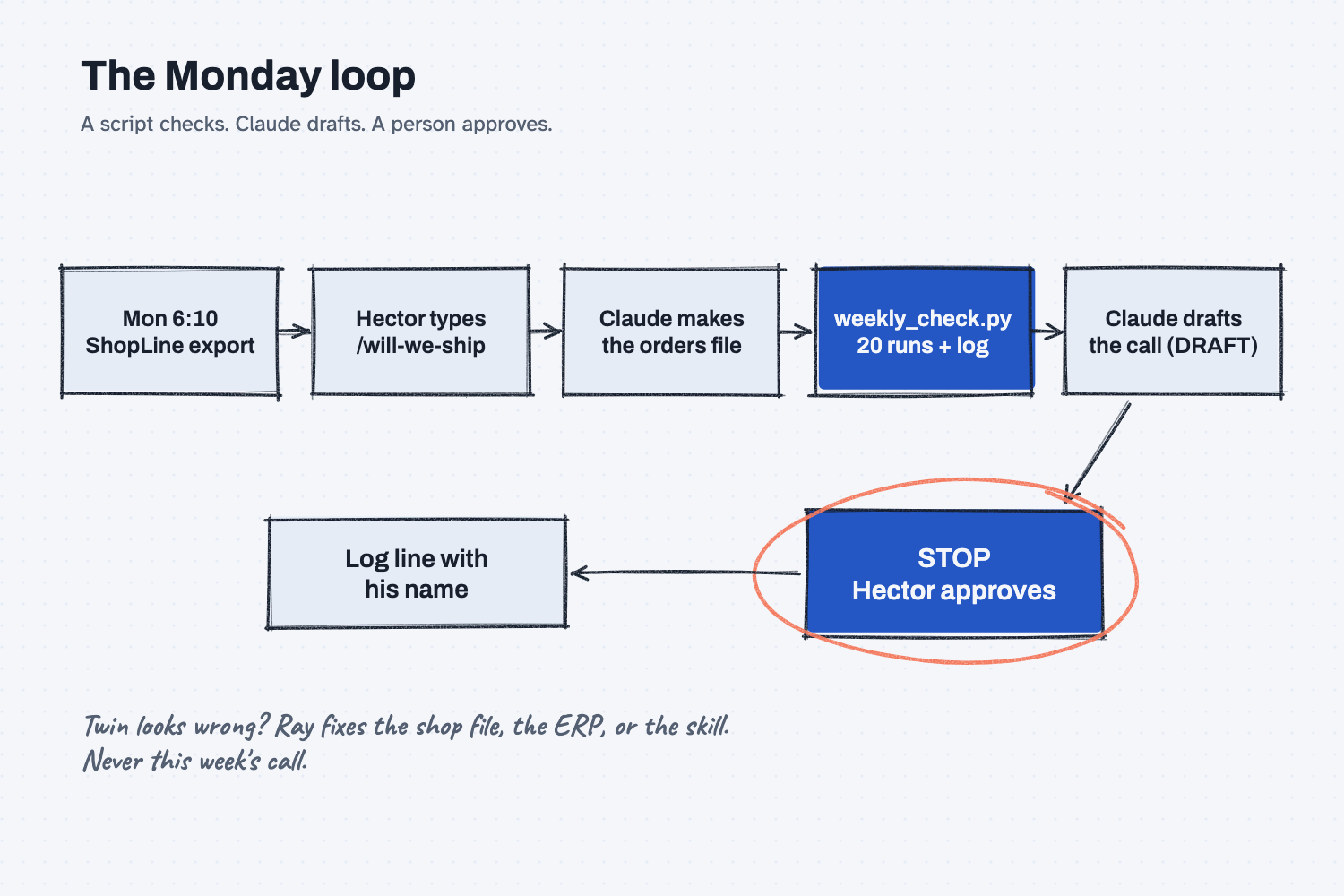
This part hands the Monday check to Hector, the planner. The twin runs are done by a script that never changes. Claude Code does the reading and drafting. Hector approves before anything reaches a customer or the schedule, and Ray, who owns the twin, fixes the system when it is wrong.
What will I learn besides handing off the check?
You will learn five methods for handing any routine job to an AI agent safely. Each has a short "why" near the end.
- Hand it off before you automate it. If a person cannot follow the steps, a computer should not run them.
- A script checks, AI drafts. The numbers come from a fixed script; Claude only reads, sorts, and writes.
- A person approves. Nothing leaves the building until someone signs the log.
- Write the failure plan first. Decide how you will know it broke before it breaks.
- Fix the system, not the output. When the call is wrong, change the shop file, the ERP, or the skill, so it is right next week too.
What do I need before I start?
You need the shop-twin folder from Parts 1 to 4, with version 1 and whatif/today.json from Part 2. If you have not set up Claude Code and twin-flow yet, follow Install Claude Code and Install twin-flow first (about 15 minutes, once).
- The check script: weekly_check.py. Save it in your
shop-twinfolder. It has no AI in it. It checks the orders file, runs the twin 20 times, compares with last week, and writes one log line. - Next Monday's export (sample data, made up): open-orders-2026-11-30.xlsx, the ShopLine export from Monday, November 30. Seven orders have shipped since Part 2 and two new ones came in.
- Our finished skill, to compare with yours at the end: will-we-ship.zip.
Safe use. A weekly check touches real orders and customer names every week. Check your company's AI rules, and keep the approval stop: the skill drafts, a person decides. Read the safe use notes.
How do I hand off the weekly check?
Decide who, when, and who owns it; have Claude write the skill; read the skill and its failure plan; run it on Monday's export; approve the call; then let someone else run it. Six steps. You plan and approve. Claude drafts. The script and the log do the checking a person would forget.
Step 1. Decide the who, the when, and the stop
This is the plan, and only you can make it. Write down four things:
- Who runs it: Hector Lee, production planner.
- When, and what starts it: every Monday by 8:00 am, after the 6:10 ShopLine export. Hector saves the export in the twin folder and types
/will-we-ship. That is the trigger, which is the event that starts an agent's work (what triggers an AI agent). - Who owns the twin: Ray Tillman, plant manager. When the twin looks wrong, Ray fixes it.
- Where it stops: after the draft. Claude writes the one-page call and stops. Hector approves it before anything goes to a customer or the schedule.
That last line decides how much you hand to the computer. On the ladder of automation, this check sits at "draft" and "check": the script checks, Claude drafts, a person approves every week (levels of AI automation). Climb higher only after weeks of clean logs.
Step 2. Have Claude write the skill
A skill is a saved set of steps Claude Code loads when the job comes up, so the job runs the same way no matter who asks (what is an AI skill). Start Claude Code in your shop-twin folder and paste this prompt with your names and times. For the sample, use Hector, Monday by 8:00 am, and Ray.
Turn the weekly "will we ship?" check into a Claude skill named will-we-ship, so someone else can run it without me. Save it in .claude/skills/will-we-ship/ and move weekly_check.py into its scripts/ folder.

The plan, which I have decided:
- Who runs it: [WHO RUNS IT]. When: [WHEN].
- The trigger: they save the new open-orders export in this folder and type /will-we-ship.
- The owner, who fixes the twin when it looks wrong: [OWNER].

The skill's steps:
1. Find the newest open-orders export in this folder. If it is more than 3 days old, stop and ask.
2. Make data/orders.csv from it with the same rules as before: skip shipped orders, leave out orders on hold, and leave out any part that does not match shop.yaml exactly. Never fix a part number. List every row left out and why.
3. Run: python3 .claude/skills/will-we-ship/scripts/weekly_check.py --week-start <this week's Monday>
   It checks the orders, runs the twin 20 times, adds a line to results/weekly-log.csv, and prints the result. If it says STOPPED, show the reason and stop.
4. Draft the one-page call in results/call-<date>.md, marked DRAFT: on-time %, late orders, the change from last week, a table of orders at risk with due date and finish dates, the rows left out, and "calls to make" written as questions for a person. Never answer those questions.
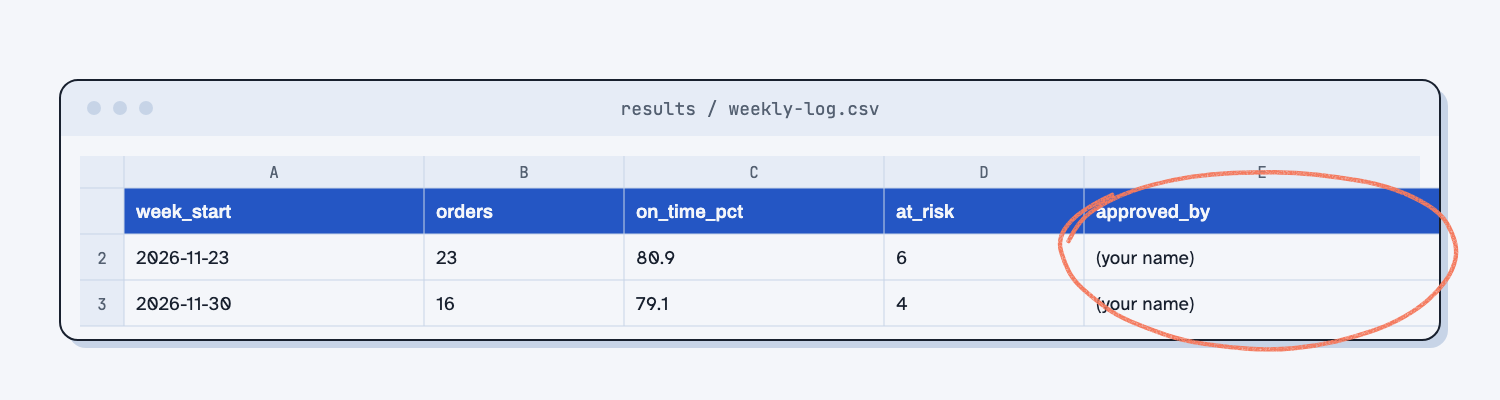
5. Stop for approval. Nothing goes to customers or the schedule until a person approves. When they approve, put their name in approved_by on this week's log line and remove DRAFT.
Never change shop.yaml or the skill during a weekly run. If the twin looks wrong, write it under "Twin questions" and tell the owner.

Also write FAILURE-PLAN.md in the skill folder that answers: how we know it is working, where stuck items land, the manual fallback, who fixes it and how to turn it off, and the worst realistic wrong answer and its limit.
Show me the skill when you are done. Do not run it yet.
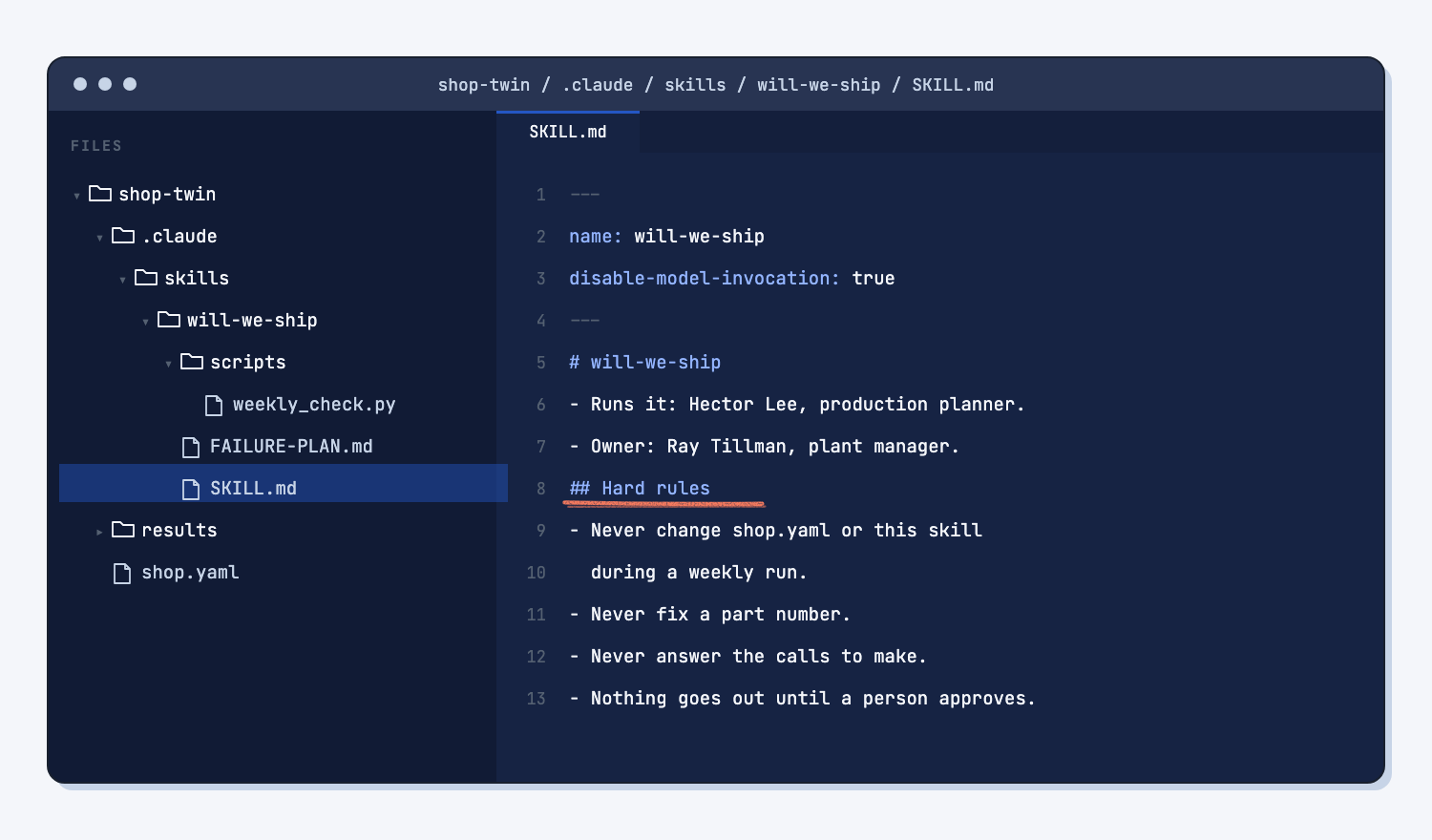
Claude Code will ask before it writes into the .claude folder, where skills live. Say yes. It takes about a minute. You get .claude/skills/will-we-ship/ with three files: SKILL.md (the steps), FAILURE-PLAN.md, and scripts/weekly_check.py.
Step 3. Read the skill and the failure plan
Read SKILL.md the way you would read a work instruction for a new hire, because that is what it is. On the sample, Claude put the hard rules at the top: never change shop.yaml, never fix a part number, never answer the "calls to make." It also made the skill run only when someone types /will-we-ship, so it never starts by itself. If a step is wrong, tell Claude to change the skill now, not during a Monday run.
Then read FAILURE-PLAN.md. It answers five questions, and each one needs a real answer before the first Monday:
- How do we know it is working? A new line in
results/weekly-log.csvevery Monday by 9:00, with a name inapproved_by. - Where do stuck items land? Rows left out of the twin are listed at the top of every call.
- What is the manual fallback? Hector walks the open-orders list with Ray the old way and marks the week "manual."
- Who fixes it, and how do we turn it off? Ray, and renaming the skill folder turns it off.
- What is the worst realistic wrong answer? The twin says an order ships on time and it does not. The limit: the call is always a draft for a person, never a promise to a customer.
Step 4. Run it on Monday's export
Save open-orders-2026-11-30.xlsx in the shop-twin folder, start Claude Code, and type /will-we-ship. Claude finds the newest export, makes the orders file, runs weekly_check.py, and writes results/call-2026-11-30.md. It takes about a minute.
On the sample, Claude left out 10 of 26 rows and listed each one: seven orders that shipped, the Lakeside order still on hold, MR1020 again, and MR-1040, a new hitch plate the twin has never heard of. It ran the other 16 orders and drafted the call.
Look at those last two rows. MR1020 is the typo you found in Part 2. Somebody fixed it in the twin's orders file that week but not in ShopLine, so it came back. The new part MR-1040 is not a mistake at all; it is new work the shop file does not know yet. Neither one is Hector's to fix on Monday. Both are Ray's, and both are fixes to the system: correct the part number in the ERP, and add the hitch plate's steps to the shop file.
Step 5. Read the call and approve it
Open results/call-2026-11-30.md. It starts with DRAFT: not approved, then gives on-time %, late orders, the change from last week, a table of orders at risk, the rows left out, and "calls to make," written as questions for a person. You can open the sample call to see one.
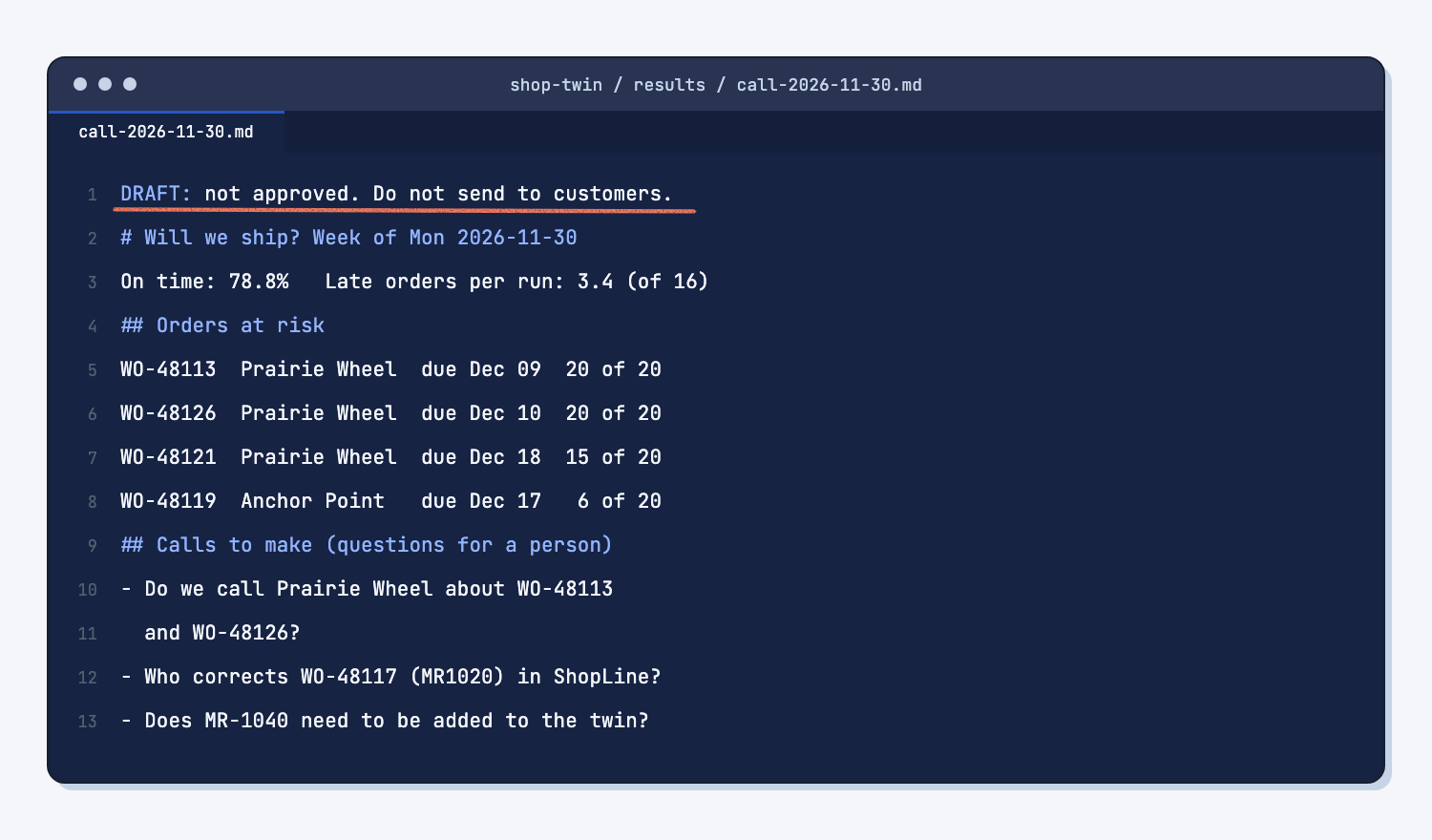
Hector reads it, answers the questions with Ray in the Monday meeting, and tells Claude: "Approved, Hector Lee." Claude puts his name in approved_by on this week's log line and removes DRAFT. That line, with a name and a date on it, is the record of who saw what and decided what (AI audit trail). This is human in the loop done the simple way: the routine work is done for him, and his attention goes to the four orders that need a decision.
Step 6. Hand it off and close the loop
Next Monday, you do not run it. Hector does, from his own computer or yours, with you out of the room. Afterward, read the log line and the call, and ask him one question: "Where did it slow you down?" Every answer is a change to the skill, the shop file, or the ERP, made by the owner on a quiet day, then tested on last week's export before the next Monday.
That is the loop Josh teaches for every AI system: "Humans plan, agents do, both check, and every miss changes the system that made it." A miss is not fixed by editing this week's call. It is fixed where it came from (close the loop with AI).
What does good look like?
Good is a skill a planner can run in a minute, a call that is a draft until someone signs it, and a log that grows one line a week.
Answer key, sample data (answer-key shop file, weekly_check.py, week of November 30): 16 orders checked, 79.1% on time, 3.35 late orders per run, 1.8 points below the week before, 4 orders at risk. A shop file you drafted yourself gave 78.8% and 3.4 in our build.
| Week | Orders | On time | Late per run | Busiest | At risk | Change |
|---|---|---|---|---|---|---|
| Nov 23 (version 1) | 23 | 80.9% | 4.40 | HMC-1 | 6 | |
| Nov 30 | 16 | 79.1% | 3.35 | HMC-1 | 4 | -1.8 |
Orders at risk on November 30: WO-48113 (late in 19 of 20 runs), WO-48126, the new Prairie Wheel order (20 of 20), WO-48121 (15 of 20), and WO-48119 (6 of 20). Rows left out: 7 shipped, 1 on hold, MR1020, and the new part MR-1040.
What can go wrong?
These came up in testing on the sample. Each fix goes into the skill, the shop file, or the ERP.
- Claude cannot write the skill. Claude Code asks before it writes into
.claude. If you say no, or it cannot ask, it stops and writes nothing. That is the safe way to fail. Run it again and say yes. - A fixed typo comes back.
MR1020was corrected in the twin's file in Part 2 but not in ShopLine, so it returns every Monday. Fix it in the ERP, where it was born. Better still, ask whoever runs ShopLine to make the part field accept only real part numbers, so the typo cannot be typed at all (make mistakes impossible). - A new part is not in the twin.
MR-1040is real new work. The skill leaves it out and says so, which means the on-time % is better than reality. The call says this, and Ray adds the part to the shop file. - The house rules and the skill disagree. Your
CLAUDE.mdsays "never edit the orders file without showing me." The weekly skill replaces it every Monday. Claude flagged this when it wrote the skill. Settle it in writing: the list of rows left out is the "showing." - The check stops. If
weekly_check.pyprints STOPPED, it names the problem, like a due date before a release date. The skill shows the reason and stops. Do not work around it; fix the data. - Work already started is not counted. The twin starts each open order from its first step. An order half done on the floor looks later than it is. Treat a call as a warning list, not a promise, which is why a person reads it.
How do I check the answer?
Check the log, then the call, then the hand-off.
results/weekly-log.csvhas one line for this week, with the export's week, the order count, on-time %, and a name inapproved_by.- The orders in the call plus the rows left out add up to the rows in the export (16 plus 10 is 26 on the sample).
- Every number in the call matches the script's output, not Claude's words.
shop.yamland the skill did not change during the weekly run.- Someone other than you ran it, and the log says who.
Why does this way work?
It works because each part of the weekly job goes to whoever is best at it, and the parts that must never vary do not depend on AI.
Hand it off before you automate it. A job that only one person can do is fragile, and automating it just makes the fragility faster. Writing the steps down so Hector can run them is the test that the process is clean enough to hand to a computer at all. Josh's line is short: "Never automate a mess" (automating a broken process).
A script checks, AI drafts. The twin runs and the log line come from weekly_check.py, which does the same thing every Monday. Claude reads the export, sorts rows, and writes the call, which are the parts that need judgment and words. Short steps with a checkpoint between them fail less than one long run, because AI fails on long tasks when nothing checks it along the way.
A person approves. The call reaches customers and the schedule only after a person signs it. The approval stop costs Hector two minutes and caps the worst case at "a wrong draft that nobody sent" (human in the loop).
Write the failure plan first. Quiet failures are the dangerous ones: a skill that stopped running three weeks ago and nobody noticed. A log line with a name on it every Monday is the heartbeat. If it is missing at 9:00, someone knows.
Fix the system, not the output. Editing this week's call fixes one Monday. Fixing the part number in ShopLine, adding a part to the shop file, or changing a step in the skill fixes every Monday after. Each fix is tested first, and the old version is saved (save every working version). Claude Code can only touch the folder you give it and asks before new actions, so the owner stays in charge of what changes (AI tools and permissions).
Frequently asked questions
Can the check run by itself on Monday morning?
It can be scheduled, but do not start there. Run it with a person typing /will-we-ship for at least a month of clean log lines. Then, if you schedule it, keep the approval stop: a scheduled run still only drafts.
Who should own the twin?
The person who knows the floor best and can say no to a wrong number, usually the plant manager. The planner runs the weekly check. The owner changes the shop file and the skill. Keeping those two jobs apart is what stops quiet, unreviewed changes.
What if the twin says we are fine and an order ships late?
Write it in the log, then find out why with the owner. Usually the shop file is missing something real: a breakdown, a setup that got longer, a part that changed routing. Fix that in the shop file, save the old version, and rerun last week's export to check the fix.
Can the skill email the customers?
It should not. Customer messages are outward-facing and hard to take back, so they stay with a person. The skill can draft the email for Hector to send, which is still a draft and still his call.
How do I keep the twin up to date?
Once a month, the owner compares the twin with what really shipped, using the log. When the floor changes (a new machine, a new shift, a new part), the owner updates the shop file, saves the old one in versions/, and runs version 1's export again to see the difference.
Take this with you
One prompt, one script, and the failure plan questions.
1. Turn the weekly check into a skill. Put your names and times where it says [WHO RUNS IT], [WHEN], and [OWNER].
Turn the weekly "will we ship?" check into a Claude skill named will-we-ship, so someone else can run it without me. Save it in .claude/skills/will-we-ship/ and move weekly_check.py into its scripts/ folder.

The plan, which I have decided:
- Who runs it: [WHO RUNS IT]. When: [WHEN].
- The trigger: they save the new open-orders export in this folder and type /will-we-ship.
- The owner, who fixes the twin when it looks wrong: [OWNER].

The skill's steps:
1. Find the newest open-orders export in this folder. If it is more than 3 days old, stop and ask.
2. Make data/orders.csv from it with the same rules as before: skip shipped orders, leave out orders on hold, and leave out any part that does not match shop.yaml exactly. Never fix a part number. List every row left out and why.
3. Run: python3 .claude/skills/will-we-ship/scripts/weekly_check.py --week-start <this week's Monday>
   It checks the orders, runs the twin 20 times, adds a line to results/weekly-log.csv, and prints the result. If it says STOPPED, show the reason and stop.
4. Draft the one-page call in results/call-<date>.md, marked DRAFT: on-time %, late orders, the change from last week, a table of orders at risk with due date and finish dates, the rows left out, and "calls to make" written as questions for a person. Never answer those questions.
5. Stop for approval. Nothing goes to customers or the schedule until a person approves. When they approve, put their name in approved_by on this week's log line and remove DRAFT.
Never change shop.yaml or the skill during a weekly run. If the twin looks wrong, write it under "Twin questions" and tell the owner.

Also write FAILURE-PLAN.md in the skill folder that answers: how we know it is working, where stuck items land, the manual fallback, who fixes it and how to turn it off, and the worst realistic wrong answer and its limit.
Show me the skill when you are done. Do not run it yet.
2. The check script: weekly_check.py. Our finished skill, to compare with yours: will-we-ship.zip.
3. The failure plan, before any job is handed to an agent: How do we know it is working? Where do stuck items land? What is the manual fallback? Who fixes it, and how do we turn it off? What is the worst realistic wrong answer, and what limits it?
What's next?
- Part 1: Draw the box and write your shop file, to start a twin of a second area or your own shop.
- Part 4: Try the cheap fixes before you buy a machine, the step before, and the place to go when the weekly log says on-time is slipping.
- Ask a sample shop twin "what if?", a quick tour to show someone new what a twin does.
- Find repeat failures in a maintenance log, to give the twin real breakdown numbers.
- Levels of AI automation, the idea behind where this check stops.