Answer. To find repeat failures in a maintenance log, export your work orders to Excel and have Claude tag each one with a machine and a cause from lists you write. A small script then counts and ranks the tags the same way every time. You get a fix-first list of repeat failures, with the work orders behind each one.
Time and cost. About 20 minutes the first time. $0 to practice with the sample log on the free Claude plan. Who this is for. Plant managers and maintenance leads who know some machines keep breaking but cannot prove which ones from the work order history.
Most maintenance logs know the answer, but they hide it. The same press brake shows up as "PB2", "brake 2", and "Press Brake #2", and the fail code says MECH when the notes say the hose leaked again. A count of the asset or fail code column gives the wrong answer, because the real story is in the notes.
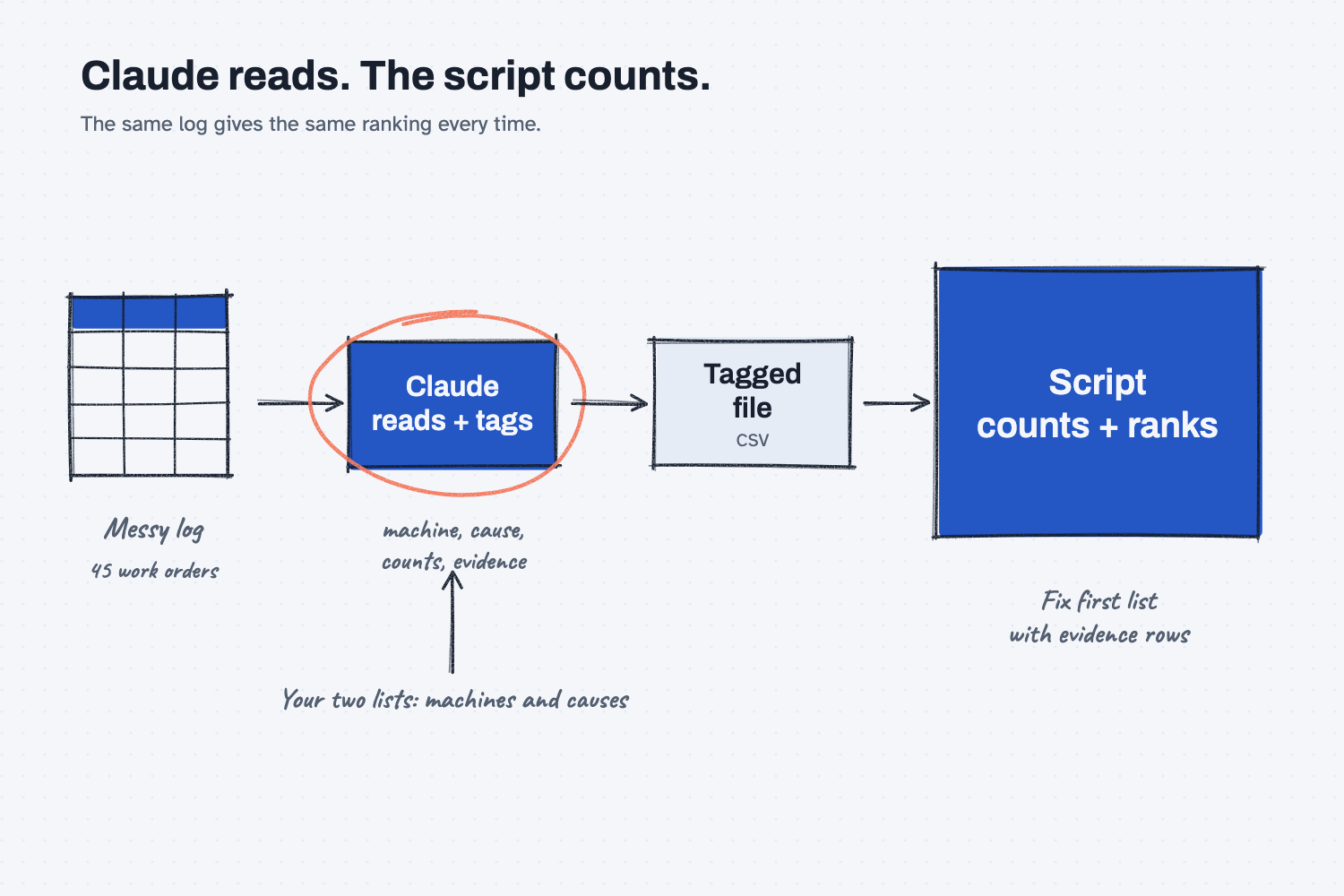
Reading those notes is a good job for AI, because it can tell that "puddle under machine" and "weep at cyl fitting" are both hydraulic leaks. Counting is not, because AI can count the same rows two ways on two days. So Claude reads and tags every work order, and a script does the counting and ranking.
What will I learn besides finding repeat failures?
You will learn five methods that work on any log with free-text notes, such as scrap logs, downtime logs, and warranty claims. Each has a short "why" later in this guide.
- Separate reading from counting. Claude reads the notes, and a script counts, so the ranking comes out the same every time.
- Give AI a fixed list to pick from. Your machine IDs and your cause names, so "PB2" and "brake 2" land in the same bucket.
- Flag doubt instead of guessing. When a row could be two machines, Claude leaves it blank and says why.
- Keep the evidence with every count. Each number on the list points back to the work orders and the words behind it.
- Check the tags against an answer key. You check a few rows you know before you trust the ranking.
What do I need before I start?
You need Claude, your work order export, and the files below. There is nothing to install.
- Claude at claude.ai, with file creation on so it can run code. The free plan works for practice. If you have not set it up yet, follow Set up Claude first (about 10 minutes, once). To add files to a chat, see Attach files to a chat, and to add a skill, see Upload a Claude skill.
- The sample files: maintenance-log-sample.zip. If you need help with the zip, follow Download and unzip sample files. Inside is
mrmw-work-order-history.xlsx, a six-month work order export from the made-up company Mesquite Ridge Metal Works, with 45 work orders from two plants. It also holdsmachines-and-causes.txt, the script, and ananswer-keyfolder. - The script: rank_repeats.py. It reads the tagged file and writes the ranked list in Excel. You never open it, because Claude runs it for you.
Safe use. Work order notes can hold names, injuries, and customer jobs. Check your company rules before you attach a real export to any AI tool, and delete columns you do not need. Practice with the sample log first. Read the safe use notes.
How do I find repeat failures in a maintenance log?
Export your work orders, write your machine and cause lists, have Claude tag every row, check the tags, and then have Claude run the script that ranks them. There are seven steps.
Step 1. Put your work order export in one folder
Make a folder called maintenance-repeats and put the work order export in it, along with rank_repeats.py. To practice, use mrmw-work-order-history.xlsx.
For your own log, export the work order history from your maintenance system (your CMMS) to Excel. Pick six to twelve months, all work order types, and include the notes column, because the notes are where the causes are.
Step 2. Write your machine list and your cause list
Claude needs two short lists, because they are what turn a hundred ways of writing things into a few buckets you can count. The sample lists are in machines-and-causes.txt, and they look like this.
Our machines:
COMP-01 = Air compressor 1, Plant 1
LASER-01 = Fiber laser 1, fab, Bay 2
PB-01 = Press brake 1, fab, Bay 2
PB-02 = Press brake 2, fab, Bay 2
RWC-01 = Robot weld cell 1, fab, Bay 2
MWB-01 = Manual weld booth 1, fab, Bay 2
MILL-04 = Vertical mill 4 (VMC 4), CNC shop, Bay 1
MILL-07 = Vertical mill 7 (VMC 7), CNC shop, Bay 1
LATHE-03 = CNC lathe 3, CNC shop, Bay 1
MIX-01 = Sand mixer 1 (the muller), foundry, Plant 2
FURN-02 = Induction furnace 2, foundry, Plant 2
SB-01 = Shot blast 1, foundry, Plant 2

Our causes:
hydraulic leak
coolant system
spindle or bearing
electrical or sensor
air or pneumatic
lube system
belt or chain
overheating
no fault found
other
For your plant, copy the machine IDs from your asset list and add the nicknames people really type, such as "the muller." Keep the cause list to 6 to 12 causes your team already uses, and keep "no fault found" and "other." Claude can only pick from a fixed list you give it, and that is what makes the counting work.
Step 3. Attach the export and paste the tag prompt
Open a new chat at claude.ai and attach mrmw-work-order-history.xlsx. Copy the prompt below, paste your two lists where it says [YOUR MACHINES] and [YOUR CAUSES], and send it.
I attached a work order export from our maintenance system. Read every work order and tag it, so a script can count the repeat failures. Do not count or rank anything yourself.

Make one CSV file named tagged-work-orders.csv with these columns, in this order:
wo,opened,asset_as_written,machine,cause,counts,down_min,evidence,check

Rules:
1. One row for every work order in the export, in the same order. Do not skip or merge any.
2. wo, asset_as_written, and down_min: copy them exactly from the export. If the downtime is blank, leave it blank. Do not write 0.
3. opened: the date the work order was opened, written as YYYY-MM-DD.
4. machine: the machine ID from my machine list below. Use the asset name, the asset ID, and the notes. If a row could be two machines, leave it blank and say why in check. Do not tag a machine only because the notes mention it.
5. cause: one cause from my cause list below, picked from what the notes say was wrong and what was fixed. The fail code is often blank or wrong, so trust the notes over the code. If you cannot tell, leave it blank and say why in check.
6. counts: yes for a breakdown or a repair call, including "no fault found." no for PMs, inspections, project work, and duplicates of another work order, even if the type says CM. When counts is no, cause can be blank.
7. evidence: copy up to 15 words from the problem or the notes that show the cause, word for word.
8. check: leave it blank when you are sure. If you are not sure about the machine, the cause, or counts, write a short reason.
9. Read each work order yourself. Do not tag rows with keyword rules or a search formula, because the same fault is written many ways.

When the file is saved, reply with three things: the number of work orders in the export, the number of rows in the file, and every row that has something in check. Nothing else.

Our machines:
[YOUR MACHINES, one per line. Example: PB-02 = Press brake 2, fab, Bay 2]

Our causes:
[YOUR CAUSES, one per line. Example: hydraulic leak]
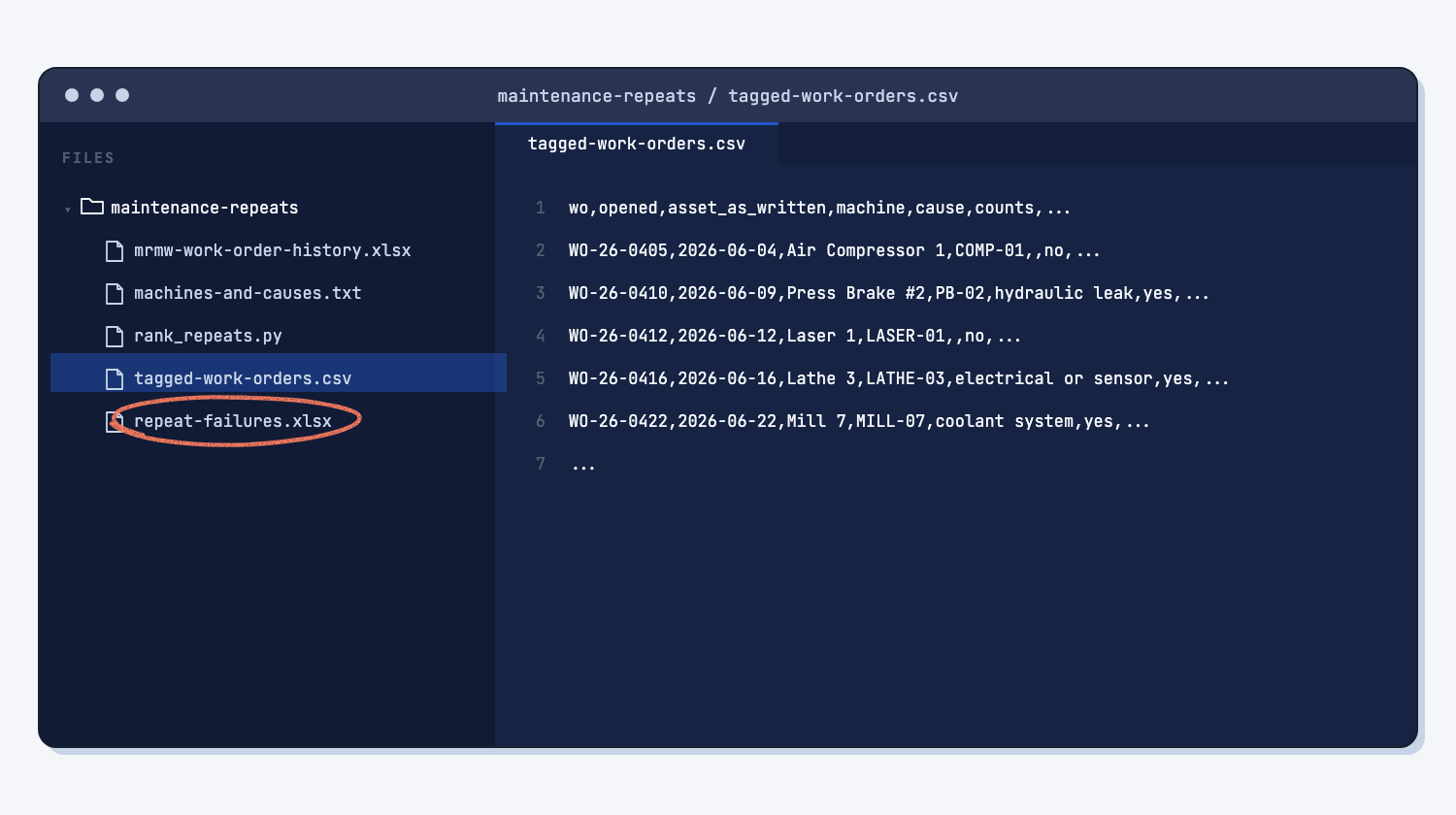
Claude saves tagged-work-orders.csv, with one row per work order and the same nine columns every time. (Why a fixed shape matters.) The reply only says how many work orders went in, how many rows came out, and which rows it was not sure about.
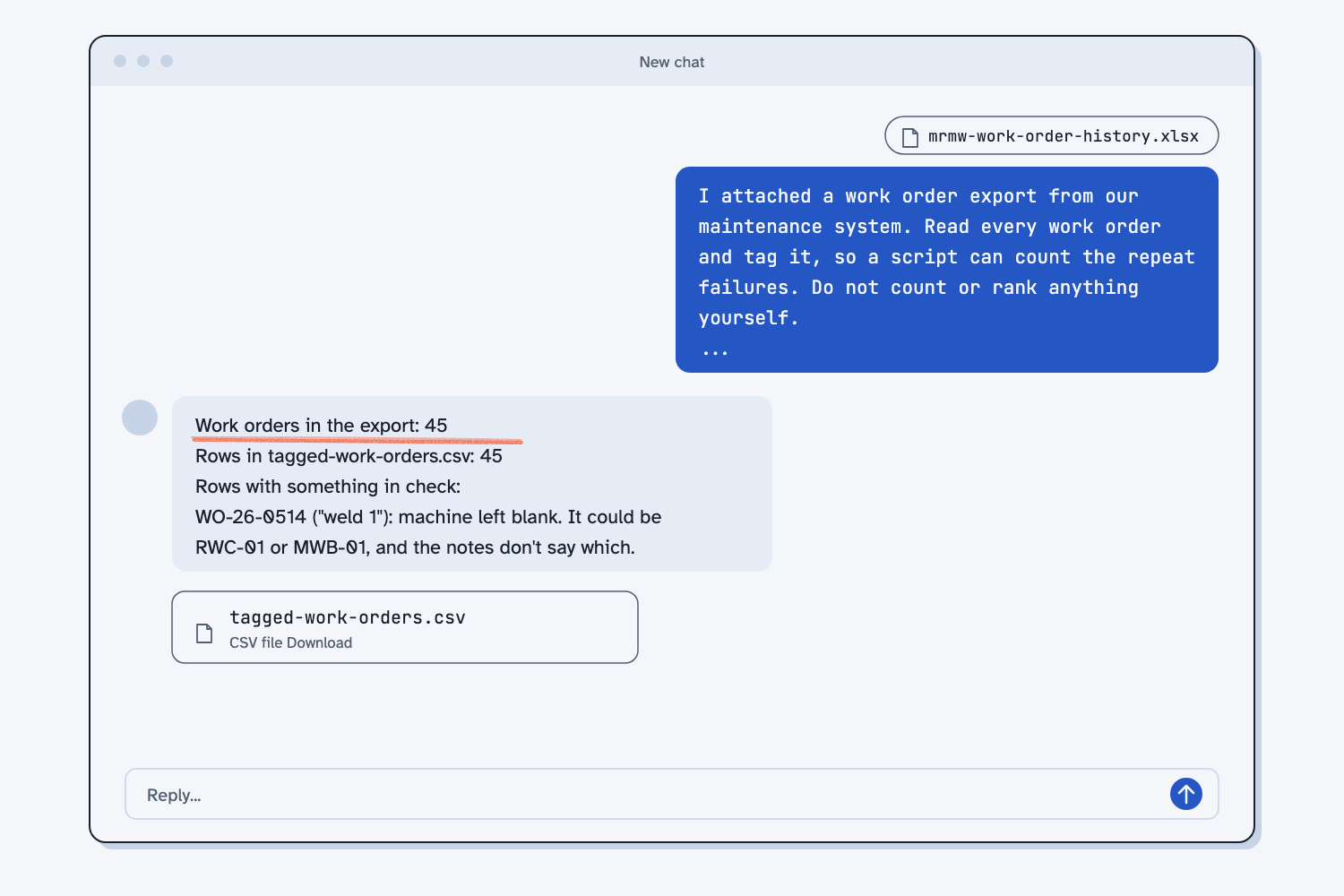
On the sample, Claude flagged WO-26-0514, "weld 1", because it could be the robot weld cell or the manual weld booth, and the notes do not say which. That is the right answer, because a guess would quietly add a failure to the wrong machine.
Step 4. Spot-check the tagged file in Excel
Download tagged-work-orders.csv and open it in Excel. Check the two counts in the reply first, because if 45 went in and 44 came out, a work order was skipped. Then check five rows you know, the same way you would test any AI tool against answers you know. On the sample, check these.
- WO-26-0435 ("PB2"), WO-26-0483 ("brake 2"), and WO-26-0563 ("PB-2") are all PB-02, hydraulic leak.
- WO-26-0463 is coded ELEC, but the notes say the chip screen was packed, so the cause is coolant system.
- WO-26-0504 says "Dup of WO-26-0503," so counts is no.
- WO-26-0543 is typed CM, but the notes say "Monthly PM done," so counts is no.
- WO-26-0471 has a blank downtime, not 0.
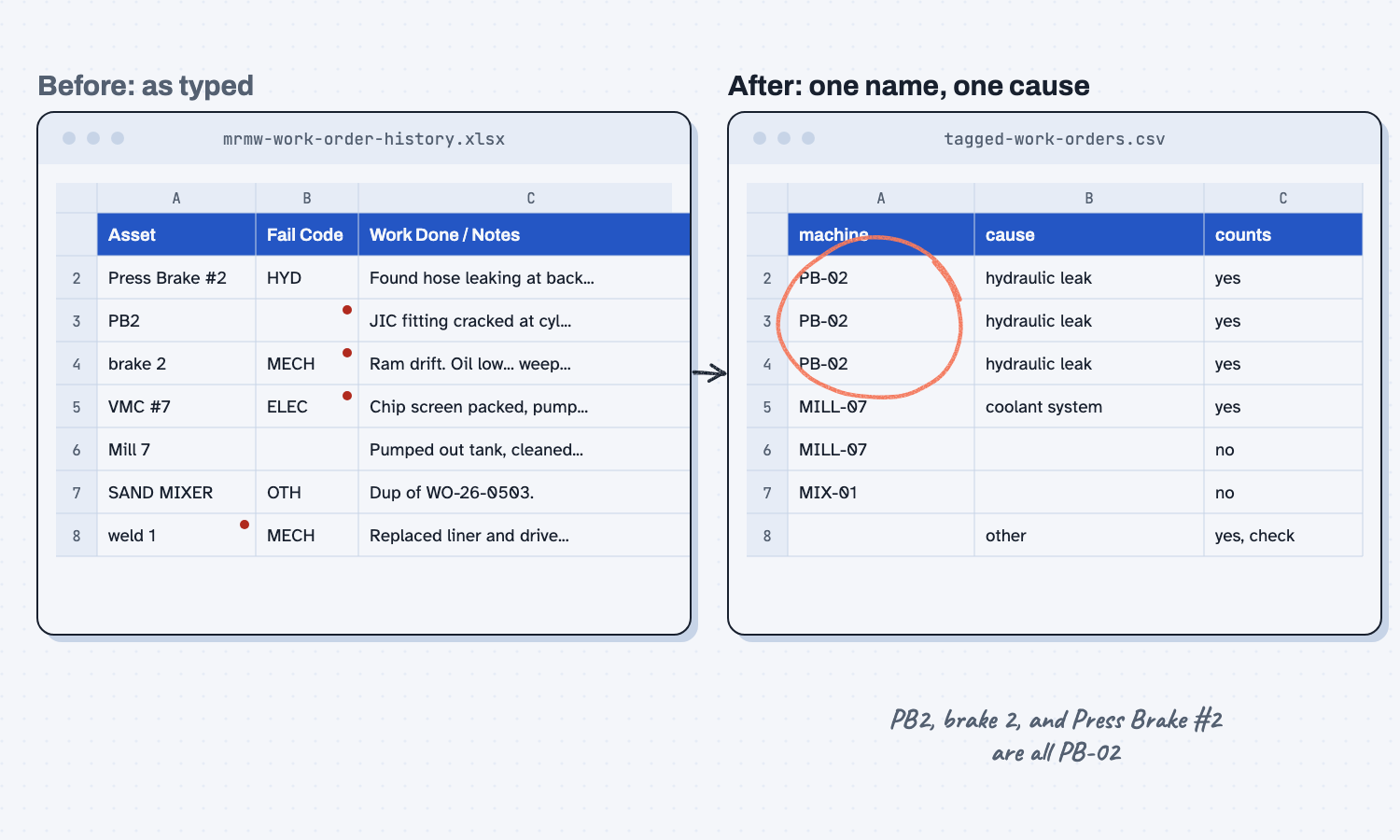
The full correct file is answer-key/tagged-work-orders.csv in the sample zip. If a tag is wrong, tell Claude the work order and the right tag, and ask it to save the file again. Do not fix it in Excel, because Excel can change the dates when it saves a CSV.
Step 5. Have Claude run the script
In the same chat, attach rank_repeats.py and send the prompt below. Claude runs the script and does not count anything itself, so this quarter's list and next quarter's list are counted the same way.
Run rank_repeats.py on tagged-work-orders.csv, like this:
python3 rank_repeats.py tagged-work-orders.csv

Do not change the script or the CSV, and do not make your own report. Give me the repeat-failures.xlsx file it writes, and paste the lines it prints. If it stops with "Bad data", show me the message and stop.
Claude gives you repeat-failures.xlsx and pastes the lines the script printed. If the tagged file has a problem, such as a date written as 12/01/2026 or counts written as "maybe," the script stops and names the row instead of guessing. Ask Claude to fix that one value in the CSV and run it again.
Step 6. Read the Fix first list and its evidence
Open repeat-failures.xlsx in Excel. The first tab, Fix first, lists every machine and cause that came up two or more times, with the most times at the top and downtime as the tie-breaker. The top three rows are shaded.
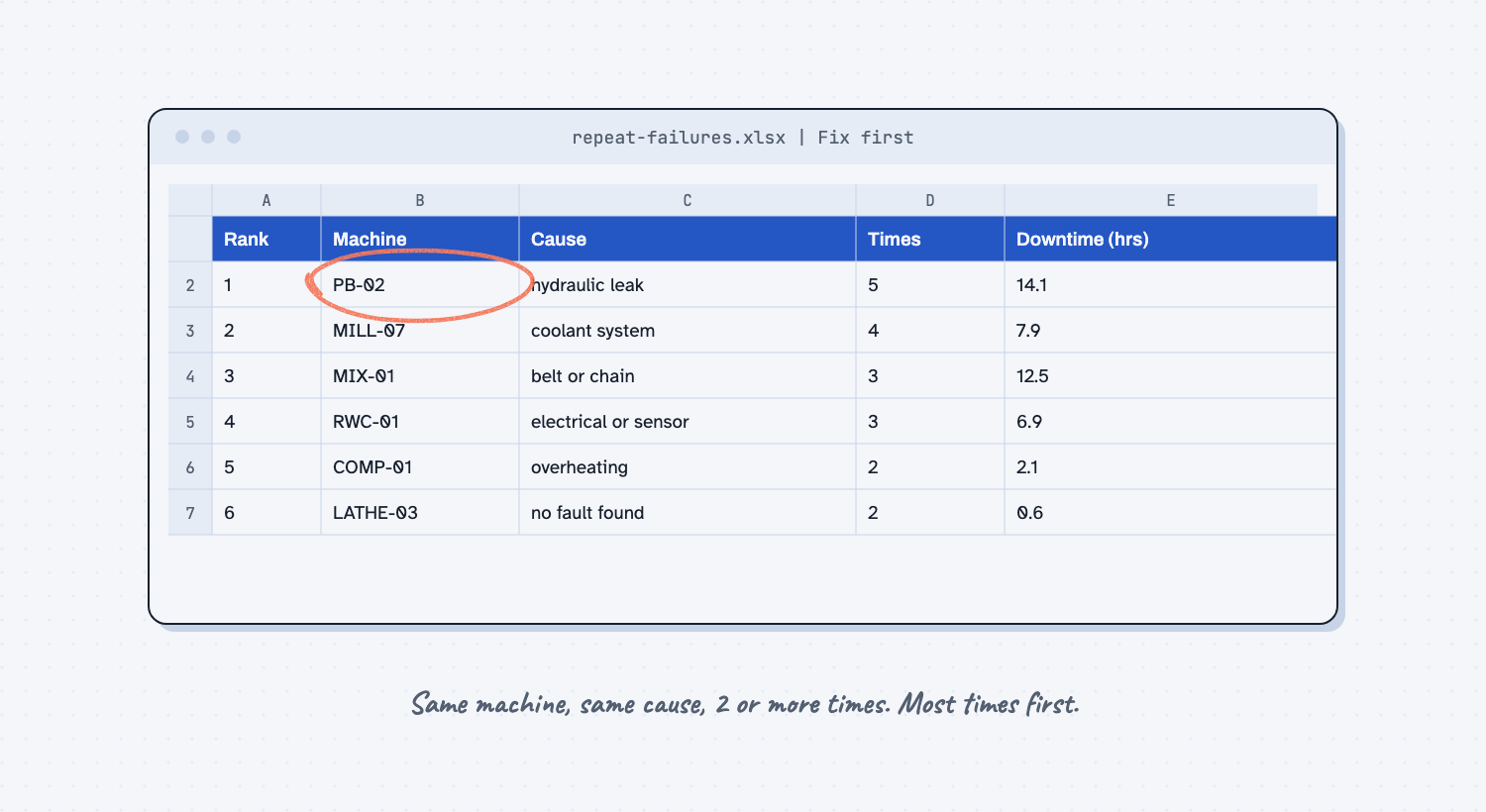
The other tabs let you check every number. Evidence lists each counted failure under its rank, with the work order, date, downtime, the asset as typed, and the words from the notes. By machine totals each machine across all causes. Check these holds the unsure rows, which stay out of the ranking until you fix them. Not counted holds the PMs, inspections, and duplicates, so you can make sure no breakdown is hiding there.
Step 7. Ask Claude for a note on the top three
The ranking tells you what to look at first, and the evidence rows hint at why it keeps happening. Reading them is a good job for Claude, as long as it sticks to the rows. Attach repeat-failures.xlsx and send this prompt.
I attached repeat-failures.xlsx. Read the Fix first sheet and the Evidence sheet. For the top 3 rows on Fix first, write a short note I can read out at the morning meeting.

For each one, give me:
1. The machine, the cause, the times, and the downtime, copied from the Fix first sheet. Do not change any number.
2. What the evidence rows have in common, in one or two sentences. Name the work orders you used.
3. One question to ask the team, or one thing to check, based only on those rows.

Use only what is in the file. If the rows do not show a pattern, say so. Do not guess at a root cause the notes do not support.
On the sample, Claude noticed that four of the five press brake leaks were at a cylinder fitting or seal, and asked whether the left cylinder fitting was checked after the seal kit went in, since it was loose again five weeks later. For Mill 7, it noticed two pump replacements and two chip blockages, and asked whether anyone checked the chip screen when the pumps were changed. You decide which questions are worth chasing. Save the tagged file, the Excel list, and the note in maintenance-repeats, so next quarter's list has something to be compared with.
What does good look like?
With the sample log, the Fix first tab shows these six repeats. Answer key, sample data. The script did the counting from the answer key's tags, and you can open the sample repeat failures file to compare.
| Rank | Machine | Cause | Times | Downtime (hrs) |
|---|---|---|---|---|
| 1 | PB-02 Press brake 2 | hydraulic leak | 5 | 14.1 |
| 2 | MILL-07 Vertical mill 7 | coolant system | 4 | 7.9 |
| 3 | MIX-01 Sand mixer 1 | belt or chain | 3 | 12.5 |
| 4 | RWC-01 Robot weld cell 1 | electrical or sensor | 3 | 6.9 |
| 5 | COMP-01 Air compressor 1 | overheating | 2 | 2.1 |
| 6 | LATHE-03 CNC lathe 3 | no fault found | 2 | 0.6 |
33 of the 45 work orders count as failures, and one row needs a check by hand. Two results are worth a second look.
- Mill 7 has the most downtime by machine (14.9 hours), but press brake 2 tops the list. One 7-hour spindle bearing job on Mill 7 is a big hit, but it happened once, so it is not a repeat. The By machine tab shows both views.
- "No fault found" twice on lathe 3 is a repeat too. Both calls were the same chuck clamp alarm, and a fault nobody can find is often a fault that comes back.
What can go wrong?
Most problems come from the tagging in Step 3, where Claude can make the same mistakes a person would. The prompt has a rule for each one, but check anyway.
- Claude trusts the fail code. WO-26-0463 is coded ELEC because the coolant alarm is electrical, but the fix was a packed chip screen. Rule 5 tells Claude to trust the notes over the code.
- Claude tags a machine the notes only mention. The laser chiller note says "Mill 7 low on coolant too." That is not a Mill 7 work order, and rule 4 is there to stop it.
- A cause on your list is worded too narrowly. When the list said "drive belt or chain," Claude was unsure whether a shot blast conveyor belt fit, so it chose "other" and flagged it. Renaming the cause to "belt or chain" fixed it, so if the same cause keeps landing in check, reword your list.
- Two machines, one name. "weld 1" could be two machines, so Claude leaves it blank, and it stays out of the ranking until you fix it.
- A blank downtime becomes 0. That makes a repeat look cheaper than it was, so rule 2 says to leave it blank.
- Claude writes its own ranking. If file creation is off, Claude may count the rows itself in the chat. The reply should paste the lines
rank_repeats.pyprinted, and if it does not, check that file creation is on in Claude (see Set up Claude) and send the Step 5 prompt again.
How do I check the answer?
Check the tags, not the counts, because the counts come from a script that does the same math every time. A wrong count almost always means a wrong tag.
- The work orders in the export and the rows in the tagged file are the same number.
- Five rows you know are tagged right, including one PM and one duplicate.
- Every row on the Check these tab is fixed or left out on purpose.
- For the top repeat, every work order on the Evidence tab is really that machine and that cause.
- You pick what to fix. The list tells you where to look, not what to spend.
Why does this way work?
It works because each part of the job goes to the tool that is best at it, and you can see the proof behind every number. Here is the short "why" behind each method.
Separate reading from counting. Knowing that "oil on floor, tightened JIC fitting" is a hydraulic leak takes judgment, which is a job AI does well. Counting and ranking are rules, and rules belong in a script that gives the same answer every time, which people call deterministic. If AI reads, counts, and ranks in one go, you cannot tell which step went wrong. (When not to use AI.)
Give AI a fixed list to pick from. A count only means something when every row is in a bucket you named. If Claude makes up its own cause names, "hyd leak" and "oil leak" become two causes, and the repeat disappears. (Give AI a pick list.)
Flag doubt instead of guessing. Claude handles the clear rows and hands you the few it cannot settle, which is how a person stays in the loop without reading all 45. A blank with a reason costs you ten seconds, while a wrong guess hides inside a count.
Keep the evidence with every count. "Press brake 2 failed five times" starts an argument, but five work order numbers and the words from each one end it, and they show the pattern behind the number. (Show the evidence rows.)
Check the tags against an answer key. A list with wrong tags looks the same as a list with right ones. Checking rows you already know, before you trust the ranking, is how you test any AI tool. On your own log, use the breakdowns you were there for.
Frequently asked questions
Do I need to know how to code to use this?
No. You attach files and paste three prompts, and Claude runs the script for you. The ranked list opens in Excel. If you want a different rule, such as three or more times instead of two, ask Claude to run the script with --min 3.
What if I do not have a clean machine list?
Export the asset list from your maintenance system, or ask Claude to read the log and suggest one machine ID per asset name it sees. Then fix that list yourself, because you know which "weld 1" is which. After that, the list is yours and stays the same every month.
Can I do the counting with a PivotTable instead of the script?
Yes. Open tagged-work-orders.csv in Excel, filter counts to yes, and make a PivotTable with machine and cause as rows and count of wo as values. You get the same counts, but the script also builds the evidence and check tabs.
Can I use ChatGPT or Copilot instead of Claude?
Yes, if the tool can read an attached Excel file and make a file. The script does not care which AI made the tagged file. If your tool cannot run code, run it yourself with python3 rank_repeats.py tagged-work-orders.csv.
Can I make this one step instead of three prompts?
Yes. Save it as a Claude skill, a saved set of instructions Claude loads when the job comes up. (What is an AI skill?) The skill in the next section tags the export and runs the script in one go. Keep checking the tags.
Take this with you
Three prompts, one script, and a skill that puts them together. They work on any work order export with free-text notes.
1. The tag prompt. Paste your machine list and your cause list where it says [YOUR MACHINES] and [YOUR CAUSES].
I attached a work order export from our maintenance system. Read every work order and tag it, so a script can count the repeat failures. Do not count or rank anything yourself.

Make one CSV file named tagged-work-orders.csv with these columns, in this order:
wo,opened,asset_as_written,machine,cause,counts,down_min,evidence,check

Rules:
1. One row for every work order in the export, in the same order. Do not skip or merge any.
2. wo, asset_as_written, and down_min: copy them exactly from the export. If the downtime is blank, leave it blank. Do not write 0.
3. opened: the date the work order was opened, written as YYYY-MM-DD.
4. machine: the machine ID from my machine list below. Use the asset name, the asset ID, and the notes. If a row could be two machines, leave it blank and say why in check. Do not tag a machine only because the notes mention it.
5. cause: one cause from my cause list below, picked from what the notes say was wrong and what was fixed. The fail code is often blank or wrong, so trust the notes over the code. If you cannot tell, leave it blank and say why in check.
6. counts: yes for a breakdown or a repair call, including "no fault found." no for PMs, inspections, project work, and duplicates of another work order, even if the type says CM. When counts is no, cause can be blank.
7. evidence: copy up to 15 words from the problem or the notes that show the cause, word for word.
8. check: leave it blank when you are sure. If you are not sure about the machine, the cause, or counts, write a short reason.
9. Read each work order yourself. Do not tag rows with keyword rules or a search formula, because the same fault is written many ways.

When the file is saved, reply with three things: the number of work orders in the export, the number of rows in the file, and every row that has something in check. Nothing else.

Our machines:
[YOUR MACHINES, one per line. Example: PB-02 = Press brake 2, fab, Bay 2]

Our causes:
[YOUR CAUSES, one per line. Example: hydraulic leak]
2. The run prompt and rank_repeats.py.
Run rank_repeats.py on tagged-work-orders.csv, like this:
python3 rank_repeats.py tagged-work-orders.csv

Do not change the script or the CSV, and do not make your own report. Give me the repeat-failures.xlsx file it writes, and paste the lines it prints. If it stops with "Bad data", show me the message and stop.
3. The morning meeting note.
I attached repeat-failures.xlsx. Read the Fix first sheet and the Evidence sheet. For the top 3 rows on Fix first, write a short note I can read out at the morning meeting.

For each one, give me:
1. The machine, the cause, the times, and the downtime, copied from the Fix first sheet. Do not change any number.
2. What the evidence rows have in common, in one or two sentences. Name the work orders you used.
3. One question to ask the team, or one thing to check, based only on those rows.

Use only what is in the file. If the rows do not show a pattern, say so. Do not guess at a root cause the notes do not support.
4. Or save it as a Claude skill. Download repeat-failures.zip. To add the zip to Claude, follow Upload a Claude skill. The skill carries the script inside it, so it ranks the same way every time. Then attach your export and your two lists and say "find the repeat failures."
Every quarter: export the new months, attach the export and your lists, check the tags, run the script, and save the list next to last quarter's.
What's next?
- Make the mistake impossible, what to do once you know which failure keeps coming back.
- Speed up only the slowest step, why the machine that holds up the shop deserves the first fix.
- Compare supplier quotes the same way every time, the same read-then-script method for buyers.
- Turn a messy ERP export into a clean report, another messy export made clean.
- All guides, filtered to plant and operations for more jobs like this one.
- If a script can do it, use the script, the idea behind the split.