Clean Up Before You Automate: The Order of Work That Makes Automation Pay
With Josh Schultz ·
Answer. Clean up before you automate means you understand a job, tidy it, and make it hard to get wrong before you hand any of it to a computer. There are six steps in a fixed order, and automation comes last. My short version is "Never automate a mess."
The picture
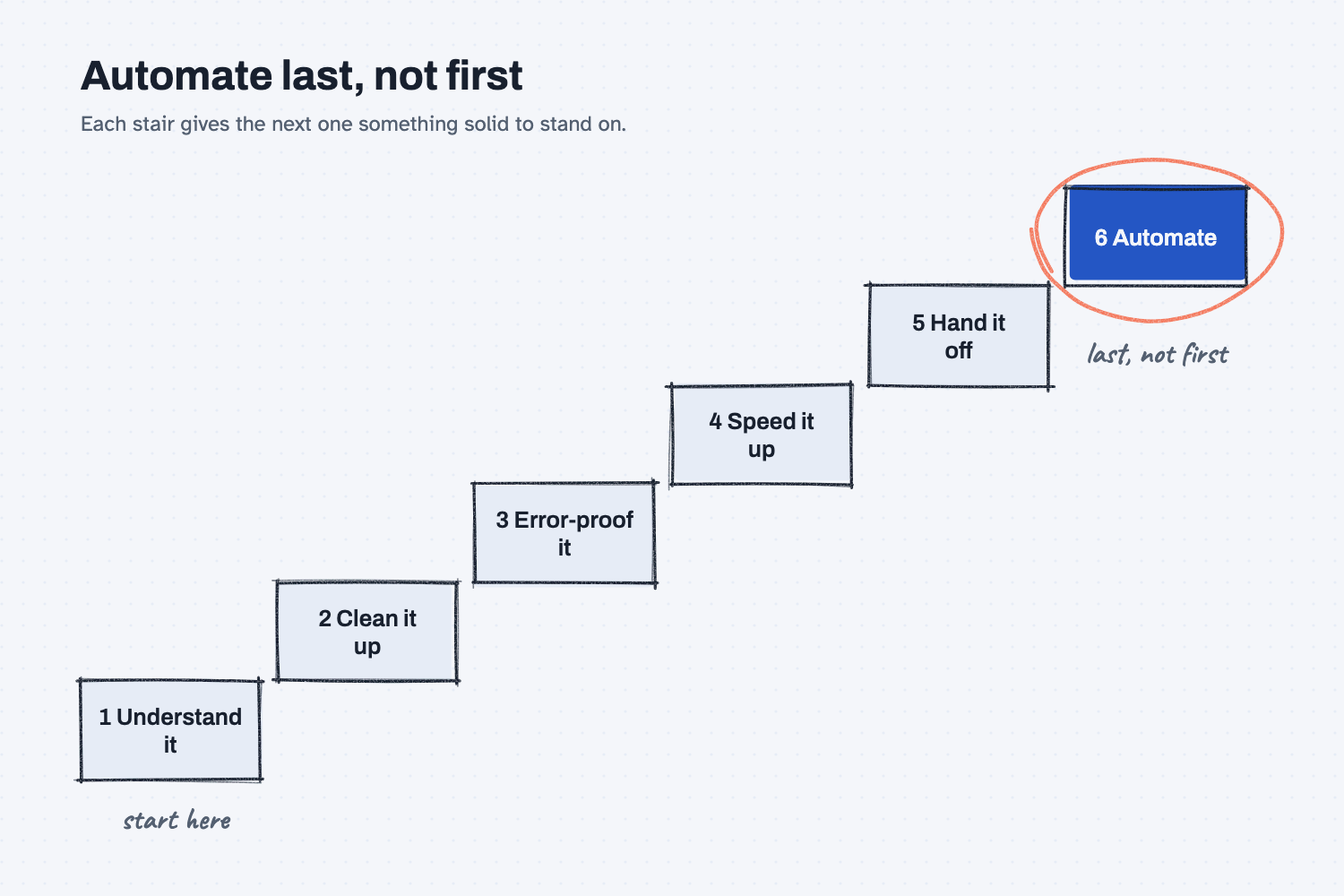
Read the stairs from the bottom left. You start by understanding the job, then you clean it up, then you make mistakes hard to make, then you speed it up, and then you make sure someone other than you could do it. Automation sits at the top, circled, because it is the last step and not the first. Each stair gives the next one something solid to stand on.
Think of it like this
Picture a stockroom that you want to run with a barcode scanner. You would not buy the scanner first. You would walk the room and see what is really in it, then throw out the junk, then label the bins so a part cannot go in the wrong place. After that you would move the fast sellers near the door, write down where things live so anyone could find them, and finally add the scanner.
The scanner is the easy part to buy, and it is the part that only pays off once the rest is done. A scanner in a messy stockroom just tells you faster that you cannot find anything.
Why does it matter at work?
Automation copies whatever it is given, including the waiting, the retyping, and the chasing. If you automate a messy job, you get the same mess at higher speed, and it is harder to see and fix afterward. As I put it: "Automating a messy process gets you a fast, expensive mess. We clean first, automate second."
Here is an example. The buyers at Mesquite Ridge Metal Works chase supplier quotes by email every week. Someone suggests using AI to write the follow-up emails, which sounds like an easy win.
But the buyers retype each quote into a spreadsheet, the quote forms often arrive without a ship date, and the quotes live in three different places. If AI writes the follow-ups on top of that, it will chase quotes that are already answered, and it will miss the ones that are missing a date. So the team writes down the steps first, cuts the retyping, requires the ship date on the form, and keeps everything in one tracker. After that, the AI drafts follow-ups from clean data, and the drafts are good.
This lesson is about the order of the whole job. The lesson on automating a broken process covers something narrower, which is a single step that exists only because something upstream is broken, such as a side spreadsheet that fixes wrong dates. You will often meet that problem during step two, when you clean up.
How does it work?
There are six steps, and each one makes the next one easier.
1. Understand it. Get the job out of one person's head and onto paper, as it really happens today and not as the manual says. You cannot improve what nobody has described.
2. Clean it up. Remove the waiting, the redoing, the chasing, and the retyping. In my words: "First we remove and simplify. Only then do we let computers help." A step you delete is one you never have to automate.
3. Error-proof it. Make mistakes hard to make, instead of asking people to be careful. The next lesson, make mistakes impossible, shows how to do that.
4. Speed it up. Put the information in one clean home and cut the handoffs between people. If you want the biggest gain, spend your effort on the slowest step first (see find the bottleneck first).
5. Hand it off. Check that someone other than you could do the job from the written steps. If only one person can do it, automating it will hide that risk and not remove it.
6. Then automate. Hand the repeat parts to a computer, and keep a person in charge of the decisions. A good way to start is the ladder in levels of AI automation, where AI drafts first and earns trust before it acts on its own. It is also the pattern in humans plan, AI does, where people plan and set the rules and the computer carries them out.
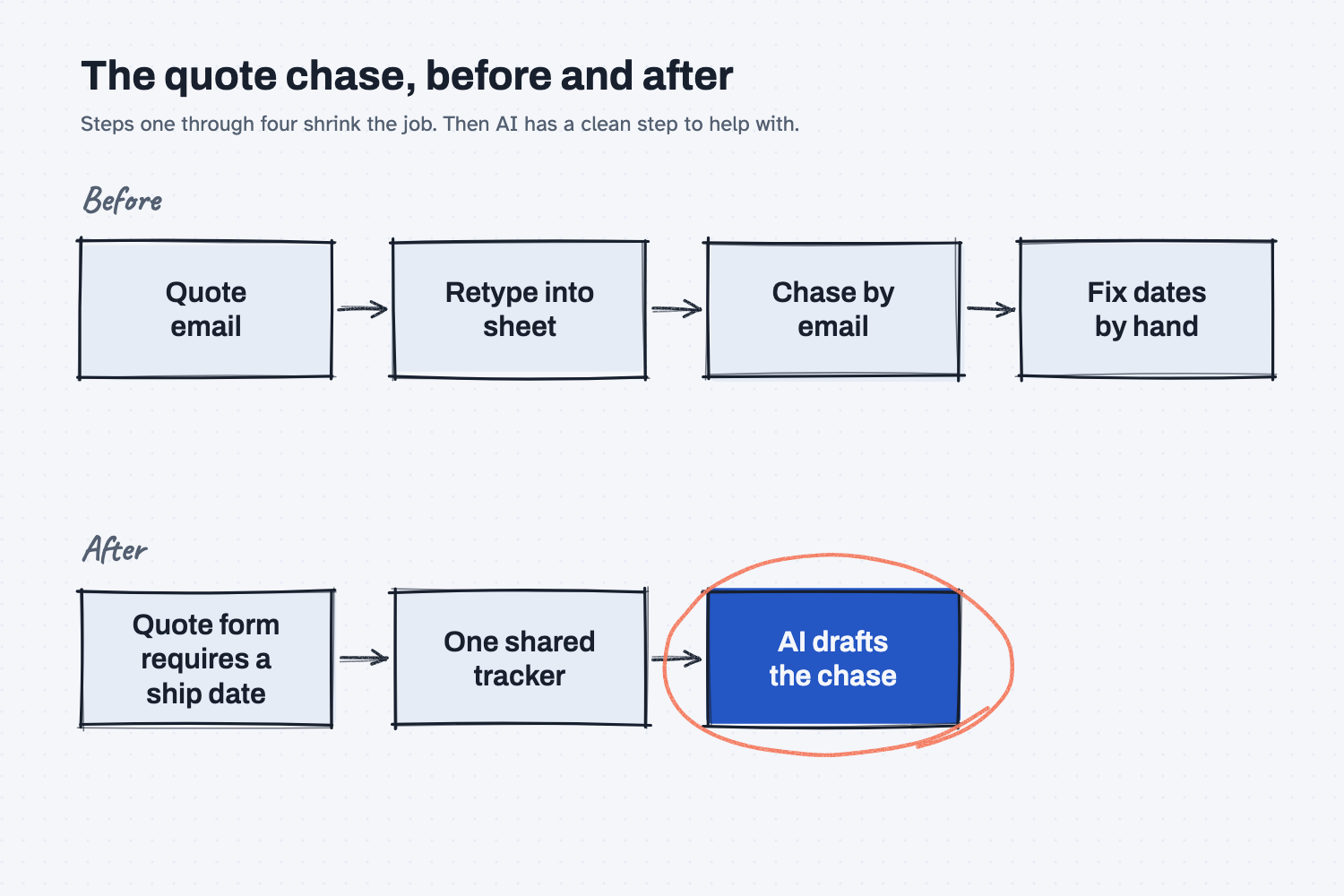
The top flow is the quote chase as it runs today, with retyping and fixing in the middle. The bottom flow is the same job after steps one through four. It is shorter, and the one step left for AI, drafting the chase, is now a clean one.
Where do people get it wrong?
Most mistakes come from jumping to the tool because the tool is exciting. These are the four I see most often.
- Starting with the tool. Someone says "let's use AI for this" before anyone has described the job, so the tool gets pointed at a guess.
- Skipping step one because you know the job. Writing the steps down almost always turns up something that surprises the person who does them every day.
- Waiting for a perfect process. You do not need every step fixed. As I like to say it: "A process that's 80% effective and actually used is better than a 'perfect' process that's too complex to implement."
- Skipping the hand off. A job that only one person can do is fragile, and automating it just makes that person's habits harder to change.
Try this in 2 minutes
This test asks AI to put six ideas for the quote chase in the best order. You can use any chat tool.
- Open a new chat and paste this:
Our buyers chase supplier quotes by email every week. Put these six ideas in the best order to do them, and say why in one short line each:
A. Use AI to draft the follow-up emails.
B. Remove the step where we retype each quote into a spreadsheet.
C. Write down the steps as they happen today.
D. Make the quote form require a ship date.
E. Make sure a coworker can do the job when the buyer is out.
F. Keep all quote data in one shared tracker.
Give the order as letters first, then the reasons.
- Here is what I expect: write the steps down first, clean up and error-proof in the middle, and put the AI drafts last.
- Compare its order to the six steps above, and notice where you would move something.
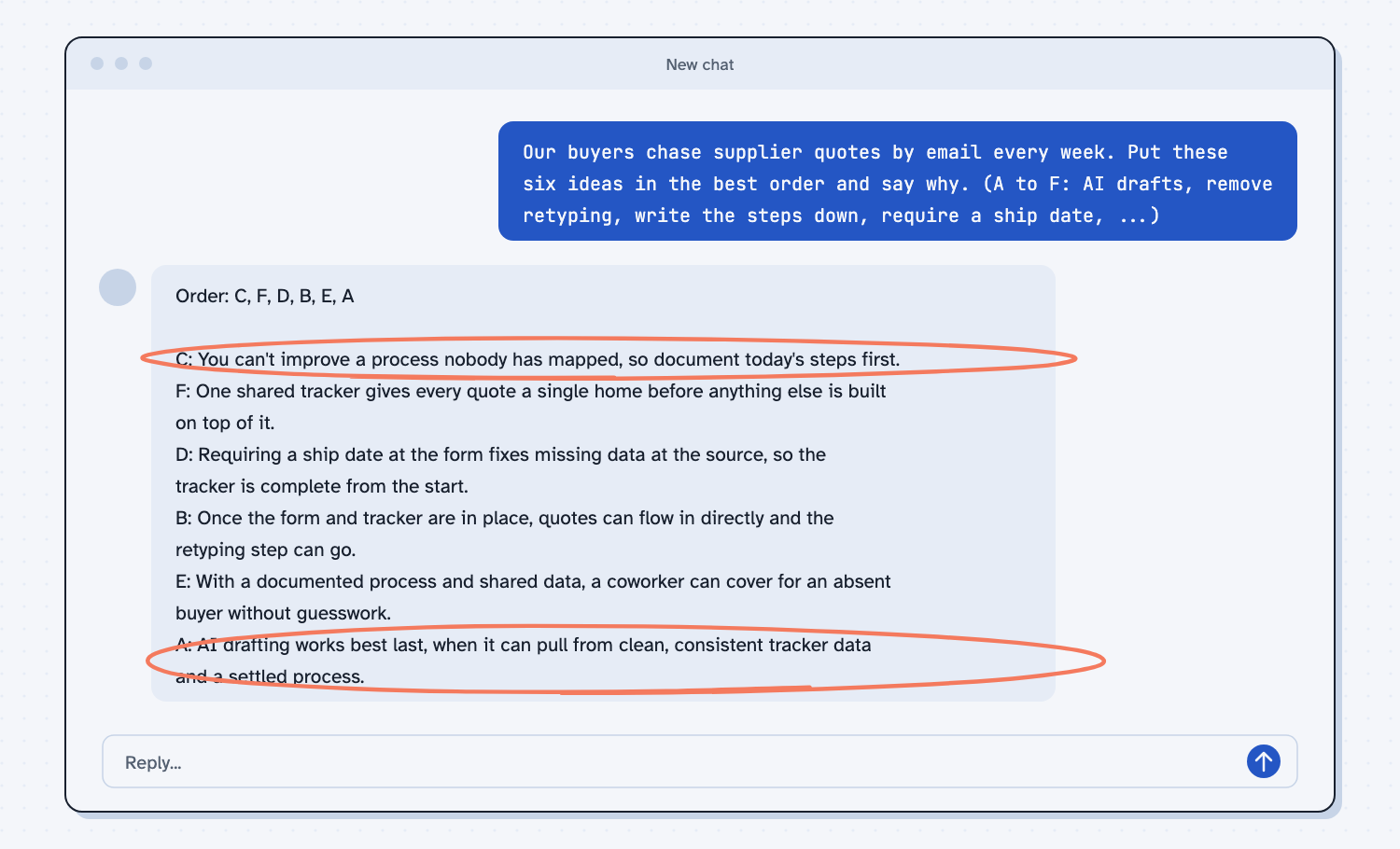
When I tried this, the order came back as "C, F, D, B, E, A." The first reason read "You can't improve a process nobody has mapped, so document today's steps first." The last one read "AI drafting works best last, when it can pull from clean, consistent tracker data and a settled process."
The order was not exactly mine, because it put the shared tracker before removing the retyping, and you could argue for either. The shape is what matters. It started with writing the steps down, it put the cleanup and the form fix in the middle, and it left AI for last.
Frequently asked questions
What does it mean to clean up a process before automating it?
It means removing the waiting, redoing, chasing, and retyping, and making mistakes hard to make, before you hand any step to a computer. Then the computer does a good job instead of a fast job of the wrong thing.
Does this mean I can't use AI until everything is fixed?
No. You only need the step you are about to automate to be clean enough. You can also use AI early to help with step one, such as turning your notes about a job into a written list of steps.
How long should the cleanup take?
Often much less than people fear, because most of the gain comes from a few steps you can delete or simplify. A short, honest look at how the job really runs usually shows where to start.
How is this different from fixing a broken step?
Fixing a broken step is one part of this. This lesson is the whole order of work, from understanding the job to handing it off, while the broken-step lesson focuses on a single workaround.
Use it today
- Clean up one process before you automate it: walk one repeat task through the order with Claude and get a yes or no on automating it.
- Browse the guides for a step-by-step way to try this on your own job.
- Related idea: Automating a broken process.
- Related idea: Make mistakes impossible.
- Related idea: Humans plan, AI does.
From my training: "Never automate a mess" is the short way to remember the order.