Answer. To clean up a process before you automate it, have Claude interview you about one repeat task, one question at a time, and write down how it really works. Then have it drop, simplify, combine, and reorder the steps, make mistakes hard, give each fact one home, and write it so someone else can do it. Last, a six-question check says yes or no on automating.
Time and cost. 25 minutes the first time, with the sample files. $0 on the free Claude plan. Who this is for. Anyone who owns a process and has been asked, "Can we automate this?"
When somebody says "let's automate the late PO chase," the honest answer is usually "not yet." I tell people the same thing every time: never automate a mess. As I put it in my own coaching notes, "Automating a messy process gets you a fast, expensive mess. We clean first, automate second."
This guide walks one real repeat task through the order I use with clients. You will end with a one-page fixed version and a plain yes or no on automating, with the reason. The practice task is how Dana, the senior buyer at our sample company, chases a late PO.
What will I learn besides cleaning up one process?
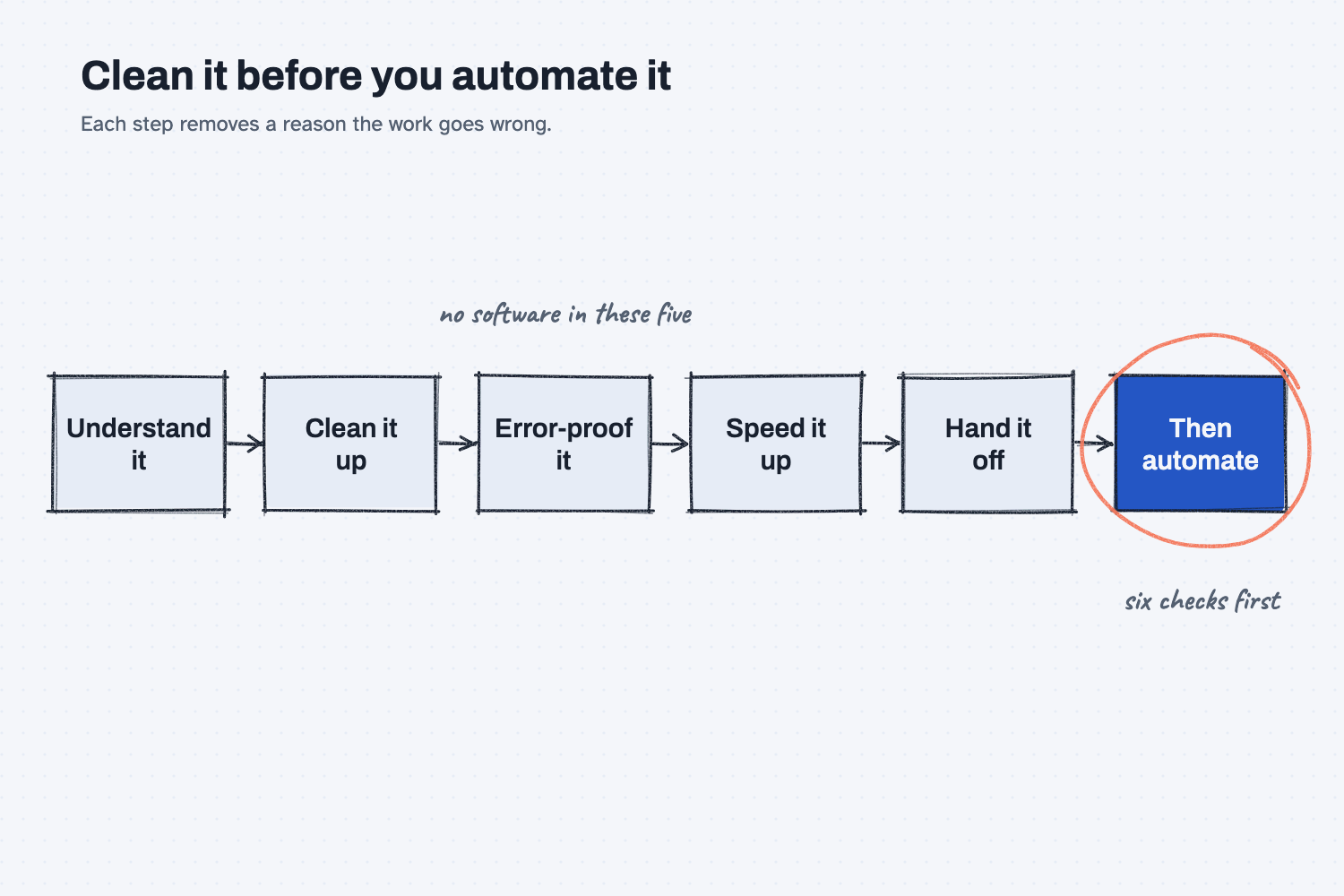
You will learn five methods that work on any repeat task, from order entry to month-end close. Each one has a short "why" later in this guide.
- Get the work out of a head and onto a page. Claude asks one question at a time and writes the steps down.
- Count before you argue. A one-week tally beats everyone's memory of how often it happens.
- Clean up in order. Drop a step before you simplify it, and simplify it before you buy anything.
- Give each fact one home. When the same date lives in four places, the four places never agree.
- Check readiness before you automate. Six yes or no questions decide it, not how excited people are.
What do I need before I start?
You need Claude and three sample files. There is nothing to install.
- Claude at claude.ai, with file creation on so it can open a spreadsheet. The free plan works. If you have not set it up yet, follow Set up Claude first (about 10 minutes, once). To add files to a chat, see Attach files to a chat.
- The sample files for Mesquite Ridge Metal Works (a made-up company):
- late-po-chase-walkthrough.docx, the notes from a walk-through with Dana, in her own words. You will answer Claude's questions from it.
- late-po-tally-week-46.xlsx, a one-week count of every late PO chase, with the minutes each one took.
- For your own process later: one-week-tally-blank.xlsx, a blank tally sheet.
Safe use. A walk-through of real work names coworkers, suppliers, and customers. Check your company rules before you type those into any AI tool, and use first names or roles if you are not sure. Practice with the sample first. Read the safe use notes.
How do I clean up a process before I automate it?
Pick one task with a clear start and finish, let Claude interview you about it, then have Claude clean it up and run the automation check. Seven steps, all in one chat.
Step 1. Pick one process and write where it starts and ends
Pick one task that repeats, not your whole job. Write one line for the moment it starts and one line for the moment it is done, and make both things a stranger could watch happen.
For the sample, the process is chasing a late PO. It starts when someone asks where their material is, or a PO shows past due. It is done when the material is on the dock, or the planner has a new date he believes. If you are not sure where to start with your own work, pick one boring task you can check.
Step 2. Paste the interview prompt into a new chat
Open claude.ai and start a new chat. Copy the prompt below and fill in the three lines at the top. For the sample, paste these:
The process: Chasing a late PO
It starts when: Someone asks where their material is, or a PO shows past due
It is done when: The material is on our dock, or the planner has a new date he believes
I want to clean up one process at work before anyone automates it. Interview me about it, then write down how it works today.

The process: [NAME IT]
It starts when: [THE FIRST THING THAT HAPPENS]
It is done when: [WHAT DONE LOOKS LIKE]

How to interview me:
1. Ask one question at a time. Wait for my answer before you ask the next one. Never send a list of questions.
2. Ask me to walk through one real, recent time it happened, start to finish.
3. Find out who does each step, what system or file they use, where work waits, where someone retypes something, and where someone chases or redoes work.
4. Ask how often it happens, the rules I follow that are not written down, and what happens when I am out.
5. Use my words, not business words. Keep each question short.
6. Ask 10 questions at the most. Stop sooner if you have enough.

When you are done asking, write "How it works today":
- One numbered list of steps. Each step says who does it and what they use.
- Mark each step that has waiting [WAIT], retyping [RETYPE], chasing [CHASE], or redoing [REDO].
- Then list the rules that live only in someone's head, how often it happens (and whether that is a guess or a count), and my frustrations in my own words.
Do not suggest any fixes yet.
Do not attach the walk-through notes. The point is the interview, because that is how you will do it on your own work, where nothing is written down yet.
Step 3. Answer one question at a time
Claude asks one short question and waits. For the sample, open the walk-through notes in another window and answer each question from them, in a sentence or two, the way Dana would say it. If the notes do not say, write "not sure."
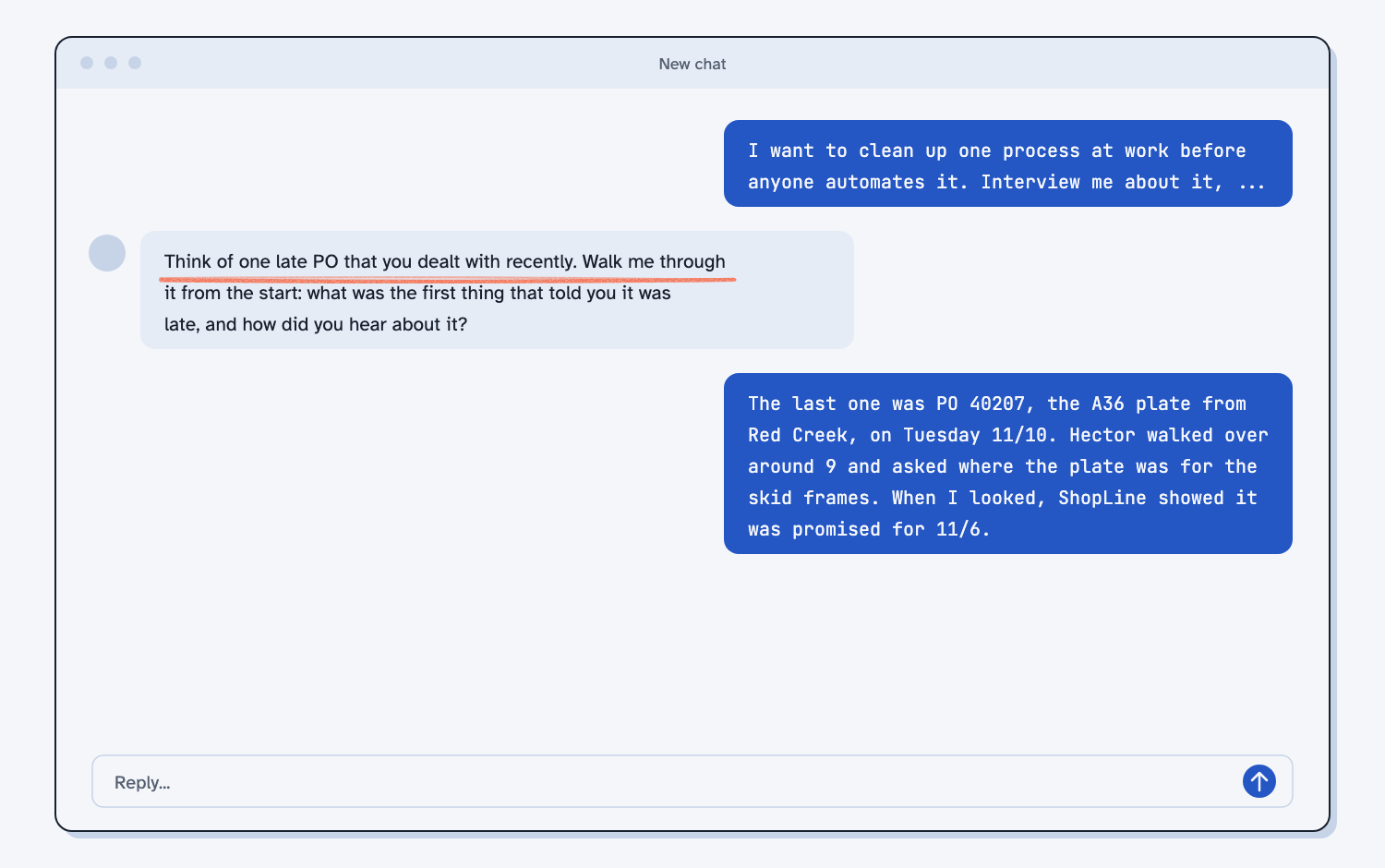
Expect about ten questions. The first one asks you to walk through the last time it happened, which in the notes is PO 40207 from Red Creek. Later questions ask how often it happens, what rules you follow that are not written down, and what happens when you are out. You can talk instead of type if that is faster for you, because talking to AI works as well as typing.
Step 4. Read "How it works today" and fix anything wrong
When Claude has enough, it writes the steps as a numbered list, with marks on the bad parts: [WAIT], [RETYPE], [CHASE], and [REDO]. Below that, it lists the rules that live only in someone's head, how often it happens, and the frustrations in your own words.
Read it like a stranger would. If a step is wrong or missing, tell Claude in one message, and it will fix the list. Do not polish it for long, because the list only has to be right enough to fix. I say this often: "Never let the map become the point."
For the sample, the list has about 12 steps. Claude should mark the email to the supplier as [RETYPE], because Dana copies the PO details by hand, and the Friday walk-around as [REDO]. The frequency should say "about 30 a week, a guess."
Step 5. Attach the count and paste the clean-up prompt
In the same chat, attach the tally. Then send the prompt below.
Now clean up this process, starting from "How it works today" above. If I attached a count, use its numbers instead of my guesses.

Work in this order, and do not skip ahead:
1. Clean it up. For each step, ask in this order: can we drop it, make it simpler, combine it with another step, or move it to a better place in the order? No software or automation in this part.
2. Error-proof it. For each mistake that has happened, pick a fix that makes it impossible or catches it the moment it happens. A reminder or "be careful" is the last choice.
3. Speed it up. Give each piece of information one home, so nobody keeps the same thing in two places, and cut handoffs.
4. Hand it off. Write it so someone else could do it tomorrow, including the rules that lived in someone's head.

Show that work as one short table: each step, and what you decided. Then write "The fixed version". It must fit on one printed page, in this shape:
- Starts when, and done when (one line each)
- Steps (numbered, with who does it and what they use)
- What we dropped, and why (one line each)
- Rules, written down
- Who covers when the owner is out
- Before and after: steps, handoffs, and places the same information is kept. Count them from the two lists.

Last, the automation check. Answer each question yes or no, with a one-line reason. A check passes only if it is true today, the way the work is really done now. The fixed version does not count until people have used it for two weeks.
1. Is the work still needed after the clean-up?
2. Does its information have one home?
3. Does it start on a clear trigger, not when someone remembers or asks?
4. Is the rule written down so someone else could follow it?
5. Does one named person own it?
6. Does it happen often enough to be worth it? Use the count.

Then answer "Automate now: yes" or "Automate now: no". If no, the failing checks are the to-do list, so say when to run the check again. If yes, name the smallest first job for a computer (a reminder, sending work to the right person, or filling in a form), and what a person still decides.
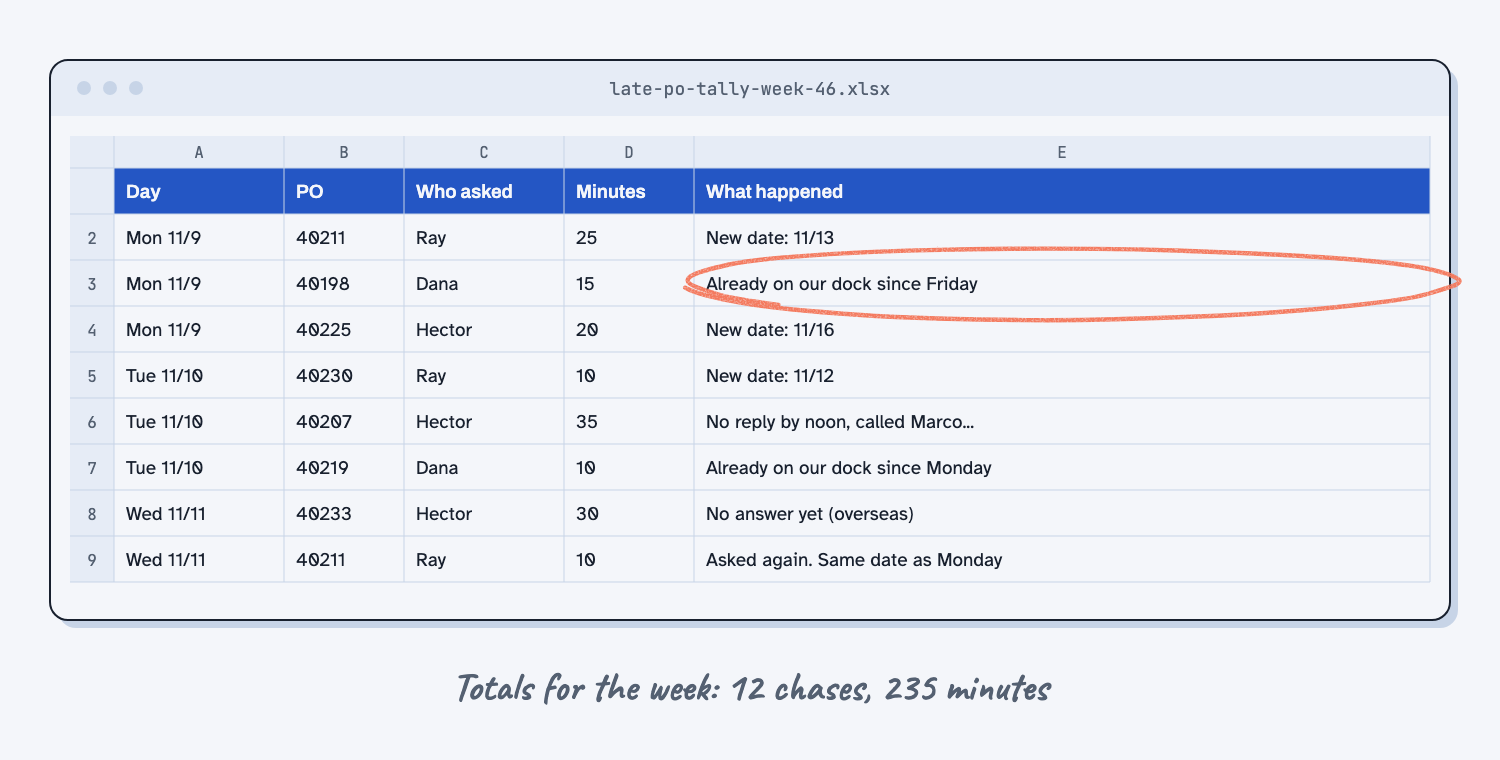
The tally matters more than it looks. Dana guessed thirty chases a week, and the count says twelve. When people disagree about how often something happens, a week of marks on a sheet settles it, which is why I count before arguing.
Step 6. Read the fixed version and the automation check
Claude works through the clean-up in a fixed order: drop the step, make it simpler, combine it with another step, or move it, and only then think about tools. It shows that work as a short table, then writes the fixed version on one page. The order matters, and here is why.
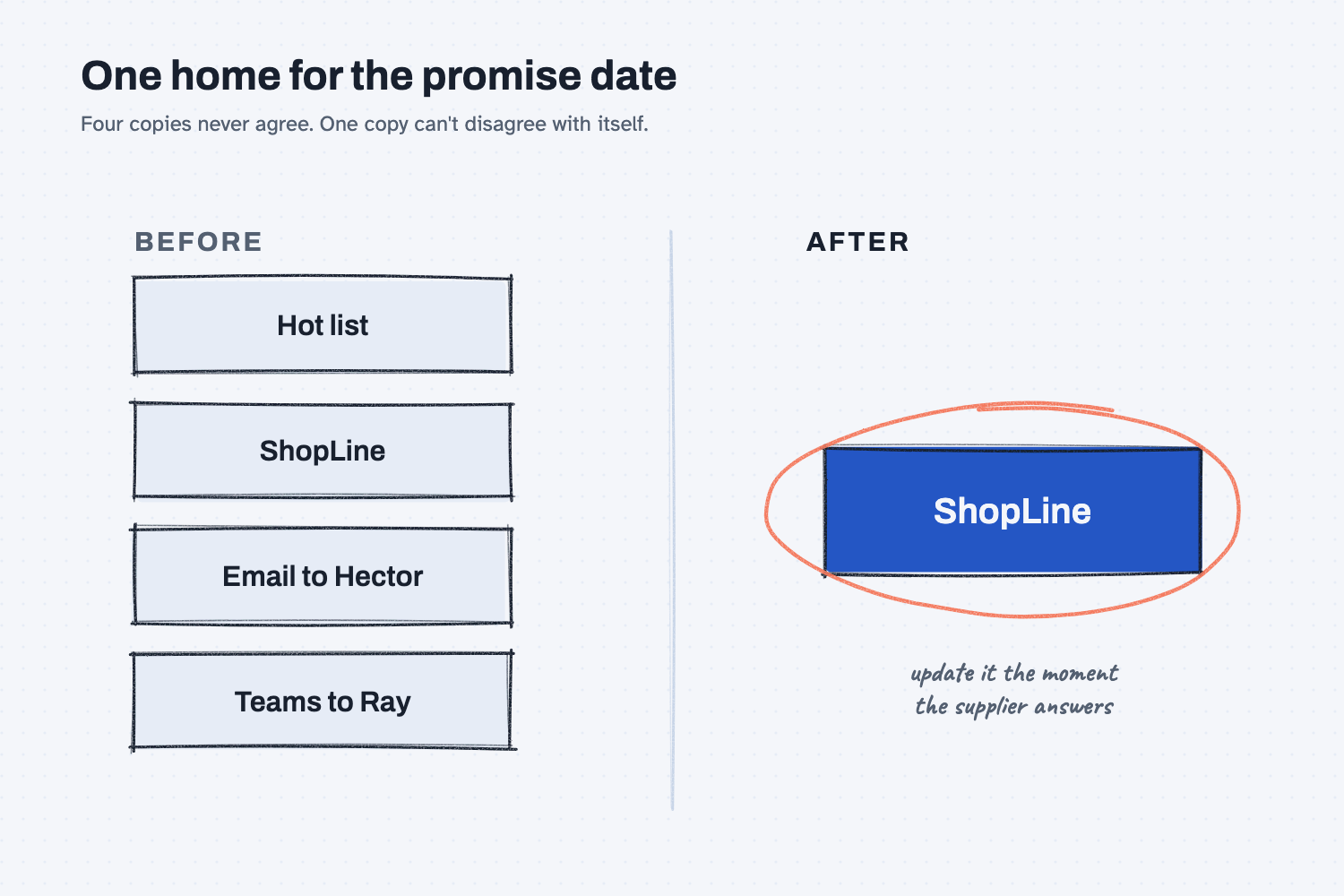
Read the fixed version first. For the sample, the biggest change is where the promise date lives. Today it is kept in four places, so the fixed version makes ShopLine the one home and drops the hot list, the extra email, and the Friday walk-around.
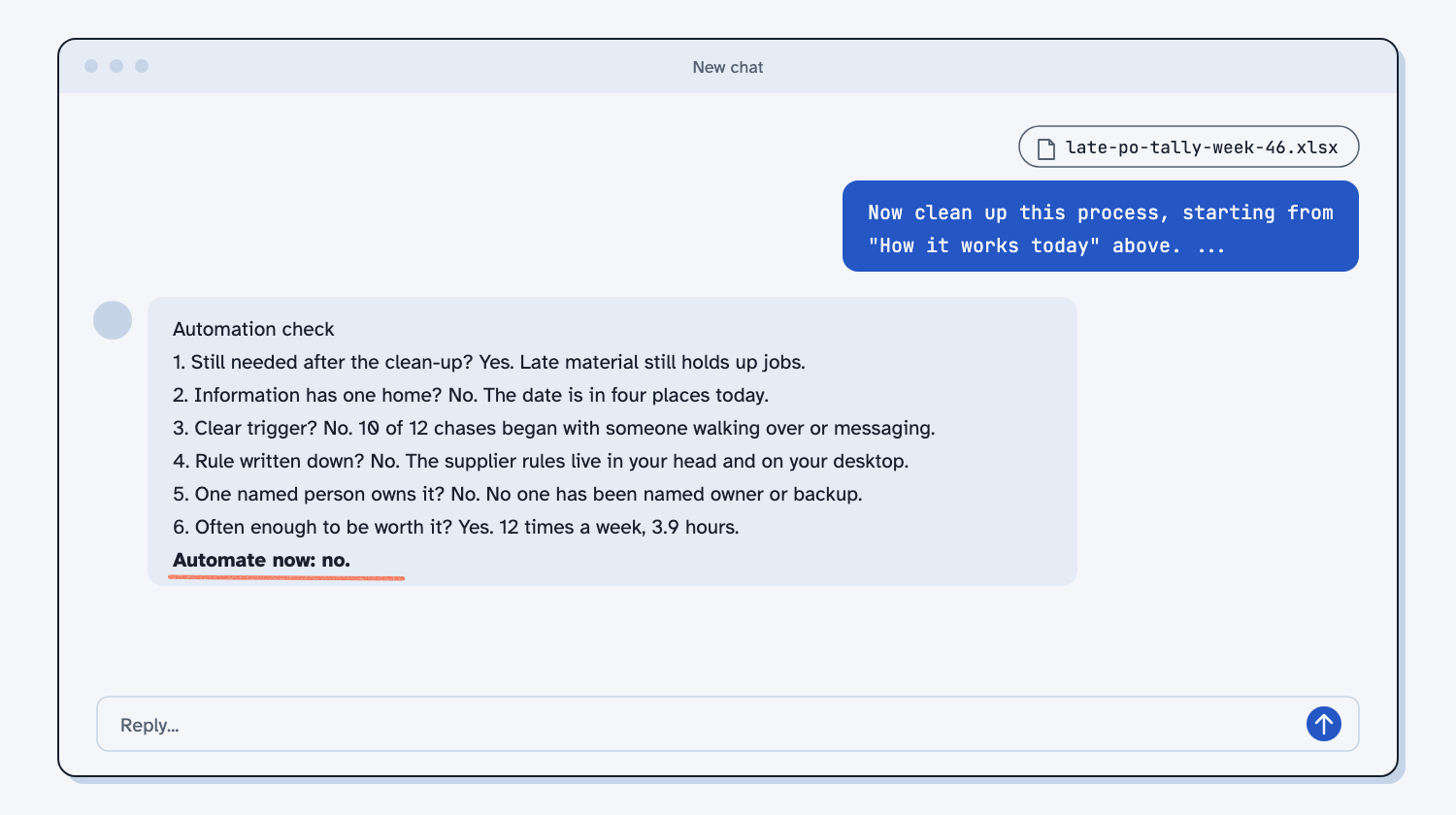
Then read the six checks at the bottom. Each one is a yes or no, judged on how the work is really done today. The last line is the answer: "Automate now: yes" or "Automate now: no."
Step 7. Save the fixed version and set a date to check again
Copy the fixed version into a document, print it, or save the chat. Put the date to run the check again on your calendar, two weeks after people start using the fixed version.
The checks that failed are your to-do list. For the sample, that means one home for the date, a daily trigger, written rules, and a named owner. Finishing that list is worth more than any automation you could buy for this task today.
What does good look like?
With the sample files, a good answer has these parts. Answer key, sample data. Compare yours to the sample fixed version, a real reply from my own run.
| Part | What it should say |
|---|---|
| The count | 12 chases and 235 minutes in the week, not 30. Three were for steel already on the dock, and two were repeat questions. |
| Dropped | The hot list, the separate email to Hector and Teams message to Ray, the Friday walk-around, and chasing steel that already came in. |
| One home | The promise date lives in ShopLine only, entered the moment the supplier answers. |
| Rules written | Red Creek: no reply by noon the next day, call Marco. Cedar Flats: call the counter. Panhandle: email again and copy the salesman. |
| Backup | Kevin Thao, with the written rules and one practice run. |
| The check | Still needed yes, one home no, trigger no, written rule no, owner no (yes is also fair), volume yes. |
| The answer | Automate now: no. Run the fixed version for two weeks, then check again. |
The steps will not match mine word for word, and the before and after counts may differ by a step or two. That is fine. What should not change is the answer and the reasons behind it.
What can go wrong?
Most problems come from Claude trying to be helpful, so read with the notes and the tally open next to you.
- Claude sends a list of questions. The prompt forbids it, but if it happens, reply "one at a time, please," and answer the first one.
- Claude writes the steps from the notes instead of asking. That happens when the notes are attached. Start a new chat without them.
- Claude cannot open the spreadsheet. It should say so and mark the volume check unknown. Check that file creation is on in Claude (see Set up Claude), or paste the rows into the chat.
- Claude fills gaps with its own rules. On the sample it proposed a wait time for Panhandle and rules for suppliers Dana never mentioned, and labeled them "proposed" or "my assumption." Check each one with the person who does the work before it goes on the page.
- Claude counts four places where you counted three. It counts every copy of the date, including an email and a Teams message. Count them yourself, because the copies you forget are the ones that drift.
- Claude says yes because the fixed version looks good. The prompt says to judge today, not the plan. A process that has only been fixed on paper is not ready, and Claude should say so.
How do I check the answer?
Check it against the notes and the tally, not against Claude's confidence.
- Every step in "How it works today" happens in the notes, and nothing in the notes is missing.
- Every number in the fixed version is in the tally: 12 chases, 235 minutes, 3 already on the dock.
- Every rule marked "proposed" has a name next to it of someone who will confirm it.
- Every failed check has a reason you could show your boss.
Why does this way work?
It works because each stage removes a reason the work goes wrong, so the computer, if it comes at all, gets a clean job instead of a tangled one.
Get the work out of a head and onto a page. People describe the version of their job they remember, and the steps they skip are the ones that are automatic for them. One question at a time keeps the answers honest and short, because a wall of ten questions gets ten rushed answers. Claude is good at this part, because listening and writing it down is a job AI does well.
Count before you argue. Dana's thirty a week was not a lie. It was how the week felt. A cheap pencil-and-paper count is the difference between a finding people accept and one they fight, and it gives the automation check a real number for volume. More on that in count it before you argue.
Clean up in order. I always go in the same order: drop, simplify, combine, reorder, and only then bring in tools, because "First we remove and simplify. Only then do we let computers help." A step that should not exist does not get faster when you automate it. It gets the same mistakes, faster. The full sequence, from understanding it to handing it off, is in clean up before you automate, and the error-proofing stage has its own guide and lesson, make mistakes impossible.
Give each fact one home. When the promise date lives in ShopLine, the hot list, an email, and a Teams message, Hector stops trusting all of them and asks again on Friday. One home means one place to update and one place to read, which is the same reason I keep rules in one place so two reports never disagree. Cutting handoffs is what speeds the work up, and it pays most at the step where work piles up, which is why I find the bottleneck first.
Check readiness before you automate. The six checks come from my client work: still needed, one home, a clear trigger, a written rule, a named owner, and enough volume. When any one fails, automation would copy the problem. "Enthusiasm is not readiness." When the checks pass, start at the bottom of the ladder with a reminder, and let AI earn more room over time, with a person still deciding the hard calls. That split, where humans plan and AI does, only works once the plan is written down.
Frequently asked questions
What if the answer is yes?
Start small. The first job for a computer should be a reminder, sending the work to the right person, or filling in a form, with a person still deciding. Give it two to four weeks before you let it do more. Read the levels of AI automation before you climb.
Do I need a tally for my own process?
You can run the prompts without one, and Claude will mark the volume as a guess. For the real decision, keep the blank tally sheet for one week first. Write each row when it happens, not at the end of the day.
Can my team do this together?
Yes. Have the person who does the work answer the questions, with the others listening. When two people remember a step differently, write both down and count it for a week instead of arguing.
Does it have to be Claude?
No. The prompts are plain text and work in ChatGPT or Copilot too. The tool needs to ask one question at a time and wait, so if it sends a list, remind it.
What if my process is already clean?
Then the check will say so, and you will have a written version someone else can follow, which you did not have before. That alone is often worth the 27 minutes.
Take this with you
Two prompts and one sheet. Use them in this order on any repeat task.
1. Before you start: keep the one-week tally for one week.
2. The interview prompt. Fill in the three lines at the top.
I want to clean up one process at work before anyone automates it. Interview me about it, then write down how it works today.

The process: [NAME IT]
It starts when: [THE FIRST THING THAT HAPPENS]
It is done when: [WHAT DONE LOOKS LIKE]

How to interview me:
1. Ask one question at a time. Wait for my answer before you ask the next one. Never send a list of questions.
2. Ask me to walk through one real, recent time it happened, start to finish.
3. Find out who does each step, what system or file they use, where work waits, where someone retypes something, and where someone chases or redoes work.
4. Ask how often it happens, the rules I follow that are not written down, and what happens when I am out.
5. Use my words, not business words. Keep each question short.
6. Ask 10 questions at the most. Stop sooner if you have enough.

When you are done asking, write "How it works today":
- One numbered list of steps. Each step says who does it and what they use.
- Mark each step that has waiting [WAIT], retyping [RETYPE], chasing [CHASE], or redoing [REDO].
- Then list the rules that live only in someone's head, how often it happens (and whether that is a guess or a count), and my frustrations in my own words.
Do not suggest any fixes yet.
3. The clean-up and check prompt. Send it in the same chat, with the tally attached.
Now clean up this process, starting from "How it works today" above. If I attached a count, use its numbers instead of my guesses.

Work in this order, and do not skip ahead:
1. Clean it up. For each step, ask in this order: can we drop it, make it simpler, combine it with another step, or move it to a better place in the order? No software or automation in this part.
2. Error-proof it. For each mistake that has happened, pick a fix that makes it impossible or catches it the moment it happens. A reminder or "be careful" is the last choice.
3. Speed it up. Give each piece of information one home, so nobody keeps the same thing in two places, and cut handoffs.
4. Hand it off. Write it so someone else could do it tomorrow, including the rules that lived in someone's head.

Show that work as one short table: each step, and what you decided. Then write "The fixed version". It must fit on one printed page, in this shape:
- Starts when, and done when (one line each)
- Steps (numbered, with who does it and what they use)
- What we dropped, and why (one line each)
- Rules, written down
- Who covers when the owner is out
- Before and after: steps, handoffs, and places the same information is kept. Count them from the two lists.

Last, the automation check. Answer each question yes or no, with a one-line reason. A check passes only if it is true today, the way the work is really done now. The fixed version does not count until people have used it for two weeks.
1. Is the work still needed after the clean-up?
2. Does its information have one home?
3. Does it start on a clear trigger, not when someone remembers or asks?
4. Is the rule written down so someone else could follow it?
5. Does one named person own it?
6. Does it happen often enough to be worth it? Use the count.

Then answer "Automate now: yes" or "Automate now: no". If no, the failing checks are the to-do list, so say when to run the check again. If yes, name the smallest first job for a computer (a reminder, sending work to the right person, or filling in a form), and what a person still decides.
Then save the fixed version, start using it, and run the check again in two weeks.
What's next?
- Make a repeat mistake impossible, not remembered, the error-proofing stage in depth, on one week of order-entry mistakes.
- Find repeat failures in a maintenance log, the same count-first habit on a year of machine work orders.
- Turn a messy ERP export into a clean report, for when the fact's one home is your ERP and the export is a mess.
- Clean up before you automate, the idea behind this guide.
- Automating a broken process makes the same mistakes faster, the short version of why.