
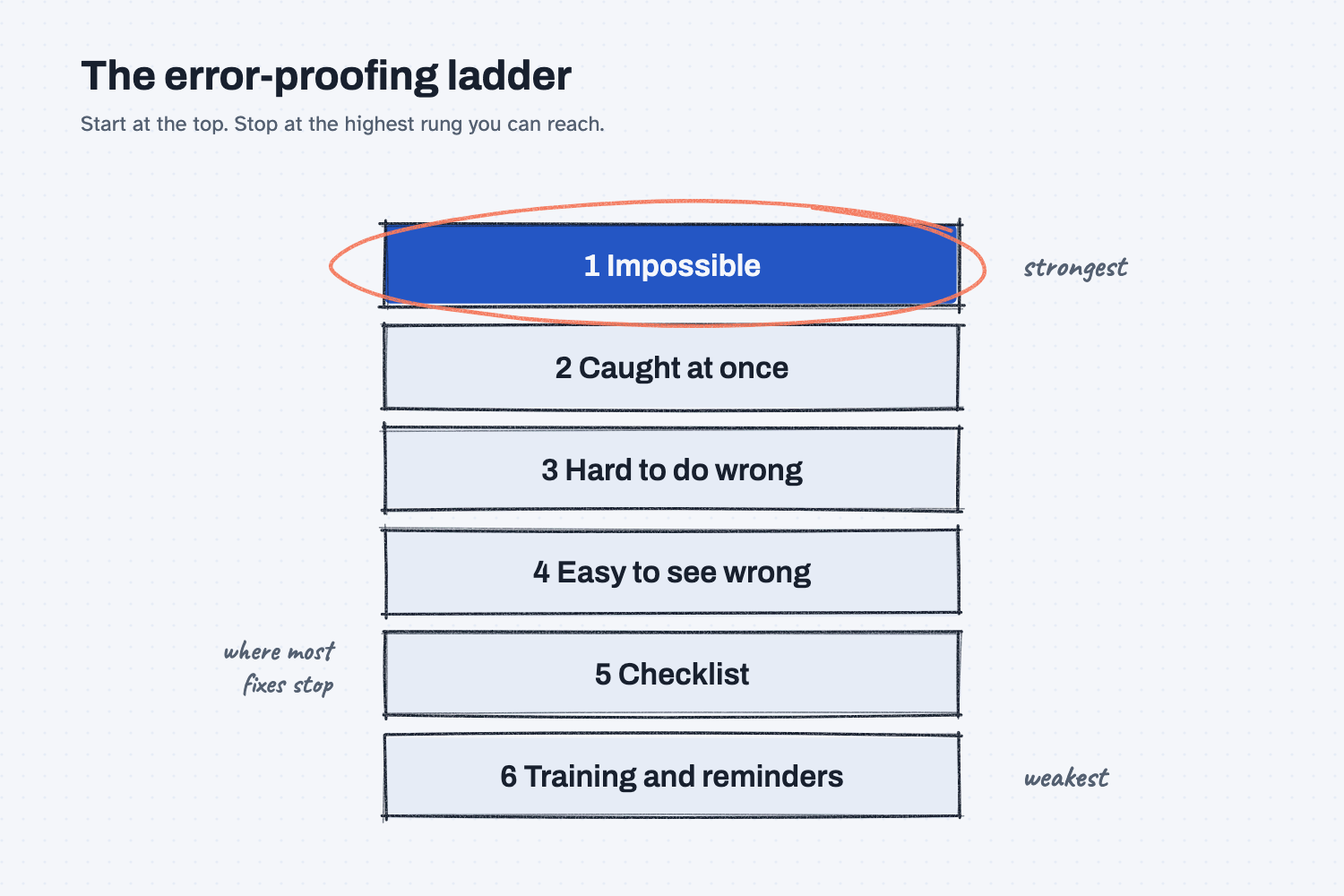
Answer. To make a repeat mistake impossible, count one week of mistakes, group them by what really went wrong, and trace the top one back to the step where it starts. Then climb the error-proofing ladder from the top: make it impossible, catch it at once, make the right choice the default, make it stand out. Use a short checklist only for what is left.
Time and cost. 20 minutes the first time, with the sample log. $0 on the free Claude plan. Who this is for. Quality leads, supervisors, and anyone tired of sending the "please double-check" email.
The same mistake shows up every week. Somebody sends a reminder, the SOP gets a new line that says "check it," and two weeks later it happens again. That is not a careless person. In my own words from my coaching notes: "When the same mistake keeps happening, it's not a careless person. It's a process that sets a trap. We're going to remove the traps."
This guide uses one week of order-entry mistakes at our sample company. You will end with one fix for the top mistake, at the strongest level you can reach, and a checklist of 5 to 9 items for the rest. This is the error-proofing stage of cleaning up a process before you automate it, done in depth.
What will I learn besides fixing one mistake?
You will learn five methods that work on any repeat error, from receiving to invoicing. Each one has a short "why" later in this guide.
- Count before you argue. One week of rows settles which mistake is really the big one.
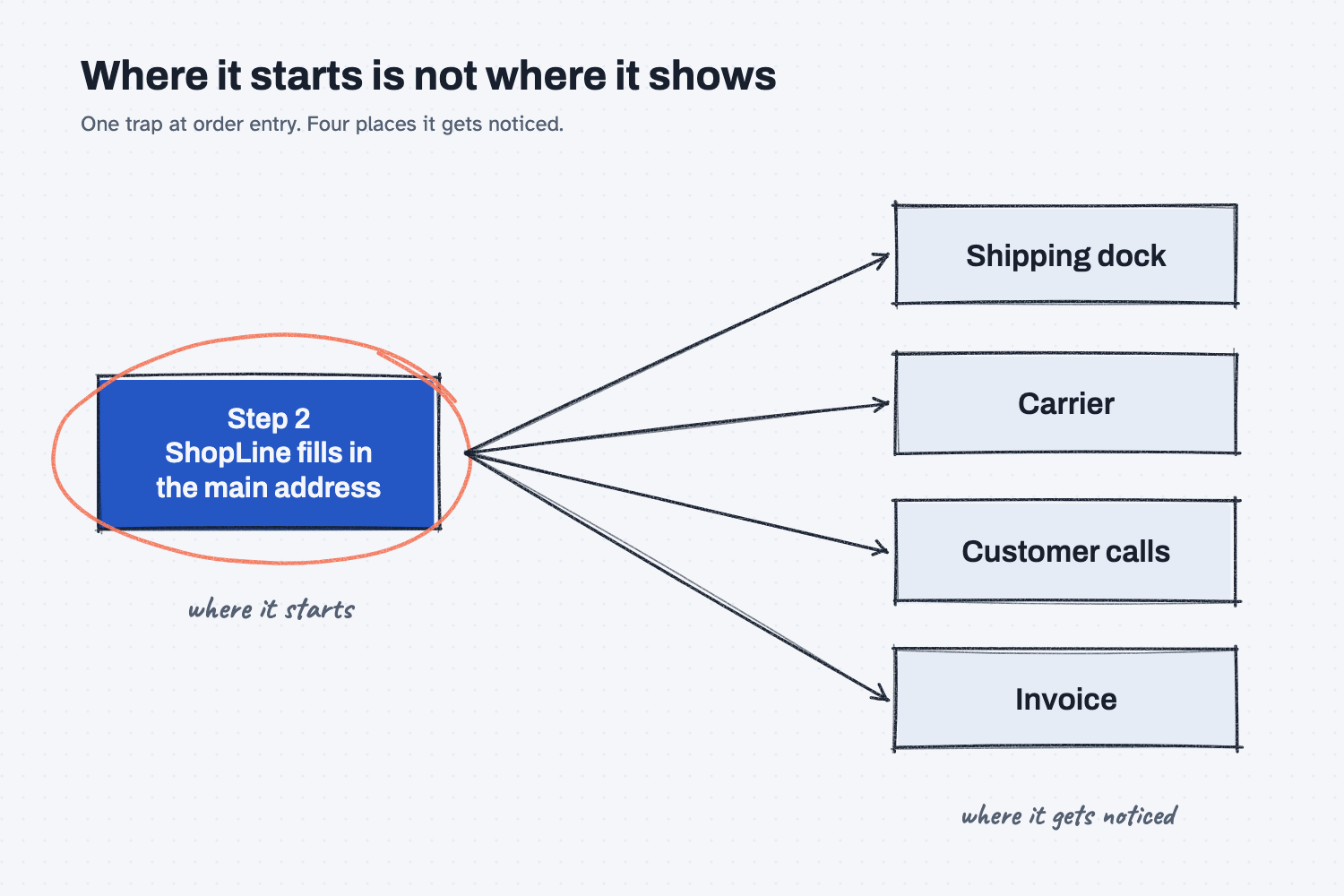
- Trace a mistake to where it starts. Where it was noticed is rarely where it was made.
- Climb the error-proofing ladder. Ask what would make the mistake impossible before you settle for a reminder.
- Keep checklists short and earned. Five to nine items, each one backed by a real mistake.
- Fix the process, not the person. Blame hides the trap, and the trap catches the next person too.
What do I need before I start?
You need Claude and one sample file. There is nothing to install.
- Claude at claude.ai, with file creation on so it can open a spreadsheet. The free plan works. If you have not set it up yet, follow Set up Claude first (about 10 minutes, once). To add files to a chat, see Attach files to a chat.
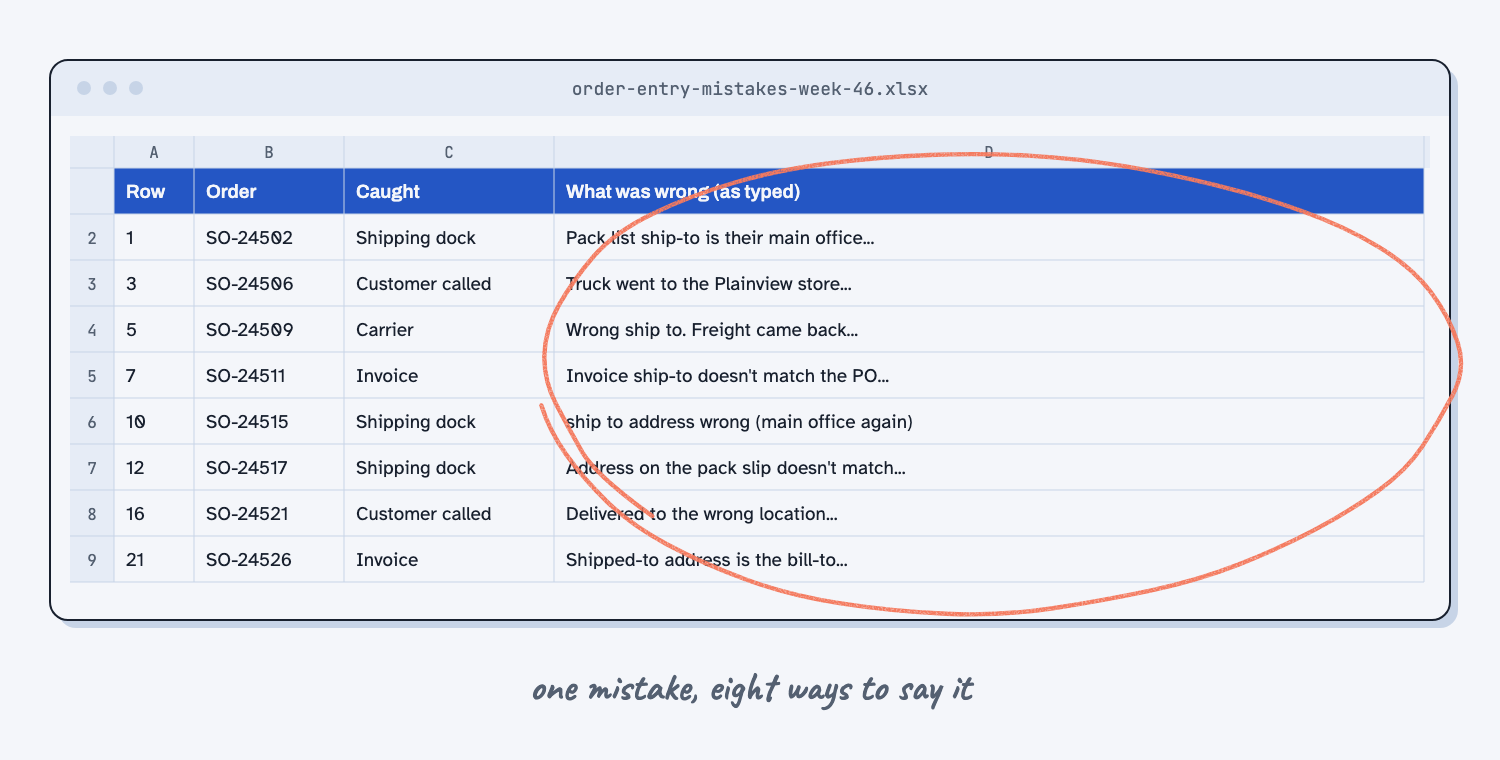
- The sample log for Mesquite Ridge Metal Works (a made-up company): order-entry-mistakes-week-46.xlsx. It has two tabs. Mistake log has 22 rows from one week, typed by whoever found each problem. How we enter an order has the 7 steps from the order desk SOP, plus notes about the order screen.
- For your own process later: one-week-tally-blank.xlsx, a blank sheet to log a week of mistakes.
Safe use. A real mistake log names customers, orders, and the people who made the mistakes. Check your company rules before you attach it to any AI tool, and take out names you do not need. Practice with the sample first. Read the safe use notes.
How do I make a repeat mistake impossible?
Have Claude group and count one week of mistakes, trace the top one to where it starts, then pick the highest rung of the ladder you can reach and write a short checklist for the rest. Six steps, in one chat.
Step 1. Get one week of mistakes in one place
Use a log where each mistake is one row: the date, the order or job, where it was caught, and what was wrong, in whatever words people used. A week is enough to see the pattern. If you do not have a log yet, keep the blank sheet for a week first, because a count settles the argument about which mistake is the big one.
Open the sample log and look at the "What was wrong" column. The same mistake is written many ways, which is normal, and it is the first thing Claude has to sort out.
Step 2. Attach the log and paste the sort-and-trace prompt
Open claude.ai and start a new chat. Attach the log and send the prompt below.
I attached a one-week log of mistakes in one of our processes. Find the mistake that happens most, and trace where it starts.

Rules:
1. Group the rows by what actually went wrong, not by the words people used. The same mistake is often written several ways.
2. If two rows are the same mistake on the same order or job, count it once. If a row is not a mistake made in this process, leave it out and say why.
3. Show a table: the mistake, how many times, and the row numbers in that group, most common first. If you can run code, use it to count.
4. If I attached how we do the work today, use it. For the most common mistake, answer these four questions:
   a. What went wrong? Give one real example from the log.
   b. At which step was the mistake first made? Not where it was noticed, but where it started.
   c. What did the person see at that moment that made the wrong choice look right?
   d. What would have to change for the mistake to be impossible?
Use plain words. Do not suggest fixes yet.
Claude replies with a table of mistakes, most common first, with the row numbers in each group. Below that, it answers four questions about the top mistake. The most important one is where the mistake was first made, as opposed to where somebody noticed it.
Step 3. Check the counts against the log
Check the table before you fix anything, because a wrong count sends you after the wrong mistake. Pick the top group and look up each row number in the log. It takes about three minutes.
For the sample, check three things:
- Wrong ship-to address is on top with 8, and rows 7 and 21 are in that group even though they were caught on invoices.
- Row 13 is counted once with row 12, because it is the same order logged twice.
- Row 18 is left out, because a carrier missing a pickup is not an order-entry mistake.
Then read the trace. The ship-to mistake was noticed at the dock, by the carrier, by customers, and on invoices, but it started at step 2 of the order steps, where ShopLine fills in the customer's main address on its own. The address looked filled in and real, so the wrong choice looked right.
Step 4. Paste the ladder prompt
In the same chat, send the prompt below. It lists the six rungs and tells Claude to start at the top and stop at the highest rung you can reach with the tools you already have.
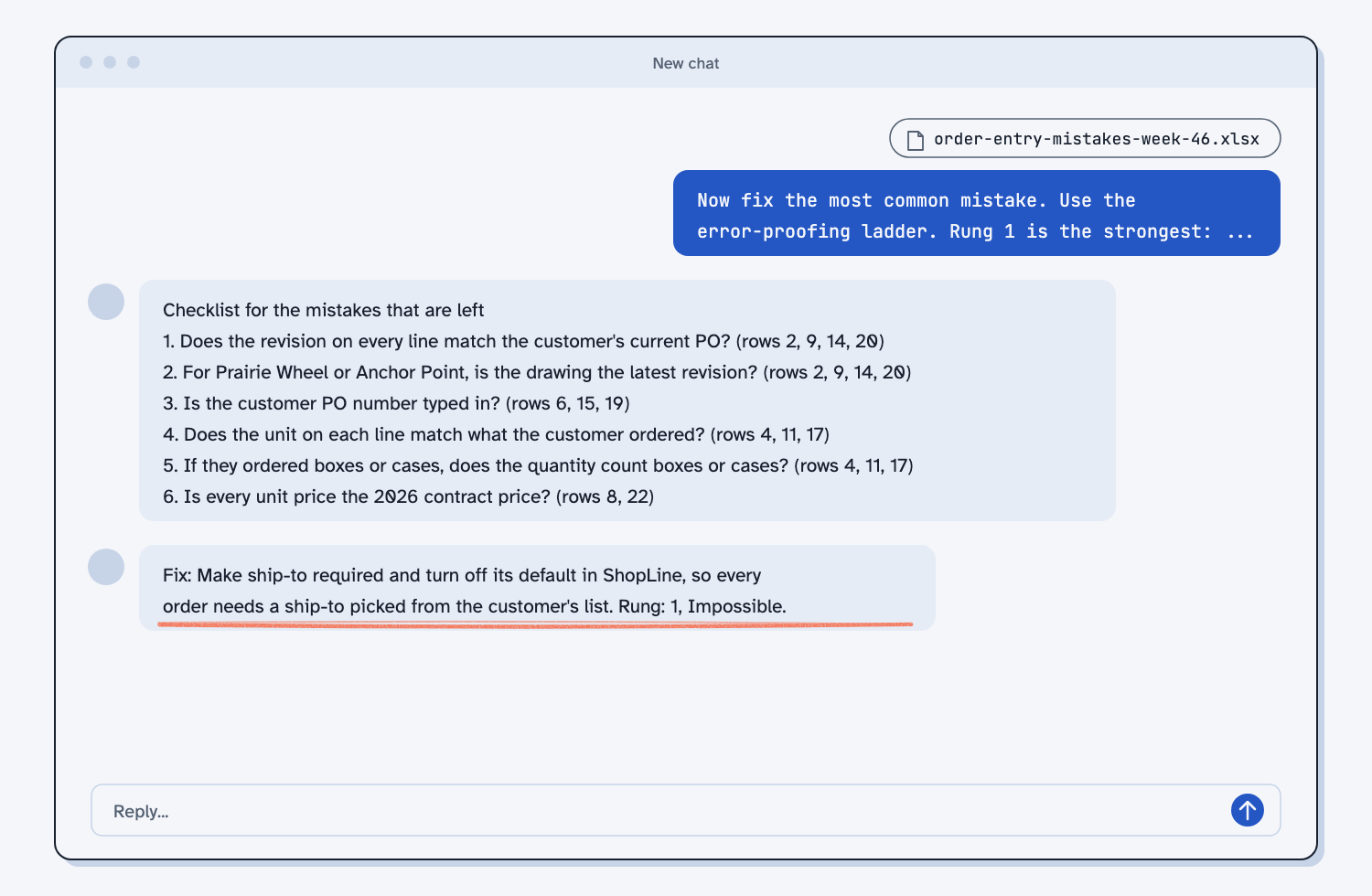
Now fix the most common mistake. Use the error-proofing ladder. Rung 1 is the strongest:
1. Impossible: the wrong thing cannot happen. (A required pick from a list. A field that will not save blank.)
2. Caught at once: it can happen, but it is flagged the moment it happens.
3. Hard to do wrong: the right choice is already filled in.
4. Easy to see wrong: a wrong entry stands out.
5. Checklist: a person checks a short list at the moment it matters.
6. Training and reminders: the weakest rung.

Rules:
1. Start at rung 1 and work down. For each rung, say in one line whether we can reach it with the tools we already have, and how. Stop at the highest rung we can reach.
2. Give one fix at that rung, in 2 or 3 sentences: what changes, who sets it up, and what the person doing the work sees.
3. If our current steps already say "check" or "be careful" about this mistake, say which rung that is on and whether the fix makes it unneeded.
4. Then write a checklist for the mistakes that are left, 5 to 9 items. Each item must point to real rows in the log. Do not add an item with no past mistake behind it. Write each item as a yes or no question, checked at the moment it matters.
5. End with one line: "Fix: [one sentence]. Rung: [number and name]."
For the sample, Claude reaches rung 1. The notes on the second tab say an admin can make any order field required and turn its default off, so the fix is to turn off the ship-to default and make ship-to a required pick from the customer's saved list. Claude should also say that SOP step 6, "double-check the ship-to," and the reminder email are low rungs, and that the fix makes them unneeded.
Step 5. Check the fix with whoever runs the system
Take the fix to the person who runs your ERP, order screen, or form, and ask one question: can this field be required, and can its default be turned off? That is usually a setting, not new software, but only they can say yes.
If the answer is no, go one rung down and ask again. Rung 3 might be "the right choice is already filled in," and rung 4 might be "the order acknowledgment shows the ship-to in large print, so the customer sees it." Write down which rung you landed on and why the higher ones were out of reach.
Step 6. Save the fix and the checklist, and log one more week
Copy the fix line and the checklist into your SOP, and print the checklist where the work is done. Cross out the old "double-check" line once the fix is in, because a check that the fix made unneeded only slows people down.
Then keep the log one more week. If the top mistake drops to zero, the fix worked, and the next mistake on the list is your next fix.
What does good look like?
With the sample log, a good answer has these parts. Answer key, sample data. Compare yours to the sample fix and checklist, a real reply from my own run.
| Mistake | Count | Rows |
|---|---|---|
| Wrong ship-to address | 8 | 1, 3, 5, 7, 10, 12, 16, 21 |
| Wrong part revision | 4 | 2, 9, 14, 20 |
| Customer PO number missing | 3 | 6, 15, 19 |
| Boxes or cases entered as each | 3 | 4, 11, 17 |
| Old price used | 2 | 8, 22 |
That is 20 real mistakes from 22 rows, with row 13 counted once and row 18 left out. The top mistake starts at step 2. The fix is rung 1: no ship-to default, and a required pick from the customer's saved list. The checklist has 5 to 9 yes or no questions covering the revision, the customer PO number, boxes or cases, and the 2026 price, each one pointing to rows in the log. Some runs keep the ship-to on the checklist too, because a person can still pick the wrong address from the list. That is fair.
What can go wrong?
Most problems come from the count or from settling too low on the ladder.
- The duplicate gets counted twice. Then ship-to shows 9 instead of 8. On your own log, look for the same order number twice.
- A row that does not belong stays in. A carrier problem is not an order-entry mistake. A total of 21 or 22 means it was kept.
- The fix lands where the mistake was noticed. "Add a check at the dock" catches the mistake late and adds a step. Fix it where it starts.
- The fix is a reminder. "Remind the order desk" or "be more careful" is the bottom rung, and the sample already tried both. Ask the question I ask every client: "What would it take to make that mistake impossible instead of remembered?"
- Claude says something the log does not show. On the sample, Claude wrote that the 8 ship-to mistakes came "the week after" the reminder, but the reminder went out on 10/2 and the log is the week of 11/9. Check any claim about dates or causes against the file.
- The checklist grows. A 20-item list gets skipped. If an item has no real mistake behind it, cut it.
How do I check the answer?
Check it against the log, not against Claude.
- Every row number in the table is in the right group, and every group adds up.
- The step where the mistake starts is a real step on the second tab.
- The fix names a rung, and the rungs above it have a reason they were out of reach.
- Every checklist item points to at least one row.
Why does this way work?
It works because it attacks the trap instead of the person, and it puts the fix where the mistake is born.
Count before you argue. Everyone has a theory about which mistake is the worst one. A week of rows replaces the theories with a number, and the number usually surprises someone. See count it before you argue.
Trace a mistake to where it starts. The dock, the carrier, and the invoice clerk all found ship-to mistakes, and each one would add a check at their own step. None of those checks would stop the mistake, because it was made earlier, at order entry, when the screen filled in an address nobody chose. A fix at the source removes the mistake for every step after it.
Climb the error-proofing ladder. Each rung down the ladder is cheaper to set up and fails more often, because it depends on a person noticing every time, on a bad day, when they are rushed or new. A required field never forgets. That is the same idea as making bad data stop the script with a loud stop, instead of hoping someone spots it later. The full ladder is in make mistakes impossible.
Keep checklists short and earned. A checklist is rung 5, so it is for what the higher rungs could not reach. Every item on it should have a real mistake behind it, and items should come off once a fix makes them unneeded. A short list gets used, and a long one gets skipped.
Fix the process, not the person. When an AI makes the same mistake twice, I fix the instructions, not the output. People are the same. Taking the blame out also gets you better logs, because people report mistakes when they are not in trouble for them. This is the error-proofing stage of clean up before you automate, and it matters doubly before automation, because automating a process with traps in it makes the same mistakes faster.
Frequently asked questions
What if I cannot reach rung 1?
Most mistakes can climb at least one rung with no new software. A free-text box can become a pick list, or a total can turn red when it does not match. Take the highest rung you can reach this week, and ask your ERP admin about the higher ones.
Should every mistake get a rung 1 fix?
No. Fix the top mistake first, at the highest rung you can reach. Use the checklist for the rest, then work down the list one fix at a time, starting with whatever is on top next week.
How long should I keep the log?
One week to find the top mistake, and one more week after the fix to see if it worked. After that, a few minutes a week keeps the next mistake in view.
Does it have to be Claude?
No. The prompts are plain text and work in ChatGPT or Copilot too. The tool needs to read your spreadsheet. If it cannot, paste the rows in.
Can AI catch these mistakes for us instead?
Sometimes, but it is a weaker rung than making the mistake impossible, and you would still need to check its work. Fix the trap first. If you later want AI to review orders, read how a person stays in the loop.
Take this with you
Two prompts and a log. Use them on any mistake that keeps coming back.
1. Log one week on the blank sheet, one row per mistake, written when it happens.
2. The sort-and-trace prompt. Attach the log.
I attached a one-week log of mistakes in one of our processes. Find the mistake that happens most, and trace where it starts.

Rules:
1. Group the rows by what actually went wrong, not by the words people used. The same mistake is often written several ways.
2. If two rows are the same mistake on the same order or job, count it once. If a row is not a mistake made in this process, leave it out and say why.
3. Show a table: the mistake, how many times, and the row numbers in that group, most common first. If you can run code, use it to count.
4. If I attached how we do the work today, use it. For the most common mistake, answer these four questions:
   a. What went wrong? Give one real example from the log.
   b. At which step was the mistake first made? Not where it was noticed, but where it started.
   c. What did the person see at that moment that made the wrong choice look right?
   d. What would have to change for the mistake to be impossible?
Use plain words. Do not suggest fixes yet.
3. The ladder prompt. Send it in the same chat.
Now fix the most common mistake. Use the error-proofing ladder. Rung 1 is the strongest:
1. Impossible: the wrong thing cannot happen. (A required pick from a list. A field that will not save blank.)
2. Caught at once: it can happen, but it is flagged the moment it happens.
3. Hard to do wrong: the right choice is already filled in.
4. Easy to see wrong: a wrong entry stands out.
5. Checklist: a person checks a short list at the moment it matters.
6. Training and reminders: the weakest rung.

Rules:
1. Start at rung 1 and work down. For each rung, say in one line whether we can reach it with the tools we already have, and how. Stop at the highest rung we can reach.
2. Give one fix at that rung, in 2 or 3 sentences: what changes, who sets it up, and what the person doing the work sees.
3. If our current steps already say "check" or "be careful" about this mistake, say which rung that is on and whether the fix makes it unneeded.
4. Then write a checklist for the mistakes that are left, 5 to 9 items. Each item must point to real rows in the log. Do not add an item with no past mistake behind it. Write each item as a yes or no question, checked at the moment it matters.
5. End with one line: "Fix: [one sentence]. Rung: [number and name]."
Then check the fix with whoever runs the system, print the checklist, and log one more week to see if the mistake is gone.
What's next?
- Clean up one process before you automate it, the whole sequence this stage belongs to, from interview to the automation check.
- Find repeat failures in a maintenance log, the same count-and-group method on a year of machine work orders.
- Check supplier invoices against PO prices, a catch-it-at-once check for billing mistakes.
- Make mistakes impossible, the idea behind the ladder.
- Automating a broken process makes the same mistakes faster, why this comes before any automation.