Fine-Tuning vs Prompting: Why Most Businesses Should Start With Instructions and Files
With Josh Schultz ·
Answer. Fine-tuning means retraining an AI model on many examples of your own work, so it changes how the model behaves from then on. Prompting means you leave the model alone and change what you give it each time, such as instructions, examples, and files. Most businesses should start with instructions and files, because they are cheaper to try, easy to change, and enough for most office work.
The picture
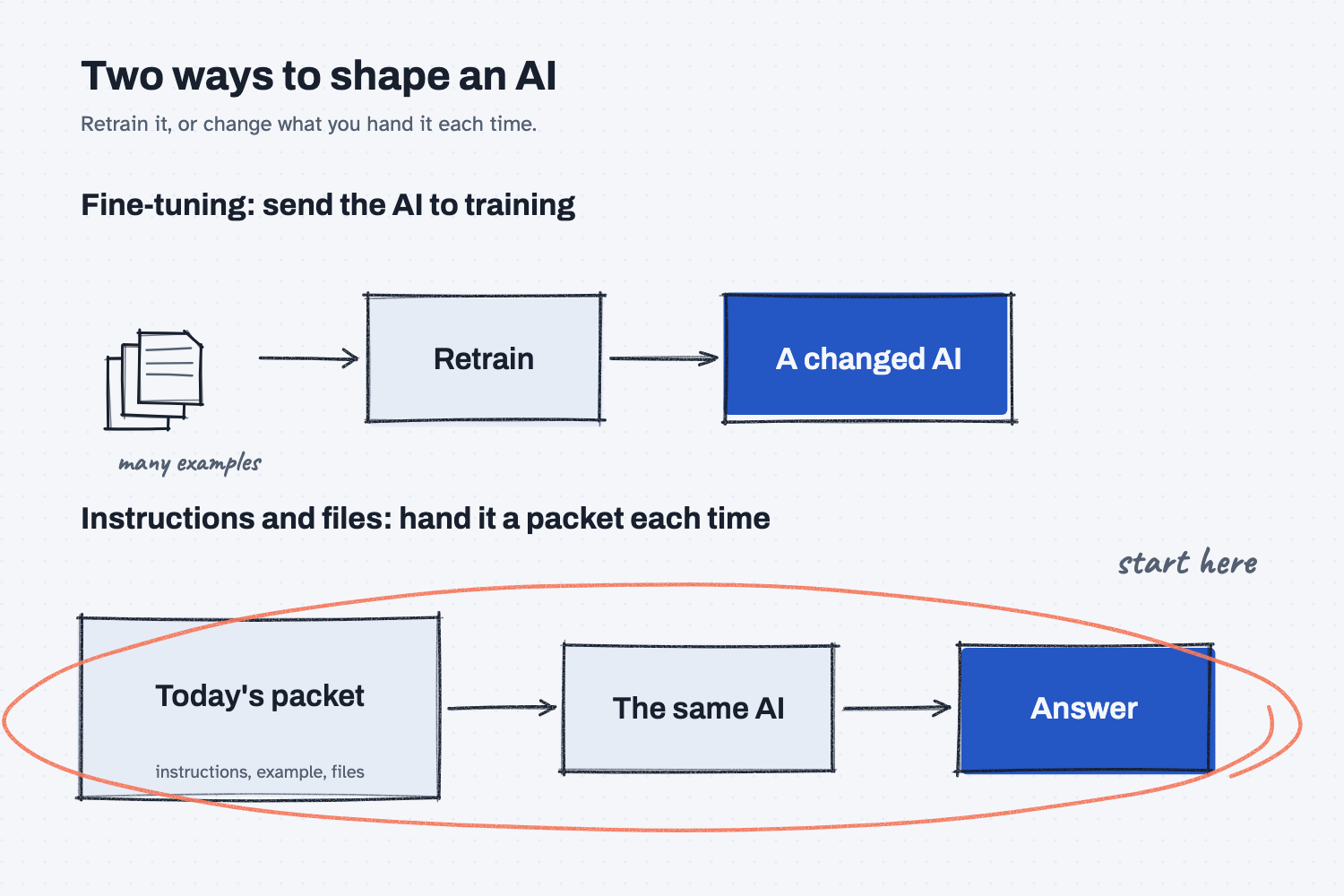
The top lane shows fine-tuning. You collect a large pile of examples, run a training step that changes the model itself, and what comes back is a different model that has absorbed your examples. The bottom lane shows the everyday way of working, where the model stays exactly as it was, and you hand it a packet with your instructions, an example or two, and the files it needs, every time you ask. The bottom lane is circled because it is where almost everyone should begin.
Think of it like this
Picture two ways to get a new hire doing the job your way. You could send them away for a multi-week apprenticeship, where they study hundreds of your finished jobs and come back with the habits built in. Or you could hand them a work instruction, a sample of a good job, and the job packet each morning, and they follow what is on the desk.
The apprenticeship is fine-tuning. It can produce someone who does one narrow thing very consistently, but it takes real effort to set up, and if your process changes, the person has to go back to training. The morning packet is prompting, and it has a big advantage for a small team, which is that you can change it before lunch. If the customer wants a different format, you edit one page, and the next job follows the new page.
Why does it matter at work?
You will hear the word "fine-tuning" from vendors, and it can sound like the serious, grown-up way to make AI fit your company. For most office work it is not the first step, because most problems that look like "the AI doesn't know our way" are really "the AI was never told our way."
Here is an example. A customer service person at Mesquite Ridge Metal Works wants delay notices to sound like the company. One path is to gather hundreds of past emails and pay for a retrained model. The other is to write five short rules, such as "open with the PO number" and "apologize once," and paste them in with each request. The second path takes ten minutes, costs almost nothing, and can be changed whenever the rules change.
So the question to ask a vendor or your IT team is: "Did you try clear instructions and our files first, and what did that not fix?" If the honest answer is "nothing yet," then you probably do not need to retrain anything. If you want to see what is already in the packet, what is a system prompt explains the standing instructions that sit behind a chat, and what is an AI skill shows how to save your instructions so you can reuse them.
How does it work?
There are four ways to shape what an AI does, and they run from the quickest to the heaviest.
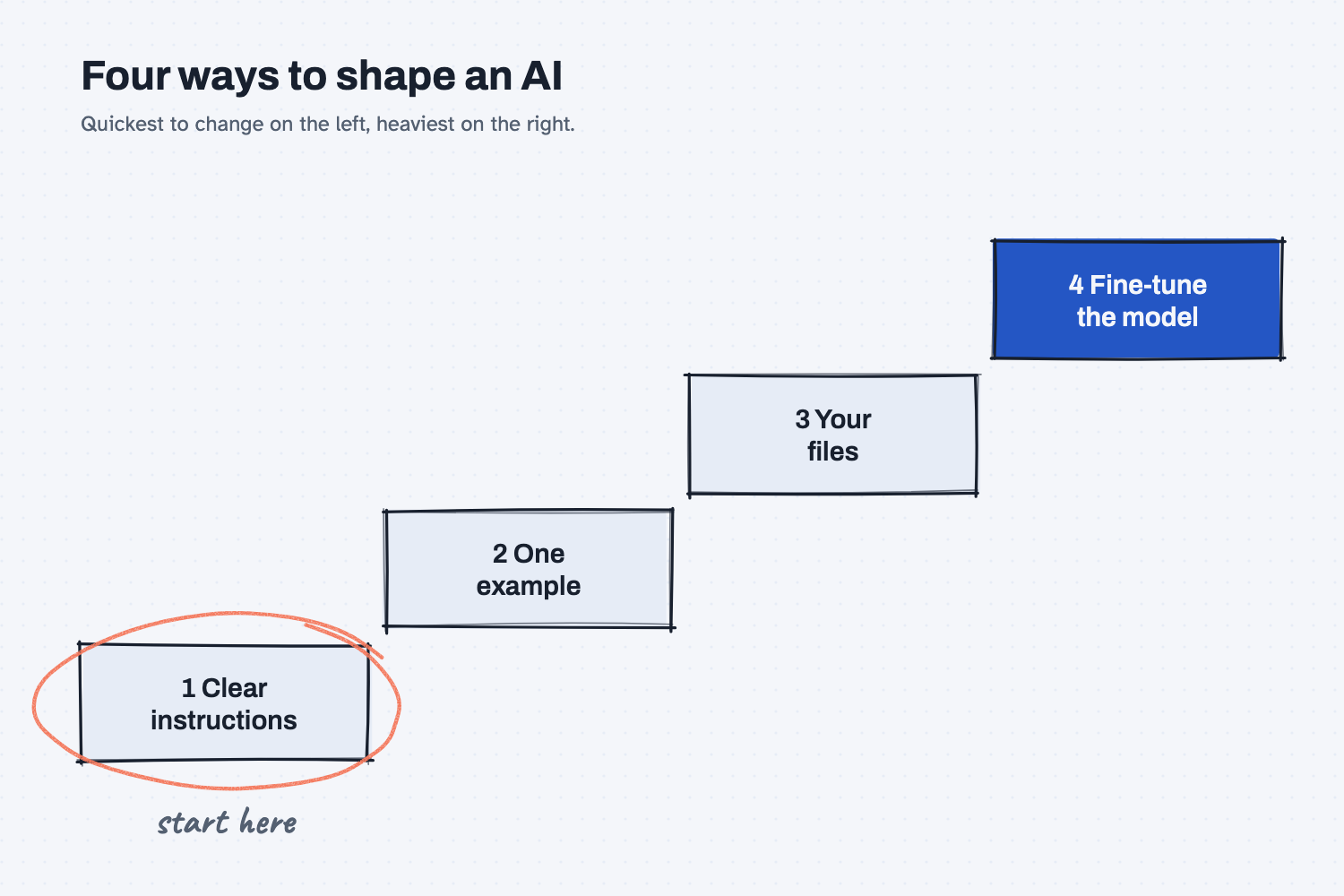
The staircase shows the order to try them in. Each step up costs more effort and is harder to undo, so you climb only when the step below has not solved the problem.
Write clearer instructions. Tell the AI the format, the tone, and the rules, in plain sentences. This is the cheapest change you can make, and you can see the result in seconds. How to write a good prompt covers how.
Show an example. Paste in one or two finished jobs you are proud of, and ask for the same. Examples often teach the AI more than a paragraph of description does, as show AI an example explains.
Give it your files. When the AI needs facts, such as your price list or your procedures, put them in front of it instead of hoping it knows them. Many tools search your files and pull in the right parts, which is described in how AI answers from your files. This route is also easy to keep current, because when a price changes you replace one file.
Fine-tune the model. This is the heaviest step. You prepare a large set of good examples, and the model is retrained on them, so that a certain style or format comes out the same way without long instructions. It is usually better at teaching a manner of working than at storing facts, especially facts that change. It also is not available for every model or every plan, and a fine-tuned model is a snapshot, so you may need to repeat the work when a newer base model arrives. Check what your tool or vendor actually offers, and what it would cost, before you plan around it.
Where do people get it wrong?
The mistakes usually come from reaching for the heavy tool before trying the light ones.
- They think fine-tuning is how you teach the AI your documents. It is a poor way to store facts that change, and a file you can swap in is the better way. Your files stay in your hands, and you can update them any day.
- They skip the instructions step. A short, clear page of rules fixes more than most people expect, and you should see how far it goes before you spend anything.
- They confuse fine-tuning with the AI "learning from my chats." Using a tool does not retrain it by itself, which does AI learn from my data explains.
- They have no test. Without a saved set of questions with known answers, you cannot tell whether a retrained model is better than good instructions. See what are AI evals.
Try this in 2 minutes
This test shows how much one page of instructions changes the result, with no retraining at all. You will ask for the same email twice.
- Open a new chat and paste this:
Write a short email to a customer saying their order of 200 brackets will ship 3 days late. Reply with only the email.
- Start a new chat and paste this instead:
House style for every customer email we send: 1. Open with the PO number. 2. Put the new ship date in the first sentence. 3. Apologize once, in one short phrase. 4. End with the sign-off 'Customer Service, Mesquite Ridge Metal Works'. 5. Keep it under 70 words.

Using that house style, write a short email to a customer saying their order of 200 brackets on PO 45017 will ship 3 days late. The original ship date was Tuesday, so the new date is Friday. Reply with only the email.
- Compare the two emails against the five rules.
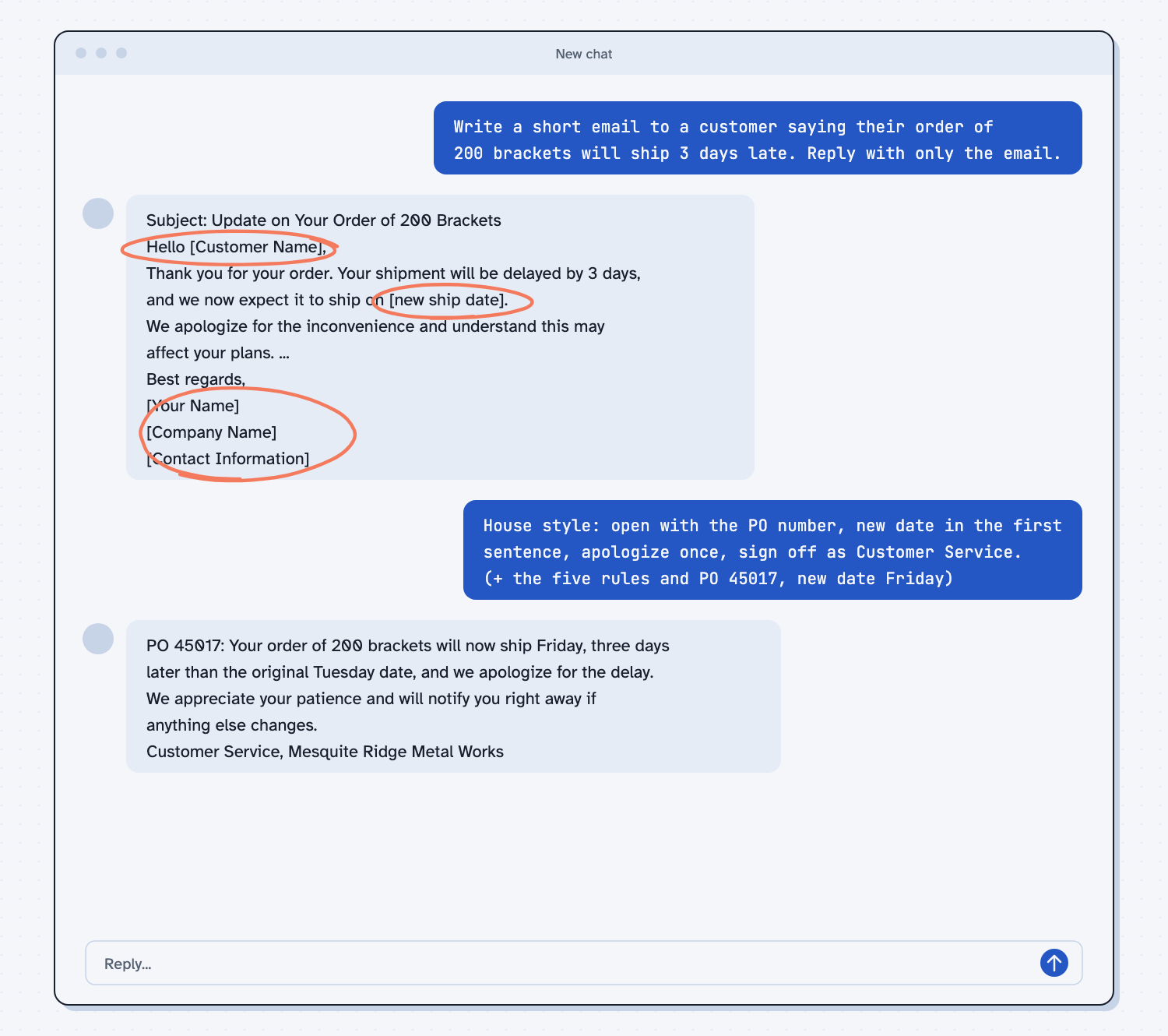
When I tried this, the first email came back with blanks to fill in, such as "[Customer Name]," "[new ship date]," and "[Contact Information]," and it wandered through several polite paragraphs. The second one opened with "PO 45017: Your order of 200 brackets will now ship Friday, three days later than the original Tuesday date, and we apologize for the delay." It ended with the sign-off I asked for, and it fit in about three sentences. The model was the same both times, so the difference came from what I handed it. That is the whole idea of prompting, and notice that if the style changes next month, you edit the five rules and nothing else.
Frequently asked questions
What is fine-tuning in AI?
Fine-tuning is extra training on top of an existing model, using your own examples, so the model changes how it behaves. It is different from giving the model instructions, which does not change the model at all.
Do I need to fine-tune a model to use my company data?
Usually not. Putting your files in front of the AI, or letting a tool search them, is simpler and easier to keep current than retraining, because you can replace a file at any time.
Is fine-tuning ever worth it?
Sometimes, for a narrow job done at high volume, where you have many good examples and instructions alone fall short. Try instructions, examples, and files first, and keep a test to compare.
Does fine-tuning cost a lot?
It takes more effort and money than writing instructions, and the price depends on the vendor and the model. Ask for a current quote and compare it to what a good instruction page already gets you.
Is a custom GPT or a Project the same as fine-tuning?
No. Those tools hold your instructions and files and hand them to the AI with each chat, so the model itself is not retrained. That makes them a form of prompting.
Use it today
- Turn a good chat into a reusable skill: save your instructions once, so every future request starts from them.
- Related idea: What is an AI skill.
- Related idea: Does AI learn from my data.
From my training: we teach people to try clear instructions, one example, and their own files before anyone talks about retraining a model.