- Claude Code
Harness. An AI helper that works in a folder of files. It writes and fixes code, and some office people use it to build small tools.
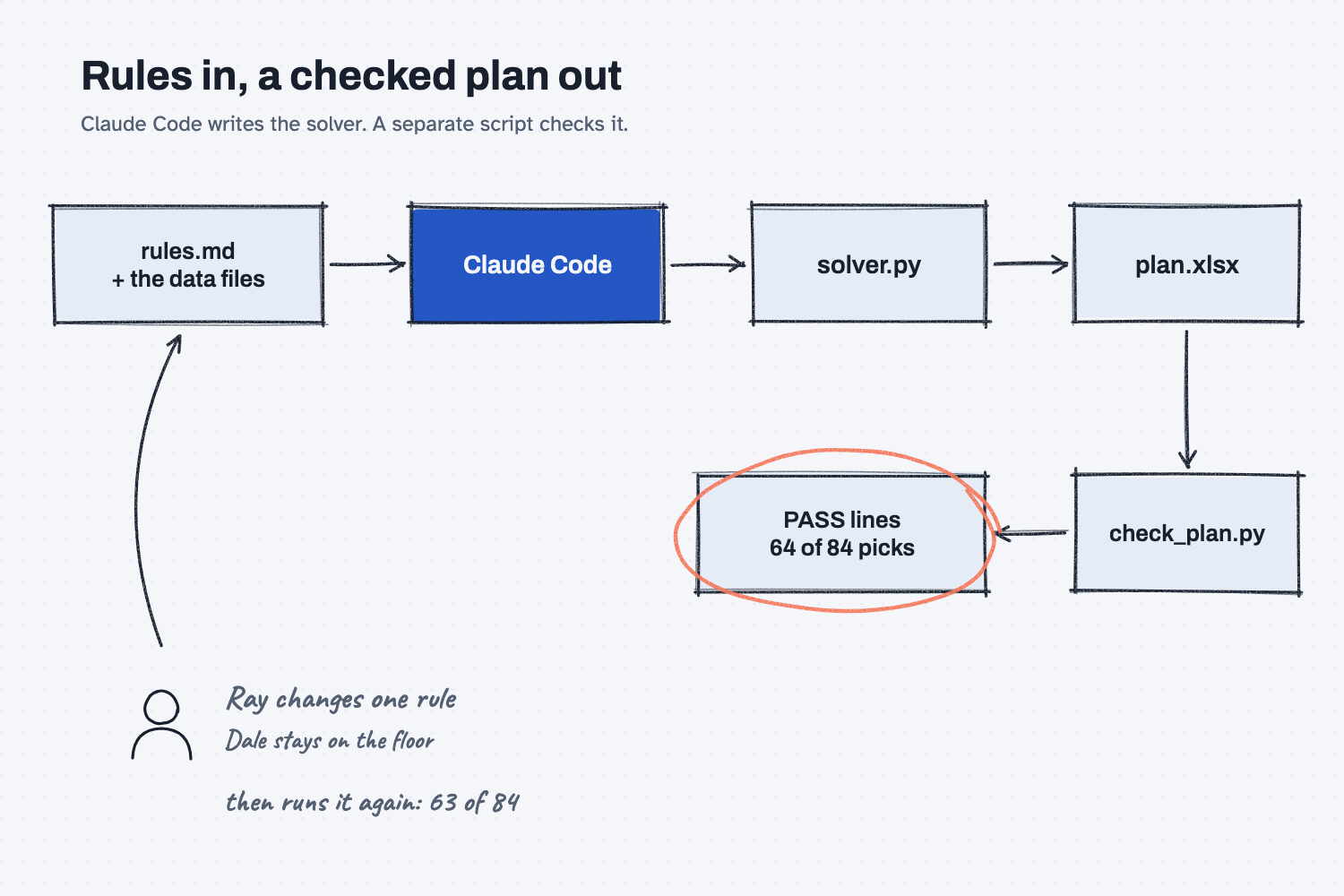
Answer. To schedule a training day so nobody is double-booked, write your hard rules and your wishes on one page, and have Claude Code write a small solver program that builds the plan from your files. A separate checker script then marks every rule PASS or FAIL. When the boss changes one thing, you change one rule and run it again.
Time and cost. About 25 minutes the first time. Claude Code needs Claude Pro or higher (about $20 a month). Python, uv, and the solver library are free. Who this is for. Plant managers, planners, and HR or training leads who have to fit people into sessions, rooms, and time slots while the work keeps going.
This is Part 2 of 2. In Match sign-up names to your roster without guessing, you turned a messy sign-up survey into name-map.csv, a list a person checked by hand. This guide starts from that file. If you skipped Part 1, the sample zip below has a confirmed name-map.csv, so you can start here.
The job is the Plant 1 Safety and Skills Day at Mesquite Ridge Metal Works (a made-up company) on Friday, December 11: six sessions in three morning slots and two rooms, for the 56 people working that day. The plant keeps running, so each department keeps a few people on the floor in every slot. This way of working came from a real company event: 89 people, six sessions, scheduled by a solver Claude wrote.
What will I learn besides a training day schedule?
You will learn four habits that work for any job where people, rooms, machines, or trucks have to fit together. Each one has a short "why" later in this guide.
- Write the hard rules and the wishes on one page. The rules that never bend go first, and the wishes go in order.
- Have AI write the solver, not the schedule. Claude writes a program once, and the program does the fitting the same way every time.
- Check the plan with a separate checker. A different script reads the plan and marks each rule PASS or FAIL.
- Change the rule, not the cells. When something changes, you change one line on the rules page and run it again.
What do I need before I start?
You need Claude Code, Python with uv, and the sample files. If you have not set them up yet, follow Install Claude Code and Install Python and uv first (about 15 minutes, once). You will type a few lines in a terminal, and Open a terminal shows how.
- The sample set: training-day-schedule-sample.zip. Unzip it into a folder called
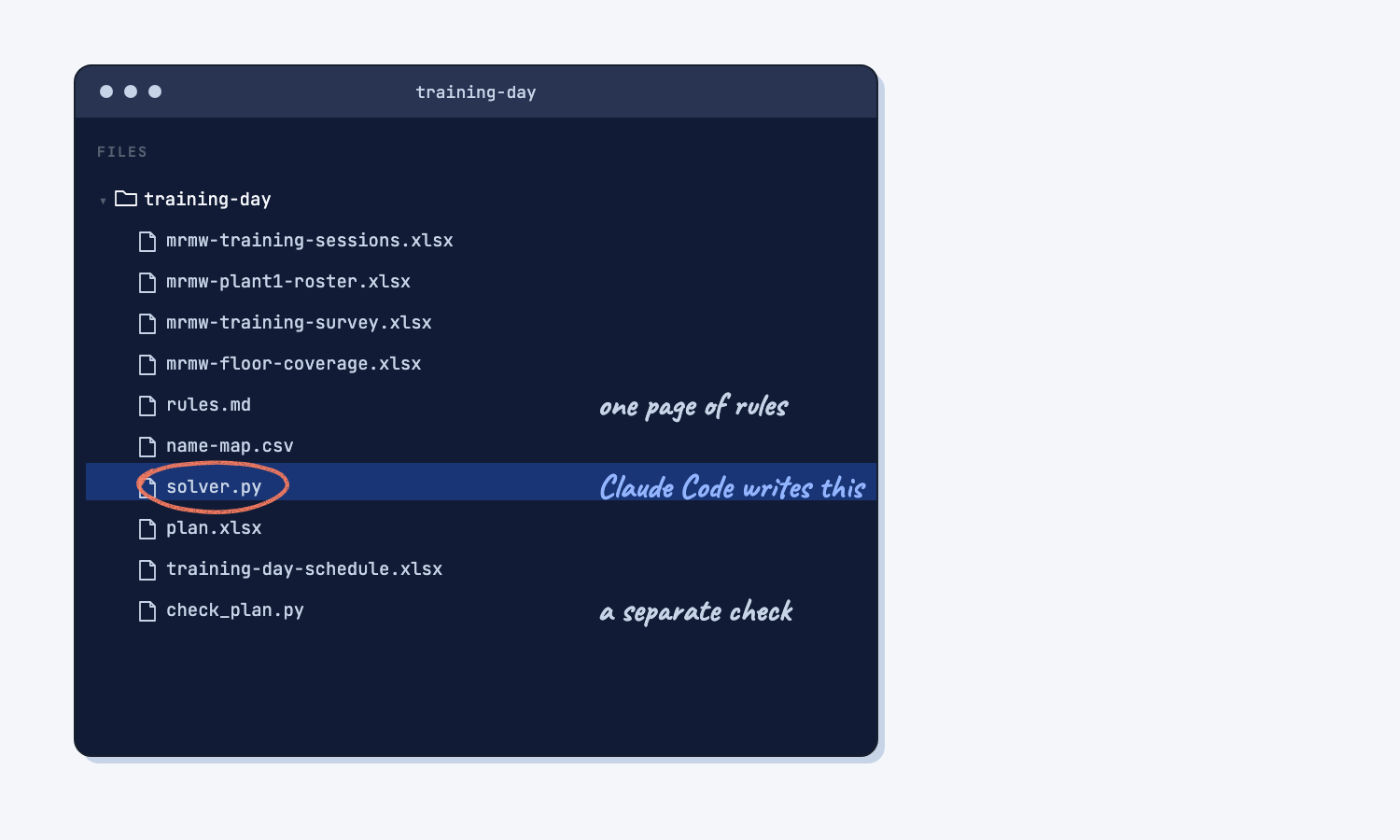
training-day(Download and unzip sample files shows how). Inside are four Excel files from HR and Ray,rules.md, the confirmedname-map.csv,check_plan.py, and ananswer-keyfolder. All of it is sample data. - If you did Part 1, use your own
name-map.csvinstead of the one in the zip. - To compare with mine at the end: solver.py, plan.xlsx, and training-day-schedule.xlsx.
Safe use. A real roster holds names, departments, and certification dates. Check your company's AI rules before you use real staff data, and practice with the sample files first. Read the safe use notes.
How do I schedule a training day so nobody is double-booked?
Look at the sessions and rules, write your rules page, have Claude Code build the solver, check the plan with a separate script, add one new rule and run it again, and then read the plan. Six steps. You write the rules and make the calls, and the solver and the checker do the counting.
Step 1. Look at the sessions and the rules
Open mrmw-training-sessions.xlsx and close it without saving. Each of the six sessions, S1 to S6, has its trainers, a "Good for" list of departments, and notes that are really rules: Forklift holds only 12 and cannot run at 8:00 because the dock has the morning truck, Hector cannot teach at 10:00, and Gloria teaches two sessions that can never share a slot.
Then open mrmw-floor-coverage.xlsx, Ray's list of how many people each department keeps on the floor in every slot. Last, look at the roster's forklift and lockout/tagout dates, because anyone due by December 31 has to take that session, whether they picked it or not.
Step 2. Write your rules on one page
Open rules.md in any text editor. It has two lists. Hard rules can never break, such as "nobody is in two places in one slot." Wishes are what you want as much as you can get, in order: honor survey picks, then fit people to their department, then keep the two rooms in each slot close in size. A lower wish never costs a higher one.
For practice, read the sample and leave it. For your own event, copy it and change the words. This page is the plan, and only you can write it (why hard rules and wishes go on separate lists).
Step 3. Have Claude Code build the solver and the plan
In your terminal, go to the training-day folder and type claude to start Claude Code. Paste the prompt below. It asks for a program, not a schedule. The program is solver.py, and it uses OR-Tools, a free solver library that searches every possible plan for the best one that keeps every hard rule (what an optimizer does).
Build the training day schedule. My rules are in rules.md: hard rules first, then wishes in order. The data is in mrmw-training-sessions.xlsx, mrmw-plant1-roster.xlsx, mrmw-training-survey.xlsx, mrmw-floor-coverage.xlsx, and name-map.csv (I already confirmed the names).

Write solver.py in Python with a real solver library (OR-Tools CP-SAT), so I can run it again with: uv run --with ortools --with openpyxl solver.py

How it must work:
- Read the data from the files every run. Do not type names, dates, or counts from the files into the code.
- Enforce every hard rule in rules.md exactly. Never break a hard rule to get a better score.
- Try every slot order (which two sessions share a slot, and which slot is first, second, and third). Solve each one to the proven best, and keep the best. Score the wishes in the order rules.md gives them; a lower wish never costs a higher one.
- If no plan fits, do not loosen a rule. Say which rule blocks it.
- Never edit the input files or rules.md.
- Keep it quick. The script should finish in under a minute. Many plans tie for best, so it is fine if a rerun moves a few people between equal spots; do not spend time making reruns identical.

Run it, then write two files:
1. plan.xlsx, in exactly this format. Sheet "Assignments": columns Name, Slot 1, Slot 2, Slot 3. One row for every person on the roster. Each slot cell is a session ID (S1 to S6) or Floor. People out on 12/11 get Out. Sheet "Sessions": columns Session ID, Slot, Room. Slot is 1, 2, or 3. Room is Training room or Break room.
2. training-day-schedule.xlsx, for people to read, with three tabs:
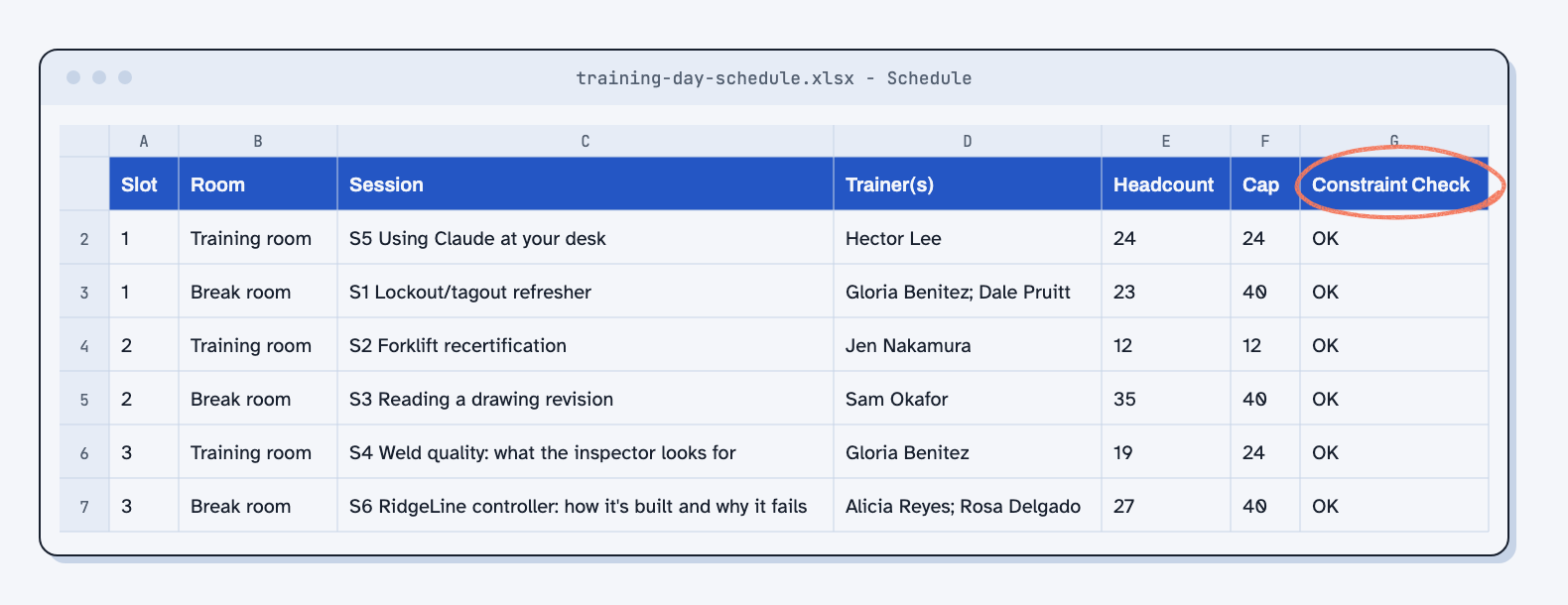
   - Schedule: slot, time, room, session, trainer(s), headcount as a live COUNTIF formula on the Assignments tab, cap, and a Constraint Check column that shows OK or CHECK by formula (CHECK if under 5 or over cap).
   - Assignments: each person's department, survey picks, slot 1, 2, 3 session and room, picks honored, and a short note, such as "LOCKED - Trainer S3", "Required: forklift card expires 12/18", "Missed pick S5: required S1 in the same slot", or "Survey name 'Tony V' matched".
   - Notes: the hard rules and wishes as you read them from rules.md, and any choice you had to make.

Then tell me in a few plain lines: picks honored (X of Y), how many slot orders tie on picks honored and how many tie on all three wishes, and why picks were missed, grouped by reason.
Claude Code asks before it creates files or runs commands. Say yes. This is the long wait: it takes about 5 minutes while Claude writes the solver, runs it, fixes its own mistakes, and builds the two workbooks. When it is done, it tells you the score and why picks were missed. Open training-day-schedule.xlsx to see the plan people will read.
Step 4. Check the plan and compare it with the answer key
Do not take Claude's word for it. In a second terminal window, in the same folder, type:
uv run --with openpyxl check_plan.py plan.xlsx
The checker was written apart from the solver. It counts everything again on its own and prints one PASS or FAIL line for each hard rule (why a separate checker catches what the solver misses). Every line should say PASS, and picks honored should be 64 of 84, which matches answer-key/answer-key.md.
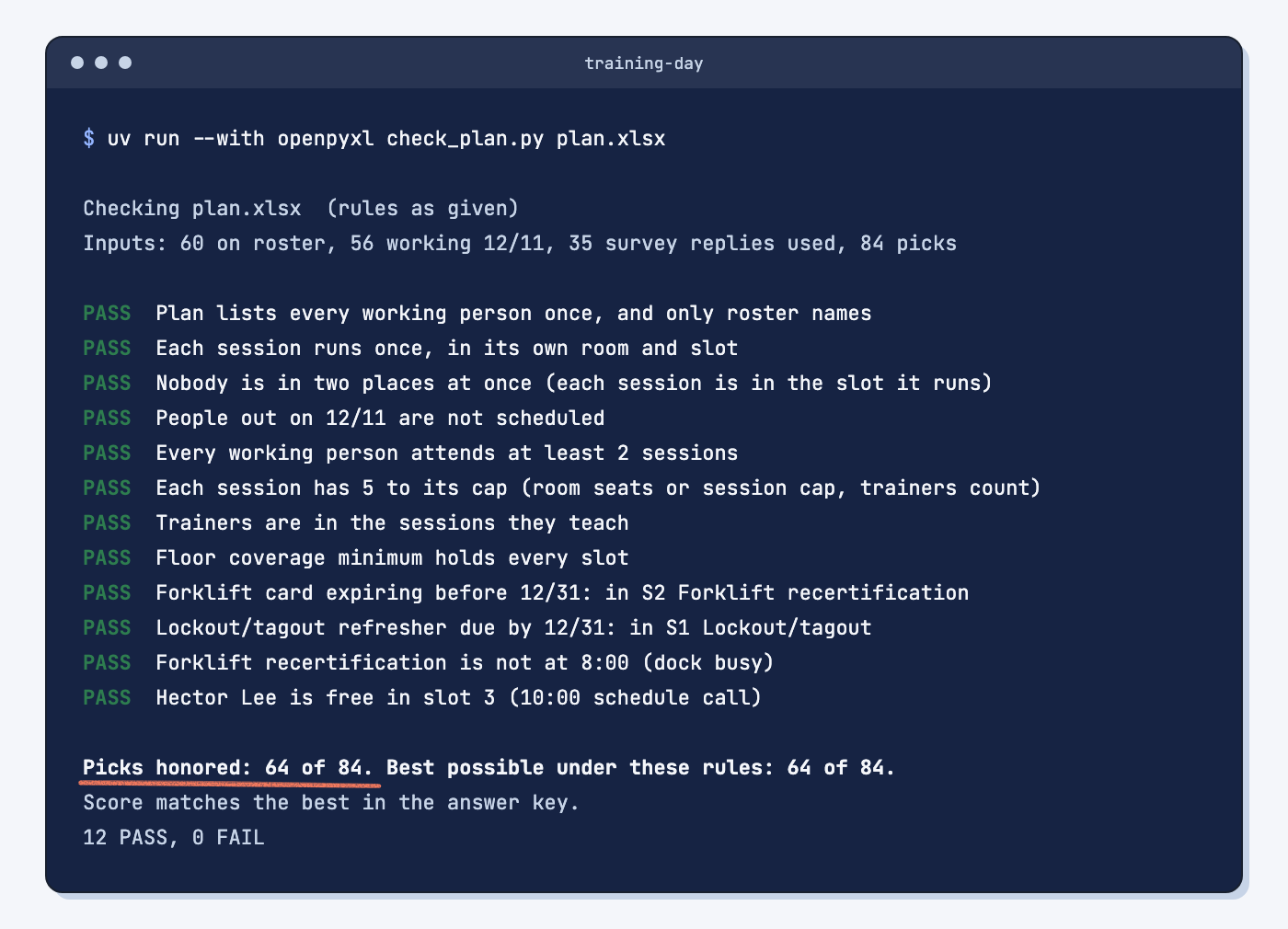
Compare the score and the PASS lines, not the names. Many plans tie for best, so a rerun can move a few people between equally good spots, and that is fine.
Step 5. Add Ray's rule and run it again
Ray calls. The laser comes back from its maintenance at 8:00, and Dale has to be on the floor to start it up. Do not move Dale in the spreadsheet. Add the rule to rules.md under the hard rules, as rule 12:
12. Dale Pruitt stays on the floor in slot 1. The laser comes back from its PM at 8:00 and he starts it up.
Then go back to Claude Code and paste this prompt. It keeps the old plan, so you can compare.
Ray changed one thing. I added it to rules.md as hard rule 12: Dale Pruitt stays on the floor in slot 1.

First copy plan.xlsx to plan-before.xlsx and training-day-schedule.xlsx to training-day-schedule-before.xlsx.

Then change solver.py only as much as it takes to obey the new rule. Do not change how it scores or searches. Do not edit the input files or rules.md. Run it again. It writes a new plan.xlsx and training-day-schedule.xlsx.

Then tell me in a few plain lines: picks honored before and after, how many slot orders tie now, what moved (slots and rooms), and who changed sessions. If no plan fits the new rule, say which rule blocks it.
This takes a minute or two. Then check the new plan with the change turned on:
uv run --with openpyxl check_plan.py plan.xlsx --change
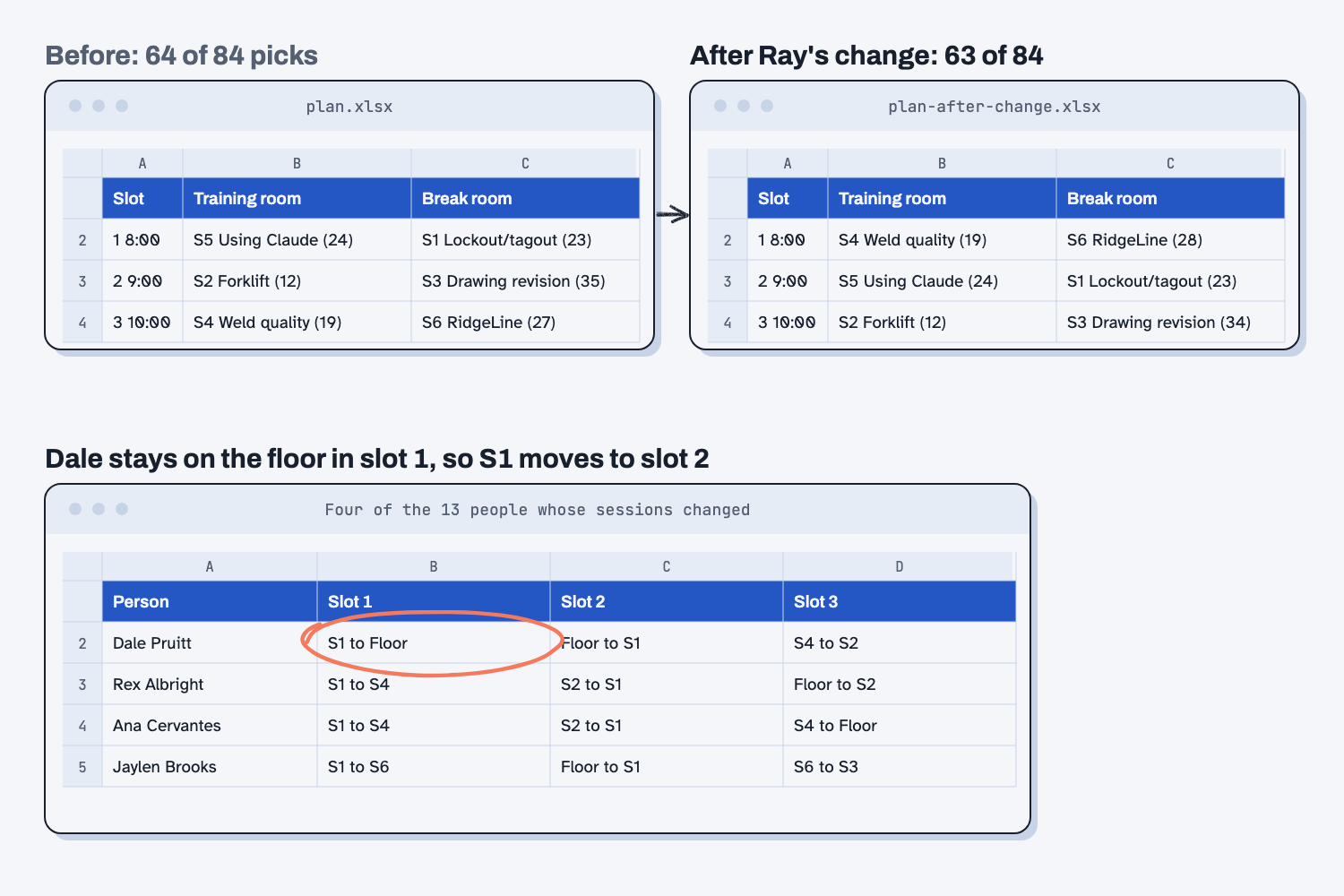
You should see 13 PASS lines, and picks honored drop to 63 of 84. Dale teaches lockout/tagout, so that session had to leave slot 1, and the rest of the day moved around it. One rule cost one pick (why you change one thing at a time).
Step 6. Read the plan and adjust it with rules
Open the Assignments tab. Every person has a short note, such as "Required: forklift card expires 12/18" or "Missed pick S5: required S1 in the same slot." Most misses come from things you would not trade away, like a required session or two picks in the same slot.
To change something, change a rule and run the solver again instead of typing over a cell. A typed-over cell can quietly break a rule, and the next run erases it anyway. The solver gives you a very good starting point, and you make the final calls (humans plan, AI does).
What does good look like?
With the sample files and the rules as given, a good plan gives these numbers. Answer key, sample data.
| Item | Rules as given | After Ray's change |
|---|---|---|
| Working people scheduled | 56 of 56 | 56 of 56 |
| Survey picks honored | 64 of 84 (proven best) | 63 of 84 (proven best) |
| Checker | 12 PASS, 0 FAIL | 13 PASS, 0 FAIL |
| Slot orders that tie on picks | 6 | 3 |
| Slot orders that tie on all three wishes | 3 | 1 |
My sample plan, before the change (plan.xlsx):
| Slot | Training room (24 seats) | Break room (40 seats) |
|---|---|---|
| 1, 8:00 | S5 Using Claude at your desk (24) | S1 Lockout/tagout refresher (23) |
| 2, 9:00 | S2 Forklift recertification (12) | S3 Reading a drawing revision (35) |
| 3, 10:00 | S4 Weld quality (19) | S6 RidgeLine controller (27) |
Your rooms can swap, and your headcounts can differ by a few, because other plans tie with this one. The score and the PASS lines should match.
What can go wrong?
These came up while building and testing this guide.
- The run takes far longer than 5 minutes. If Claude Code tries to make every rerun give the exact same names, it can spend 10 minutes or more on it. The "Keep it quick" line stops that. If it still runs long, tell it ties are fine and to finish.
- The checker reads every slot as blank. This happens when the Sessions sheet header is not exactly "Slot". Check that the headers say Session ID, Slot, Room.
- The reply says 3 slot orders tie, and the key says 6. Both are right. Six tie on picks alone, and three of those also tie on department fit and room size.
- Your names differ from mine. That is the ties at work. Compare the score and the PASS lines.
- People who are out still need training. Wes Lindqvist and Victor Huerta are out on December 11 but due for lockout/tagout this month. The plan only covers who is there, so keep a make-up list.
- Someone edits the plan by hand. One moved person can push a room over its cap or leave a department short. Run the checker after any hand change, and if it fails, put the change into
rules.mdinstead.
How do I check the answer?
Check the plan with the checker and the answer key, not with Claude's summary.
check_plan.py plan.xlsxprints only PASS lines and ends with 0 FAIL.- Picks honored is 64 of 84, or 63 of 84 after the change, as in
answer-key/answer-key.md. - On the Schedule tab, every Constraint Check cell says OK.
- Rex Albright, who must take both Forklift and lockout/tagout, has both on his row.
Why does this way work?
It works because each part does the job it is good at: you decide what matters, the solver does counting no person can do by hand, and a second script checks the result.
Write the hard rules and the wishes on one page. A solver treats a hard rule as a wall and a wish as a score. Mix them up and it either breaks something that matters or gives up a good plan for a small thing. One page with two lists is easy to read out loud to Ray before anything runs (hard rules and wishes).
Have AI write the solver, not the schedule. A chat asked for a schedule writes one that looks right, and it can quietly put someone in two places. A solver searches every plan and proves which is best, which is what an optimizer does, and it works the same way from the same files every time, which is what deterministic means. You use AI once, to build the tool, which is the habit to keep: ask AI for the tool, not the answer.
Check the plan with a separate checker. The program that made the plan has the same blind spots as the plan, so a script that counts again on its own catches what the solver misses, like an inspector who did not build the part (check the plan with a separate checker).
Change the rule, not the cells. Change one rule, run it again, and you see exactly what that rule cost: here, one pick. Change three things or type over cells, and you cannot tell which change did what (change one thing at a time). You plan, the solver does, and you decide (humans plan, AI does).
Frequently asked questions
Does this work for crews and stations, shifts, or routes?
Yes. Crew to station, skills to shifts, visits or deliveries to routes, and people to teams are the same kind of job: things that must fit, rules that never bend, and wishes in order. Write the two lists for your job, change the files and prompt to match, and keep the separate checker.
Why not just ask the chat to make the schedule?
A chat writes a schedule that looks right, but it does not count every room and every slot. With 56 people and six sessions, one person in two places is easy to miss by eye. A solver checks every rule every time, and the checker proves it.
What if no plan fits all my rules?
The solver says which rule blocks it and does not quietly loosen one. In the sample, 9 slot orders have no plan at all, because Rex must take two sessions that would then share a slot. You decide which rule to change.
Does it work with ChatGPT or Codex?
Yes, if the tool can write and run Python on your files. The prompts are plain text, the solver is plain Python, and the checker does not care which tool made the plan.
Take this with you
A rules page you can copy for your own event, two prompts, and one check command.
1. Your rules page. Save this as rules.md and change the words to fit your event.
# [Event name]: the rules

[Date, times of each slot, rooms and seats, number of sessions.]

Files: [your sessions, roster, survey, and coverage files], name-map.csv.

## Hard rules (never break)

1. Each session runs once. Each slot has [N] sessions, one in each room.
2. Nobody is in two places in one slot.
3. People who are out that day are not scheduled.
4. Every person working that day is in at least [N] sessions.
5. Each session has at least [N] people and no more than its cap. Trainers count.
6. Trainers are in the sessions they teach.
7. Floor coverage: in every slot, each department keeps its minimum on the floor.
8. [Anyone due for a required session is in it.]
9. [Any time limit on a session or a person.]

## Wishes (in order)

1. Honor survey picks.
2. Department fit.
3. Keep the sessions in each slot close in size.

A lower wish never costs a higher one.
2. Build the solver and the plan. In Claude Code, in your folder.
Build the training day schedule. My rules are in rules.md: hard rules first, then wishes in order. The data is in mrmw-training-sessions.xlsx, mrmw-plant1-roster.xlsx, mrmw-training-survey.xlsx, mrmw-floor-coverage.xlsx, and name-map.csv (I already confirmed the names).

Write solver.py in Python with a real solver library (OR-Tools CP-SAT), so I can run it again with: uv run --with ortools --with openpyxl solver.py

How it must work:
- Read the data from the files every run. Do not type names, dates, or counts from the files into the code.
- Enforce every hard rule in rules.md exactly. Never break a hard rule to get a better score.
- Try every slot order (which two sessions share a slot, and which slot is first, second, and third). Solve each one to the proven best, and keep the best. Score the wishes in the order rules.md gives them; a lower wish never costs a higher one.
- If no plan fits, do not loosen a rule. Say which rule blocks it.
- Never edit the input files or rules.md.
- Keep it quick. The script should finish in under a minute. Many plans tie for best, so it is fine if a rerun moves a few people between equal spots; do not spend time making reruns identical.

Run it, then write two files:
1. plan.xlsx, in exactly this format. Sheet "Assignments": columns Name, Slot 1, Slot 2, Slot 3. One row for every person on the roster. Each slot cell is a session ID (S1 to S6) or Floor. People out on 12/11 get Out. Sheet "Sessions": columns Session ID, Slot, Room. Slot is 1, 2, or 3. Room is Training room or Break room.
2. training-day-schedule.xlsx, for people to read, with three tabs:
   - Schedule: slot, time, room, session, trainer(s), headcount as a live COUNTIF formula on the Assignments tab, cap, and a Constraint Check column that shows OK or CHECK by formula (CHECK if under 5 or over cap).
   - Assignments: each person's department, survey picks, slot 1, 2, 3 session and room, picks honored, and a short note, such as "LOCKED - Trainer S3", "Required: forklift card expires 12/18", "Missed pick S5: required S1 in the same slot", or "Survey name 'Tony V' matched".
   - Notes: the hard rules and wishes as you read them from rules.md, and any choice you had to make.

Then tell me in a few plain lines: picks honored (X of Y), how many slot orders tie on picks honored and how many tie on all three wishes, and why picks were missed, grouped by reason.
3. Change one rule. Add the rule to rules.md first.
Ray changed one thing. I added it to rules.md as hard rule 12: Dale Pruitt stays on the floor in slot 1.

First copy plan.xlsx to plan-before.xlsx and training-day-schedule.xlsx to training-day-schedule-before.xlsx.

Then change solver.py only as much as it takes to obey the new rule. Do not change how it scores or searches. Do not edit the input files or rules.md. Run it again. It writes a new plan.xlsx and training-day-schedule.xlsx.

Then tell me in a few plain lines: picks honored before and after, how many slot orders tie now, what moved (slots and rooms), and who changed sessions. If no plan fits the new rule, say which rule blocks it.
4. Check every plan before you post it. uv run --with openpyxl check_plan.py plan.xlsx. For your own event, have Claude Code write a checker from your rules.md in a new session, apart from the solver.
What's next?
- Match sign-up names to your roster without guessing, Part 1: the confirmed name map this guide starts from.
- Check if your Infor orders fit your work centers, the same "script does the counting, you decide" idea for shop load.
- Have Claude build your quote report, the same "AI builds the tool once" idea for buyers.
- What is an optimizer?, the idea behind the solver.